Skip to content
  • Categories
  • Recent
  • Tags
  • Popular
  • Users
  • Groups
  • Search
  • Get Qt Extensions
  • Unsolved
Collapse
Brand Logo
  1. Home
  2. Qt Development
  3. General and Desktop
  4. Missed Compiler/Tool/Platform
Qt 6.11 is out! See what's new in the release blog

Missed Compiler/Tool/Platform

Scheduled Pinned Locked Moved Unsolved General and Desktop
34 Posts 8 Posters 6.6k Views 4 Watching
  • Oldest to Newest
  • Newest to Oldest
  • Most Votes
Reply
  • Reply as topic
Log in to reply
This topic has been deleted. Only users with topic management privileges can see it.
  • JKSHJ JKSH

    @CodeFreaks said in Missed Compiler/Tool/Platform:

    What about Android Settings Option ?

    You have only installed Qt for Windows (desktop) and Qt for UWP.

    Install Qt for Android too.

    I also installed doxygen but any option didn't add !

    Qt Creator does not have Doxygen integration.

    CodeFreaksC Offline
    CodeFreaksC Offline
    CodeFreaks
    wrote on last edited by CodeFreaks
    #5

    @JKSH said in Missed Compiler/Tool/Platform:

    Install Qt for Android too.

    Thanks for reply.
    I selected the android during Qt Creator installation.
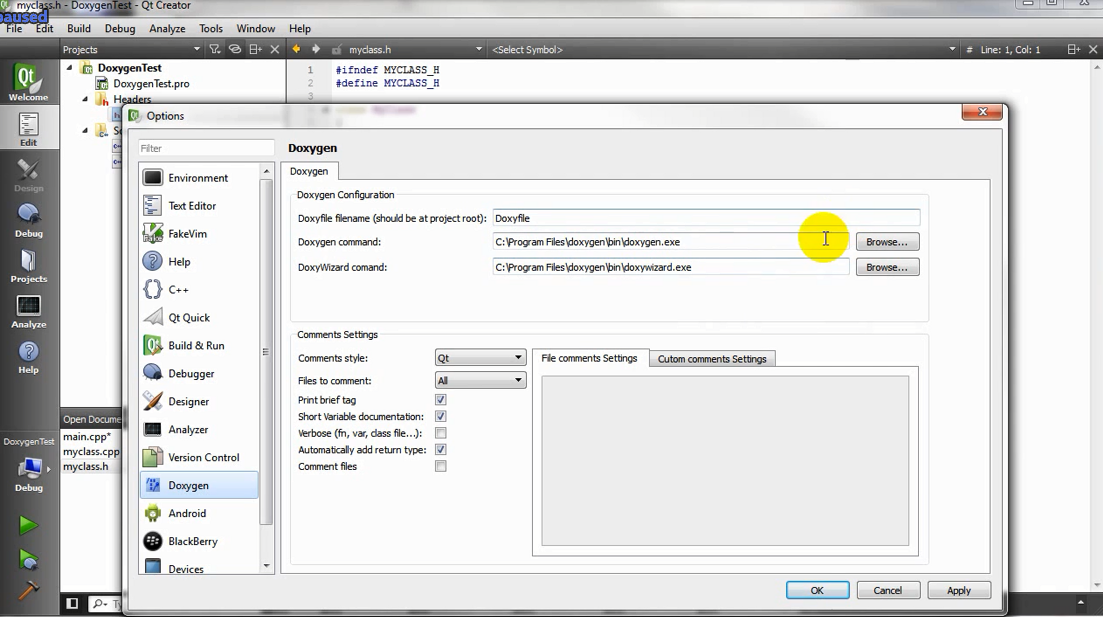
    0_1538324305523_doxyqt.png

    JKSHJ 1 Reply Last reply
    0
    • CodeFreaksC CodeFreaks

      @JKSH said in Missed Compiler/Tool/Platform:

      Install Qt for Android too.

      Thanks for reply.
      I selected the android during Qt Creator installation.

      0_1538324305523_doxyqt.png

      JKSHJ Offline
      JKSHJ Offline
      JKSH
      Moderators
      wrote on last edited by JKSH
      #6

      @CodeFreaks said in Missed Compiler/Tool/Platform:

      I selected the android during Qt Creator installation.

      OK.

      Did you also install the Android development tools? See http://doc.qt.io/qt-5/androidgs.html

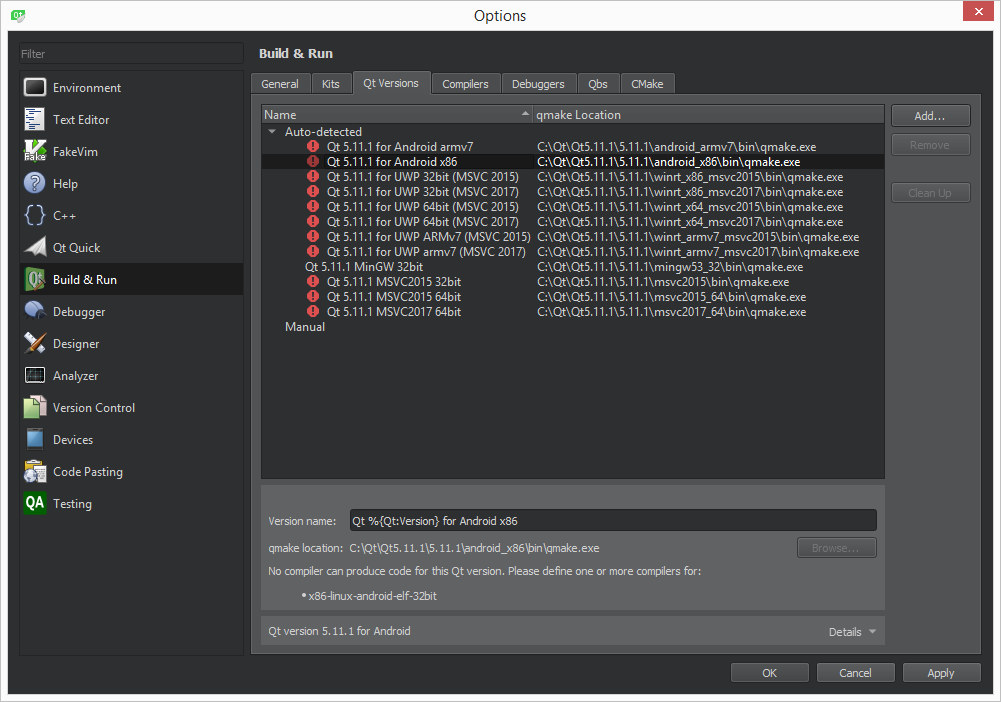
      EDIT: If you've installed the Android tools and still can't see them in Qt Creator, please post a screenshot of Tools > Options > Build & Run > Qt Versions

      0_1538324305523_doxyqt.png

      Hmm, I haven't seen this before.

      Is this a 3rd-party Doxygen plugin? Where did you download it from?

      Qt Doc Search for browsers: forum.qt.io/topic/35616/web-browser-extension-for-improved-doc-searches

      CodeFreaksC 1 Reply Last reply
      3
      • JKSHJ JKSH

        @CodeFreaks said in Missed Compiler/Tool/Platform:

        I selected the android during Qt Creator installation.

        OK.

        Did you also install the Android development tools? See http://doc.qt.io/qt-5/androidgs.html

        EDIT: If you've installed the Android tools and still can't see them in Qt Creator, please post a screenshot of Tools > Options > Build & Run > Qt Versions

        0_1538324305523_doxyqt.png

        Hmm, I haven't seen this before.

        Is this a 3rd-party Doxygen plugin? Where did you download it from?

        CodeFreaksC Offline
        CodeFreaksC Offline
        CodeFreaks
        wrote on last edited by CodeFreaks
        #7

        @JKSH
        Thanks for reply.
        Yes I've installed android development tools (Android Studio, JDK, SDK & NDK).
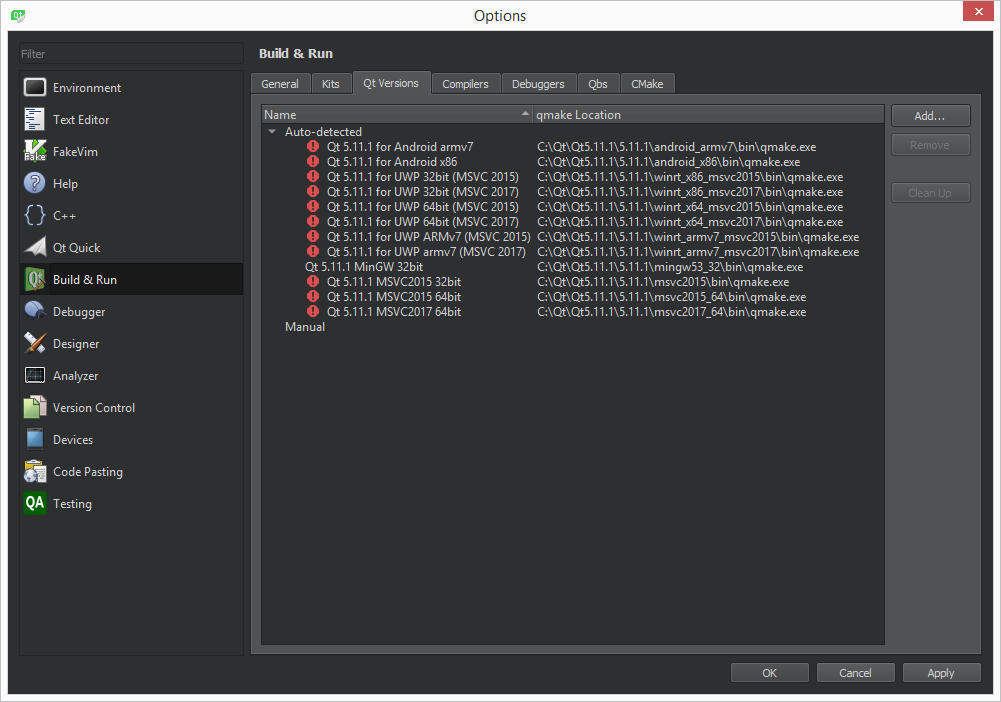
        0_1538413731646_noandroid1.png

        @JKSH said in Missed Compiler/Tool/Platform:

        Is this a 3rd-party Doxygen plugin? Where did you download it from?

        YouTube
        Yes, it is, but I can't integrate doxygen with Qt Creator even through this 3RD Party App. .

        JKSHJ 1 Reply Last reply
        0
        • SGaistS Offline
          SGaistS Offline
          SGaist
          Lifetime Qt Champion
          wrote on last edited by
          #8

          Hi,

          What version of the NDK did you install ?

          Interested in AI ? www.idiap.ch
          Please read the Qt Code of Conduct - https://forum.qt.io/topic/113070/qt-code-of-conduct

          CodeFreaksC 1 Reply Last reply
          1
          • CodeFreaksC CodeFreaks

            @JKSH
            Thanks for reply.
            Yes I've installed android development tools (Android Studio, JDK, SDK & NDK).
            0_1538413731646_noandroid1.png

            @JKSH said in Missed Compiler/Tool/Platform:

            Is this a 3rd-party Doxygen plugin? Where did you download it from?

            YouTube
            Yes, it is, but I can't integrate doxygen with Qt Creator even through this 3RD Party App. .

            JKSHJ Offline
            JKSHJ Offline
            JKSH
            Moderators
            wrote on last edited by JKSH
            #9

            @CodeFreaks said in Missed Compiler/Tool/Platform:

            Yes I've installed android development tools (Android Studio, JDK, SDK & NDK).

            There are red error icons next to your Qt 5.11.1 for Android installations. Mouse-over them to see the error message. The message will give you clues on how to fix it.

            @CodeFreaks said in Missed Compiler/Tool/Platform:

            YouTube
            Yes, it is, but I can't integrate doxygen with Qt Creator even through this 3RD Party App. .

            The video shows that the plugin was built for Qt Creator 3.1. The current version is Qt Creator 4.7 which might be incompatible with plugins for 3.1.

            You need to check with the author of the plugin if it supports Qt Creator 4.7.

            Qt Doc Search for browsers: forum.qt.io/topic/35616/web-browser-extension-for-improved-doc-searches

            1 Reply Last reply
            3
            • SGaistS SGaist

              Hi,

              What version of the NDK did you install ?

              CodeFreaksC Offline
              CodeFreaksC Offline
              CodeFreaks
              wrote on last edited by
              #10

              @SGaist
              Hi,
              its: android-ndk-r18 .

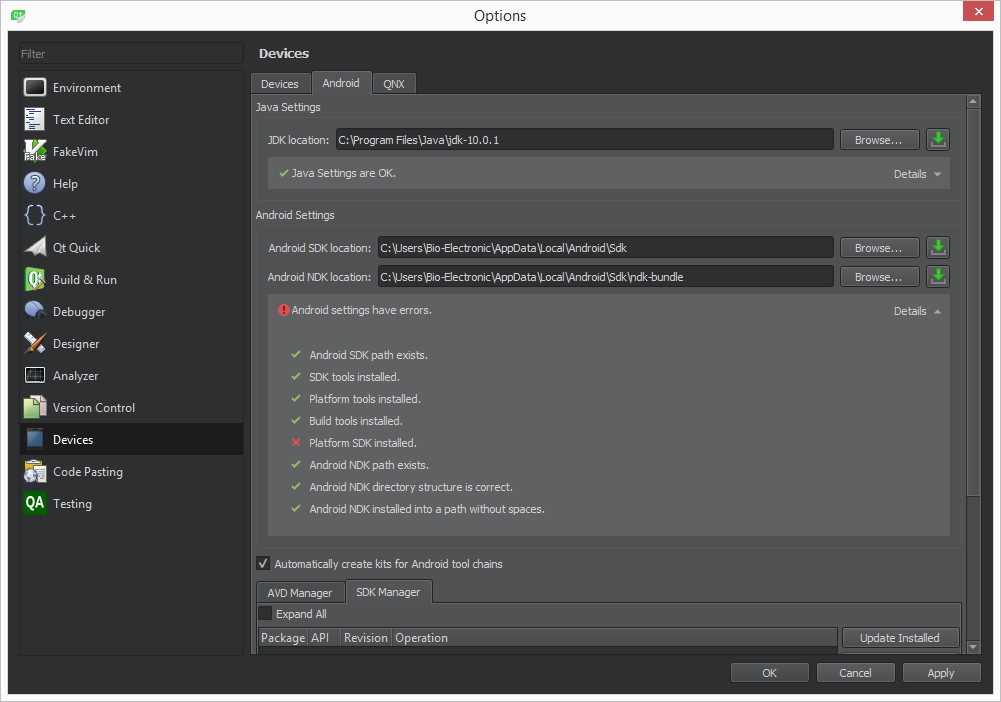
              1_1538498570596_noandroid3.png 0_1538498570574_noandroid2.png

              1 Reply Last reply
              0
              • K Offline
                K Offline
                kuzulis
                Qt Champions 2020
                wrote on last edited by
                #11

                @CodeFreaks said in Missed Compiler/Tool/Platform:

                its: android-ndk-r18 .

                Use NDK 10 or 16.

                CodeFreaksC 1 Reply Last reply
                2
                • K kuzulis

                  @CodeFreaks said in Missed Compiler/Tool/Platform:

                  its: android-ndk-r18 .

                  Use NDK 10 or 16.

                  CodeFreaksC Offline
                  CodeFreaksC Offline
                  CodeFreaks
                  wrote on last edited by CodeFreaks
                  #12

                  @kuzulis said in Missed Compiler/Tool/Platform:

                  Use NDK 10 or 16.

                  I added NDK 10 and also 16 but still it doesn't work.
                  I installed all the available platforms for SDK (from 7 to 28) . I don't know why Qt Creator doesn't recognize them.
                  missed x86-linux-android-elf-32bit macro is another problem.

                  aha_1980A 1 Reply Last reply
                  0
                  • CodeFreaksC CodeFreaks

                    @kuzulis said in Missed Compiler/Tool/Platform:

                    Use NDK 10 or 16.

                    I added NDK 10 and also 16 but still it doesn't work.
                    I installed all the available platforms for SDK (from 7 to 28) . I don't know why Qt Creator doesn't recognize them.
                    missed x86-linux-android-elf-32bit macro is another problem.

                    aha_1980A Offline
                    aha_1980A Offline
                    aha_1980
                    Lifetime Qt Champion
                    wrote on last edited by
                    #13

                    Hi @CodeFreaks,

                    you do know that you need both NDK and SDK? http://doc.qt.io/qt-5/androidgs.html

                    Qt has to stay free or it will die.

                    CodeFreaksC 1 Reply Last reply
                    2
                    • aha_1980A aha_1980

                      Hi @CodeFreaks,

                      you do know that you need both NDK and SDK? http://doc.qt.io/qt-5/androidgs.html

                      CodeFreaksC Offline
                      CodeFreaksC Offline
                      CodeFreaks
                      wrote on last edited by
                      #14

                      @aha_1980
                      Hi, Thanks for reply.
                      Yes I've defined both.
                      second image in the : Post 10

                      JKSHJ 1 Reply Last reply
                      0
                      • CodeFreaksC CodeFreaks

                        @aha_1980
                        Hi, Thanks for reply.
                        Yes I've defined both.
                        second image in the : Post 10

                        JKSHJ Offline
                        JKSHJ Offline
                        JKSH
                        Moderators
                        wrote on last edited by JKSH
                        #15

                        @CodeFreaks See https://stackoverflow.com/questions/48189272/qt-creator-android-error-platform-sdk-installed/48348201

                        You might need to downgrade to JDK 8 and delete Qt Creator's config files.

                        Qt Doc Search for browsers: forum.qt.io/topic/35616/web-browser-extension-for-improved-doc-searches

                        CodeFreaksC 2 Replies Last reply
                        1
                        • JKSHJ JKSH

                          @CodeFreaks See https://stackoverflow.com/questions/48189272/qt-creator-android-error-platform-sdk-installed/48348201

                          You might need to downgrade to JDK 8 and delete Qt Creator's config files.

                          CodeFreaksC Offline
                          CodeFreaksC Offline
                          CodeFreaks
                          wrote on last edited by CodeFreaks
                          #16

                          @JKSH
                          Thanks for reply.
                          Whole android kit problems related to
                          x86-linux-android-elf-32bit
                          x86-linux-android-elf-64bit
                          arm-linux-android-elf-32bit
                          and I don't have any idea how can I resolve it.
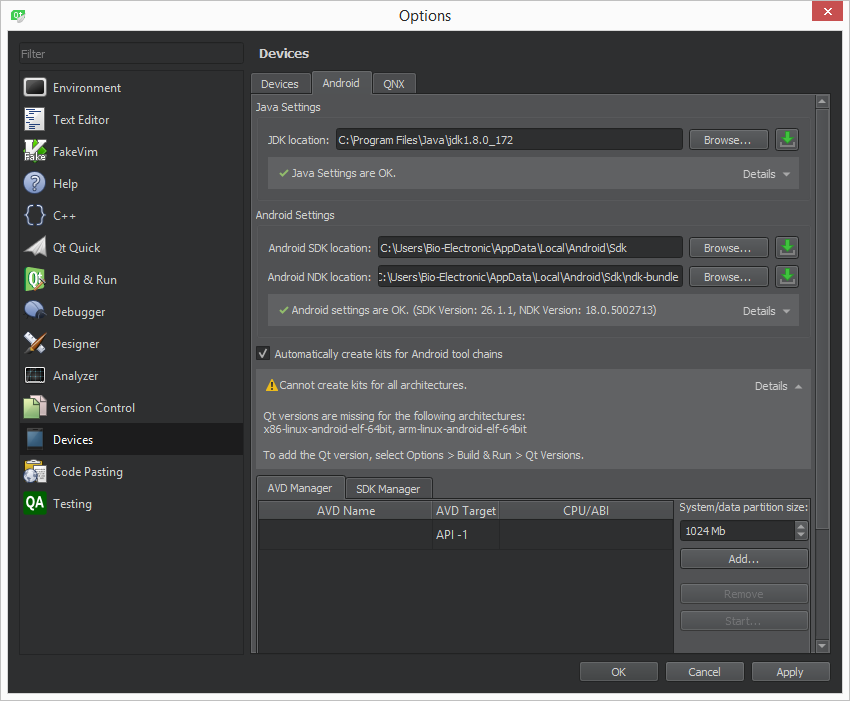
                          0_1538654682772_noandroid4.png

                          1 Reply Last reply
                          0
                          • CodeFreaksC Offline
                            CodeFreaksC Offline
                            CodeFreaks
                            wrote on last edited by
                            #17
                            This post is deleted!
                            1 Reply Last reply
                            0
                            • JKSHJ JKSH

                              @CodeFreaks See https://stackoverflow.com/questions/48189272/qt-creator-android-error-platform-sdk-installed/48348201

                              You might need to downgrade to JDK 8 and delete Qt Creator's config files.

                              CodeFreaksC Offline
                              CodeFreaksC Offline
                              CodeFreaks
                              wrote on last edited by
                              #18
                              This post is deleted!
                              1 Reply Last reply
                              0
                              • CodeFreaksC Offline
                                CodeFreaksC Offline
                                CodeFreaks
                                wrote on last edited by CodeFreaks
                                #19

                                I followed all instructions and problem still exists with android development kits.
                                I really don't have any idea.
                                Isn't it supported even with those who have commercial license ?

                                Pablo J. RoginaP 1 Reply Last reply
                                0
                                • CodeFreaksC CodeFreaks

                                  I followed all instructions and problem still exists with android development kits.
                                  I really don't have any idea.
                                  Isn't it supported even with those who have commercial license ?

                                  Pablo J. RoginaP Offline
                                  Pablo J. RoginaP Offline
                                  Pablo J. Rogina
                                  wrote on last edited by
                                  #20

                                  @CodeFreaks said in Missed Compiler/Tool/Platform:

                                  Isn't it supported even with those who have commercial license ?

                                  In that case, I think you need to contact Qt's customer support in other to engage them with your incident. This is a users forum actually.

                                  Upvote the answer(s) that helped you solve the issue
                                  Use "Topic Tools" button to mark your post as Solved
                                  Add screenshots via postimage.org
                                  Don't ask support requests via chat/PM. Please use the forum so others can benefit from the solution in the future

                                  1 Reply Last reply
                                  0
                                  • ndt_mikeN Offline
                                    ndt_mikeN Offline
                                    ndt_mike
                                    wrote on last edited by
                                    #21

                                    You need to install NDK 10 e. I had the same problem, yeah I know it's frustrating.

                                    http://doc.qt.io/qt-5/androidgs.html

                                    If you follow the instructions here regarding versions the system works, any deviation and you have issues like you are seeing now.

                                    So I have it working and have

                                    JDK 8.181
                                    Android SDk 23.03 and 28.03 installed
                                    Android NDK 10 e ( you have to install this without android studio, android studio installs a much more contemporary version)

                                    I had the same problem that you have, saying everything is installed correctly but it's not working.

                                    CodeFreaksC 1 Reply Last reply
                                    1
                                    • ndt_mikeN ndt_mike

                                      You need to install NDK 10 e. I had the same problem, yeah I know it's frustrating.

                                      http://doc.qt.io/qt-5/androidgs.html

                                      If you follow the instructions here regarding versions the system works, any deviation and you have issues like you are seeing now.

                                      So I have it working and have

                                      JDK 8.181
                                      Android SDk 23.03 and 28.03 installed
                                      Android NDK 10 e ( you have to install this without android studio, android studio installs a much more contemporary version)

                                      I had the same problem that you have, saying everything is installed correctly but it's not working.

                                      CodeFreaksC Offline
                                      CodeFreaksC Offline
                                      CodeFreaks
                                      wrote on last edited by CodeFreaks
                                      #22

                                      @ndt_mike
                                      Thanks for reply.
                                      I have following according to instruction:
                                      JDK 8.181
                                      Android SDk 25.2.5 and 28.03
                                      Android NDK 10e
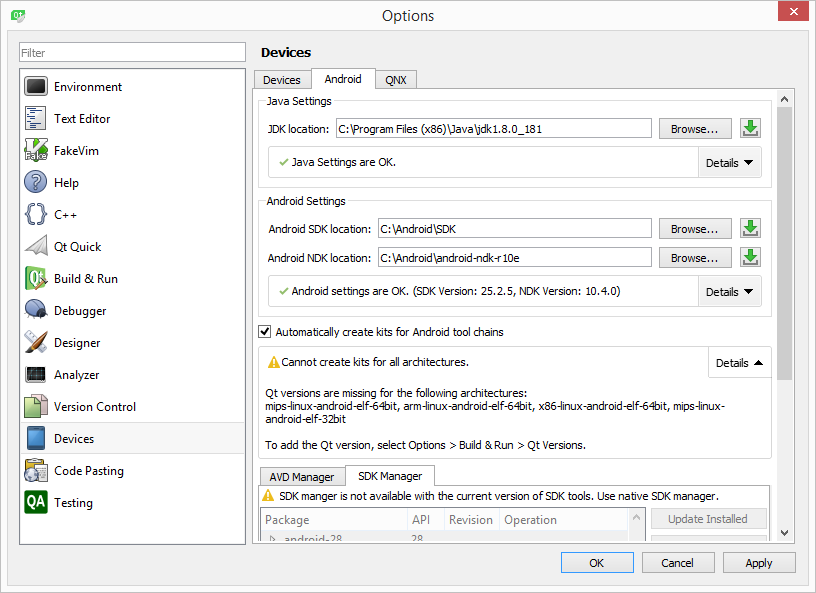
                                      0_1539372523307_f5e75235-60b1-4a91-9c62-50b8a3d9ff10-image.png

                                      The problem is not resolved yet.

                                      the only thing that I should investigate is degrading my sdk but as mentioned in the instruction the last sdk should be compatible with the Qt Creator.

                                      1 Reply Last reply
                                      0
                                      • SGaistS Offline
                                        SGaistS Offline
                                        SGaist
                                        Lifetime Qt Champion
                                        wrote on last edited by
                                        #23

                                        You have installed Qt for armv7 and x86 so it's normal that all these architectures are missing.

                                        Interested in AI ? www.idiap.ch
                                        Please read the Qt Code of Conduct - https://forum.qt.io/topic/113070/qt-code-of-conduct

                                        CodeFreaksC 1 Reply Last reply
                                        1
                                        • SGaistS SGaist

                                          You have installed Qt for armv7 and x86 so it's normal that all these architectures are missing.

                                          CodeFreaksC Offline
                                          CodeFreaksC Offline
                                          CodeFreaks
                                          wrote on last edited by CodeFreaks
                                          #24

                                          @SGaist
                                          Thanks for reply.
                                          is it possible to add tool chain for these architectures?
                                          Please let me know what should I do?

                                          1 Reply Last reply
                                          0

                                          • Login

                                          • Login or register to search.
                                          • First post
                                            Last post
                                          0
                                          • Categories
                                          • Recent
                                          • Tags
                                          • Popular
                                          • Users
                                          • Groups
                                          • Search
                                          • Get Qt Extensions
                                          • Unsolved