Skip to content
  • Categories
  • Recent
  • Tags
  • Popular
  • Users
  • Groups
  • Search
  • Get Qt
  • Unsolved
Collapse
Brand Logo
  1. Home
  2. Qt Development
  3. General and Desktop
  4. QTabbar Missed Style
Qt 6.12 LTS is out! See what's new in the release blog

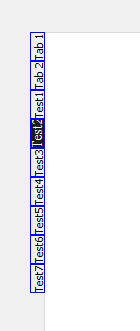
QTabbar Missed Style

Scheduled Pinned Locked Moved Unsolved General and Desktop
32 Posts 4 Posters 16.2k Views 2 Watching
  • Oldest to Newest
  • Newest to Oldest
  • Most Votes
Reply
  • Reply as topic
Log in to reply
This topic has been deleted. Only users with topic management privileges can see it.
  • CodeFreaksC CodeFreaks

    @mrjj
    Unfortunately, if I add borders feature to the stylesheet statement whole the customstyle will be ignored.
    :_(

    mrjjM Offline
    mrjjM Offline
    mrjj
    Lifetime Qt Champion
    wrote on last edited by
    #13

    @CodeFreaks
    Hi can you show how your style sheet looks with borders?
    Often is sheet is ignored its due to errors.

    Since you already have a Delegate we could just draw some border :)
    Maybe its CE_TabBarTabShape that should have it. not looked into it.

    I assume you try to have teh current tab have a border ?

    CodeFreaksC 1 Reply Last reply
    0
    • mrjjM mrjj

      @CodeFreaks
      Hi can you show how your style sheet looks with borders?
      Often is sheet is ignored its due to errors.

      Since you already have a Delegate we could just draw some border :)
      Maybe its CE_TabBarTabShape that should have it. not looked into it.

      I assume you try to have teh current tab have a border ?

      CodeFreaksC Offline
      CodeFreaksC Offline
      CodeFreaks
      wrote on last edited by CodeFreaks
      #14

      @mrjj
      Thanks for reply.
      Widget with borders definition in stylesheet statement:
      0_1537125483443_GroupBox5.png

      I applied the borders to all tabs.

           tabWidget->setStyleSheet("QTabBar::tab { font-size: 14px; font-family: \"Times New Roman\" ;"
                                    " border-width: 1px;"
                                    " border-style: solid;"
                                    " border-color: black; }"
      
      mrjjM 1 Reply Last reply
      0
      • CodeFreaksC CodeFreaks

        @mrjj
        Thanks for reply.
        Widget with borders definition in stylesheet statement:
        0_1537125483443_GroupBox5.png

        I applied the borders to all tabs.

             tabWidget->setStyleSheet("QTabBar::tab { font-size: 14px; font-family: \"Times New Roman\" ;"
                                      " border-width: 1px;"
                                      " border-style: solid;"
                                      " border-color: black; }"
        
        mrjjM Offline
        mrjjM Offline
        mrjj
        Lifetime Qt Champion
        wrote on last edited by mrjj
        #15

        Hi
        well good news is that it does support it
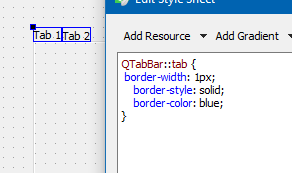
        alt text

        update:
        Ok, when there is delegate it NOT drawn.
        wrong :) I was stupid :)
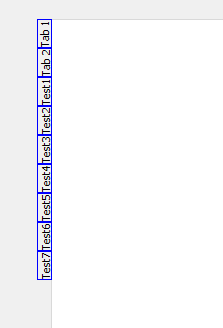
        alt text
        it does work with delegate

        CodeFreaksC 1 Reply Last reply
        1
        • mrjjM mrjj

          Hi
          well good news is that it does support it
          alt text

          update:
          Ok, when there is delegate it NOT drawn.
          wrong :) I was stupid :)
          alt text
          it does work with delegate

          CodeFreaksC Offline
          CodeFreaksC Offline
          CodeFreaks
          wrote on last edited by
          #16

          @mrjj
          Hi,
          Thanks a lot.
          May I ask you to present an example for it.

          mrjjM 1 Reply Last reply
          0
          • CodeFreaksC CodeFreaks

            @mrjj
            Hi,
            Thanks a lot.
            May I ask you to present an example for it.

            mrjjM Offline
            mrjjM Offline
            mrjj
            Lifetime Qt Champion
            wrote on last edited by
            #17

            @CodeFreaks
            alt text

            using stylesheet

             tabWidget->setStyleSheet(QLatin1String("QTabBar::tab { \n"
            " border-width: 1px;\n"
            "    border-style: solid;\n"
            "    border-color: blue;\n"
            "}\n"
            "\n"
            "QTabBar::tab:selected  { \n"
            "color:white; \n"
            "background: rgba(28,28,29) ;  \n"
            "font-size: 14px; font-family: Times New Roman\n"
            "}"));
            
            CodeFreaksC 1 Reply Last reply
            0
            • mrjjM mrjj

              @CodeFreaks
              alt text

              using stylesheet

               tabWidget->setStyleSheet(QLatin1String("QTabBar::tab { \n"
              " border-width: 1px;\n"
              "    border-style: solid;\n"
              "    border-color: blue;\n"
              "}\n"
              "\n"
              "QTabBar::tab:selected  { \n"
              "color:white; \n"
              "background: rgba(28,28,29) ;  \n"
              "font-size: 14px; font-family: Times New Roman\n"
              "}"));
              
              CodeFreaksC Offline
              CodeFreaksC Offline
              CodeFreaks
              wrote on last edited by
              #18

              @mrjj
              Thanks,
              but its like before, it missed the custom style:
              0_1537126341781_GroupBox6.png

              mrjjM 1 Reply Last reply
              0
              • CodeFreaksC CodeFreaks

                @mrjj
                Thanks,
                but its like before, it missed the custom style:
                0_1537126341781_GroupBox6.png

                mrjjM Offline
                mrjjM Offline
                mrjj
                Lifetime Qt Champion
                wrote on last edited by mrjj
                #19

                @CodeFreaks said in QTabbar Missed Style:

                it missed the custom style:

                Im not sure what you refer to here ?

                update: ah sorry. tired.
                You mean it no longer flips the tabs.

                CodeFreaksC 1 Reply Last reply
                1
                • mrjjM mrjj

                  @CodeFreaks said in QTabbar Missed Style:

                  it missed the custom style:

                  Im not sure what you refer to here ?

                  update: ah sorry. tired.
                  You mean it no longer flips the tabs.

                  CodeFreaksC Offline
                  CodeFreaksC Offline
                  CodeFreaks
                  wrote on last edited by CodeFreaks
                  #20

                  @mrjj
                  Thanks for reply,
                  update: yes.
                  the orientation of text and shape which have been defined in custom style is missed here.
                  I want to achieve something like this but with customized borders:
                  0_1537126785282_GroupBox7.png

                  mrjjM 1 Reply Last reply
                  0
                  • CodeFreaksC CodeFreaks

                    @mrjj
                    Thanks for reply,
                    update: yes.
                    the orientation of text and shape which have been defined in custom style is missed here.
                    I want to achieve something like this but with customized borders:
                    0_1537126785282_GroupBox7.png

                    mrjjM Offline
                    mrjjM Offline
                    mrjj
                    Lifetime Qt Champion
                    wrote on last edited by
                    #21

                    @CodeFreaks
                    Hmm. very odd. it does seems like adding border makes the delegate not work
                    as expected. Sadly i have no idea why.

                    CodeFreaksC 1 Reply Last reply
                    1
                    • mrjjM mrjj

                      @CodeFreaks
                      Hmm. very odd. it does seems like adding border makes the delegate not work
                      as expected. Sadly i have no idea why.

                      CodeFreaksC Offline
                      CodeFreaksC Offline
                      CodeFreaks
                      wrote on last edited by CodeFreaks
                      #22

                      @mrjj
                      Thanks a lot for your help.
                      Should I report it to The Qt Support Team ?

                      mrjjM 1 Reply Last reply
                      0
                      • SGaistS Offline
                        SGaistS Offline
                        SGaist
                        Lifetime Qt Champion
                        wrote on last edited by
                        #23

                        Hi,

                        Yes, you can. But before that, did you already check that issue with the latest version of Qt ? It not please, do, that will help narrowing where developers should take a look. And please provide a minimal compilable example on the issue explaining when the issue appears and when not.

                        Interested in AI ? www.idiap.ch
                        Please read the Qt Code of Conduct - https://forum.qt.io/topic/113070/qt-code-of-conduct

                        1 Reply Last reply
                        1
                        • mrjjM Offline
                          mrjjM Offline
                          mrjj
                          Lifetime Qt Champion
                          wrote on last edited by mrjj
                          #24

                          Hi
                          I tested with 5.11.1
                          BUT.
                          Some combinations does work.
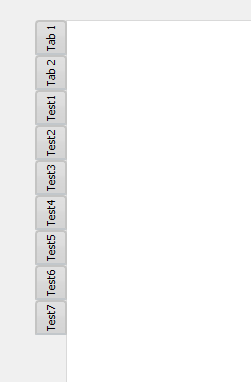
                          alt text

                          So Im not sure its a actual bug more like the need to specify more keys.

                          Damn it was a hard tired Sunday. they still not flipped. so not working.

                          1 Reply Last reply
                          1
                          • SGaistS Offline
                            SGaistS Offline
                            SGaist
                            Lifetime Qt Champion
                            wrote on last edited by
                            #25

                            Then it might be considered a documentation bug.

                            Interested in AI ? www.idiap.ch
                            Please read the Qt Code of Conduct - https://forum.qt.io/topic/113070/qt-code-of-conduct

                            1 Reply Last reply
                            0
                            • Christian EhrlicherC Offline
                              Christian EhrlicherC Offline
                              Christian Ehrlicher
                              Lifetime Qt Champion
                              wrote on last edited by
                              #26

                              @SGaist said in QTabbar Missed Style:

                              Then it might be considered a documentation bug.

                              It might be something like this one: https://codereview.qt-project.org/#/c/238575/2//ALL
                              So please provide a proper bug report :)

                              Qt Online Installer direct download: https://download.qt.io/official_releases/online_installers/
                              Visit the Qt Academy at https://academy.qt.io/catalog

                              1 Reply Last reply
                              1
                              • CodeFreaksC CodeFreaks

                                @mrjj
                                Thanks a lot for your help.
                                Should I report it to The Qt Support Team ?

                                mrjjM Offline
                                mrjjM Offline
                                mrjj
                                Lifetime Qt Champion
                                wrote on last edited by
                                #27

                                @CodeFreaks
                                Hi
                                After some testing, it does seems like a bug.
                                Applying border style key seems to reset the orientation.
                                Will you report it ?

                                CodeFreaksC 1 Reply Last reply
                                1
                                • mrjjM mrjj

                                  @CodeFreaks
                                  Hi
                                  After some testing, it does seems like a bug.
                                  Applying border style key seems to reset the orientation.
                                  Will you report it ?

                                  CodeFreaksC Offline
                                  CodeFreaksC Offline
                                  CodeFreaks
                                  wrote on last edited by CodeFreaks
                                  #28

                                  @mrjj
                                  Hi, Thanks a lot.
                                  Yes I do.
                                  Just one another point:
                                  I can't find any syntax for rotation in Qt Style Sheets Reference. As I realized this tool (setStyleSheet() function) hasn't been considered as a stand alone tool. Does it?

                                  mrjjM 1 Reply Last reply
                                  0
                                  • CodeFreaksC CodeFreaks

                                    @mrjj
                                    Hi, Thanks a lot.
                                    Yes I do.
                                    Just one another point:
                                    I can't find any syntax for rotation in Qt Style Sheets Reference. As I realized this tool (setStyleSheet() function) hasn't been considered as a stand alone tool. Does it?

                                    mrjjM Offline
                                    mrjjM Offline
                                    mrjj
                                    Lifetime Qt Champion
                                    wrote on last edited by
                                    #29

                                    @CodeFreaks
                                    Hi
                                    I don't think there is type of rotation concept in stylesheet syntax.

                                    -As I realized this tool hasn't been considered as a stand alone tool. Does it?

                                    Sorry, im not sure what you ask here ?

                                    Do you mean the proxyStyle Delegate ?

                                    CodeFreaksC 1 Reply Last reply
                                    0
                                    • mrjjM mrjj

                                      @CodeFreaks
                                      Hi
                                      I don't think there is type of rotation concept in stylesheet syntax.

                                      -As I realized this tool hasn't been considered as a stand alone tool. Does it?

                                      Sorry, im not sure what you ask here ?

                                      Do you mean the proxyStyle Delegate ?

                                      CodeFreaksC Offline
                                      CodeFreaksC Offline
                                      CodeFreaks
                                      wrote on last edited by
                                      #30

                                      @mrjj
                                      Thanks for reply.
                                      No, I'm about supported statements by setStyleSheet() function.

                                      mrjjM 1 Reply Last reply
                                      0
                                      • CodeFreaksC CodeFreaks

                                        @mrjj
                                        Thanks for reply.
                                        No, I'm about supported statements by setStyleSheet() function.

                                        mrjjM Offline
                                        mrjjM Offline
                                        mrjj
                                        Lifetime Qt Champion
                                        wrote on last edited by
                                        #31

                                        @CodeFreaks said in QTabbar Missed Style:

                                        @mrjj
                                        Thanks for reply.
                                        No, I'm about supported statements by setStyleSheet() function.

                                        ahh.
                                        Here
                                        http://doc.qt.io/qt-5/stylesheet-reference.html

                                        CodeFreaksC 1 Reply Last reply
                                        0
                                        • mrjjM mrjj

                                          @CodeFreaks said in QTabbar Missed Style:

                                          @mrjj
                                          Thanks for reply.
                                          No, I'm about supported statements by setStyleSheet() function.

                                          ahh.
                                          Here
                                          http://doc.qt.io/qt-5/stylesheet-reference.html

                                          CodeFreaksC Offline
                                          CodeFreaksC Offline
                                          CodeFreaks
                                          wrote on last edited by CodeFreaks
                                          #32

                                          @mrjj
                                          Thanks.
                                          I investigated this page before.
                                          I also tried different HTML/CSS rotation syntax within setStyleSheet() but they don't work (so its not a stand alone tool and needs another styles beside it).

                                          1 Reply Last reply
                                          0

                                          • Login

                                          • Login or register to search.
                                          • First post
                                            Last post
                                          0
                                          • Categories
                                          • Recent
                                          • Tags
                                          • Popular
                                          • Users
                                          • Groups
                                          • Search
                                          • Get Qt
                                          • Unsolved