Skip to content
  • Categories
  • Recent
  • Tags
  • Popular
  • Users
  • Groups
  • Search
  • Get Qt Extensions
  • Unsolved
Collapse
Brand Logo
  1. Home
  2. Qt Development
  3. General and Desktop
  4. QTabbar Missed Style
Qt 6.11 is out! See what's new in the release blog

QTabbar Missed Style

Scheduled Pinned Locked Moved Unsolved General and Desktop
32 Posts 4 Posters 11.6k Views 2 Watching
  • Oldest to Newest
  • Newest to Oldest
  • Most Votes
Reply
  • Reply as topic
Log in to reply
This topic has been deleted. Only users with topic management privileges can see it.
  • mrjjM Offline
    mrjjM Offline
    mrjj
    Lifetime Qt Champion
    wrote on last edited by
    #3

    @CodeFreaks said in QTabbar Missed Style:

    QTabBar::tab:selected,

    Hi, the comma "," seems odd ?
    also that style is for the seelected tab ?
    Is that the background u mean ?

    CodeFreaksC 1 Reply Last reply
    1
    • mrjjM mrjj

      @CodeFreaks said in QTabbar Missed Style:

      QTabBar::tab:selected,

      Hi, the comma "," seems odd ?
      also that style is for the seelected tab ?
      Is that the background u mean ?

      CodeFreaksC Offline
      CodeFreaksC Offline
      CodeFreaks
      wrote on last edited by CodeFreaks
      #4

      @mrjj
      Thanks for reply.
      the stylesheet statement is right (additional comma inserted when I copied the statement here).
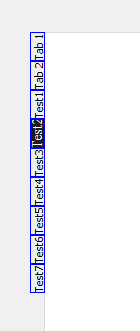
      I've edited the styleoptiontab to rotate the tabs. Shape and text rotated well.
      When I applied the stylesheet to the selected tab the result was as presented in first post (Test1 is selected - the dark part is its background color applied by setStyleSheet syntax).

      1 Reply Last reply
      0
      • Christian EhrlicherC Offline
        Christian EhrlicherC Offline
        Christian Ehrlicher
        Lifetime Qt Champion
        wrote on last edited by
        #5

        Can you show use the complete code used for your test?

        Qt Online Installer direct download: https://download.qt.io/official_releases/online_installers/
        Visit the Qt Academy at https://academy.qt.io/catalog

        CodeFreaksC 1 Reply Last reply
        2
        • Christian EhrlicherC Christian Ehrlicher

          Can you show use the complete code used for your test?

          CodeFreaksC Offline
          CodeFreaksC Offline
          CodeFreaks
          wrote on last edited by CodeFreaks
          #6

          @Christian-Ehrlicher
          @mrjj
          Thanks for reply.
          Of course :

          int main(int argc, char *argv[])
          {
              QApplication app(argc, argv);
          
              QTabWidget *tabWidget = new QTabWidget();
          
              tabWidget->setTabPosition(QTabWidget::West);
              tabWidget->tabBar()->setStyle(new CustomTabStyle);
          
          tabWidget->setStyleSheet("QTabBar::tab:selected  { background: rgba(28,28,29) ;  font-size: 14px; font-family: 'Times New Roman' ; height: 120px; width: 30px; }");
          
                QWidget* tab_content1 = new QWidget();
                QWidget* tab_content2 = new QWidget();
                QWidget* tab_content3 = new QWidget();
                QWidget* tab_content4 = new QWidget();
                QWidget* tab_content5 = new QWidget();
                QWidget* tab_content6 = new QWidget();
                QWidget* tab_content7 = new QWidget();
          
              tabWidget->addTab(tab_content1, "Test1" );
              tabWidget->addTab(tab_content2, "Test2" );
              tabWidget->addTab(tab_content3, "Test3" );
              tabWidget->addTab(tab_content4, "Test4" );
              tabWidget->addTab(tab_content5, "Test5" );
              tabWidget->addTab(tab_content6, "Test6" );
              tabWidget->addTab(tab_content7, "Test7" );
          
              tabWidget->setMinimumSize(400,400);
          
              tabWidget->show();
          
              return app.exec();
          }
          
          
          1 Reply Last reply
          0
          • CodeFreaksC Offline
            CodeFreaksC Offline
            CodeFreaks
            wrote on last edited by
            #7

            Can't anyone help me ?

            mrjjM 1 Reply Last reply
            0
            • CodeFreaksC CodeFreaks

              Can't anyone help me ?

              mrjjM Offline
              mrjjM Offline
              mrjj
              Lifetime Qt Champion
              wrote on last edited by
              #8

              @CodeFreaks
              Hi. i did try your code but could not spot why style would draw in
              old orientation.
              I will have a look again this evening.

              CodeFreaksC 1 Reply Last reply
              0
              • mrjjM mrjj

                @CodeFreaks
                Hi. i did try your code but could not spot why style would draw in
                old orientation.
                I will have a look again this evening.

                CodeFreaksC Offline
                CodeFreaksC Offline
                CodeFreaks
                wrote on last edited by
                #9

                @mrjj
                Hi, Thanks a lot.
                If I add borders feature to the stylesheet statement whole the customstyle will be ignored.

                mrjjM 1 Reply Last reply
                0
                • CodeFreaksC CodeFreaks

                  @mrjj
                  Hi, Thanks a lot.
                  If I add borders feature to the stylesheet statement whole the customstyle will be ignored.

                  mrjjM Offline
                  mrjjM Offline
                  mrjj
                  Lifetime Qt Champion
                  wrote on last edited by
                  #10

                  @CodeFreaks
                  Hi
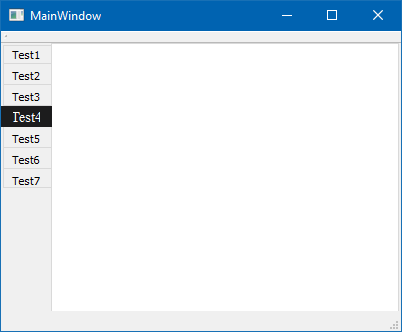
                  On second try i realized the odd rectangle came from stylesheet
                  tabWidget->setStyleSheet("QTabBar::tab:selected { background: rgba(28,28,29) ; font-size: 14px; font-family: 'Times New Roman' ; height: 120px; width: 30px; }");

                  the last height and width is what makes it look wrong.
                  If you remove them it colors the area correctly.
                  alt text
                  tabWidget->setStyleSheet("QTabBar::tab:selected { color:white; background: rgba(28,28,29) ; font-size: 14px; font-family: 'Times New Roman'; }");

                  CodeFreaksC 2 Replies Last reply
                  1
                  • mrjjM mrjj

                    @CodeFreaks
                    Hi
                    On second try i realized the odd rectangle came from stylesheet
                    tabWidget->setStyleSheet("QTabBar::tab:selected { background: rgba(28,28,29) ; font-size: 14px; font-family: 'Times New Roman' ; height: 120px; width: 30px; }");

                    the last height and width is what makes it look wrong.
                    If you remove them it colors the area correctly.
                    alt text
                    tabWidget->setStyleSheet("QTabBar::tab:selected { color:white; background: rgba(28,28,29) ; font-size: 14px; font-family: 'Times New Roman'; }");

                    CodeFreaksC Offline
                    CodeFreaksC Offline
                    CodeFreaks
                    wrote on last edited by
                    #11

                    @mrjj
                    Thanks a lot.
                    You are great...

                    1 Reply Last reply
                    0
                    • mrjjM mrjj

                      @CodeFreaks
                      Hi
                      On second try i realized the odd rectangle came from stylesheet
                      tabWidget->setStyleSheet("QTabBar::tab:selected { background: rgba(28,28,29) ; font-size: 14px; font-family: 'Times New Roman' ; height: 120px; width: 30px; }");

                      the last height and width is what makes it look wrong.
                      If you remove them it colors the area correctly.
                      alt text
                      tabWidget->setStyleSheet("QTabBar::tab:selected { color:white; background: rgba(28,28,29) ; font-size: 14px; font-family: 'Times New Roman'; }");

                      CodeFreaksC Offline
                      CodeFreaksC Offline
                      CodeFreaks
                      wrote on last edited by CodeFreaks
                      #12

                      @mrjj
                      Unfortunately, if I add borders feature to the stylesheet statement whole the customstyle will be ignored.
                      :_(

                      mrjjM 1 Reply Last reply
                      0
                      • CodeFreaksC CodeFreaks

                        @mrjj
                        Unfortunately, if I add borders feature to the stylesheet statement whole the customstyle will be ignored.
                        :_(

                        mrjjM Offline
                        mrjjM Offline
                        mrjj
                        Lifetime Qt Champion
                        wrote on last edited by
                        #13

                        @CodeFreaks
                        Hi can you show how your style sheet looks with borders?
                        Often is sheet is ignored its due to errors.

                        Since you already have a Delegate we could just draw some border :)
                        Maybe its CE_TabBarTabShape that should have it. not looked into it.

                        I assume you try to have teh current tab have a border ?

                        CodeFreaksC 1 Reply Last reply
                        0
                        • mrjjM mrjj

                          @CodeFreaks
                          Hi can you show how your style sheet looks with borders?
                          Often is sheet is ignored its due to errors.

                          Since you already have a Delegate we could just draw some border :)
                          Maybe its CE_TabBarTabShape that should have it. not looked into it.

                          I assume you try to have teh current tab have a border ?

                          CodeFreaksC Offline
                          CodeFreaksC Offline
                          CodeFreaks
                          wrote on last edited by CodeFreaks
                          #14

                          @mrjj
                          Thanks for reply.
                          Widget with borders definition in stylesheet statement:
                          0_1537125483443_GroupBox5.png

                          I applied the borders to all tabs.

                               tabWidget->setStyleSheet("QTabBar::tab { font-size: 14px; font-family: \"Times New Roman\" ;"
                                                        " border-width: 1px;"
                                                        " border-style: solid;"
                                                        " border-color: black; }"
                          
                          mrjjM 1 Reply Last reply
                          0
                          • CodeFreaksC CodeFreaks

                            @mrjj
                            Thanks for reply.
                            Widget with borders definition in stylesheet statement:
                            0_1537125483443_GroupBox5.png

                            I applied the borders to all tabs.

                                 tabWidget->setStyleSheet("QTabBar::tab { font-size: 14px; font-family: \"Times New Roman\" ;"
                                                          " border-width: 1px;"
                                                          " border-style: solid;"
                                                          " border-color: black; }"
                            
                            mrjjM Offline
                            mrjjM Offline
                            mrjj
                            Lifetime Qt Champion
                            wrote on last edited by mrjj
                            #15

                            Hi
                            well good news is that it does support it
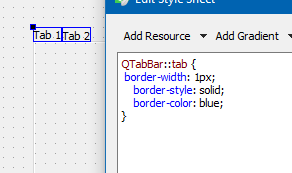
                            alt text

                            update:
                            Ok, when there is delegate it NOT drawn.
                            wrong :) I was stupid :)
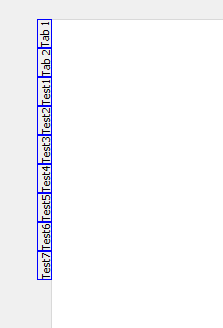
                            alt text
                            it does work with delegate

                            CodeFreaksC 1 Reply Last reply
                            1
                            • mrjjM mrjj

                              Hi
                              well good news is that it does support it
                              alt text

                              update:
                              Ok, when there is delegate it NOT drawn.
                              wrong :) I was stupid :)
                              alt text
                              it does work with delegate

                              CodeFreaksC Offline
                              CodeFreaksC Offline
                              CodeFreaks
                              wrote on last edited by
                              #16

                              @mrjj
                              Hi,
                              Thanks a lot.
                              May I ask you to present an example for it.

                              mrjjM 1 Reply Last reply
                              0
                              • CodeFreaksC CodeFreaks

                                @mrjj
                                Hi,
                                Thanks a lot.
                                May I ask you to present an example for it.

                                mrjjM Offline
                                mrjjM Offline
                                mrjj
                                Lifetime Qt Champion
                                wrote on last edited by
                                #17

                                @CodeFreaks
                                alt text

                                using stylesheet

                                 tabWidget->setStyleSheet(QLatin1String("QTabBar::tab { \n"
                                " border-width: 1px;\n"
                                "    border-style: solid;\n"
                                "    border-color: blue;\n"
                                "}\n"
                                "\n"
                                "QTabBar::tab:selected  { \n"
                                "color:white; \n"
                                "background: rgba(28,28,29) ;  \n"
                                "font-size: 14px; font-family: Times New Roman\n"
                                "}"));
                                
                                CodeFreaksC 1 Reply Last reply
                                0
                                • mrjjM mrjj

                                  @CodeFreaks
                                  alt text

                                  using stylesheet

                                   tabWidget->setStyleSheet(QLatin1String("QTabBar::tab { \n"
                                  " border-width: 1px;\n"
                                  "    border-style: solid;\n"
                                  "    border-color: blue;\n"
                                  "}\n"
                                  "\n"
                                  "QTabBar::tab:selected  { \n"
                                  "color:white; \n"
                                  "background: rgba(28,28,29) ;  \n"
                                  "font-size: 14px; font-family: Times New Roman\n"
                                  "}"));
                                  
                                  CodeFreaksC Offline
                                  CodeFreaksC Offline
                                  CodeFreaks
                                  wrote on last edited by
                                  #18

                                  @mrjj
                                  Thanks,
                                  but its like before, it missed the custom style:
                                  0_1537126341781_GroupBox6.png

                                  mrjjM 1 Reply Last reply
                                  0
                                  • CodeFreaksC CodeFreaks

                                    @mrjj
                                    Thanks,
                                    but its like before, it missed the custom style:
                                    0_1537126341781_GroupBox6.png

                                    mrjjM Offline
                                    mrjjM Offline
                                    mrjj
                                    Lifetime Qt Champion
                                    wrote on last edited by mrjj
                                    #19

                                    @CodeFreaks said in QTabbar Missed Style:

                                    it missed the custom style:

                                    Im not sure what you refer to here ?

                                    update: ah sorry. tired.
                                    You mean it no longer flips the tabs.

                                    CodeFreaksC 1 Reply Last reply
                                    1
                                    • mrjjM mrjj

                                      @CodeFreaks said in QTabbar Missed Style:

                                      it missed the custom style:

                                      Im not sure what you refer to here ?

                                      update: ah sorry. tired.
                                      You mean it no longer flips the tabs.

                                      CodeFreaksC Offline
                                      CodeFreaksC Offline
                                      CodeFreaks
                                      wrote on last edited by CodeFreaks
                                      #20

                                      @mrjj
                                      Thanks for reply,
                                      update: yes.
                                      the orientation of text and shape which have been defined in custom style is missed here.
                                      I want to achieve something like this but with customized borders:
                                      0_1537126785282_GroupBox7.png

                                      mrjjM 1 Reply Last reply
                                      0
                                      • CodeFreaksC CodeFreaks

                                        @mrjj
                                        Thanks for reply,
                                        update: yes.
                                        the orientation of text and shape which have been defined in custom style is missed here.
                                        I want to achieve something like this but with customized borders:
                                        0_1537126785282_GroupBox7.png

                                        mrjjM Offline
                                        mrjjM Offline
                                        mrjj
                                        Lifetime Qt Champion
                                        wrote on last edited by
                                        #21

                                        @CodeFreaks
                                        Hmm. very odd. it does seems like adding border makes the delegate not work
                                        as expected. Sadly i have no idea why.

                                        CodeFreaksC 1 Reply Last reply
                                        1
                                        • mrjjM mrjj

                                          @CodeFreaks
                                          Hmm. very odd. it does seems like adding border makes the delegate not work
                                          as expected. Sadly i have no idea why.

                                          CodeFreaksC Offline
                                          CodeFreaksC Offline
                                          CodeFreaks
                                          wrote on last edited by CodeFreaks
                                          #22

                                          @mrjj
                                          Thanks a lot for your help.
                                          Should I report it to The Qt Support Team ?

                                          mrjjM 1 Reply Last reply
                                          0

                                          • Login

                                          • Login or register to search.
                                          • First post
                                            Last post
                                          0
                                          • Categories
                                          • Recent
                                          • Tags
                                          • Popular
                                          • Users
                                          • Groups
                                          • Search
                                          • Get Qt Extensions
                                          • Unsolved