Skip to content
  • Categories
  • Recent
  • Tags
  • Popular
  • Users
  • Groups
  • Search
  • Get Qt Extensions
  • Unsolved
Collapse
Brand Logo
  1. Home
  2. Qt Development
  3. General and Desktop
  4. QTabbar Missed Style

QTabbar Missed Style

Scheduled Pinned Locked Moved Unsolved General and Desktop
32 Posts 4 Posters 7.9k Views 2 Watching
  • Oldest to Newest
  • Newest to Oldest
  • Most Votes
Reply
  • Reply as topic
Log in to reply
This topic has been deleted. Only users with topic management privileges can see it.
  • CodeFreaksC Offline
    CodeFreaksC Offline
    CodeFreaks
    wrote on last edited by CodeFreaks
    #1

    Hi everyone,
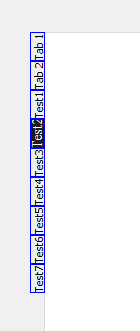
    I want to rotate the tab with its background.
    The frame and text rotated but its background hasn't.
    0_1536910283605_GroupBox3.png

    1 Reply Last reply
    0
    • CodeFreaksC Offline
      CodeFreaksC Offline
      CodeFreaks
      wrote on last edited by CodeFreaks
      #2

      Which styleoptiontab should be modified ?
      I've modified the styles. As I try to use setStyleSheet():

      tabWidget->setStyleSheet("QTabBar::tab:selected  { background: rgba(28,28,29) ; background-origin: content; font-size: 14px; font-family: 'Times New Roman' ; height: 120px; width: 30px; }");
      

      I think, it applies to the base style instead of modified one.

      1 Reply Last reply
      0
      • mrjjM Offline
        mrjjM Offline
        mrjj
        Lifetime Qt Champion
        wrote on last edited by
        #3

        @CodeFreaks said in QTabbar Missed Style:

        QTabBar::tab:selected,

        Hi, the comma "," seems odd ?
        also that style is for the seelected tab ?
        Is that the background u mean ?

        CodeFreaksC 1 Reply Last reply
        1
        • mrjjM mrjj

          @CodeFreaks said in QTabbar Missed Style:

          QTabBar::tab:selected,

          Hi, the comma "," seems odd ?
          also that style is for the seelected tab ?
          Is that the background u mean ?

          CodeFreaksC Offline
          CodeFreaksC Offline
          CodeFreaks
          wrote on last edited by CodeFreaks
          #4

          @mrjj
          Thanks for reply.
          the stylesheet statement is right (additional comma inserted when I copied the statement here).
          I've edited the styleoptiontab to rotate the tabs. Shape and text rotated well.
          When I applied the stylesheet to the selected tab the result was as presented in first post (Test1 is selected - the dark part is its background color applied by setStyleSheet syntax).

          1 Reply Last reply
          0
          • Christian EhrlicherC Offline
            Christian EhrlicherC Offline
            Christian Ehrlicher
            Lifetime Qt Champion
            wrote on last edited by
            #5

            Can you show use the complete code used for your test?

            Qt Online Installer direct download: https://download.qt.io/official_releases/online_installers/
            Visit the Qt Academy at https://academy.qt.io/catalog

            CodeFreaksC 1 Reply Last reply
            2
            • Christian EhrlicherC Christian Ehrlicher

              Can you show use the complete code used for your test?

              CodeFreaksC Offline
              CodeFreaksC Offline
              CodeFreaks
              wrote on last edited by CodeFreaks
              #6

              @Christian-Ehrlicher
              @mrjj
              Thanks for reply.
              Of course :

              int main(int argc, char *argv[])
              {
                  QApplication app(argc, argv);
              
                  QTabWidget *tabWidget = new QTabWidget();
              
                  tabWidget->setTabPosition(QTabWidget::West);
                  tabWidget->tabBar()->setStyle(new CustomTabStyle);
              
              tabWidget->setStyleSheet("QTabBar::tab:selected  { background: rgba(28,28,29) ;  font-size: 14px; font-family: 'Times New Roman' ; height: 120px; width: 30px; }");
              
                    QWidget* tab_content1 = new QWidget();
                    QWidget* tab_content2 = new QWidget();
                    QWidget* tab_content3 = new QWidget();
                    QWidget* tab_content4 = new QWidget();
                    QWidget* tab_content5 = new QWidget();
                    QWidget* tab_content6 = new QWidget();
                    QWidget* tab_content7 = new QWidget();
              
                  tabWidget->addTab(tab_content1, "Test1" );
                  tabWidget->addTab(tab_content2, "Test2" );
                  tabWidget->addTab(tab_content3, "Test3" );
                  tabWidget->addTab(tab_content4, "Test4" );
                  tabWidget->addTab(tab_content5, "Test5" );
                  tabWidget->addTab(tab_content6, "Test6" );
                  tabWidget->addTab(tab_content7, "Test7" );
              
                  tabWidget->setMinimumSize(400,400);
              
                  tabWidget->show();
              
                  return app.exec();
              }
              
              
              1 Reply Last reply
              0
              • CodeFreaksC Offline
                CodeFreaksC Offline
                CodeFreaks
                wrote on last edited by
                #7

                Can't anyone help me ?

                mrjjM 1 Reply Last reply
                0
                • CodeFreaksC CodeFreaks

                  Can't anyone help me ?

                  mrjjM Offline
                  mrjjM Offline
                  mrjj
                  Lifetime Qt Champion
                  wrote on last edited by
                  #8

                  @CodeFreaks
                  Hi. i did try your code but could not spot why style would draw in
                  old orientation.
                  I will have a look again this evening.

                  CodeFreaksC 1 Reply Last reply
                  0
                  • mrjjM mrjj

                    @CodeFreaks
                    Hi. i did try your code but could not spot why style would draw in
                    old orientation.
                    I will have a look again this evening.

                    CodeFreaksC Offline
                    CodeFreaksC Offline
                    CodeFreaks
                    wrote on last edited by
                    #9

                    @mrjj
                    Hi, Thanks a lot.
                    If I add borders feature to the stylesheet statement whole the customstyle will be ignored.

                    mrjjM 1 Reply Last reply
                    0
                    • CodeFreaksC CodeFreaks

                      @mrjj
                      Hi, Thanks a lot.
                      If I add borders feature to the stylesheet statement whole the customstyle will be ignored.

                      mrjjM Offline
                      mrjjM Offline
                      mrjj
                      Lifetime Qt Champion
                      wrote on last edited by
                      #10

                      @CodeFreaks
                      Hi
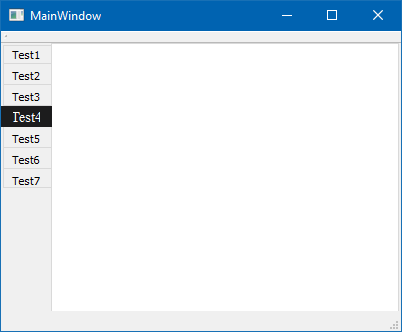
                      On second try i realized the odd rectangle came from stylesheet
                      tabWidget->setStyleSheet("QTabBar::tab:selected { background: rgba(28,28,29) ; font-size: 14px; font-family: 'Times New Roman' ; height: 120px; width: 30px; }");

                      the last height and width is what makes it look wrong.
                      If you remove them it colors the area correctly.
                      alt text
                      tabWidget->setStyleSheet("QTabBar::tab:selected { color:white; background: rgba(28,28,29) ; font-size: 14px; font-family: 'Times New Roman'; }");

                      CodeFreaksC 2 Replies Last reply
                      1
                      • mrjjM mrjj

                        @CodeFreaks
                        Hi
                        On second try i realized the odd rectangle came from stylesheet
                        tabWidget->setStyleSheet("QTabBar::tab:selected { background: rgba(28,28,29) ; font-size: 14px; font-family: 'Times New Roman' ; height: 120px; width: 30px; }");

                        the last height and width is what makes it look wrong.
                        If you remove them it colors the area correctly.
                        alt text
                        tabWidget->setStyleSheet("QTabBar::tab:selected { color:white; background: rgba(28,28,29) ; font-size: 14px; font-family: 'Times New Roman'; }");

                        CodeFreaksC Offline
                        CodeFreaksC Offline
                        CodeFreaks
                        wrote on last edited by
                        #11

                        @mrjj
                        Thanks a lot.
                        You are great...

                        1 Reply Last reply
                        0
                        • mrjjM mrjj

                          @CodeFreaks
                          Hi
                          On second try i realized the odd rectangle came from stylesheet
                          tabWidget->setStyleSheet("QTabBar::tab:selected { background: rgba(28,28,29) ; font-size: 14px; font-family: 'Times New Roman' ; height: 120px; width: 30px; }");

                          the last height and width is what makes it look wrong.
                          If you remove them it colors the area correctly.
                          alt text
                          tabWidget->setStyleSheet("QTabBar::tab:selected { color:white; background: rgba(28,28,29) ; font-size: 14px; font-family: 'Times New Roman'; }");

                          CodeFreaksC Offline
                          CodeFreaksC Offline
                          CodeFreaks
                          wrote on last edited by CodeFreaks
                          #12

                          @mrjj
                          Unfortunately, if I add borders feature to the stylesheet statement whole the customstyle will be ignored.
                          :_(

                          mrjjM 1 Reply Last reply
                          0
                          • CodeFreaksC CodeFreaks

                            @mrjj
                            Unfortunately, if I add borders feature to the stylesheet statement whole the customstyle will be ignored.
                            :_(

                            mrjjM Offline
                            mrjjM Offline
                            mrjj
                            Lifetime Qt Champion
                            wrote on last edited by
                            #13

                            @CodeFreaks
                            Hi can you show how your style sheet looks with borders?
                            Often is sheet is ignored its due to errors.

                            Since you already have a Delegate we could just draw some border :)
                            Maybe its CE_TabBarTabShape that should have it. not looked into it.

                            I assume you try to have teh current tab have a border ?

                            CodeFreaksC 1 Reply Last reply
                            0
                            • mrjjM mrjj

                              @CodeFreaks
                              Hi can you show how your style sheet looks with borders?
                              Often is sheet is ignored its due to errors.

                              Since you already have a Delegate we could just draw some border :)
                              Maybe its CE_TabBarTabShape that should have it. not looked into it.

                              I assume you try to have teh current tab have a border ?

                              CodeFreaksC Offline
                              CodeFreaksC Offline
                              CodeFreaks
                              wrote on last edited by CodeFreaks
                              #14

                              @mrjj
                              Thanks for reply.
                              Widget with borders definition in stylesheet statement:
                              0_1537125483443_GroupBox5.png

                              I applied the borders to all tabs.

                                   tabWidget->setStyleSheet("QTabBar::tab { font-size: 14px; font-family: \"Times New Roman\" ;"
                                                            " border-width: 1px;"
                                                            " border-style: solid;"
                                                            " border-color: black; }"
                              
                              mrjjM 1 Reply Last reply
                              0
                              • CodeFreaksC CodeFreaks

                                @mrjj
                                Thanks for reply.
                                Widget with borders definition in stylesheet statement:
                                0_1537125483443_GroupBox5.png

                                I applied the borders to all tabs.

                                     tabWidget->setStyleSheet("QTabBar::tab { font-size: 14px; font-family: \"Times New Roman\" ;"
                                                              " border-width: 1px;"
                                                              " border-style: solid;"
                                                              " border-color: black; }"
                                
                                mrjjM Offline
                                mrjjM Offline
                                mrjj
                                Lifetime Qt Champion
                                wrote on last edited by mrjj
                                #15

                                Hi
                                well good news is that it does support it
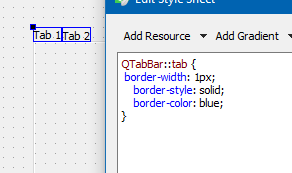
                                alt text

                                update:
                                Ok, when there is delegate it NOT drawn.
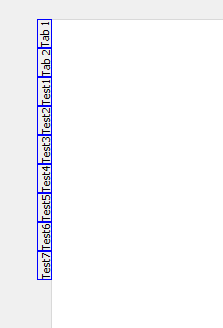
                                wrong :) I was stupid :)
                                alt text
                                it does work with delegate

                                CodeFreaksC 1 Reply Last reply
                                1
                                • mrjjM mrjj

                                  Hi
                                  well good news is that it does support it
                                  alt text

                                  update:
                                  Ok, when there is delegate it NOT drawn.
                                  wrong :) I was stupid :)
                                  alt text
                                  it does work with delegate

                                  CodeFreaksC Offline
                                  CodeFreaksC Offline
                                  CodeFreaks
                                  wrote on last edited by
                                  #16

                                  @mrjj
                                  Hi,
                                  Thanks a lot.
                                  May I ask you to present an example for it.

                                  mrjjM 1 Reply Last reply
                                  0
                                  • CodeFreaksC CodeFreaks

                                    @mrjj
                                    Hi,
                                    Thanks a lot.
                                    May I ask you to present an example for it.

                                    mrjjM Offline
                                    mrjjM Offline
                                    mrjj
                                    Lifetime Qt Champion
                                    wrote on last edited by
                                    #17

                                    @CodeFreaks
                                    alt text

                                    using stylesheet

                                     tabWidget->setStyleSheet(QLatin1String("QTabBar::tab { \n"
                                    " border-width: 1px;\n"
                                    "    border-style: solid;\n"
                                    "    border-color: blue;\n"
                                    "}\n"
                                    "\n"
                                    "QTabBar::tab:selected  { \n"
                                    "color:white; \n"
                                    "background: rgba(28,28,29) ;  \n"
                                    "font-size: 14px; font-family: Times New Roman\n"
                                    "}"));
                                    
                                    CodeFreaksC 1 Reply Last reply
                                    0
                                    • mrjjM mrjj

                                      @CodeFreaks
                                      alt text

                                      using stylesheet

                                       tabWidget->setStyleSheet(QLatin1String("QTabBar::tab { \n"
                                      " border-width: 1px;\n"
                                      "    border-style: solid;\n"
                                      "    border-color: blue;\n"
                                      "}\n"
                                      "\n"
                                      "QTabBar::tab:selected  { \n"
                                      "color:white; \n"
                                      "background: rgba(28,28,29) ;  \n"
                                      "font-size: 14px; font-family: Times New Roman\n"
                                      "}"));
                                      
                                      CodeFreaksC Offline
                                      CodeFreaksC Offline
                                      CodeFreaks
                                      wrote on last edited by
                                      #18

                                      @mrjj
                                      Thanks,
                                      but its like before, it missed the custom style:
                                      0_1537126341781_GroupBox6.png

                                      mrjjM 1 Reply Last reply
                                      0
                                      • CodeFreaksC CodeFreaks

                                        @mrjj
                                        Thanks,
                                        but its like before, it missed the custom style:
                                        0_1537126341781_GroupBox6.png

                                        mrjjM Offline
                                        mrjjM Offline
                                        mrjj
                                        Lifetime Qt Champion
                                        wrote on last edited by mrjj
                                        #19

                                        @CodeFreaks said in QTabbar Missed Style:

                                        it missed the custom style:

                                        Im not sure what you refer to here ?

                                        update: ah sorry. tired.
                                        You mean it no longer flips the tabs.

                                        CodeFreaksC 1 Reply Last reply
                                        1
                                        • mrjjM mrjj

                                          @CodeFreaks said in QTabbar Missed Style:

                                          it missed the custom style:

                                          Im not sure what you refer to here ?

                                          update: ah sorry. tired.
                                          You mean it no longer flips the tabs.

                                          CodeFreaksC Offline
                                          CodeFreaksC Offline
                                          CodeFreaks
                                          wrote on last edited by CodeFreaks
                                          #20

                                          @mrjj
                                          Thanks for reply,
                                          update: yes.
                                          the orientation of text and shape which have been defined in custom style is missed here.
                                          I want to achieve something like this but with customized borders:
                                          0_1537126785282_GroupBox7.png

                                          mrjjM 1 Reply Last reply
                                          0

                                          • Login

                                          • Login or register to search.
                                          • First post
                                            Last post
                                          0
                                          • Categories
                                          • Recent
                                          • Tags
                                          • Popular
                                          • Users
                                          • Groups
                                          • Search
                                          • Get Qt Extensions
                                          • Unsolved