
Skip to content
  • Categories
  • Recent
  • Tags
  • Popular
  • Users
  • Groups
  • Search
  • Get Qt
  • Unsolved
Collapse
qtws26_logo

The Qt Event of the Year: Qt World Summit 2026

Save Your Spot >
Brand Logo
  1. Home
  2. Qt Development
  3. General and Desktop
  4. Visible region in Qscrollarea
Qt 6.12 LTS is out! See what's new in the release blog

Visible region in Qscrollarea

Scheduled Pinned Locked Moved Unsolved General and Desktop
15 Posts 4 Posters 7.1k Views 2 Watching
  • Oldest to Newest
  • Newest to Oldest
  • Most Votes
Reply
  • Reply as topic
Log in to reply
This topic has been deleted. Only users with topic management privileges can see it.
  • H hjohn

    @raven-worx Thanks for responding.

    There's scrollbar in my scenario and I've put a few labels in it.
    Now i have a slot which gets called when I scroll, and it works fine.
    That slot gives the visibleRegion of the QScrollArea.
    In constructor I have put 20 Qlabels in the scroll area so when the code gets executed the scrollbar allready has 20 Labels.
    on that time i want to know how many labels are visible in the scrollArea.

    mrjjM Offline
    mrjjM Offline
    mrjj
    Lifetime Qt Champion
    wrote on last edited by mrjj
    #4

    @hjohn
    Hi
    you could do

     // count visible
      int count = 0;
      QList<QLabel*> labels = ui->scrollArea->findChildren<QLabel*>();
      for ( QLabel* label : labels) {
        if ( ! label->visibleRegion().isEmpty() ) { count++; }
      }
    
      qDebug() << count;
    

    Note that if last label is only partly visible, its still counted.

    H 1 Reply Last reply
    3
    • mrjjM mrjj

      @hjohn
      Hi
      you could do

       // count visible
        int count = 0;
        QList<QLabel*> labels = ui->scrollArea->findChildren<QLabel*>();
        for ( QLabel* label : labels) {
          if ( ! label->visibleRegion().isEmpty() ) { count++; }
        }
      
        qDebug() << count;
      

      Note that if last label is only partly visible, its still counted.

      H Offline
      H Offline
      hjohn
      wrote on last edited by
      #5

      @mrjj yeah I have used it before.It works only i scroll the scrollbar.
      But at beggining it counts total buttons.
      for example At the begging : only 10 buttons are visible from 23.
      above logic works only if i scroll the scrollbar but It does not work for start up scenario.I want to display 10 count when widgets added in scrollarea.
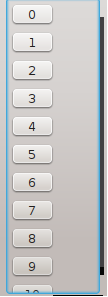
      0_1533791259708_Untitled.png

      mrjjM 1 Reply Last reply
      0
      • H hjohn

        @mrjj yeah I have used it before.It works only i scroll the scrollbar.
        But at beggining it counts total buttons.
        for example At the begging : only 10 buttons are visible from 23.
        above logic works only if i scroll the scrollbar but It does not work for start up scenario.I want to display 10 count when widgets added in scrollarea.
        0_1533791259708_Untitled.png

        mrjjM Offline
        mrjjM Offline
        mrjj
        Lifetime Qt Champion
        wrote on last edited by
        #6

        @hjohn
        Im not sure how u use it.

        For me it counted the visible lables for me.
        With or without scrollbar. with/without scrolling.

        but they must be visible on screen before u count.

        H 1 Reply Last reply
        0
        • mrjjM mrjj

          @hjohn
          Im not sure how u use it.

          For me it counted the visible lables for me.
          With or without scrollbar. with/without scrolling.

          but they must be visible on screen before u count.

          H Offline
          H Offline
          hjohn
          wrote on last edited by
          #7

          @mrjj yeah In My case It does count but It counts 23 instead of 10. It gives right answer when i Scroll.

          mrjjM 1 Reply Last reply
          0
          • H hjohn

            @mrjj yeah In My case It does count but It counts 23 instead of 10. It gives right answer when i Scroll.

            mrjjM Offline
            mrjjM Offline
            mrjj
            Lifetime Qt Champion
            wrote on last edited by
            #8

            @hjohn
            ok. cant guess. works 100% as expected for me.

            H 1 Reply Last reply
            0
            • mrjjM mrjj

              @hjohn
              ok. cant guess. works 100% as expected for me.

              H Offline
              H Offline
              hjohn
              wrote on last edited by hjohn
              #9

              @mrjj okay thanks...Have a Good Day :)

              mrjjM 1 Reply Last reply
              0
              • H hjohn

                @mrjj okay thanks...Have a Good Day :)

                mrjjM Offline
                mrjjM Offline
                mrjj
                Lifetime Qt Champion
                wrote on last edited by
                #10

                @hjohn
                same to you :)
                If you provide a small sample that shows it
                count wrong, i will look into it.

                H 1 Reply Last reply
                0
                • mrjjM mrjj

                  @hjohn
                  same to you :)
                  If you provide a small sample that shows it
                  count wrong, i will look into it.

                  H Offline
                  H Offline
                  hjohn
                  wrote on last edited by hjohn
                  #11

                  @mrjj

                  Widget::Widget(QWidget *parent) :
                      QWidget(parent),
                      ui(new Ui::Widget)
                  {
                      ui->setupUi(this);
                  
                        area=new QScrollArea(this);
                        area->setVerticalScrollBarPolicy(Qt::ScrollBarAlwaysOn);
                      for(int i=0;i<23;i++){
                          button=new QPushButton;
                         button->setText(QString::number(i));
                          layOut->addWidget(button);
                      }
                  setlabels();
                  

                  setlabels() function:

                   P=area->findChildren<QPushButton*>();
                      for(int i=0;i<P.count() ;i++)
                  {
                          if(!P.at(i)->visibleRegion().isEmpty())
                        {
                                  visibleButtonVectorBottom.push_back(P.at(i));
                       }
                   }
                     
                  
                  mrjjM 1 Reply Last reply
                  0
                  • H hjohn

                    @mrjj

                    Widget::Widget(QWidget *parent) :
                        QWidget(parent),
                        ui(new Ui::Widget)
                    {
                        ui->setupUi(this);
                    
                          area=new QScrollArea(this);
                          area->setVerticalScrollBarPolicy(Qt::ScrollBarAlwaysOn);
                        for(int i=0;i<23;i++){
                            button=new QPushButton;
                           button->setText(QString::number(i));
                            layOut->addWidget(button);
                        }
                    setlabels();
                    

                    setlabels() function:

                     P=area->findChildren<QPushButton*>();
                        for(int i=0;i<P.count() ;i++)
                    {
                            if(!P.at(i)->visibleRegion().isEmpty())
                          {
                                    visibleButtonVectorBottom.push_back(P.at(i));
                         }
                     }
                       
                    
                    mrjjM Offline
                    mrjjM Offline
                    mrjj
                    Lifetime Qt Champion
                    wrote on last edited by mrjj
                    #12

                    @hjohn
                    Hi
                    well, you call it from constructor so widget is not yet visible and
                    visibleRegion make no sense then.

                    You could use /override
                    http://doc.qt.io/qt-5/qwidget.html#showEvent
                    to first call it when shown.

                    Alternatively, you must know size of scroll area and calculate how many is shown using
                    buttons height. Since its not visible yet, it is not scrolled so should be pretty forward.

                    Can i ask WHY you need to know how many is visible ?

                    H 2 Replies Last reply
                    4
                    • mrjjM mrjj

                      @hjohn
                      Hi
                      well, you call it from constructor so widget is not yet visible and
                      visibleRegion make no sense then.

                      You could use /override
                      http://doc.qt.io/qt-5/qwidget.html#showEvent
                      to first call it when shown.

                      Alternatively, you must know size of scroll area and calculate how many is shown using
                      buttons height. Since its not visible yet, it is not scrolled so should be pretty forward.

                      Can i ask WHY you need to know how many is visible ?

                      H Offline
                      H Offline
                      hjohn
                      wrote on last edited by
                      #13

                      @mrjj Actually I want to Display how may widgets in Scrolllarea are not visible at a time.

                      1 Reply Last reply
                      0
                      • mrjjM mrjj

                        @hjohn
                        Hi
                        well, you call it from constructor so widget is not yet visible and
                        visibleRegion make no sense then.

                        You could use /override
                        http://doc.qt.io/qt-5/qwidget.html#showEvent
                        to first call it when shown.

                        Alternatively, you must know size of scroll area and calculate how many is shown using
                        buttons height. Since its not visible yet, it is not scrolled so should be pretty forward.

                        Can i ask WHY you need to know how many is visible ?

                        H Offline
                        H Offline
                        hjohn
                        wrote on last edited by hjohn
                        #14

                        @mrjj Thanks , It worked
                        I have a further question...

                        QScrollArea *ScrollArea=new QScrollArea;
                        QVBoxLayout *VLayout=new QVBoxLayout;
                        QWidget *widget_in_ScrollAra=new QWidget;
                        
                        widget_in_ScrollAra->setLayout(VLayout);
                        
                        for(int i=0;i<20;i++){
                             QLabel *Label=new QLabel;
                             Label->setText(QString::number(i));
                             VLayout->setWidget(Label);
                        }
                        ScrollArea->setWidget(widget_in_ScrollAra);


                        That's how I'm setting my ScrollArea, But is there a way to add those Label into ScrollArea by making Labels children of widget_in_ScrollAra without using any Layout?

                        jsulmJ 1 Reply Last reply
                        0
                        • H hjohn

                          @mrjj Thanks , It worked
                          I have a further question...

                          QScrollArea *ScrollArea=new QScrollArea;
                          QVBoxLayout *VLayout=new QVBoxLayout;
                          QWidget *widget_in_ScrollAra=new QWidget;
                          
                          widget_in_ScrollAra->setLayout(VLayout);
                          
                          for(int i=0;i<20;i++){
                               QLabel *Label=new QLabel;
                               Label->setText(QString::number(i));
                               VLayout->setWidget(Label);
                          }
                          ScrollArea->setWidget(widget_in_ScrollAra);


                          That's how I'm setting my ScrollArea, But is there a way to add those Label into ScrollArea by making Labels children of widget_in_ScrollAra without using any Layout?

                          jsulmJ Offline
                          jsulmJ Offline
                          jsulm
                          Lifetime Qt Champion
                          wrote on last edited by
                          #15

                          @hjohn Sure it is. Just don't create any layout and put the labels manually somewhere in the widget_in_ScrollAra.
                          Use widget_in_ScrollAra as parent for the labels.

                          https://forum.qt.io/topic/113070/qt-code-of-conduct

                          1 Reply Last reply
                          2

                          • Login

                          • Login or register to search.
                          • First post
                            Last post
                          0
                          • Categories
                          • Recent
                          • Tags
                          • Popular
                          • Users
                          • Groups
                          • Search
                          • Get Qt
                          • Unsolved