
Skip to content
  • Categories
  • Recent
  • Tags
  • Popular
  • Users
  • Groups
  • Search
  • Get Qt Extensions
  • Unsolved
Collapse
Brand Logo
  1. Home
  2. Qt Development
  3. General and Desktop
  4. Visible region in Qscrollarea
Qt 6.11 is out! See what's new in the release blog

Visible region in Qscrollarea

Scheduled Pinned Locked Moved Unsolved General and Desktop
15 Posts 4 Posters 6.4k Views 2 Watching
  • Oldest to Newest
  • Newest to Oldest
  • Most Votes
Reply
  • Reply as topic
Log in to reply
This topic has been deleted. Only users with topic management privileges can see it.
  • H hjohn

    How to Get number of Visible widgets in scrollarea as scrollarea gets created?

    raven-worxR Offline
    raven-worxR Offline
    raven-worx
    Moderators
    wrote on last edited by
    #2

    @hjohn
    what exactly are you trying to achieve?

    --- SUPPORT REQUESTS VIA CHAT WILL BE IGNORED ---
    If you have a question please use the forum so others can benefit from the solution in the future

    H 1 Reply Last reply
    0
    • raven-worxR raven-worx

      @hjohn
      what exactly are you trying to achieve?

      H Offline
      H Offline
      hjohn
      wrote on last edited by
      #3

      @raven-worx Thanks for responding.

      There's scrollbar in my scenario and I've put a few labels in it.
      Now i have a slot which gets called when I scroll, and it works fine.
      That slot gives the visibleRegion of the QScrollArea.
      In constructor I have put 20 Qlabels in the scroll area so when the code gets executed the scrollbar allready has 20 Labels.
      on that time i want to know how many labels are visible in the scrollArea.

      mrjjM 1 Reply Last reply
      0
      • H hjohn

        @raven-worx Thanks for responding.

        There's scrollbar in my scenario and I've put a few labels in it.
        Now i have a slot which gets called when I scroll, and it works fine.
        That slot gives the visibleRegion of the QScrollArea.
        In constructor I have put 20 Qlabels in the scroll area so when the code gets executed the scrollbar allready has 20 Labels.
        on that time i want to know how many labels are visible in the scrollArea.

        mrjjM Offline
        mrjjM Offline
        mrjj
        Lifetime Qt Champion
        wrote on last edited by mrjj
        #4

        @hjohn
        Hi
        you could do

         // count visible
          int count = 0;
          QList<QLabel*> labels = ui->scrollArea->findChildren<QLabel*>();
          for ( QLabel* label : labels) {
            if ( ! label->visibleRegion().isEmpty() ) { count++; }
          }
        
          qDebug() << count;
        

        Note that if last label is only partly visible, its still counted.

        H 1 Reply Last reply
        3
        • mrjjM mrjj

          @hjohn
          Hi
          you could do

           // count visible
            int count = 0;
            QList<QLabel*> labels = ui->scrollArea->findChildren<QLabel*>();
            for ( QLabel* label : labels) {
              if ( ! label->visibleRegion().isEmpty() ) { count++; }
            }
          
            qDebug() << count;
          

          Note that if last label is only partly visible, its still counted.

          H Offline
          H Offline
          hjohn
          wrote on last edited by
          #5

          @mrjj yeah I have used it before.It works only i scroll the scrollbar.
          But at beggining it counts total buttons.
          for example At the begging : only 10 buttons are visible from 23.
          above logic works only if i scroll the scrollbar but It does not work for start up scenario.I want to display 10 count when widgets added in scrollarea.
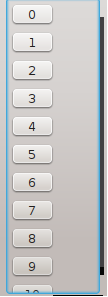
          0_1533791259708_Untitled.png

          mrjjM 1 Reply Last reply
          0
          • H hjohn

            @mrjj yeah I have used it before.It works only i scroll the scrollbar.
            But at beggining it counts total buttons.
            for example At the begging : only 10 buttons are visible from 23.
            above logic works only if i scroll the scrollbar but It does not work for start up scenario.I want to display 10 count when widgets added in scrollarea.
            0_1533791259708_Untitled.png

            mrjjM Offline
            mrjjM Offline
            mrjj
            Lifetime Qt Champion
            wrote on last edited by
            #6

            @hjohn
            Im not sure how u use it.

            For me it counted the visible lables for me.
            With or without scrollbar. with/without scrolling.

            but they must be visible on screen before u count.

            H 1 Reply Last reply
            0
            • mrjjM mrjj

              @hjohn
              Im not sure how u use it.

              For me it counted the visible lables for me.
              With or without scrollbar. with/without scrolling.

              but they must be visible on screen before u count.

              H Offline
              H Offline
              hjohn
              wrote on last edited by
              #7

              @mrjj yeah In My case It does count but It counts 23 instead of 10. It gives right answer when i Scroll.

              mrjjM 1 Reply Last reply
              0
              • H hjohn

                @mrjj yeah In My case It does count but It counts 23 instead of 10. It gives right answer when i Scroll.

                mrjjM Offline
                mrjjM Offline
                mrjj
                Lifetime Qt Champion
                wrote on last edited by
                #8

                @hjohn
                ok. cant guess. works 100% as expected for me.

                H 1 Reply Last reply
                0
                • mrjjM mrjj

                  @hjohn
                  ok. cant guess. works 100% as expected for me.

                  H Offline
                  H Offline
                  hjohn
                  wrote on last edited by hjohn
                  #9

                  @mrjj okay thanks...Have a Good Day :)

                  mrjjM 1 Reply Last reply
                  0
                  • H hjohn

                    @mrjj okay thanks...Have a Good Day :)

                    mrjjM Offline
                    mrjjM Offline
                    mrjj
                    Lifetime Qt Champion
                    wrote on last edited by
                    #10

                    @hjohn
                    same to you :)
                    If you provide a small sample that shows it
                    count wrong, i will look into it.

                    H 1 Reply Last reply
                    0
                    • mrjjM mrjj

                      @hjohn
                      same to you :)
                      If you provide a small sample that shows it
                      count wrong, i will look into it.

                      H Offline
                      H Offline
                      hjohn
                      wrote on last edited by hjohn
                      #11

                      @mrjj

                      Widget::Widget(QWidget *parent) :
                          QWidget(parent),
                          ui(new Ui::Widget)
                      {
                          ui->setupUi(this);
                      
                            area=new QScrollArea(this);
                            area->setVerticalScrollBarPolicy(Qt::ScrollBarAlwaysOn);
                          for(int i=0;i<23;i++){
                              button=new QPushButton;
                             button->setText(QString::number(i));
                              layOut->addWidget(button);
                          }
                      setlabels();
                      

                      setlabels() function:

                       P=area->findChildren<QPushButton*>();
                          for(int i=0;i<P.count() ;i++)
                      {
                              if(!P.at(i)->visibleRegion().isEmpty())
                            {
                                      visibleButtonVectorBottom.push_back(P.at(i));
                           }
                       }
                         
                      
                      mrjjM 1 Reply Last reply
                      0
                      • H hjohn

                        @mrjj

                        Widget::Widget(QWidget *parent) :
                            QWidget(parent),
                            ui(new Ui::Widget)
                        {
                            ui->setupUi(this);
                        
                              area=new QScrollArea(this);
                              area->setVerticalScrollBarPolicy(Qt::ScrollBarAlwaysOn);
                            for(int i=0;i<23;i++){
                                button=new QPushButton;
                               button->setText(QString::number(i));
                                layOut->addWidget(button);
                            }
                        setlabels();
                        

                        setlabels() function:

                         P=area->findChildren<QPushButton*>();
                            for(int i=0;i<P.count() ;i++)
                        {
                                if(!P.at(i)->visibleRegion().isEmpty())
                              {
                                        visibleButtonVectorBottom.push_back(P.at(i));
                             }
                         }
                           
                        
                        mrjjM Offline
                        mrjjM Offline
                        mrjj
                        Lifetime Qt Champion
                        wrote on last edited by mrjj
                        #12

                        @hjohn
                        Hi
                        well, you call it from constructor so widget is not yet visible and
                        visibleRegion make no sense then.

                        You could use /override
                        http://doc.qt.io/qt-5/qwidget.html#showEvent
                        to first call it when shown.

                        Alternatively, you must know size of scroll area and calculate how many is shown using
                        buttons height. Since its not visible yet, it is not scrolled so should be pretty forward.

                        Can i ask WHY you need to know how many is visible ?

                        H 2 Replies Last reply
                        4
                        • mrjjM mrjj

                          @hjohn
                          Hi
                          well, you call it from constructor so widget is not yet visible and
                          visibleRegion make no sense then.

                          You could use /override
                          http://doc.qt.io/qt-5/qwidget.html#showEvent
                          to first call it when shown.

                          Alternatively, you must know size of scroll area and calculate how many is shown using
                          buttons height. Since its not visible yet, it is not scrolled so should be pretty forward.

                          Can i ask WHY you need to know how many is visible ?

                          H Offline
                          H Offline
                          hjohn
                          wrote on last edited by
                          #13

                          @mrjj Actually I want to Display how may widgets in Scrolllarea are not visible at a time.

                          1 Reply Last reply
                          0
                          • mrjjM mrjj

                            @hjohn
                            Hi
                            well, you call it from constructor so widget is not yet visible and
                            visibleRegion make no sense then.

                            You could use /override
                            http://doc.qt.io/qt-5/qwidget.html#showEvent
                            to first call it when shown.

                            Alternatively, you must know size of scroll area and calculate how many is shown using
                            buttons height. Since its not visible yet, it is not scrolled so should be pretty forward.

                            Can i ask WHY you need to know how many is visible ?

                            H Offline
                            H Offline
                            hjohn
                            wrote on last edited by hjohn
                            #14

                            @mrjj Thanks , It worked
                            I have a further question...

                            QScrollArea *ScrollArea=new QScrollArea;
                            QVBoxLayout *VLayout=new QVBoxLayout;
                            QWidget *widget_in_ScrollAra=new QWidget;
                            
                            widget_in_ScrollAra->setLayout(VLayout);
                            
                            for(int i=0;i<20;i++){
                                 QLabel *Label=new QLabel;
                                 Label->setText(QString::number(i));
                                 VLayout->setWidget(Label);
                            }
                            ScrollArea->setWidget(widget_in_ScrollAra);


                            That's how I'm setting my ScrollArea, But is there a way to add those Label into ScrollArea by making Labels children of widget_in_ScrollAra without using any Layout?

                            jsulmJ 1 Reply Last reply
                            0
                            • H hjohn

                              @mrjj Thanks , It worked
                              I have a further question...

                              QScrollArea *ScrollArea=new QScrollArea;
                              QVBoxLayout *VLayout=new QVBoxLayout;
                              QWidget *widget_in_ScrollAra=new QWidget;
                              
                              widget_in_ScrollAra->setLayout(VLayout);
                              
                              for(int i=0;i<20;i++){
                                   QLabel *Label=new QLabel;
                                   Label->setText(QString::number(i));
                                   VLayout->setWidget(Label);
                              }
                              ScrollArea->setWidget(widget_in_ScrollAra);


                              That's how I'm setting my ScrollArea, But is there a way to add those Label into ScrollArea by making Labels children of widget_in_ScrollAra without using any Layout?

                              jsulmJ Offline
                              jsulmJ Offline
                              jsulm
                              Lifetime Qt Champion
                              wrote on last edited by
                              #15

                              @hjohn Sure it is. Just don't create any layout and put the labels manually somewhere in the widget_in_ScrollAra.
                              Use widget_in_ScrollAra as parent for the labels.

                              https://forum.qt.io/topic/113070/qt-code-of-conduct

                              1 Reply Last reply
                              2

                              • Login

                              • Login or register to search.
                              • First post
                                Last post
                              0
                              • Categories
                              • Recent
                              • Tags
                              • Popular
                              • Users
                              • Groups
                              • Search
                              • Get Qt Extensions
                              • Unsolved