Skip to content
  • Categories
  • Recent
  • Tags
  • Popular
  • Users
  • Groups
  • Search
  • Get Qt Extensions
  • Unsolved
Collapse
Brand Logo
  1. Home
  2. Qt Development
  3. General and Desktop
  4. Display language issue
Forum Updated to NodeBB v4.3 + New Features

Display language issue

Scheduled Pinned Locked Moved Unsolved General and Desktop
16 Posts 4 Posters 3.1k Views 2 Watching
  • Oldest to Newest
  • Newest to Oldest
  • Most Votes
Reply
  • Reply as topic
Log in to reply
This topic has been deleted. Only users with topic management privileges can see it.
  • 9 9999

    So basically when I installed okular, it was showing some arabic language. But since okular is based on qt5 then I checked that so whole problem was starting from qt5 configuration tool. In this tool box everything is in Arabic so I'm not being able to get anything. I want to change the display language for this qt5 configuration tool.

    mrjjM Offline
    mrjjM Offline
    mrjj
    Lifetime Qt Champion
    wrote on last edited by
    #6

    Ahh
    so its not with Qt development tool but okular

    qt5 configuration tool.

    this one ?
    alt text

    mrjjM 1 Reply Last reply
    0
    • mrjjM mrjj

      Ahh
      so its not with Qt development tool but okular

      qt5 configuration tool.

      this one ?
      alt text

      mrjjM Offline
      mrjjM Offline
      mrjj
      Lifetime Qt Champion
      wrote on last edited by
      #7

      hi
      did u try start it from shell with
      LC_ALL=C /xx/okular an see if it reacts to that ?

      1 Reply Last reply
      0
      • 9 Offline
        9 Offline
        9999
        wrote on last edited by
        #8

        Yes. Is there any language tab there?

        mrjjM 1 Reply Last reply
        0
        • 9 9999

          Yes. Is there any language tab there?

          mrjjM Offline
          mrjjM Offline
          mrjj
          Lifetime Qt Champion
          wrote on last edited by mrjj
          #9

          @9999
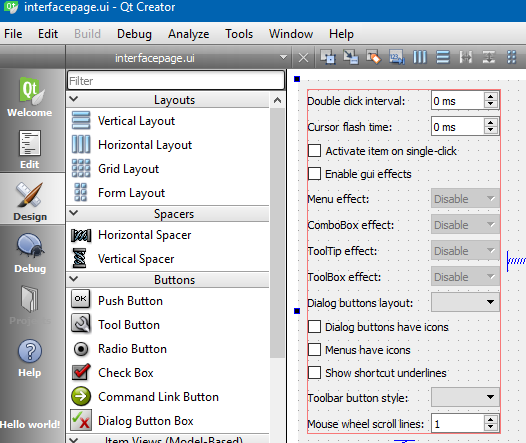
          Not in the version i could find. only icons and looks.
          maybe under interface.
          im sitting in windows so cant run it currently.

          update: found the source
          seems not to be language option
          alt text

          1 Reply Last reply
          0
          • 9 Offline
            9 Offline
            9999
            wrote on last edited by
            #10

            I have version 0.35. If you can find an answer please ping me.

            mrjjM 1 Reply Last reply
            0
            • 9 9999

              I have version 0.35. If you can find an answer please ping me.

              mrjjM Offline
              mrjjM Offline
              mrjj
              Lifetime Qt Champion
              wrote on last edited by
              #11

              @9999
              did u try the shell thing ?
              LC_ALL=C /xx/okular

              1 Reply Last reply
              0
              • 9 Offline
                9 Offline
                9999
                wrote on last edited by
                #12

                Yes, I did. It's showing "can't change locale". Actually I am working with Gnome environment and okular is for KDE. Does that sound problematic?

                1 Reply Last reply
                0
                • 9 Offline
                  9 Offline
                  9999
                  wrote on last edited by
                  #13

                  Can anyone solve this issue?

                  1 Reply Last reply
                  0
                  • SGaistS Offline
                    SGaistS Offline
                    SGaist
                    Lifetime Qt Champion
                    wrote on last edited by
                    #14

                    What locale are you using ?
                    What does your distribution provide to setup language support ?
                    What desktop system are you using ?

                    Interested in AI ? www.idiap.ch
                    Please read the Qt Code of Conduct - https://forum.qt.io/topic/113070/qt-code-of-conduct

                    9 1 Reply Last reply
                    0
                    • SGaistS SGaist

                      What locale are you using ?
                      What does your distribution provide to setup language support ?
                      What desktop system are you using ?

                      9 Offline
                      9 Offline
                      9999
                      wrote on last edited by
                      #15

                      @SGaist hi, thanks for replying.
                      I'm using Antergos linux with GNOME3 environment. The locale of system is en_US.UTF-8.
                      The main problem with system is that it doesn't support any devanagari script in any browser. When I installed devanagari font separately, it's changing the language of qt5ct and qt based apps.
                      For installing the font separately I used the command "sudo pacman -S ttf-indic-otf".
                      Any further help will be appreciated.

                      1 Reply Last reply
                      0
                      • kkoehneK Offline
                        kkoehneK Offline
                        kkoehne
                        Moderators
                        wrote on last edited by kkoehne
                        #16

                        KDE has it's own system for loading translations, and Okular is a KDE application.

                        KDE settings have a Language setting where you can select the Preferred Language: For Plasma 5, you can open it by launching 'systemsettings' (sometimes called 'systemsettings5').

                        Alternatively you can try setting KDE_LANG environment variable, e.g. KDE_LANG=en_US.

                        If this doesn't help, I suggest contacting a KDE forum.

                        Director R&D, The Qt Company

                        1 Reply Last reply
                        2

                        • Login

                        • Login or register to search.
                        • First post
                          Last post
                        0
                        • Categories
                        • Recent
                        • Tags
                        • Popular
                        • Users
                        • Groups
                        • Search
                        • Get Qt Extensions
                        • Unsolved