Skip to content
  • Categories
  • Recent
  • Tags
  • Popular
  • Users
  • Groups
  • Search
  • Get Qt Extensions
  • Unsolved
Collapse
Brand Logo
  1. Home
  2. Qt Development
  3. General and Desktop
  4. Display language issue
Qt 6.11 is out! See what's new in the release blog

Display language issue

Scheduled Pinned Locked Moved Unsolved General and Desktop
16 Posts 4 Posters 4.2k Views 2 Watching
  • Oldest to Newest
  • Newest to Oldest
  • Most Votes
Reply
  • Reply as topic
Log in to reply
This topic has been deleted. Only users with topic management privileges can see it.
  • 9 Offline
    9 Offline
    9999
    wrote on last edited by
    #5

    So basically when I installed okular, it was showing some arabic language. But since okular is based on qt5 then I checked that so whole problem was starting from qt5 configuration tool. In this tool box everything is in Arabic so I'm not being able to get anything. I want to change the display language for this qt5 configuration tool.

    mrjjM 1 Reply Last reply
    0
    • 9 9999

      So basically when I installed okular, it was showing some arabic language. But since okular is based on qt5 then I checked that so whole problem was starting from qt5 configuration tool. In this tool box everything is in Arabic so I'm not being able to get anything. I want to change the display language for this qt5 configuration tool.

      mrjjM Offline
      mrjjM Offline
      mrjj
      Lifetime Qt Champion
      wrote on last edited by
      #6

      Ahh
      so its not with Qt development tool but okular

      qt5 configuration tool.

      this one ?
      alt text

      mrjjM 1 Reply Last reply
      0
      • mrjjM mrjj

        Ahh
        so its not with Qt development tool but okular

        qt5 configuration tool.

        this one ?
        alt text

        mrjjM Offline
        mrjjM Offline
        mrjj
        Lifetime Qt Champion
        wrote on last edited by
        #7

        hi
        did u try start it from shell with
        LC_ALL=C /xx/okular an see if it reacts to that ?

        1 Reply Last reply
        0
        • 9 Offline
          9 Offline
          9999
          wrote on last edited by
          #8

          Yes. Is there any language tab there?

          mrjjM 1 Reply Last reply
          0
          • 9 9999

            Yes. Is there any language tab there?

            mrjjM Offline
            mrjjM Offline
            mrjj
            Lifetime Qt Champion
            wrote on last edited by mrjj
            #9

            @9999
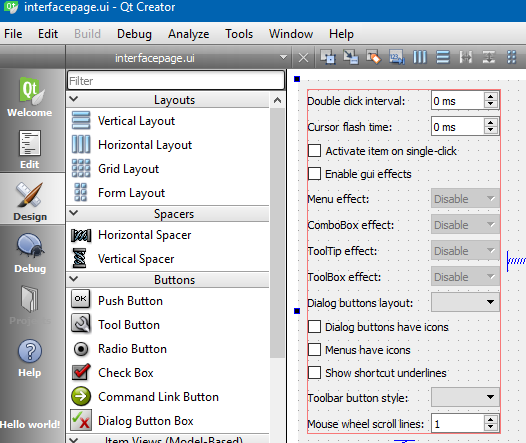
            Not in the version i could find. only icons and looks.
            maybe under interface.
            im sitting in windows so cant run it currently.

            update: found the source
            seems not to be language option
            alt text

            1 Reply Last reply
            0
            • 9 Offline
              9 Offline
              9999
              wrote on last edited by
              #10

              I have version 0.35. If you can find an answer please ping me.

              mrjjM 1 Reply Last reply
              0
              • 9 9999

                I have version 0.35. If you can find an answer please ping me.

                mrjjM Offline
                mrjjM Offline
                mrjj
                Lifetime Qt Champion
                wrote on last edited by
                #11

                @9999
                did u try the shell thing ?
                LC_ALL=C /xx/okular

                1 Reply Last reply
                0
                • 9 Offline
                  9 Offline
                  9999
                  wrote on last edited by
                  #12

                  Yes, I did. It's showing "can't change locale". Actually I am working with Gnome environment and okular is for KDE. Does that sound problematic?

                  1 Reply Last reply
                  0
                  • 9 Offline
                    9 Offline
                    9999
                    wrote on last edited by
                    #13

                    Can anyone solve this issue?

                    1 Reply Last reply
                    0
                    • SGaistS Offline
                      SGaistS Offline
                      SGaist
                      Lifetime Qt Champion
                      wrote on last edited by
                      #14

                      What locale are you using ?
                      What does your distribution provide to setup language support ?
                      What desktop system are you using ?

                      Interested in AI ? www.idiap.ch
                      Please read the Qt Code of Conduct - https://forum.qt.io/topic/113070/qt-code-of-conduct

                      9 1 Reply Last reply
                      0
                      • SGaistS SGaist

                        What locale are you using ?
                        What does your distribution provide to setup language support ?
                        What desktop system are you using ?

                        9 Offline
                        9 Offline
                        9999
                        wrote on last edited by
                        #15

                        @SGaist hi, thanks for replying.
                        I'm using Antergos linux with GNOME3 environment. The locale of system is en_US.UTF-8.
                        The main problem with system is that it doesn't support any devanagari script in any browser. When I installed devanagari font separately, it's changing the language of qt5ct and qt based apps.
                        For installing the font separately I used the command "sudo pacman -S ttf-indic-otf".
                        Any further help will be appreciated.

                        1 Reply Last reply
                        0
                        • kkoehneK Offline
                          kkoehneK Offline
                          kkoehne
                          Moderators
                          wrote on last edited by kkoehne
                          #16

                          KDE has it's own system for loading translations, and Okular is a KDE application.

                          KDE settings have a Language setting where you can select the Preferred Language: For Plasma 5, you can open it by launching 'systemsettings' (sometimes called 'systemsettings5').

                          Alternatively you can try setting KDE_LANG environment variable, e.g. KDE_LANG=en_US.

                          If this doesn't help, I suggest contacting a KDE forum.

                          Director R&D, The Qt Company

                          1 Reply Last reply
                          2

                          • Login

                          • Login or register to search.
                          • First post
                            Last post
                          0
                          • Categories
                          • Recent
                          • Tags
                          • Popular
                          • Users
                          • Groups
                          • Search
                          • Get Qt Extensions
                          • Unsolved