Skip to content
  • Categories
  • Recent
  • Tags
  • Popular
  • Users
  • Groups
  • Search
  • Get Qt Extensions
  • Unsolved
Collapse
Brand Logo
  1. Home
  2. Qt Development
  3. General and Desktop
  4. Why Run QT Widget Application on Raspberry Pi close/minimize button doesn't show and can't adjust window size

Why Run QT Widget Application on Raspberry Pi close/minimize button doesn't show and can't adjust window size

Scheduled Pinned Locked Moved Solved General and Desktop
23 Posts 6 Posters 7.7k Views 3 Watching
  • Oldest to Newest
  • Newest to Oldest
  • Most Votes
Reply
  • Reply as topic
Log in to reply
This topic has been deleted. Only users with topic management privileges can see it.
  • sierdzioS sierdzio

    Do you have an active X11 session (are you logged into GUI on your raspberry pi) when you run that command?

    I Offline
    I Offline
    isan
    wrote on last edited by
    #9

    @sierdzioI plugged the raspberry into a lcd and run it with ./yourApp -platform Xcb
    The program runs but does not make a difference(close / minimize button doesn't show and widget cover the entire screen)

    I set the pushButton to close with this->close();
    can set pushButton to minimize the widget?

    mrjjM 1 Reply Last reply
    0
    • I isan

      @sierdzioI plugged the raspberry into a lcd and run it with ./yourApp -platform Xcb
      The program runs but does not make a difference(close / minimize button doesn't show and widget cover the entire screen)

      I set the pushButton to close with this->close();
      can set pushButton to minimize the widget?

      mrjjM Offline
      mrjjM Offline
      mrjj
      Lifetime Qt Champion
      wrote on last edited by
      #10

      @isan
      Hi

      • the program runs but does not make a difference(close / minimize button doesn't show and widget cover the entire screen)

      Sounds like you are running with no windows manager.
      Qt do not draw the close button etc. Its the Os/windows manager.

      Yes, you can also make button minimize the window. just like close there is a call for that.
      http://doc.qt.io/qt-5/qwidget.html#showMinimized

      I 1 Reply Last reply
      2
      • mrjjM mrjj

        @isan
        Hi

        • the program runs but does not make a difference(close / minimize button doesn't show and widget cover the entire screen)

        Sounds like you are running with no windows manager.
        Qt do not draw the close button etc. Its the Os/windows manager.

        Yes, you can also make button minimize the window. just like close there is a call for that.
        http://doc.qt.io/qt-5/qwidget.html#showMinimized

        I Offline
        I Offline
        isan
        wrote on last edited by
        #11

        @mrjj I set pushButton and do this

        connect(ui->pushButton,SIGNAL(clicked(bool)),this,SLOT(showMinimized()));
        

        but not work

        mrjjM jsulmJ 2 Replies Last reply
        0
        • I isan

          @mrjj I set pushButton and do this

          connect(ui->pushButton,SIGNAL(clicked(bool)),this,SLOT(showMinimized()));
          

          but not work

          mrjjM Offline
          mrjjM Offline
          mrjj
          Lifetime Qt Champion
          wrote on last edited by
          #12

          @isan
          hi
          try without the bool
          connect(ui->pushButton,SIGNAL(clicked()),this,SLOT(showMinimized()));
          and check return value of connect.

          1 Reply Last reply
          0
          • I isan

            @mrjj I set pushButton and do this

            connect(ui->pushButton,SIGNAL(clicked(bool)),this,SLOT(showMinimized()));
            

            but not work

            jsulmJ Offline
            jsulmJ Offline
            jsulm
            Lifetime Qt Champion
            wrote on last edited by
            #13

            @isan said in Why Run QT Widget Application on Raspberry Pi close/minimize button doesn't show and can't adjust window size:

            showMinimized()

            I'm not sure this will work without window manager. Do you use any window manager on your device?

            https://forum.qt.io/topic/113070/qt-code-of-conduct

            I 1 Reply Last reply
            2
            • jsulmJ jsulm

              @isan said in Why Run QT Widget Application on Raspberry Pi close/minimize button doesn't show and can't adjust window size:

              showMinimized()

              I'm not sure this will work without window manager. Do you use any window manager on your device?

              I Offline
              I Offline
              isan
              wrote on last edited by
              #14

              @jsulm I don’t know ,how can I found?

              W 1 Reply Last reply
              0
              • SGaistS Offline
                SGaistS Offline
                SGaist
                Lifetime Qt Champion
                wrote on last edited by
                #15

                Hi,

                Are you running an Xorg server ?
                What plugin is your application loading ?

                Interested in AI ? www.idiap.ch
                Please read the Qt Code of Conduct - https://forum.qt.io/topic/113070/qt-code-of-conduct

                1 Reply Last reply
                1
                • I isan

                  @jsulm I don’t know ,how can I found?

                  W Offline
                  W Offline
                  wrosecrans
                  wrote on last edited by
                  #16

                  @isan When you aren't running the app, what does the system look like? Is it a normal GUi desktop with icons and windows? Or is it just a text mode command line interface?

                  Step 1: Run a normal desktop with windows.

                  Step 2: Make your app run nicely in that desktop.

                  I 1 Reply Last reply
                  2
                  • W wrosecrans

                    @isan When you aren't running the app, what does the system look like? Is it a normal GUi desktop with icons and windows? Or is it just a text mode command line interface?

                    Step 1: Run a normal desktop with windows.

                    Step 2: Make your app run nicely in that desktop.

                    I Offline
                    I Offline
                    isan
                    wrote on last edited by
                    #17

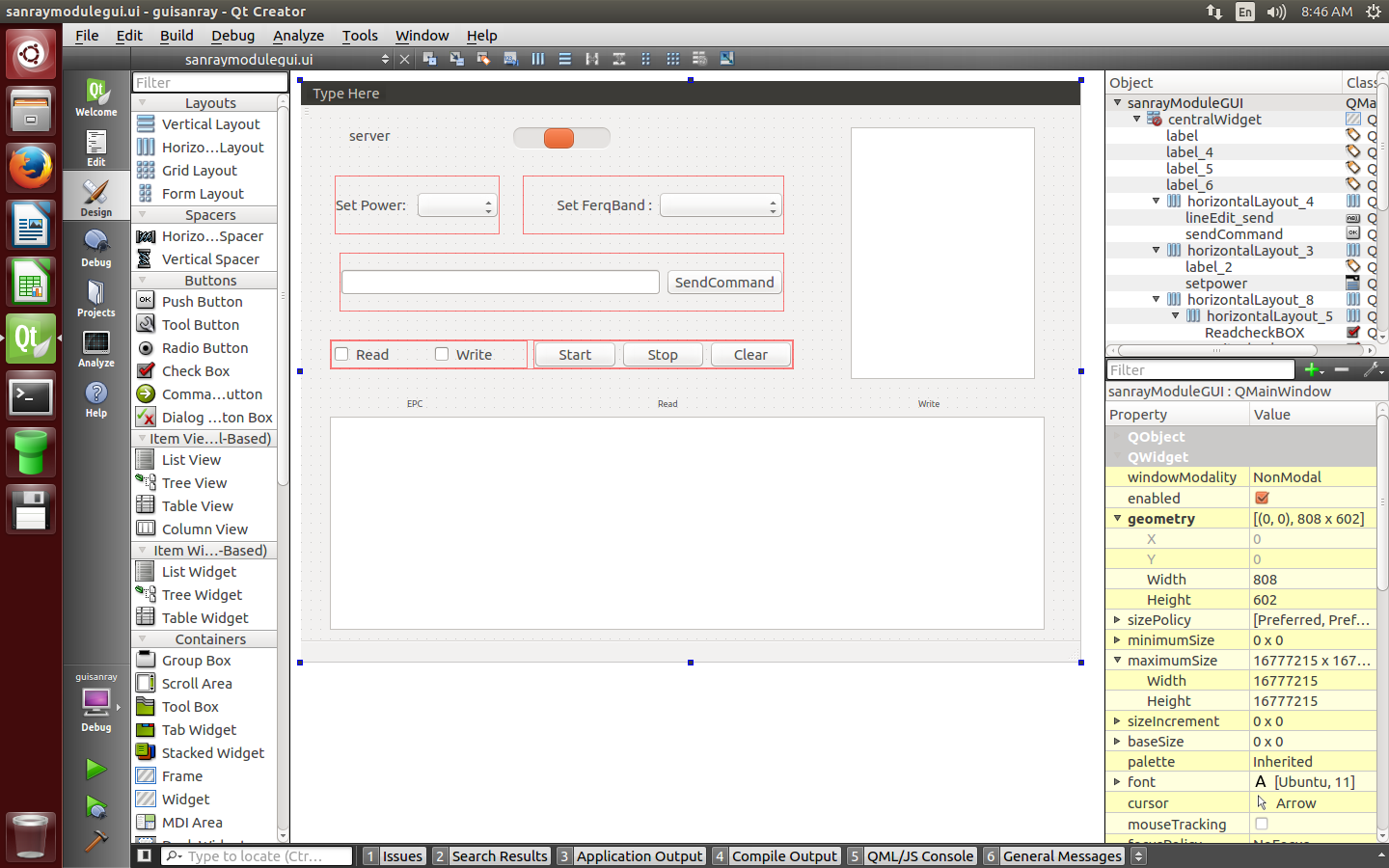
                    @wrosecrans this is gui on forms QT 0_1526359719104_1.png

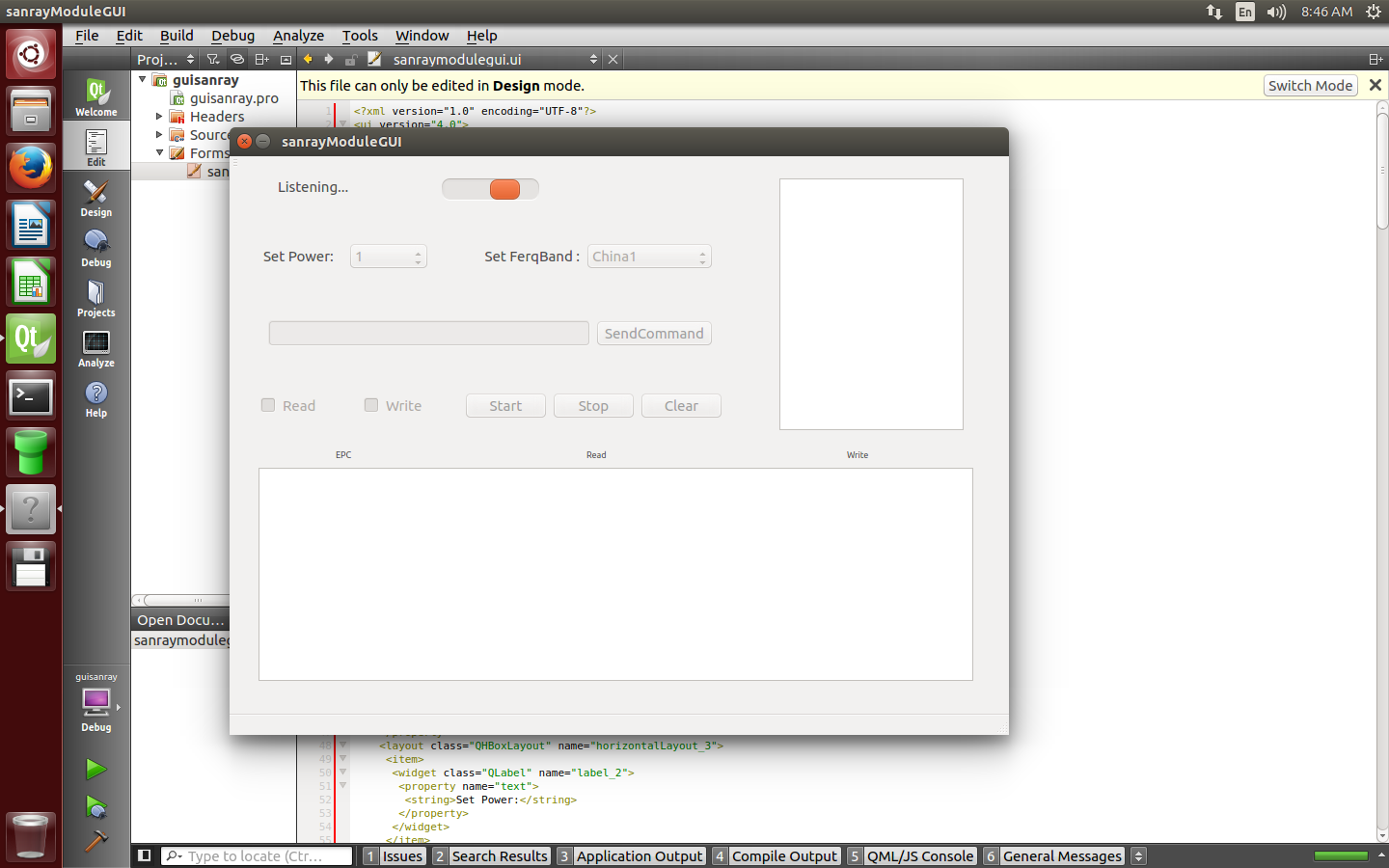
                    this is when run on ubuntu desktop
                    0_1526359748580_2.png

                    this is when run on raspberry

                    0_1526361065826_3.jpg

                    now what?

                    jsulmJ 1 Reply Last reply
                    0
                    • I isan

                      @wrosecrans this is gui on forms QT 0_1526359719104_1.png

                      this is when run on ubuntu desktop
                      0_1526359748580_2.png

                      this is when run on raspberry

                      0_1526361065826_3.jpg

                      now what?

                      jsulmJ Offline
                      jsulmJ Offline
                      jsulm
                      Lifetime Qt Champion
                      wrote on last edited by
                      #18

                      @isan What did you install on your Raspberry?
                      From the picture I would say you don't have any window manager.
                      Raspbian usually installs Pixel desktop.

                      https://forum.qt.io/topic/113070/qt-code-of-conduct

                      I 1 Reply Last reply
                      2
                      • jsulmJ jsulm

                        @isan What did you install on your Raspberry?
                        From the picture I would say you don't have any window manager.
                        Raspbian usually installs Pixel desktop.

                        I Offline
                        I Offline
                        isan
                        wrote on last edited by isan
                        #19

                        @jsulm I did no install any window manager
                        What is the way to find the window manager that is used?
                        If raspi has pixel desktop can it be changed?
                        What is the good window manager ?

                        sierdzioS 1 Reply Last reply
                        0
                        • I isan

                          @jsulm I did no install any window manager
                          What is the way to find the window manager that is used?
                          If raspi has pixel desktop can it be changed?
                          What is the good window manager ?

                          sierdzioS Offline
                          sierdzioS Offline
                          sierdzio
                          Moderators
                          wrote on last edited by
                          #20

                          @isan said in Why Run QT Widget Application on Raspberry Pi close/minimize button doesn't show and can't adjust window size:

                          @jsulm I don't know
                          How to find out which window manager is being used?

                          Just answer the questions @wrosecrans that will be enough to know if you're on X11 or without a windowing system.

                          As @jsulm pointed out, most probably you do not have any window manager running, so the window bezel will just not be there (and no way to minimize/maximize because without window manager such methods do not make sense).

                          To see if you have X11 installed, log into your raspberry pi and run this command:

                          startx
                          

                          If as a result you get a nice OS GUI, then you have X11 installed and ready. To turn it on permanently, you can then run:

                          sudo raspi-config
                          

                          And set it up to boot to GUI instead of command line.

                          (Z(:^

                          I 1 Reply Last reply
                          3
                          • sierdzioS sierdzio

                            @isan said in Why Run QT Widget Application on Raspberry Pi close/minimize button doesn't show and can't adjust window size:

                            @jsulm I don't know
                            How to find out which window manager is being used?

                            Just answer the questions @wrosecrans that will be enough to know if you're on X11 or without a windowing system.

                            As @jsulm pointed out, most probably you do not have any window manager running, so the window bezel will just not be there (and no way to minimize/maximize because without window manager such methods do not make sense).

                            To see if you have X11 installed, log into your raspberry pi and run this command:

                            startx
                            

                            If as a result you get a nice OS GUI, then you have X11 installed and ready. To turn it on permanently, you can then run:

                            sudo raspi-config
                            

                            And set it up to boot to GUI instead of command line.

                            I Offline
                            I Offline
                            isan
                            wrote on last edited by isan
                            #21

                            @sierdzio when run sudo startx

                            X.Org X Server 1.18.4
                            Release Date: 2016-07-19
                            X Protocol Version 11, Revision 0
                            Build Operating System: Linux 4.4.26-v7+ armv7l Raspbian
                            Current Operating System: Linux pi 4.9.28-v7+ #998 SMP Mon May 15 16:55:39 BST 2                                                                                        017 armv7l
                            Kernel command line: 8250.nr_uarts=1 bcm2708_fb.fbwidth=800 bcm2708_fb.fbheight=                                                                                        480 bcm2708_fb.fbswap=1 vc_mem.mem_base=0x3dc00000 vc_mem.mem_size=0x3f000000  w                                                                                        c_otg.lpm_enable=0 console=tty3 root=PARTUUID=5229808c-02 rootfstype=ext4 elevat                                                                                        or=deadline fsck.repair=yes rootwait quiet splash plymouth.ignore-serial-console                                                                                        s
                            Build Date: 11 November 2016  11:59:59AM
                            xorg-server 2:1.18.4-2+rpi1 (https://www.debian.org/support)
                            Current version of pixman: 0.33.3
                                    Before reporting problems, check http://wiki.x.org
                                    to make sure that you have the latest version.
                            Markers: (--) probed, (**) from config file, (==) default setting,
                                    (++) from command line, (!!) notice, (II) informational,
                                    (WW) warning, (EE) error, (NI) not implemented, (??) unknown.
                            (==) Log file: "/var/log/Xorg.1.log", Time: Tue May 15 19:19:36 2018
                            (==) Using system config directory "/usr/share/X11/xorg.conf.d"
                            modprobe: FATAL: Module g2d_23 not found.
                            

                            If as a result you get a nice OS GUI, then you have X11 installed and ready. To turn it

                            And it does not make a difference ,It shows OS GUI that I already saw
                            I run the program, it still does not have a window manager

                            sierdzioS 1 Reply Last reply
                            0
                            • SGaistS Offline
                              SGaistS Offline
                              SGaist
                              Lifetime Qt Champion
                              wrote on last edited by
                              #22

                              Check the platform plugin that is loaded on application start.

                              Interested in AI ? www.idiap.ch
                              Please read the Qt Code of Conduct - https://forum.qt.io/topic/113070/qt-code-of-conduct

                              1 Reply Last reply
                              0
                              • I isan

                                @sierdzio when run sudo startx

                                X.Org X Server 1.18.4
                                Release Date: 2016-07-19
                                X Protocol Version 11, Revision 0
                                Build Operating System: Linux 4.4.26-v7+ armv7l Raspbian
                                Current Operating System: Linux pi 4.9.28-v7+ #998 SMP Mon May 15 16:55:39 BST 2                                                                                        017 armv7l
                                Kernel command line: 8250.nr_uarts=1 bcm2708_fb.fbwidth=800 bcm2708_fb.fbheight=                                                                                        480 bcm2708_fb.fbswap=1 vc_mem.mem_base=0x3dc00000 vc_mem.mem_size=0x3f000000  w                                                                                        c_otg.lpm_enable=0 console=tty3 root=PARTUUID=5229808c-02 rootfstype=ext4 elevat                                                                                        or=deadline fsck.repair=yes rootwait quiet splash plymouth.ignore-serial-console                                                                                        s
                                Build Date: 11 November 2016  11:59:59AM
                                xorg-server 2:1.18.4-2+rpi1 (https://www.debian.org/support)
                                Current version of pixman: 0.33.3
                                        Before reporting problems, check http://wiki.x.org
                                        to make sure that you have the latest version.
                                Markers: (--) probed, (**) from config file, (==) default setting,
                                        (++) from command line, (!!) notice, (II) informational,
                                        (WW) warning, (EE) error, (NI) not implemented, (??) unknown.
                                (==) Log file: "/var/log/Xorg.1.log", Time: Tue May 15 19:19:36 2018
                                (==) Using system config directory "/usr/share/X11/xorg.conf.d"
                                modprobe: FATAL: Module g2d_23 not found.
                                

                                If as a result you get a nice OS GUI, then you have X11 installed and ready. To turn it

                                And it does not make a difference ,It shows OS GUI that I already saw
                                I run the program, it still does not have a window manager

                                sierdzioS Offline
                                sierdzioS Offline
                                sierdzio
                                Moderators
                                wrote on last edited by
                                #23

                                @isan said in Why Run QT Widget Application on Raspberry Pi close/minimize button doesn't show and can't adjust window size:

                                It shows OS GUI that I already saw

                                You could have mentioned that earlier...

                                OK so you have X11 running it seems. Looks like it is running on EGLFS plugin. Make sure you run it with -platform xcb like I mentioned earlier. Also, see which makespec does qmake pick up when compiling your project, it should be either linux-rasp-pi3-g++ or linux-rasp-pi3-vc4-g++ if you are using the vc4 GPU driver.

                                (Z(:^

                                1 Reply Last reply
                                0

                                • Login

                                • Login or register to search.
                                • First post
                                  Last post
                                0
                                • Categories
                                • Recent
                                • Tags
                                • Popular
                                • Users
                                • Groups
                                • Search
                                • Get Qt Extensions
                                • Unsolved