Skip to content
  • Categories
  • Recent
  • Tags
  • Popular
  • Users
  • Groups
  • Search
  • Get Qt
  • Unsolved
Collapse
qtws26_logo

The Qt Event of the Year: Qt World Summit 2026

Save Your Spot >
Brand Logo
  1. Home
  2. Qt Development
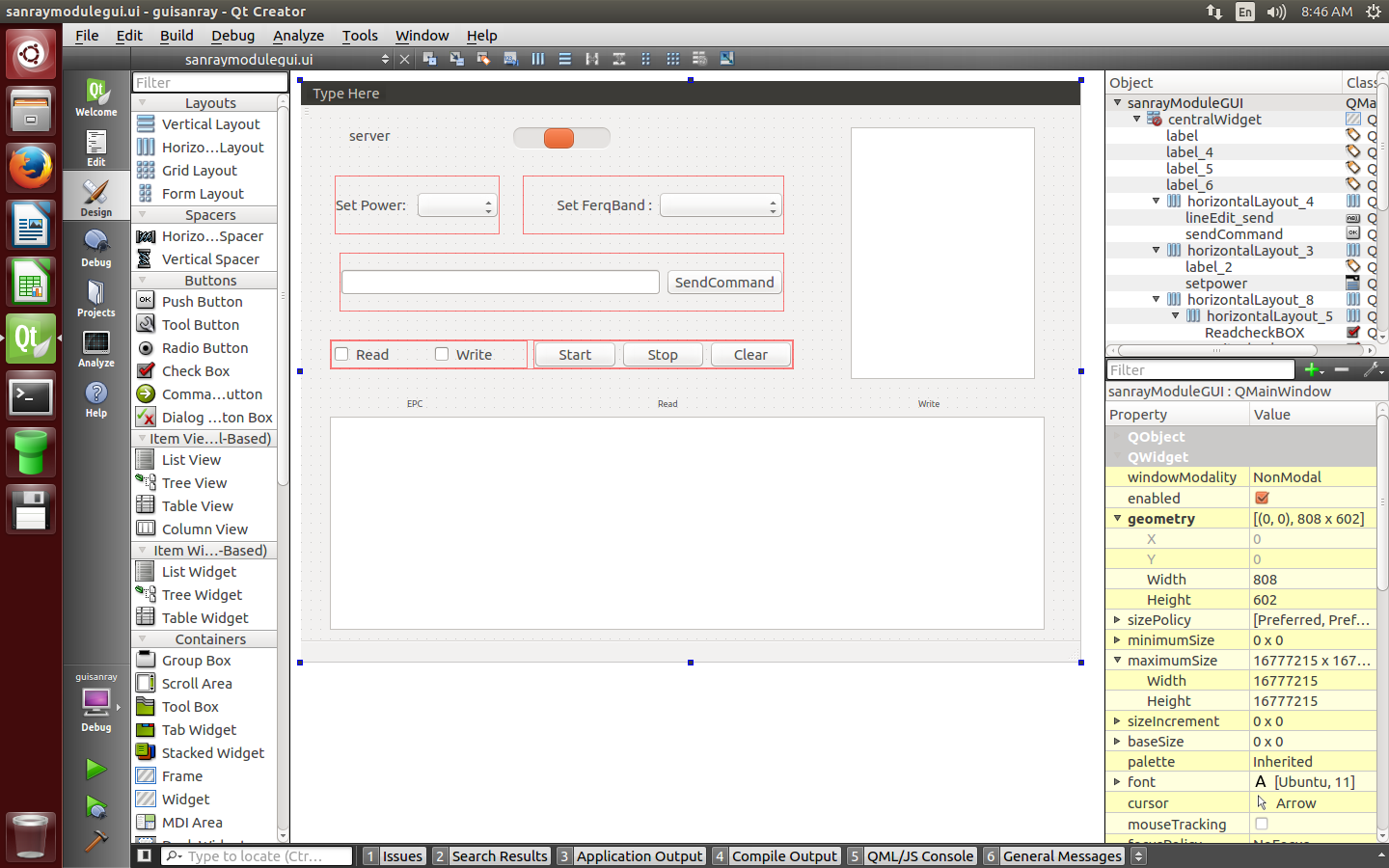
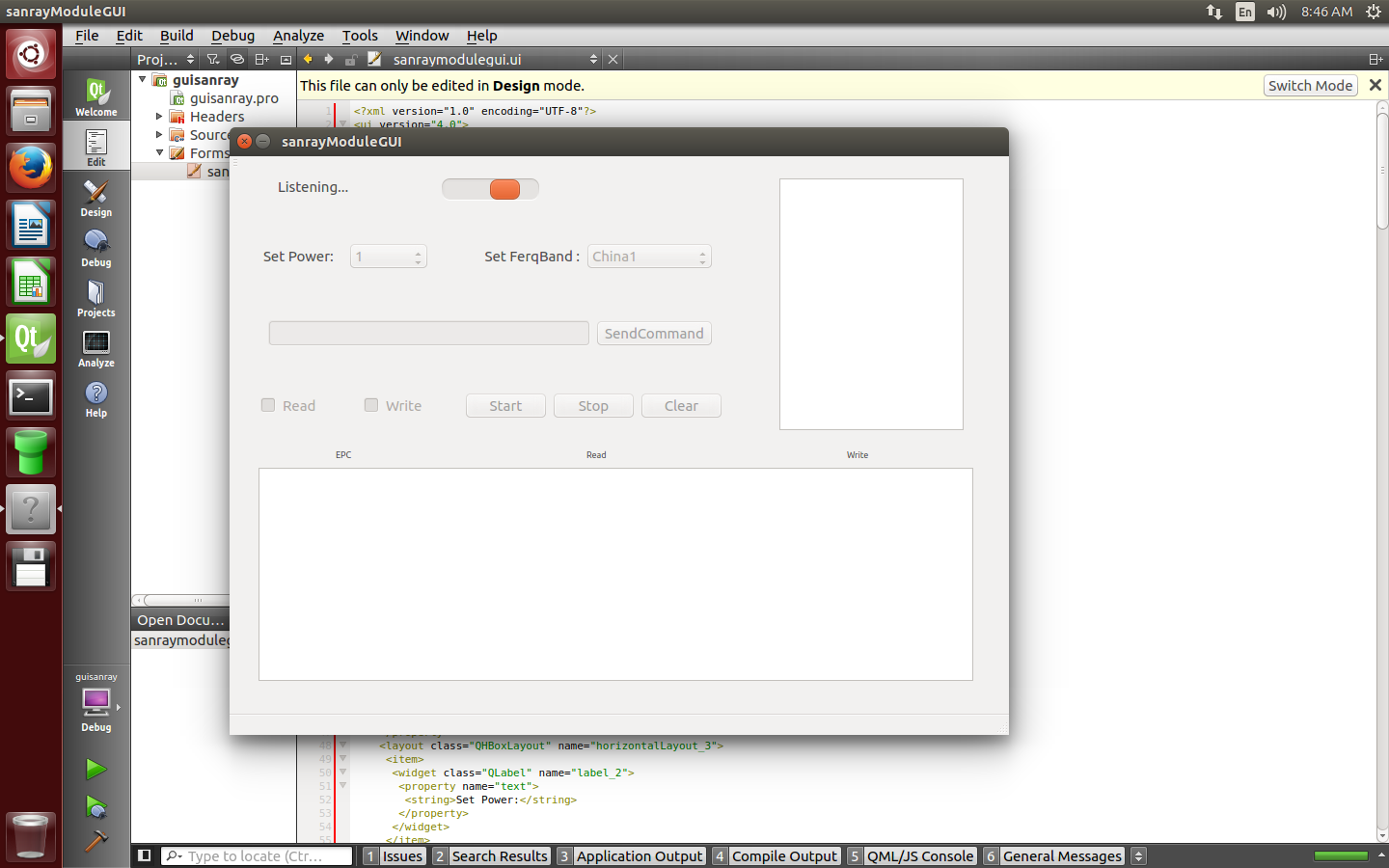
  3. General and Desktop
  4. Why Run QT Widget Application on Raspberry Pi close/minimize button doesn't show and can't adjust window size
Qt 6.12 LTS is out! See what's new in the release blog

Why Run QT Widget Application on Raspberry Pi close/minimize button doesn't show and can't adjust window size

Scheduled Pinned Locked Moved Solved General and Desktop
23 Posts 6 Posters 12.1k Views 3 Watching
  • Oldest to Newest
  • Newest to Oldest
  • Most Votes
Reply
  • Reply as topic
Log in to reply
This topic has been deleted. Only users with topic management privileges can see it.
  • I isan

    I use raspberrypi2eglfs to cross compile QT for pi
    For use wayland or xorg I should cross compile again?how can use wayland or xrog

    sierdzioS Offline
    sierdzioS Offline
    sierdzio
    Moderators
    wrote on last edited by
    #4

    @isan said in Why Run QT Widget Application on Raspberry Pi close/minimize button doesn't show and can't adjust window size:

    For use wayland or xorg I should cross compile again?how can use wayland or xrog

    Check if you have the plugins in QTDIR/plugins/platforms. If yes, then there is no need to (re)compile.

    All you need to do to run it under X11, for example, is to boot into X11 GUI (like the default Raspbian system) and run your app like this:

    ./yourApp -platform xcb
    

    (Z(:^

    1 Reply Last reply
    3
    • I Offline
      I Offline
      isan
      wrote on last edited by isan
      #5

      @sierdzio I have libqxcb.so on my Ubuntu on QTDIR / qt5pi / plugins / platforms.
      And in Raspi I do not have it
      So I copied it to raspi
      And the permision is rw-r-r--
      I run the program with ./program -platform xcb
      And I'm getting this error: what should I do?

      This application failed to start because it could not find or load the Qt platform plugin "xcb"
      in "".
      
      Available platform plugins are: eglfs, linuxfb, minimal, minimalegl, offscreen, xcb.
      
      Reinstalling the application may fix this problem.
      Aborted
      
      1 Reply Last reply
      0
      • sierdzioS Offline
        sierdzioS Offline
        sierdzio
        Moderators
        wrote on last edited by
        #6

        Hm, platform plugin is available but Qt cannot load it. Try setting QT_PLUGIN_PATH on your Pi. Also, maybe setting LD_LIBRARY_PATH would help but I doubt it.

        Lastly, run ldd on libqxcb.so on your raspberry to see which dependencies are missing.

        Also, make sure the libqxcb.so is really compiled for your Pi, and not for your host PC. readelf could probably help here.

        (Z(:^

        I 1 Reply Last reply
        2
        • sierdzioS sierdzio

          Hm, platform plugin is available but Qt cannot load it. Try setting QT_PLUGIN_PATH on your Pi. Also, maybe setting LD_LIBRARY_PATH would help but I doubt it.

          Lastly, run ldd on libqxcb.so on your raspberry to see which dependencies are missing.

          Also, make sure the libqxcb.so is really compiled for your Pi, and not for your host PC. readelf could probably help here.

          I Offline
          I Offline
          isan
          wrote on last edited by isan
          #7

          @sierdzio I re-rsync /raspi/qt5pi/plugins/platforms to raspi/qt5pi/plugins/
          and now when run with this command

          ./yourApp -platform xcb
          

          I get this error:

          QXcbConnection: Could not connect to display 
          Aborted
          

          what should I do now?

          1 Reply Last reply
          0
          • sierdzioS Offline
            sierdzioS Offline
            sierdzio
            Moderators
            wrote on last edited by
            #8

            Do you have an active X11 session (are you logged into GUI on your raspberry pi) when you run that command?

            (Z(:^

            I 1 Reply Last reply
            1
            • sierdzioS sierdzio

              Do you have an active X11 session (are you logged into GUI on your raspberry pi) when you run that command?

              I Offline
              I Offline
              isan
              wrote on last edited by
              #9

              @sierdzioI plugged the raspberry into a lcd and run it with ./yourApp -platform Xcb
              The program runs but does not make a difference(close / minimize button doesn't show and widget cover the entire screen)

              I set the pushButton to close with this->close();
              can set pushButton to minimize the widget?

              mrjjM 1 Reply Last reply
              0
              • I isan

                @sierdzioI plugged the raspberry into a lcd and run it with ./yourApp -platform Xcb
                The program runs but does not make a difference(close / minimize button doesn't show and widget cover the entire screen)

                I set the pushButton to close with this->close();
                can set pushButton to minimize the widget?

                mrjjM Offline
                mrjjM Offline
                mrjj
                Lifetime Qt Champion
                wrote on last edited by
                #10

                @isan
                Hi

                • the program runs but does not make a difference(close / minimize button doesn't show and widget cover the entire screen)

                Sounds like you are running with no windows manager.
                Qt do not draw the close button etc. Its the Os/windows manager.

                Yes, you can also make button minimize the window. just like close there is a call for that.
                http://doc.qt.io/qt-5/qwidget.html#showMinimized

                I 1 Reply Last reply
                2
                • mrjjM mrjj

                  @isan
                  Hi

                  • the program runs but does not make a difference(close / minimize button doesn't show and widget cover the entire screen)

                  Sounds like you are running with no windows manager.
                  Qt do not draw the close button etc. Its the Os/windows manager.

                  Yes, you can also make button minimize the window. just like close there is a call for that.
                  http://doc.qt.io/qt-5/qwidget.html#showMinimized

                  I Offline
                  I Offline
                  isan
                  wrote on last edited by
                  #11

                  @mrjj I set pushButton and do this

                  connect(ui->pushButton,SIGNAL(clicked(bool)),this,SLOT(showMinimized()));
                  

                  but not work

                  mrjjM jsulmJ 2 Replies Last reply
                  0
                  • I isan

                    @mrjj I set pushButton and do this

                    connect(ui->pushButton,SIGNAL(clicked(bool)),this,SLOT(showMinimized()));
                    

                    but not work

                    mrjjM Offline
                    mrjjM Offline
                    mrjj
                    Lifetime Qt Champion
                    wrote on last edited by
                    #12

                    @isan
                    hi
                    try without the bool
                    connect(ui->pushButton,SIGNAL(clicked()),this,SLOT(showMinimized()));
                    and check return value of connect.

                    1 Reply Last reply
                    0
                    • I isan

                      @mrjj I set pushButton and do this

                      connect(ui->pushButton,SIGNAL(clicked(bool)),this,SLOT(showMinimized()));
                      

                      but not work

                      jsulmJ Offline
                      jsulmJ Offline
                      jsulm
                      Lifetime Qt Champion
                      wrote on last edited by
                      #13

                      @isan said in Why Run QT Widget Application on Raspberry Pi close/minimize button doesn't show and can't adjust window size:

                      showMinimized()

                      I'm not sure this will work without window manager. Do you use any window manager on your device?

                      https://forum.qt.io/topic/113070/qt-code-of-conduct

                      I 1 Reply Last reply
                      2
                      • jsulmJ jsulm

                        @isan said in Why Run QT Widget Application on Raspberry Pi close/minimize button doesn't show and can't adjust window size:

                        showMinimized()

                        I'm not sure this will work without window manager. Do you use any window manager on your device?

                        I Offline
                        I Offline
                        isan
                        wrote on last edited by
                        #14

                        @jsulm I don’t know ,how can I found?

                        W 1 Reply Last reply
                        0
                        • SGaistS Offline
                          SGaistS Offline
                          SGaist
                          Lifetime Qt Champion
                          wrote on last edited by
                          #15

                          Hi,

                          Are you running an Xorg server ?
                          What plugin is your application loading ?

                          Interested in AI ? www.idiap.ch
                          Please read the Qt Code of Conduct - https://forum.qt.io/topic/113070/qt-code-of-conduct

                          1 Reply Last reply
                          1
                          • I isan

                            @jsulm I don’t know ,how can I found?

                            W Offline
                            W Offline
                            wrosecrans
                            wrote on last edited by
                            #16

                            @isan When you aren't running the app, what does the system look like? Is it a normal GUi desktop with icons and windows? Or is it just a text mode command line interface?

                            Step 1: Run a normal desktop with windows.

                            Step 2: Make your app run nicely in that desktop.

                            I 1 Reply Last reply
                            2
                            • W wrosecrans

                              @isan When you aren't running the app, what does the system look like? Is it a normal GUi desktop with icons and windows? Or is it just a text mode command line interface?

                              Step 1: Run a normal desktop with windows.

                              Step 2: Make your app run nicely in that desktop.

                              I Offline
                              I Offline
                              isan
                              wrote on last edited by
                              #17

                              @wrosecrans this is gui on forms QT 0_1526359719104_1.png

                              this is when run on ubuntu desktop
                              0_1526359748580_2.png

                              this is when run on raspberry

                              0_1526361065826_3.jpg

                              now what?

                              jsulmJ 1 Reply Last reply
                              0
                              • I isan

                                @wrosecrans this is gui on forms QT 0_1526359719104_1.png

                                this is when run on ubuntu desktop
                                0_1526359748580_2.png

                                this is when run on raspberry

                                0_1526361065826_3.jpg

                                now what?

                                jsulmJ Offline
                                jsulmJ Offline
                                jsulm
                                Lifetime Qt Champion
                                wrote on last edited by
                                #18

                                @isan What did you install on your Raspberry?
                                From the picture I would say you don't have any window manager.
                                Raspbian usually installs Pixel desktop.

                                https://forum.qt.io/topic/113070/qt-code-of-conduct

                                I 1 Reply Last reply
                                2
                                • jsulmJ jsulm

                                  @isan What did you install on your Raspberry?
                                  From the picture I would say you don't have any window manager.
                                  Raspbian usually installs Pixel desktop.

                                  I Offline
                                  I Offline
                                  isan
                                  wrote on last edited by isan
                                  #19

                                  @jsulm I did no install any window manager
                                  What is the way to find the window manager that is used?
                                  If raspi has pixel desktop can it be changed?
                                  What is the good window manager ?

                                  sierdzioS 1 Reply Last reply
                                  0
                                  • I isan

                                    @jsulm I did no install any window manager
                                    What is the way to find the window manager that is used?
                                    If raspi has pixel desktop can it be changed?
                                    What is the good window manager ?

                                    sierdzioS Offline
                                    sierdzioS Offline
                                    sierdzio
                                    Moderators
                                    wrote on last edited by
                                    #20

                                    @isan said in Why Run QT Widget Application on Raspberry Pi close/minimize button doesn't show and can't adjust window size:

                                    @jsulm I don't know
                                    How to find out which window manager is being used?

                                    Just answer the questions @wrosecrans that will be enough to know if you're on X11 or without a windowing system.

                                    As @jsulm pointed out, most probably you do not have any window manager running, so the window bezel will just not be there (and no way to minimize/maximize because without window manager such methods do not make sense).

                                    To see if you have X11 installed, log into your raspberry pi and run this command:

                                    startx
                                    

                                    If as a result you get a nice OS GUI, then you have X11 installed and ready. To turn it on permanently, you can then run:

                                    sudo raspi-config
                                    

                                    And set it up to boot to GUI instead of command line.

                                    (Z(:^

                                    I 1 Reply Last reply
                                    3
                                    • sierdzioS sierdzio

                                      @isan said in Why Run QT Widget Application on Raspberry Pi close/minimize button doesn't show and can't adjust window size:

                                      @jsulm I don't know
                                      How to find out which window manager is being used?

                                      Just answer the questions @wrosecrans that will be enough to know if you're on X11 or without a windowing system.

                                      As @jsulm pointed out, most probably you do not have any window manager running, so the window bezel will just not be there (and no way to minimize/maximize because without window manager such methods do not make sense).

                                      To see if you have X11 installed, log into your raspberry pi and run this command:

                                      startx
                                      

                                      If as a result you get a nice OS GUI, then you have X11 installed and ready. To turn it on permanently, you can then run:

                                      sudo raspi-config
                                      

                                      And set it up to boot to GUI instead of command line.

                                      I Offline
                                      I Offline
                                      isan
                                      wrote on last edited by isan
                                      #21

                                      @sierdzio when run sudo startx

                                      X.Org X Server 1.18.4
                                      Release Date: 2016-07-19
                                      X Protocol Version 11, Revision 0
                                      Build Operating System: Linux 4.4.26-v7+ armv7l Raspbian
                                      Current Operating System: Linux pi 4.9.28-v7+ #998 SMP Mon May 15 16:55:39 BST 2                                                                                        017 armv7l
                                      Kernel command line: 8250.nr_uarts=1 bcm2708_fb.fbwidth=800 bcm2708_fb.fbheight=                                                                                        480 bcm2708_fb.fbswap=1 vc_mem.mem_base=0x3dc00000 vc_mem.mem_size=0x3f000000  w                                                                                        c_otg.lpm_enable=0 console=tty3 root=PARTUUID=5229808c-02 rootfstype=ext4 elevat                                                                                        or=deadline fsck.repair=yes rootwait quiet splash plymouth.ignore-serial-console                                                                                        s
                                      Build Date: 11 November 2016  11:59:59AM
                                      xorg-server 2:1.18.4-2+rpi1 (https://www.debian.org/support)
                                      Current version of pixman: 0.33.3
                                              Before reporting problems, check http://wiki.x.org
                                              to make sure that you have the latest version.
                                      Markers: (--) probed, (**) from config file, (==) default setting,
                                              (++) from command line, (!!) notice, (II) informational,
                                              (WW) warning, (EE) error, (NI) not implemented, (??) unknown.
                                      (==) Log file: "/var/log/Xorg.1.log", Time: Tue May 15 19:19:36 2018
                                      (==) Using system config directory "/usr/share/X11/xorg.conf.d"
                                      modprobe: FATAL: Module g2d_23 not found.
                                      

                                      If as a result you get a nice OS GUI, then you have X11 installed and ready. To turn it

                                      And it does not make a difference ,It shows OS GUI that I already saw
                                      I run the program, it still does not have a window manager

                                      sierdzioS 1 Reply Last reply
                                      0
                                      • SGaistS Offline
                                        SGaistS Offline
                                        SGaist
                                        Lifetime Qt Champion
                                        wrote on last edited by
                                        #22

                                        Check the platform plugin that is loaded on application start.

                                        Interested in AI ? www.idiap.ch
                                        Please read the Qt Code of Conduct - https://forum.qt.io/topic/113070/qt-code-of-conduct

                                        1 Reply Last reply
                                        0
                                        • I isan

                                          @sierdzio when run sudo startx

                                          X.Org X Server 1.18.4
                                          Release Date: 2016-07-19
                                          X Protocol Version 11, Revision 0
                                          Build Operating System: Linux 4.4.26-v7+ armv7l Raspbian
                                          Current Operating System: Linux pi 4.9.28-v7+ #998 SMP Mon May 15 16:55:39 BST 2                                                                                        017 armv7l
                                          Kernel command line: 8250.nr_uarts=1 bcm2708_fb.fbwidth=800 bcm2708_fb.fbheight=                                                                                        480 bcm2708_fb.fbswap=1 vc_mem.mem_base=0x3dc00000 vc_mem.mem_size=0x3f000000  w                                                                                        c_otg.lpm_enable=0 console=tty3 root=PARTUUID=5229808c-02 rootfstype=ext4 elevat                                                                                        or=deadline fsck.repair=yes rootwait quiet splash plymouth.ignore-serial-console                                                                                        s
                                          Build Date: 11 November 2016  11:59:59AM
                                          xorg-server 2:1.18.4-2+rpi1 (https://www.debian.org/support)
                                          Current version of pixman: 0.33.3
                                                  Before reporting problems, check http://wiki.x.org
                                                  to make sure that you have the latest version.
                                          Markers: (--) probed, (**) from config file, (==) default setting,
                                                  (++) from command line, (!!) notice, (II) informational,
                                                  (WW) warning, (EE) error, (NI) not implemented, (??) unknown.
                                          (==) Log file: "/var/log/Xorg.1.log", Time: Tue May 15 19:19:36 2018
                                          (==) Using system config directory "/usr/share/X11/xorg.conf.d"
                                          modprobe: FATAL: Module g2d_23 not found.
                                          

                                          If as a result you get a nice OS GUI, then you have X11 installed and ready. To turn it

                                          And it does not make a difference ,It shows OS GUI that I already saw
                                          I run the program, it still does not have a window manager

                                          sierdzioS Offline
                                          sierdzioS Offline
                                          sierdzio
                                          Moderators
                                          wrote on last edited by
                                          #23

                                          @isan said in Why Run QT Widget Application on Raspberry Pi close/minimize button doesn't show and can't adjust window size:

                                          It shows OS GUI that I already saw

                                          You could have mentioned that earlier...

                                          OK so you have X11 running it seems. Looks like it is running on EGLFS plugin. Make sure you run it with -platform xcb like I mentioned earlier. Also, see which makespec does qmake pick up when compiling your project, it should be either linux-rasp-pi3-g++ or linux-rasp-pi3-vc4-g++ if you are using the vc4 GPU driver.

                                          (Z(:^

                                          1 Reply Last reply
                                          0

                                          • Login

                                          • Login or register to search.
                                          • First post
                                            Last post
                                          0
                                          • Categories
                                          • Recent
                                          • Tags
                                          • Popular
                                          • Users
                                          • Groups
                                          • Search
                                          • Get Qt
                                          • Unsolved