Skip to content
  • Categories
  • Recent
  • Tags
  • Popular
  • Users
  • Groups
  • Search
  • Get Qt Extensions
  • Unsolved
Collapse
Brand Logo
  1. Home
  2. Qt Development
  3. General and Desktop
  4. Windows and Dialogs

Windows and Dialogs

Scheduled Pinned Locked Moved Unsolved General and Desktop
15 Posts 4 Posters 2.7k Views 2 Watching
  • Oldest to Newest
  • Newest to Oldest
  • Most Votes
Reply
  • Reply as topic
Log in to reply
This topic has been deleted. Only users with topic management privileges can see it.
  • SGaistS Offline
    SGaistS Offline
    SGaist
    Lifetime Qt Champion
    wrote on last edited by
    #2

    Hi,

    From what you wrote QInputDialog::getText could be enough.

    Interested in AI ? www.idiap.ch
    Please read the Qt Code of Conduct - https://forum.qt.io/topic/113070/qt-code-of-conduct

    1 Reply Last reply
    1
    • M Offline
      M Offline
      MFrost
      wrote on last edited by
      #3

      But that is just one lineEdit-ish a dialog, right? I need more, like in the photos. Is the way I created and run a dialog correct? What can I improve?

      jsulmJ 1 Reply Last reply
      0
      • M MFrost

        But that is just one lineEdit-ish a dialog, right? I need more, like in the photos. Is the way I created and run a dialog correct? What can I improve?

        jsulmJ Offline
        jsulmJ Offline
        jsulm
        Lifetime Qt Champion
        wrote on last edited by
        #4

        @MFrost QInputDialog::getText creates and shows a dialog...

        https://forum.qt.io/topic/113070/qt-code-of-conduct

        M 1 Reply Last reply
        1
        • mrjjM Offline
          mrjjM Offline
          mrjj
          Lifetime Qt Champion
          wrote on last edited by
          #5

          Hi

          • Is the way I created and run a dialog correct? What can I improve?

          If you use exec() there is no need to new the dialog as exec() is blocking.
          So
          Dialog dia;
          dia.exec();
          is fine. No possiblty for leaks and works just as fine.
          Maybe you want to check for user pressing Cancel?

          Also, naming it Dialog is not super.
          InputPlayerNameDialog or anything that describes its role is much better.

          M 1 Reply Last reply
          3
          • jsulmJ jsulm

            @MFrost QInputDialog::getText creates and shows a dialog...

            M Offline
            M Offline
            MFrost
            wrote on last edited by MFrost
            #6

            @jsulm Well, what I've tried to say/seek confirmation of is, that this type contains only one input place and I need four different lineEdits.

            mrjjM 1 Reply Last reply
            0
            • M MFrost

              @jsulm Well, what I've tried to say/seek confirmation of is, that this type contains only one input place and I need four different lineEdits.

              mrjjM Offline
              mrjjM Offline
              mrjj
              Lifetime Qt Champion
              wrote on last edited by
              #7

              @MFrost
              Hi
              yes QInputDialog::getText is just a simple dialog.
              If you need more, you must make a custom one.

              1 Reply Last reply
              2
              • mrjjM mrjj

                Hi

                • Is the way I created and run a dialog correct? What can I improve?

                If you use exec() there is no need to new the dialog as exec() is blocking.
                So
                Dialog dia;
                dia.exec();
                is fine. No possiblty for leaks and works just as fine.
                Maybe you want to check for user pressing Cancel?

                Also, naming it Dialog is not super.
                InputPlayerNameDialog or anything that describes its role is much better.

                M Offline
                M Offline
                MFrost
                wrote on last edited by
                #8

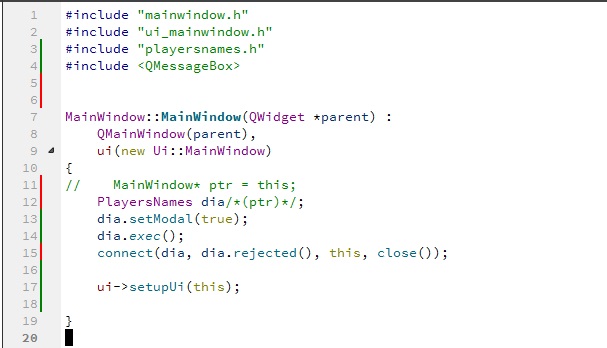
                @mrjj This doesn't work:
                alt text

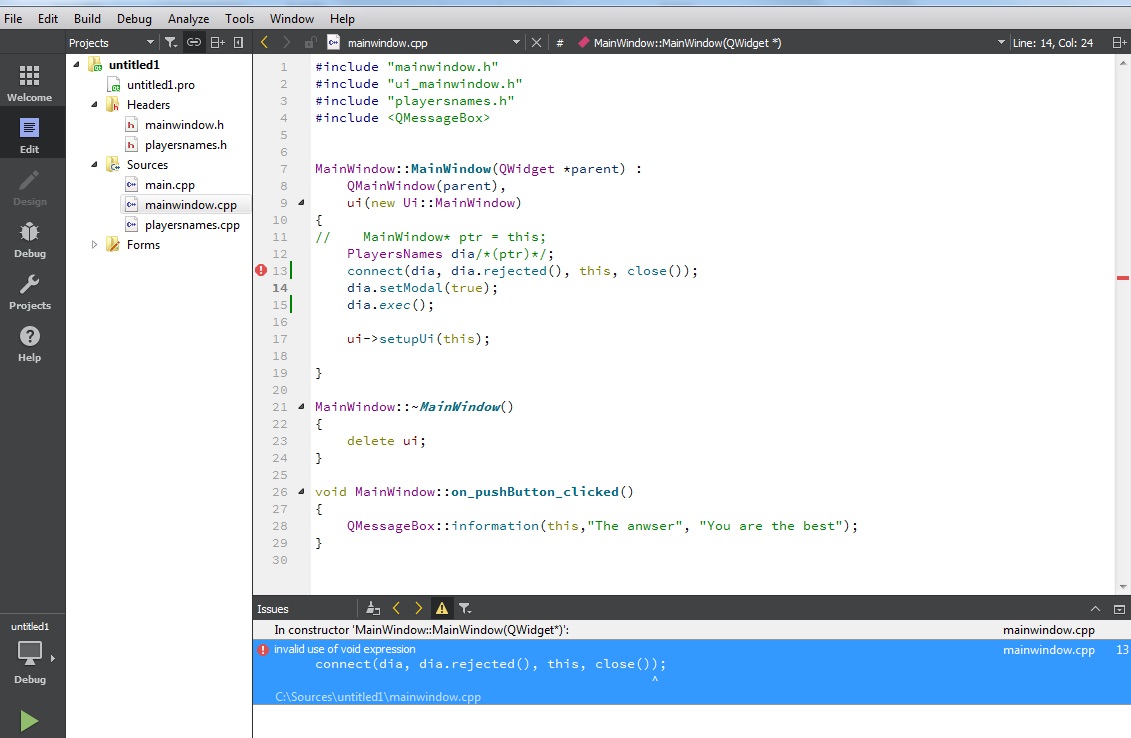
                And this neither(with default dialog):
                alt text

                What is wronq in both cases?

                1 Reply Last reply
                0
                • mrjjM Offline
                  mrjjM Offline
                  mrjj
                  Lifetime Qt Champion
                  wrote on last edited by
                  #9

                  Well you fist connect the signal AFTER
                  Dialog has been shown and closed :)
                  Try connect just after you declare it.

                  1 Reply Last reply
                  1
                  • M Offline
                    M Offline
                    MFrost
                    wrote on last edited by
                    #10

                    What is wrong?
                    alt text

                    1 Reply Last reply
                    0
                    • mrjjM Offline
                      mrjjM Offline
                      mrjj
                      Lifetime Qt Champion
                      wrote on last edited by mrjj
                      #11

                      Hi
                      first guess is that
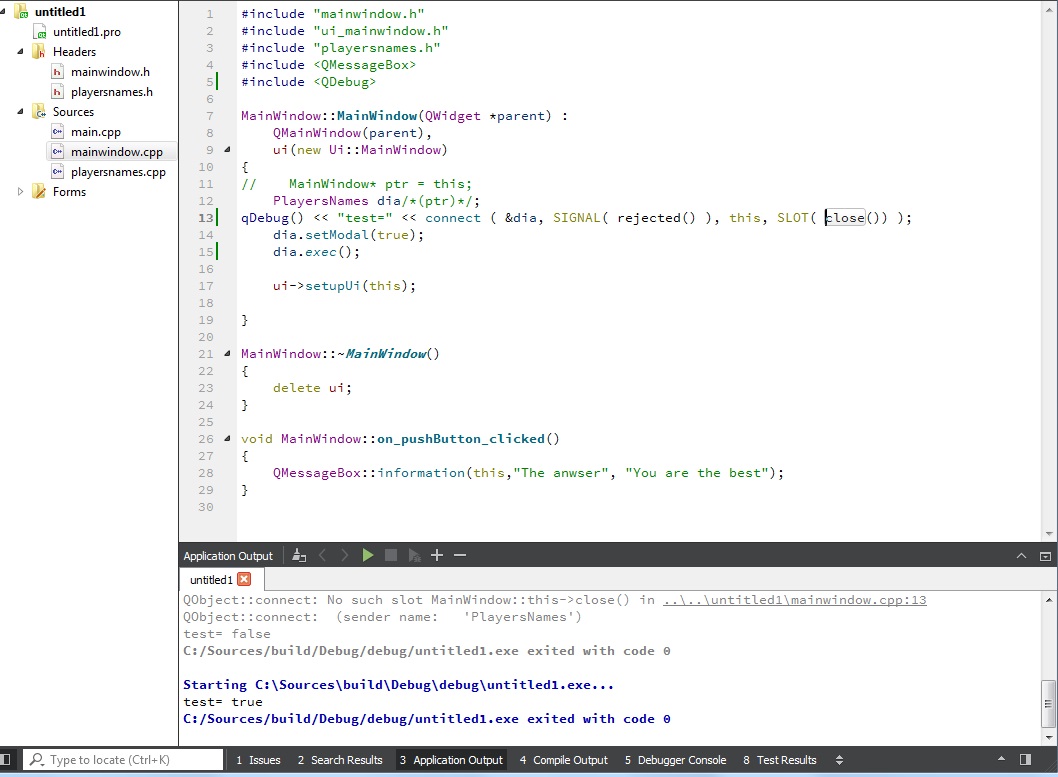
                      you didnt use the SIGNAL() and SLOT() macros ?
                      also check the return code from connect.

                      qDebug() << "test=" << connect ( &dia, SIGNAL( rejected() ), this, SLOT( close()) );
                      note the & on dia.

                      1 Reply Last reply
                      1
                      • M Offline
                        M Offline
                        MFrost
                        wrote on last edited by
                        #12

                        alt text

                        I'm confused.

                        1 Reply Last reply
                        0
                        • mrjjM Offline
                          mrjjM Offline
                          mrjj
                          Lifetime Qt Champion
                          wrote on last edited by
                          #13

                          Hi
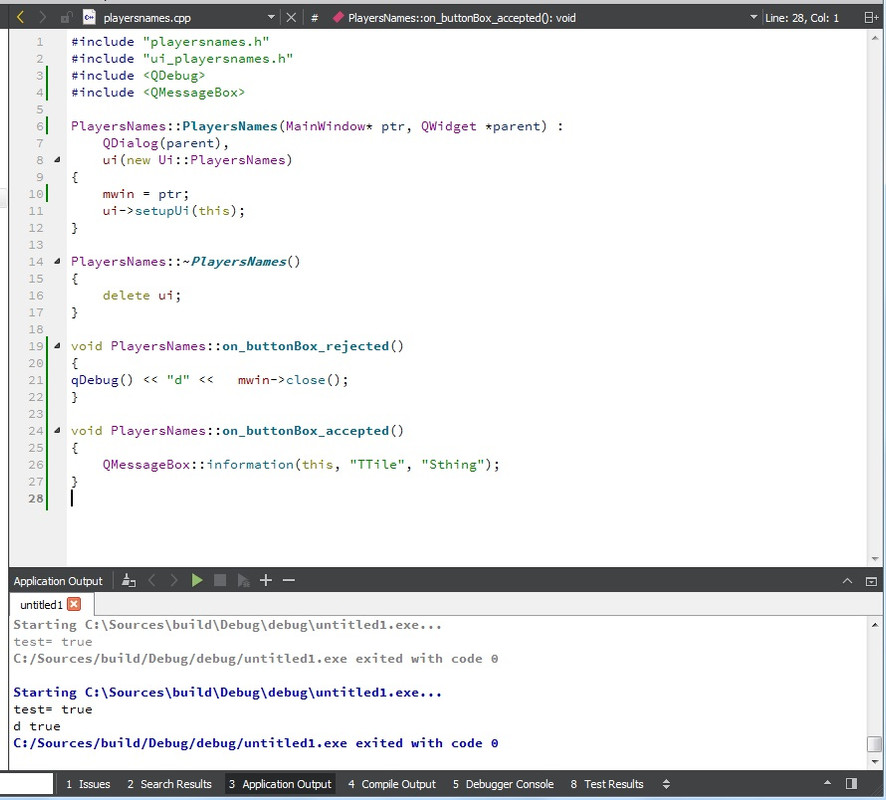
                          so connect is accepted.
                          So when you press cancel on dialog it should call close on mainwind.

                          You have made sure in playerNames that you actually use accepted() and rejected() ?

                          M 1 Reply Last reply
                          1
                          • mrjjM mrjj

                            Hi
                            so connect is accepted.
                            So when you press cancel on dialog it should call close on mainwind.

                            You have made sure in playerNames that you actually use accepted() and rejected() ?

                            M Offline
                            M Offline
                            MFrost
                            wrote on last edited by
                            #14

                            @mrjj

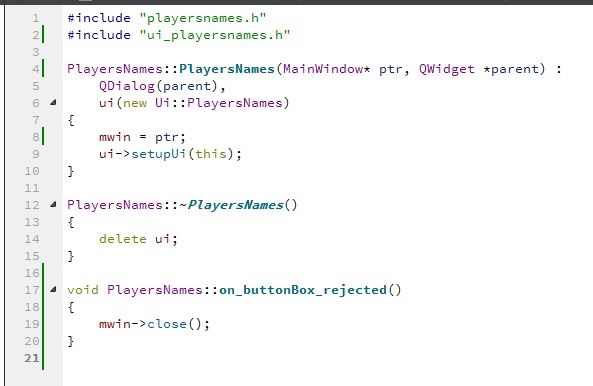
                            What shoudl I write inside?

                            alt text

                            1 Reply Last reply
                            0
                            • mrjjM Offline
                              mrjjM Offline
                              mrjj
                              Lifetime Qt Champion
                              wrote on last edited by
                              #15

                              Hi
                              in button rejected and button accepted
                              try call accept() and reject() so dialog is closed in normal faction.
                              Currently im not 100% sure it will send the signals with your implementation.
                              (and hence close for mainwin wont be called)

                              1 Reply Last reply
                              0

                              • Login

                              • Login or register to search.
                              • First post
                                Last post
                              0
                              • Categories
                              • Recent
                              • Tags
                              • Popular
                              • Users
                              • Groups
                              • Search
                              • Get Qt Extensions
                              • Unsolved