
Skip to content
  • Categories
  • Recent
  • Tags
  • Popular
  • Users
  • Groups
  • Search
  • Get Qt Extensions
  • Unsolved
Collapse
Brand Logo
  1. Home
  2. Qt Development
  3. General and Desktop
  4. qsplitter children sizes
Qt 6.11 is out! See what's new in the release blog

qsplitter children sizes

Scheduled Pinned Locked Moved Solved General and Desktop
29 Posts 3 Posters 9.3k Views 2 Watching
  • Oldest to Newest
  • Newest to Oldest
  • Most Votes
Reply
  • Reply as topic
Log in to reply
This topic has been deleted. Only users with topic management privileges can see it.
  • U Offline
    U Offline
    user4592357
    wrote on last edited by
    #1

    i have two widgets and i need to place them inside a splitter.

    this is what i have:

            auto widget1 = new QWidget(this);
    
            auto widget2 = new QWidget(this);
            widget2->setFixedHeight(60);
    
            auto splitter = new QSplitter(Qt::Vertical, this);
            splitter->addWidget(widget1);
            splitter->addWidget(widget2);
            splitter->setChildrenCollapsible(false);
            splitter->setStretchFactor(0, 50);
            splitter->setStretchFactor(1, 0);
            splitter->setSizes(QList() << widget1->sizeHint().height() << widget2->height());
            splitter->show();
    

    the problem is that i need the second widget small and the first one to be its normal size.

    when i don't add the second widget, first one has the ideal size for me.
    when i add the second one, the first one becomes bigger than the ideal size.

    above is what i've tried to apply to fix it but no luck. any idea?

    1 Reply Last reply
    0
    • mrjjM Offline
      mrjjM Offline
      mrjj
      Lifetime Qt Champion
      wrote on last edited by
      #2

      Hi
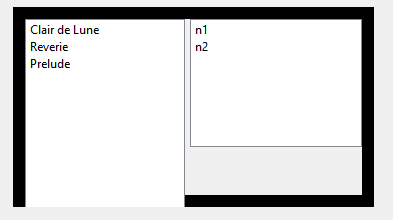
      Do you mean one normal height and one less than full height ?
      alt text

      it seems not to really like it. (using max height)

      U 1 Reply Last reply
      0
      • mrjjM mrjj

        Hi
        Do you mean one normal height and one less than full height ?
        alt text

        it seems not to really like it. (using max height)

        U Offline
        U Offline
        user4592357
        wrote on last edited by user4592357
        #3

        @mrjj
        no, initially the two widgets occupied the same height, i.e. (height/2)
        so i made the second one small (by setting fixed size)
        and now the first widget occupies the place that was "released" by second widget

        1 Reply Last reply
        0
        • mrjjM Offline
          mrjjM Offline
          mrjj
          Lifetime Qt Champion
          wrote on last edited by
          #4

          Hi
          From small tests i just did, it dont seems like QSplitter allows/supports
          different heights for the widgets. will it seems to work for a moment using
          fixed/setmax methods, it behaves oddly when refreshed.

          1 Reply Last reply
          0
          • mrjjM Offline
            mrjjM Offline
            mrjj
            Lifetime Qt Champion
            wrote on last edited by
            #5

            Hi
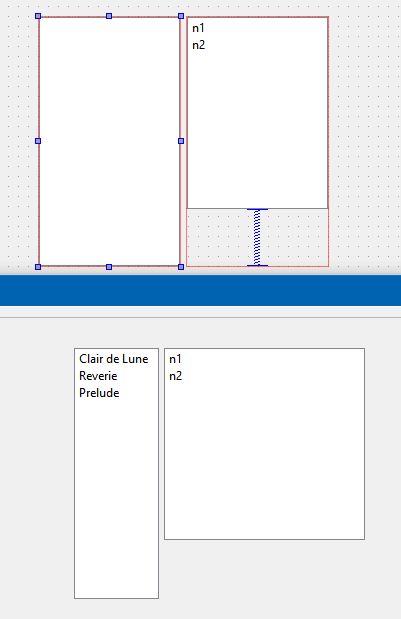
            You could put 2 grid layouts in the splitter. seems to work pretty ok
            alt text

            U 1 Reply Last reply
            2
            • mrjjM mrjj

              Hi
              You could put 2 grid layouts in the splitter. seems to work pretty ok
              alt text

              U Offline
              U Offline
              user4592357
              wrote on last edited by
              #6

              @mrjj
              okay i need this, only widgets are vertically laid out

              1 Reply Last reply
              0
              • U Offline
                U Offline
                user4592357
                wrote on last edited by
                #7

                how do i add a layout to splitter?

                jsulmJ 1 Reply Last reply
                0
                • U user4592357

                  how do i add a layout to splitter?

                  jsulmJ Offline
                  jsulmJ Offline
                  jsulm
                  Lifetime Qt Champion
                  wrote on last edited by
                  #8

                  @user4592357 said in qsplitter children sizes:

                  how do i add a layout to splitter?

                  You don't. You create two layouts like @mrjj shown, then select both and then click on "Lay Out horizontally in Splitter.

                  https://forum.qt.io/topic/113070/qt-code-of-conduct

                  U 1 Reply Last reply
                  0
                  • jsulmJ jsulm

                    @user4592357 said in qsplitter children sizes:

                    how do i add a layout to splitter?

                    You don't. You create two layouts like @mrjj shown, then select both and then click on "Lay Out horizontally in Splitter.

                    U Offline
                    U Offline
                    user4592357
                    wrote on last edited by
                    #9

                    @jsulm
                    i'm not using designer

                    jsulmJ 1 Reply Last reply
                    0
                    • U user4592357

                      @jsulm
                      i'm not using designer

                      jsulmJ Offline
                      jsulmJ Offline
                      jsulm
                      Lifetime Qt Champion
                      wrote on last edited by
                      #10

                      @user4592357 Then add two widgets and in each widget add a layout

                      https://forum.qt.io/topic/113070/qt-code-of-conduct

                      U 1 Reply Last reply
                      0
                      • jsulmJ jsulm

                        @user4592357 Then add two widgets and in each widget add a layout

                        U Offline
                        U Offline
                        user4592357
                        wrote on last edited by
                        #11

                        @jsulm
                        what about splitter then?

                        1 Reply Last reply
                        0
                        • mrjjM Offline
                          mrjjM Offline
                          mrjj
                          Lifetime Qt Champion
                          wrote on last edited by
                          #12

                          Hi
                          You could just use designer
                          and then take the c++ code.
                          Code is in setupUI()

                          U 1 Reply Last reply
                          0
                          • mrjjM mrjj

                            Hi
                            You could just use designer
                            and then take the c++ code.
                            Code is in setupUI()

                            U Offline
                            U Offline
                            user4592357
                            wrote on last edited by
                            #13

                            @mrjj
                            i tried to do that but i need to lay them out vertically which gives the same result as writing the code

                            mrjjM 1 Reply Last reply
                            0
                            • U user4592357

                              @mrjj
                              i tried to do that but i need to lay them out vertically which gives the same result as writing the code

                              mrjjM Offline
                              mrjjM Offline
                              mrjj
                              Lifetime Qt Champion
                              wrote on last edited by
                              #14

                              @user4592357
                              Hi
                              Im not sure what goes wrong. the concept seems to work.
                              do u have mutiple widgets pr side in splitter of what is difference to the mini test?

                              U 1 Reply Last reply
                              0
                              • mrjjM mrjj

                                @user4592357
                                Hi
                                Im not sure what goes wrong. the concept seems to work.
                                do u have mutiple widgets pr side in splitter of what is difference to the mini test?

                                U Offline
                                U Offline
                                user4592357
                                wrote on last edited by user4592357
                                #15

                                @mrjj
                                i create one tall widget at top and one short widget at bottom. then i select lay out vertically in splitter.
                                and both get smaller size:

                                alt text
                                after laying out:
                                alt text

                                mrjjM 1 Reply Last reply
                                0
                                • U user4592357

                                  @mrjj
                                  i create one tall widget at top and one short widget at bottom. then i select lay out vertically in splitter.
                                  and both get smaller size:

                                  alt text
                                  after laying out:
                                  alt text

                                  mrjjM Offline
                                  mrjjM Offline
                                  mrjj
                                  Lifetime Qt Champion
                                  wrote on last edited by
                                  #16

                                  @user4592357
                                  Hi
                                  yes, the Splitter adjust a bit to the sizehints of the widgets if no min/max is set.
                                  So the issue is that they become smaller when inserted into splitter ?

                                  U 1 Reply Last reply
                                  0
                                  • mrjjM mrjj

                                    @user4592357
                                    Hi
                                    yes, the Splitter adjust a bit to the sizehints of the widgets if no min/max is set.
                                    So the issue is that they become smaller when inserted into splitter ?

                                    U Offline
                                    U Offline
                                    user4592357
                                    wrote on last edited by
                                    #17

                                    @mrjj
                                    now yes,
                                    with code the only first one became taller

                                    mrjjM 1 Reply Last reply
                                    0
                                    • U user4592357

                                      @mrjj
                                      now yes,
                                      with code the only first one became taller

                                      mrjjM Offline
                                      mrjjM Offline
                                      mrjj
                                      Lifetime Qt Champion
                                      wrote on last edited by
                                      #18

                                      @user4592357
                                      but do you set min/max on them or how do you control size ?

                                      U 1 Reply Last reply
                                      0
                                      • mrjjM mrjj

                                        @user4592357
                                        but do you set min/max on them or how do you control size ?

                                        U Offline
                                        U Offline
                                        user4592357
                                        wrote on last edited by user4592357
                                        #19

                                        @mrjj
                                        i set min and max sizes to the same value and got this after puttting in splitter:
                                        alt text

                                        widgets got narrower.

                                        mrjjM 1 Reply Last reply
                                        0
                                        • U user4592357

                                          @mrjj
                                          i set min and max sizes to the same value and got this after puttting in splitter:
                                          alt text

                                          widgets got narrower.

                                          mrjjM Offline
                                          mrjjM Offline
                                          mrjj
                                          Lifetime Qt Champion
                                          wrote on last edited by
                                          #20

                                          @user4592357
                                          you set the min/max on the widgets?
                                          it works here.
                                          alt text

                                          U 1 Reply Last reply
                                          0

                                          • Login

                                          • Login or register to search.
                                          • First post
                                            Last post
                                          0
                                          • Categories
                                          • Recent
                                          • Tags
                                          • Popular
                                          • Users
                                          • Groups
                                          • Search
                                          • Get Qt Extensions
                                          • Unsolved