
Skip to content
  • Categories
  • Recent
  • Tags
  • Popular
  • Users
  • Groups
  • Search
  • Get Qt Extensions
  • Unsolved
Collapse
Brand Logo
  1. Home
  2. Qt Development
  3. Mobile and Embedded
  4. Custom QPushButton which can be stretchable and draggable

Custom QPushButton which can be stretchable and draggable

Scheduled Pinned Locked Moved Solved Mobile and Embedded
15 Posts 5 Posters 3.7k Views 2 Watching
  • Oldest to Newest
  • Newest to Oldest
  • Most Votes
Reply
  • Reply as topic
Log in to reply
This topic has been deleted. Only users with topic management privileges can see it.
  • S Offline
    S Offline
    Sherlin N G
    wrote on last edited by
    #4

    Can you give me a code snippet on how it is used.If you dont mind I'm new to this tool

    mrjjM 1 Reply Last reply
    0
    • S Sherlin N G

      Can you give me a code snippet on how it is used.If you dont mind I'm new to this tool

      mrjjM Offline
      mrjjM Offline
      mrjj
      Lifetime Qt Champion
      wrote on last edited by
      #5

      @Sherlin-N-G
      Hi
      This sample have docks
      http://doc.qt.io/qt-5/qtwidgets-mainwindows-dockwidgets-example.html

      1 Reply Last reply
      0
      • S Offline
        S Offline
        Sherlin N G
        wrote on last edited by
        #6

        @mrjj Thanks for the reply.I tried running the application but I dont know how that is even related to my problem.Please help me understand.

        mrjjM 1 Reply Last reply
        0
        • S Sherlin N G

          @mrjj Thanks for the reply.I tried running the application but I dont know how that is even related to my problem.Please help me understand.

          mrjjM Offline
          mrjjM Offline
          mrjj
          Lifetime Qt Champion
          wrote on last edited by
          #7

          @Sherlin-N-G
          Hi
          Im not sure how either. Docks are windows :)
          For resize/move push buttons, this might be more useful
          https://wiki.qt.io/Widget-moveable-and-resizeable

          K 1 Reply Last reply
          0
          • S Offline
            S Offline
            Sherlin N G
            wrote on last edited by
            #8

            @mrjj Hi,Thanks for the link. I tried the code in the link,but thats creating a widget not a button.I actually want a resizable and movable QPushbutton on which further I'll give signals and slots.

            jsulmJ 1 Reply Last reply
            0
            • S Sherlin N G

              @mrjj Hi,Thanks for the link. I tried the code in the link,but thats creating a widget not a button.I actually want a resizable and movable QPushbutton on which further I'll give signals and slots.

              jsulmJ Offline
              jsulmJ Offline
              jsulm
              Lifetime Qt Champion
              wrote on last edited by
              #9

              @Sherlin-N-G A button is a widget...

              https://forum.qt.io/topic/113070/qt-code-of-conduct

              S 1 Reply Last reply
              2
              • jsulmJ jsulm

                @Sherlin-N-G A button is a widget...

                S Offline
                S Offline
                Sherlin N G
                wrote on last edited by
                #10

                @jsulm Hi,I'm sharing the screenshot0_1519119673693_QPushButton.png

                I need to create a QPushButton widget which looks something like this.Zone11,10,6,8 are different QpushButtons which can be movable and resizable.

                1 Reply Last reply
                0
                • mrjjM Offline
                  mrjjM Offline
                  mrjj
                  Lifetime Qt Champion
                  wrote on last edited by mrjj
                  #11

                  Hi
                  The code from link also works with buttons and all widgets.
                  So just insert QPushButton and it manage that.

                  it create labels

                  QLabel *lab1 = new QLabel("Label1");
                      QLabel *lab2 = new QLabel("Label2");
                      TContainer *con1 = new TContainer(this, QPoint(10, 10), lab1);
                      TContainer *con2 = new TContainer(this, QPoint(20, 50),lab2);
                  }
                  

                  but you can just use PushButton instead.
                  You can use a stylesheet to make button look like that.

                  QPushButton {
                  border: 0;
                  background-color: qlineargradient(spread:pad, x1:0, y1:0, x2:1, y2:0, stop:0 rgba(255, 239, 224, 255), stop:0.55 rgba(38, 108, 235, 255), stop:0.98 rgba(0, 0, 0, 255), stop:1 rgba(0, 0, 0, 0));
                  }
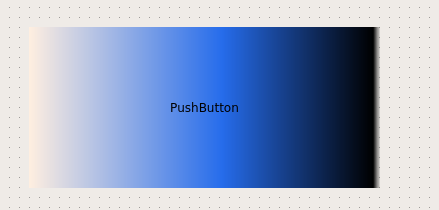
                  

                  alt text

                  S 1 Reply Last reply
                  2
                  • mrjjM mrjj

                    Hi
                    The code from link also works with buttons and all widgets.
                    So just insert QPushButton and it manage that.

                    it create labels

                    QLabel *lab1 = new QLabel("Label1");
                        QLabel *lab2 = new QLabel("Label2");
                        TContainer *con1 = new TContainer(this, QPoint(10, 10), lab1);
                        TContainer *con2 = new TContainer(this, QPoint(20, 50),lab2);
                    }
                    

                    but you can just use PushButton instead.
                    You can use a stylesheet to make button look like that.

                    QPushButton {
                    border: 0;
                    background-color: qlineargradient(spread:pad, x1:0, y1:0, x2:1, y2:0, stop:0 rgba(255, 239, 224, 255), stop:0.55 rgba(38, 108, 235, 255), stop:0.98 rgba(0, 0, 0, 255), stop:1 rgba(0, 0, 0, 0));
                    }
                    

                    alt text

                    S Offline
                    S Offline
                    Sherlin N G
                    wrote on last edited by
                    #12

                    @mrjj Hi, I donot know where to add the code snippet.Please suggest.

                    mrjjM 1 Reply Last reply
                    0
                    • S Sherlin N G

                      @mrjj Hi, I donot know where to add the code snippet.Please suggest.

                      mrjjM Offline
                      mrjjM Offline
                      mrjj
                      Lifetime Qt Champion
                      wrote on last edited by
                      #13

                      @Sherlin-N-G
                      The stylesheet, you can assign to Mainwindow so all pushbuttons are affected.

                      The
                      TContainer *con1 = new TContainer(this, QPoint(10, 10), lab1);

                      is for the function in your app that inserts new Button on form.
                      there u would hook it to container for resize/move.

                      1 Reply Last reply
                      2
                      • mrjjM mrjj

                        @Sherlin-N-G
                        Hi
                        Im not sure how either. Docks are windows :)
                        For resize/move push buttons, this might be more useful
                        https://wiki.qt.io/Widget-moveable-and-resizeable

                        K Offline
                        K Offline
                        kishore_hemmady
                        wrote on last edited by
                        #14

                        @mrjj Hi,
                        Is this code LGPL ?Can I use it in my project?

                        1 Reply Last reply
                        0
                        • mrjjM Offline
                          mrjjM Offline
                          mrjj
                          Lifetime Qt Champion
                          wrote on last edited by
                          #15

                          Hi
                          The author is
                          https://wiki.qt.io/Widget-moveable-and-resizeable

                          • Programmer Aleksey Osipov
                          • email: aliks-os@yandex.ru

                          But since its just a sample and posted on a wiki i would say its safe to use.

                          1 Reply Last reply
                          0

                          • Login

                          • Login or register to search.
                          • First post
                            Last post
                          0
                          • Categories
                          • Recent
                          • Tags
                          • Popular
                          • Users
                          • Groups
                          • Search
                          • Get Qt Extensions
                          • Unsolved