
Skip to content
  • Categories
  • Recent
  • Tags
  • Popular
  • Users
  • Groups
  • Search
  • Get Qt Extensions
  • Unsolved
Collapse
Brand Logo
  1. Home
  2. Qt Development
  3. Mobile and Embedded
  4. LCD display contents corruption
Qt 6.11 is out! See what's new in the release blog

LCD display contents corruption

Scheduled Pinned Locked Moved Solved Mobile and Embedded
14 Posts 6 Posters 2.6k Views 4 Watching
  • Oldest to Newest
  • Newest to Oldest
  • Most Votes
Reply
  • Reply as topic
Log in to reply
This topic has been deleted. Only users with topic management privileges can see it.
  • K Offline
    K Offline
    kumararajas
    wrote on last edited by kumararajas
    #1

    Hello all,

    I am facing a strange problem.

    I have a Qt application developed for my program.

    Platform details:
    Qt 4.8.4
    TI Sitara Am3358 based hardware

    It works good on a short run.

    But on a long run ( Time is not deterministic, but issue was observed in 16- 20 hours ), I see that some of the screens are having corrupted content.

    Screen 1 -

    Custom Keypad UI - One can see that some of buttons are not displaying the text on it. Interestingly, '8' is totally distorted. And if I press the keys, the values are taken correctly.

    0_1517827660882_Screen1.jpg

    Screen 2 -
    Missing some of characters. Even text is getting reorganized.
    Example: I want to display "Information". After the corruption issue, I can see that it shows as 'Inatin', missing few characters. And every time I see the corruption, not the same characters are getting missed.
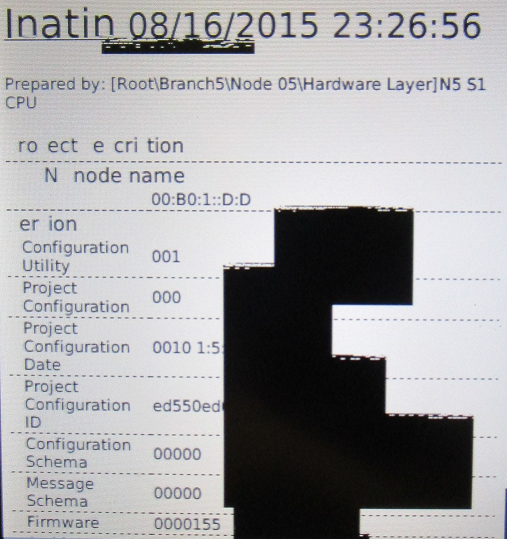
    0_1517827678850_Screen2.jpg

    Screen 3 -
    In some screens, I see the black 'patches'. And those patches remain in the same window.
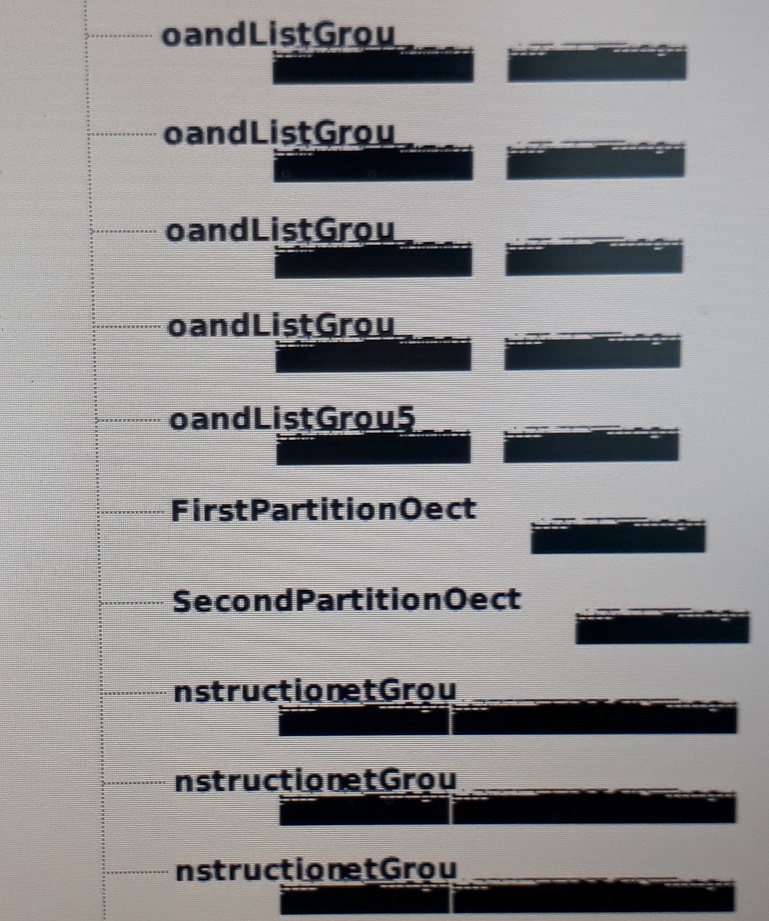
    0_1517827694080_Screen3.jpg

    I have run the same application in 4 boards and one board has this problem. But this is not consistent. On one another long run, I could see a different board showing the similar problem.

    Any clues on debugging such problems?
    Is framebuffer getting corrupted?
    Is display driver behaving differently?

    I have no idea.

    Please help me out in this regard.

    Thank you,
    Kumara

    --Kumar

    1 Reply Last reply
    0
    • M Offline
      M Offline
      mvuori
      wrote on last edited by
      #2

      Just an idea: slow memory leak causing the system to behave erratically, and at some point corrupting the system.
      Black areas could possible also be a result of for example heat and you can probably notice if the display runs too hot - and check for that by rebooting the system and seeing how soon the problem reappears.

      K 1 Reply Last reply
      3
      • Pablo J. RoginaP Offline
        Pablo J. RoginaP Offline
        Pablo J. Rogina
        wrote on last edited by
        #3

        @kumararajas have you try running some other (not based on Qt) application using such LCD display for the same long time? Same behavior? Just to rule out that you don't have a hardware problem, as @mvuori already suggested

        Upvote the answer(s) that helped you solve the issue
        Use "Topic Tools" button to mark your post as Solved
        Add screenshots via postimage.org
        Don't ask support requests via chat/PM. Please use the forum so others can benefit from the solution in the future

        K 1 Reply Last reply
        0
        • M mvuori

          Just an idea: slow memory leak causing the system to behave erratically, and at some point corrupting the system.
          Black areas could possible also be a result of for example heat and you can probably notice if the display runs too hot - and check for that by rebooting the system and seeing how soon the problem reappears.

          K Offline
          K Offline
          kumararajas
          wrote on last edited by
          #4

          @mvuori Thank you for the response.

          After reboot, I can see that display gets normal.
          I did also check the available memory using /proc/meminfo, I can see that, I have around 12 mb of free RAM. Is that sufficient?

          --Kumar

          1 Reply Last reply
          0
          • Pablo J. RoginaP Pablo J. Rogina

            @kumararajas have you try running some other (not based on Qt) application using such LCD display for the same long time? Same behavior? Just to rule out that you don't have a hardware problem, as @mvuori already suggested

            K Offline
            K Offline
            kumararajas
            wrote on last edited by
            #5

            @Pablo-J.-Rogina I haven't run any other application on my test bench yet. I will have to do that.

            --Kumar

            1 Reply Last reply
            0
            • K Offline
              K Offline
              kumararajas
              wrote on last edited by
              #6

              Further to this post, I continued to analyse the problem.

              I wanted to isolate the problem around framebuffer-display driver. I did convert the framebuffer contents to an image to verify what is being displayed in the LCD. I see that, frame buffer contents exactly matches with what is being displayed. So looks like, as @mvuori mentioned, there could be memory leaks which might contribute for this problem.

              Today I am going to run valgrind by attaching my application and run overnight and see if there are any leaks in the system.

              --Kumar

              K 1 Reply Last reply
              1
              • K kumararajas

                Further to this post, I continued to analyse the problem.

                I wanted to isolate the problem around framebuffer-display driver. I did convert the framebuffer contents to an image to verify what is being displayed in the LCD. I see that, frame buffer contents exactly matches with what is being displayed. So looks like, as @mvuori mentioned, there could be memory leaks which might contribute for this problem.

                Today I am going to run valgrind by attaching my application and run overnight and see if there are any leaks in the system.

                K Offline
                K Offline
                kumararajas
                wrote on last edited by
                #7

                Any more thoughts on this problem?

                @SGaist Any comments?

                --Kumar

                1 Reply Last reply
                0
                • SGaistS Offline
                  SGaistS Offline
                  SGaist
                  Lifetime Qt Champion
                  wrote on last edited by
                  #8

                  Hi,

                  What backend are you using ?

                  Interested in AI ? www.idiap.ch
                  Please read the Qt Code of Conduct - https://forum.qt.io/topic/113070/qt-code-of-conduct

                  K 1 Reply Last reply
                  0
                  • SGaistS SGaist

                    Hi,

                    What backend are you using ?

                    K Offline
                    K Offline
                    kumararajas
                    wrote on last edited by
                    #9

                    @SGaist Can you please explain a bit more on what you meant by backend?
                    Linux based system built on AM3358 TI Sitara with Qt 4.8.4. Is that what you have meant Sam?

                    --Kumar

                    mrjjM 1 Reply Last reply
                    0
                    • K kumararajas

                      @SGaist Can you please explain a bit more on what you meant by backend?
                      Linux based system built on AM3358 TI Sitara with Qt 4.8.4. Is that what you have meant Sam?

                      mrjjM Offline
                      mrjjM Offline
                      mrjj
                      Lifetime Qt Champion
                      wrote on last edited by
                      #10

                      @kumararajas

                      Hi
                      backend info could also include if you are using X11, or directFB or
                      which method is used for the gfx part / display manager etc.

                      K 1 Reply Last reply
                      1
                      • mrjjM mrjj

                        @kumararajas

                        Hi
                        backend info could also include if you are using X11, or directFB or
                        which method is used for the gfx part / display manager etc.

                        K Offline
                        K Offline
                        kumararajas
                        wrote on last edited by
                        #11

                        @mrjj Thanks for the explanation.

                        Since this is Embedded Qt, I am don't think it involves X11. I believe that, it uses Linux framebuffer for the rendering.

                        --Kumar

                        1 Reply Last reply
                        0
                        • K Offline
                          K Offline
                          kumararajas
                          wrote on last edited by kumararajas
                          #12

                          Hi guys!

                          I should share the good news.
                          This problem is pretty close to what @mvuori pointed out. I did run a valgrind and I could see lot of leaks.
                          Instead of focusing on fixing the leaks, I did add a piece of code to leak more memory more often. This was to flood the memory. I can see that, UI contents gets corrupted after the memory gets full.

                          And the black spots / patches on the screen are also linked with the same problem.

                          So I think this solves the problem. I should build a clean system without memory leaks!

                          Thanks a lot guys! Special thanks to @mvuori for giving the right clue! I will be happy to mark this post as solved.

                          --Kumara

                          --Kumar

                          J.HilkJ 1 Reply Last reply
                          2
                          • K kumararajas

                            Hi guys!

                            I should share the good news.
                            This problem is pretty close to what @mvuori pointed out. I did run a valgrind and I could see lot of leaks.
                            Instead of focusing on fixing the leaks, I did add a piece of code to leak more memory more often. This was to flood the memory. I can see that, UI contents gets corrupted after the memory gets full.

                            And the black spots / patches on the screen are also linked with the same problem.

                            So I think this solves the problem. I should build a clean system without memory leaks!

                            Thanks a lot guys! Special thanks to @mvuori for giving the right clue! I will be happy to mark this post as solved.

                            --Kumara

                            J.HilkJ Offline
                            J.HilkJ Offline
                            J.Hilk
                            Moderators
                            wrote on last edited by
                            #13

                            @kumararajas said in LCD display contents corruption:

                            So I think this solves the problem. I should build a clean system without memory leaks!

                            That should generally be your goal oO

                            I'm glad you were able to narrow the issue down, good luck hunting those leaks.


                            Be aware of the Qt Code of Conduct, when posting : https://forum.qt.io/topic/113070/qt-code-of-conduct


                            Q: What's that?
                            A: It's blue light.
                            Q: What does it do?
                            A: It turns blue.

                            K 1 Reply Last reply
                            2
                            • J.HilkJ J.Hilk

                              @kumararajas said in LCD display contents corruption:

                              So I think this solves the problem. I should build a clean system without memory leaks!

                              That should generally be your goal oO

                              I'm glad you were able to narrow the issue down, good luck hunting those leaks.

                              K Offline
                              K Offline
                              kumararajas
                              wrote on last edited by
                              #14

                              @J.Hilk Thank you :)

                              --Kumar

                              1 Reply Last reply
                              0

                              • Login

                              • Login or register to search.
                              • First post
                                Last post
                              0
                              • Categories
                              • Recent
                              • Tags
                              • Popular
                              • Users
                              • Groups
                              • Search
                              • Get Qt Extensions
                              • Unsolved