Skip to content
  • Categories
  • Recent
  • Tags
  • Popular
  • Users
  • Groups
  • Search
  • Get Qt Extensions
  • Unsolved
Collapse
Brand Logo
  1. Home
  2. Qt Development
  3. General and Desktop
  4. [SOLVED] PDF Print in multiple pages

[SOLVED] PDF Print in multiple pages

Scheduled Pinned Locked Moved General and Desktop
22 Posts 5 Posters 21.7k Views 4 Watching
  • Oldest to Newest
  • Newest to Oldest
  • Most Votes
Reply
  • Reply as topic
Log in to reply
This topic has been deleted. Only users with topic management privileges can see it.
  • M mourad_bilog

    Hello everyone,
    I'm trying to print data from QStringList into a PDF File using the QPrint Class. My function is like :
    QString pdfFile = QFileDialog::getSaveFileName(this, tr("Ouvrir fichier"), "/", tr("Fichier pdf (*.pdf)"));

    if(pdfFile.isEmpty())
    	return;
    
    int nbColonnes = header.size();
    int nbDonnees = donnees.size();
    
    QPrinter printer; //The QPrinter class is a paint device that paints on a printer
    printer.setOutputFormat(QPrinter::PdfFormat); 
    printer.setOrientation(QPrinter::Landscape); 
    printer.setPageSize(QPrinter::A4);
    
    //this can be also NativeFormat or PostScriptFormat
    //for details, read QPrinter class documentation
    printer.setOutputFileName(pdfFile);
    QPainter painter; //The QPainter class performs painting on widgets and other paint devices (such as QPrinter)
        
    //here we start painting to the printer
    if (!painter.begin(&printer))
    {
    	QMessageBox::critical(this, NAME_APP, "Fichier pdf non crée");
         return;
    }
    
    int x = 0;
    int y = 0;  
    
    QRect r;
    for (int k=0; k<nbColonnes; k++)
    {
    	// bilog-mh cf. TL-20819 : Paraméterer largeur des colonnes à afficher
    	if (k==0)
    		colonne_width = 70;
    	else if (k==1)
    		colonne_width = 130;
    	else if (k==2)
    		colonne_width = 150;
    	else if (k==3)
    		colonne_width = 700;
    
    	QRect required = QRect(); //this represent the required rectangled size
    	r = QRect(x, 0, colonne_width, 60); //this represent our calculated rectangle size
    	painter.drawRect(r);
    	//now we insert each string of the list into the rectangle
    	QString text = header.at(k);
    	//now we draw the text into the given rectangle, using word wrap option.
    	//the last parameter indicates a rectangle in which the text should be enclosed         
    	painter.drawText(r, Qt::AlignCenter | Qt::TextWordWrap, text, &required);
    	//if the calculated height is not enought for drawing the text, we should redraw all rectangles
    	 x += colonne_width;			  
    }
    
    x = 0;
    for (int k=0; k<nbDonnees; k++)
    {
    	// bilog-mh cf. TL-20819 : Paraméterer largeur des colonnes à afficher
    	switch ((k+1)%4)
    	{
    	case 1 :
    			colonne_width = 70;
    			break;
    	case 2:
    			colonne_width = 130;
    			break;
    	case 3 :
    			colonne_width = 150;
    			break;
    	case 0 :
    			colonne_width = 700;
    			break;
    	}
    		
    	if (k%nbColonnes == 0)
    	{
    		// bilog-mh cf. TL-20819 : si première ligne de données alors on retient le height de la ligne header
    		if (k== 0)
    			y += 60;
    		else
    			y += 200;
    		x = 0;
    	}
    
    	QRect required = QRect(); //this represent the required rectangled size
    	r = QRect(x, y, colonne_width, 200); //this represent our calculated rectangle size
    	painter.drawRect(r);
    	//now we insert each string of the list into the rectangle
    	QString txt = donnees.at(k);		
    	//now we draw the text into the given rectangle, using word wrap option.
    	//the last parameter indicates a rectangle in which the text should be enclosed         
    	painter.drawText(r, Qt::AlignJustify | Qt::TextWordWrap, txt, &required);
    
    	 x += colonne_width;		 
    	 
    	// bilog-mh cf. TL-20819 : si on atteint la fin de page, on insère un nouvelle page
    	if (y > printer.height())
    		printer.newPage();
    }
    painter.end();
    

    The problem is that only the first page display data and the other pages are blank.

    Does anyone have an idea what I'm wrong et tell me how to modify my function to display all data ?
    Many thanks in advance for your useful help.
    Best regards.

    F Offline
    F Offline
    filipdns
    wrote on last edited by
    #7

    @mourad_bilog
    Hello Mourad, I'm trying to print pdf in multiple page also but with table creation with data from SQLite, did you do that already? do you have sample code for that?

    Best regards
    Philippe

    mrjjM 1 Reply Last reply
    0
    • F filipdns

      @mourad_bilog
      Hello Mourad, I'm trying to print pdf in multiple page also but with table creation with data from SQLite, did you do that already? do you have sample code for that?

      Best regards
      Philippe

      mrjjM Offline
      mrjjM Offline
      mrjj
      Lifetime Qt Champion
      wrote on last edited by
      #8

      @filipdns
      Hi
      To print data from a db, you use
      qsqldatabase + QSqlQuery and use
      painter.drawText to paint a table.

      You can also use QTableView + QSqlTableModel and print an image of the
      QTableView to get cell painting etc.

      Alternatively you can use a report generator like
      https://sourceforge.net/projects/qtrpt/

      F 2 Replies Last reply
      1
      • mrjjM mrjj

        @filipdns
        Hi
        To print data from a db, you use
        qsqldatabase + QSqlQuery and use
        painter.drawText to paint a table.

        You can also use QTableView + QSqlTableModel and print an image of the
        QTableView to get cell painting etc.

        Alternatively you can use a report generator like
        https://sourceforge.net/projects/qtrpt/

        F Offline
        F Offline
        filipdns
        wrote on last edited by
        #9

        @mrjj Thanks a lot for your reply, the report generator look very nice but I don't understand yet how to include this to my project to make automatic report by click button, I have to study again the readme ;-)

        1 Reply Last reply
        0
        • mrjjM mrjj

          @filipdns
          Hi
          To print data from a db, you use
          qsqldatabase + QSqlQuery and use
          painter.drawText to paint a table.

          You can also use QTableView + QSqlTableModel and print an image of the
          QTableView to get cell painting etc.

          Alternatively you can use a report generator like
          https://sourceforge.net/projects/qtrpt/

          F Offline
          F Offline
          filipdns
          wrote on last edited by
          #10

          @mrjj just in case I can not found how to use the report generator, do you have a small sample code with qsqldatabase + QSqlQuery and use painter.drawText to paint a table?
          thank you very much

          mrjjM 1 Reply Last reply
          0
          • F filipdns

            @mrjj just in case I can not found how to use the report generator, do you have a small sample code with qsqldatabase + QSqlQuery and use painter.drawText to paint a table?
            thank you very much

            mrjjM Offline
            mrjjM Offline
            mrjj
            Lifetime Qt Champion
            wrote on last edited by
            #11

            @filipdns

            Hi
            I have not seen any samples that uses text. most print an image.

            F 1 Reply Last reply
            0
            • mrjjM mrjj

              @filipdns

              Hi
              I have not seen any samples that uses text. most print an image.

              F Offline
              F Offline
              filipdns
              wrote on last edited by
              #12

              @mrjj I understand, thank you

              mrjjM 1 Reply Last reply
              0
              • F filipdns

                @mrjj I understand, thank you

                mrjjM Offline
                mrjjM Offline
                mrjj
                Lifetime Qt Champion
                wrote on last edited by
                #13

                @filipdns

                Im wondering how you want the table to look ?

                With captions and cells lines and all the bells?
                or would something like

                Name        Age  Phone
                -----------------------------
                Mister Muh  12   0014545454545
                Miss Miaow  12   0045454
                Dude        66   66-66-66-66
                

                Be enough ?

                (made with tabs)

                F 1 Reply Last reply
                0
                • mrjjM mrjj

                  @filipdns

                  Im wondering how you want the table to look ?

                  With captions and cells lines and all the bells?
                  or would something like

                  Name        Age  Phone
                  -----------------------------
                  Mister Muh  12   0014545454545
                  Miss Miaow  12   0045454
                  Dude        66   66-66-66-66
                  

                  Be enough ?

                  (made with tabs)

                  F Offline
                  F Offline
                  filipdns
                  wrote on last edited by
                  #14

                  @mrjj I would like add logo but your example is good point to start

                  mrjjM 1 Reply Last reply
                  0
                  • F filipdns

                    @mrjj I would like add logo but your example is good point to start

                    mrjjM Offline
                    mrjjM Offline
                    mrjj
                    Lifetime Qt Champion
                    wrote on last edited by
                    #15

                    @filipdns
                    Hi
                    well to add logo, you just draw an image
                    with drawPixmap where you want.

                    F 1 Reply Last reply
                    0
                    • mrjjM mrjj

                      @filipdns
                      Hi
                      well to add logo, you just draw an image
                      with drawPixmap where you want.

                      F Offline
                      F Offline
                      filipdns
                      wrote on last edited by
                      #16

                      @mrjj oki, thanks I will try that.

                      Do you have code sample to get result like you show before from SQLite table?

                      mrjjM 1 Reply Last reply
                      0
                      • F filipdns

                        @mrjj oki, thanks I will try that.

                        Do you have code sample to get result like you show before from SQLite table?

                        mrjjM Offline
                        mrjjM Offline
                        mrjj
                        Lifetime Qt Champion
                        wrote on last edited by mrjj
                        #17

                        @filipdns
                        Well to get result, it would be using
                        http://doc.qt.io/qt-5/sql-sqlstatements.html

                        (in paintEvent/print)
                          QPainter painter(printer);  
                          QSqlQuery query;
                          query.exec("SELECT name, salary FROM employee WHERE salary > 50000");
                            while (query.next()) {
                                QString name = query.value(0).toString();
                                int salary = query.value(1).toInt();
                               QString text = name +"\t" + salary ; // make one row line with tabs
                               painter->drawText(x, y, width, height, Qt::TextExpandTabs , text); // fix width, height 
                        //     that would print one "row" tabbed
                            }
                        

                        All names for tables etc are ofc wrong here. Must use your real names.

                        F 2 Replies Last reply
                        0
                        • mrjjM mrjj

                          @filipdns
                          Well to get result, it would be using
                          http://doc.qt.io/qt-5/sql-sqlstatements.html

                          (in paintEvent/print)
                            QPainter painter(printer);  
                            QSqlQuery query;
                            query.exec("SELECT name, salary FROM employee WHERE salary > 50000");
                              while (query.next()) {
                                  QString name = query.value(0).toString();
                                  int salary = query.value(1).toInt();
                                 QString text = name +"\t" + salary ; // make one row line with tabs
                                 painter->drawText(x, y, width, height, Qt::TextExpandTabs , text); // fix width, height 
                          //     that would print one "row" tabbed
                              }
                          

                          All names for tables etc are ofc wrong here. Must use your real names.

                          F Offline
                          F Offline
                          filipdns
                          wrote on last edited by
                          #18

                          @mrjj thank you so much!! I will try that!!

                          1 Reply Last reply
                          0
                          • mrjjM mrjj

                            @filipdns
                            Well to get result, it would be using
                            http://doc.qt.io/qt-5/sql-sqlstatements.html

                            (in paintEvent/print)
                              QPainter painter(printer);  
                              QSqlQuery query;
                              query.exec("SELECT name, salary FROM employee WHERE salary > 50000");
                                while (query.next()) {
                                    QString name = query.value(0).toString();
                                    int salary = query.value(1).toInt();
                                   QString text = name +"\t" + salary ; // make one row line with tabs
                                   painter->drawText(x, y, width, height, Qt::TextExpandTabs , text); // fix width, height 
                            //     that would print one "row" tabbed
                                }
                            

                            All names for tables etc are ofc wrong here. Must use your real names.

                            F Offline
                            F Offline
                            filipdns
                            wrote on last edited by
                            #19

                            @mrjj Hello I try that but I got error :
                            erreur : C2819: type 'QPainter' does not have an overloaded member 'operator ->'
                            erreur : C2232: '->QPainter::drawText': left operand has 'class' type, use '.'
                            erreur : C2065: 'x': undeclared identifier
                            erreur : C2065: 'y': undeclared identifier
                            erreur : C3861: 'width': identifier not found
                            erreur : C3861: 'height': identifier not found

                            void print()
                            
                            {
                            
                            
                                QPrinter printer(QPrinter::HighResolution);
                                //printer.setResolution(1200);
                                printer.setOrientation(QPrinter::Portrait);
                                printer.setPageSize(QPrinter::A4);
                                QPrintDialog *dlg = new QPrintDialog(&printer,0);
                                if(dlg->exec() == QDialog::Accepted) {
                                    //QPainter::Antialiasing;
                                    QPainter::TextAntialiasing;
                                    QPainter painter(&printer);
                                    QSqlQuery query;
                                    query.exec("SELECT date_etape, immatriculation FROM flight_log");
                                    while (query.next()) {
                                        QString date_etape = query.value(0).toString();
                                        QString immatriculation = query.value(1).toString();
                                        QString text = date_etape +"\t" + immatriculation ; // make one row line with tabs
                                        painter->drawText(x, y, width, height, Qt::TextExpandTabs , text); // fix width, height
                                        //     that would print one "row" tabbed
                                    }
                            
                                    painter.end();
                                }
                            
                            jsulmJ 1 Reply Last reply
                            0
                            • mrjjM Offline
                              mrjjM Offline
                              mrjj
                              Lifetime Qt Champion
                              wrote on last edited by
                              #20

                              @filipdns said in

                              erreur : C2819: type 'QPainter' does not have an overloaded member 'operator ->'
                              erreur : C2232: '->QPainter::drawText': left operand has 'class' type, use '.'
                              Those are because painter is not pointer so -> should be .
                              painter->draw.. should be painter.drawText

                              erreur : C2065: 'x': undeclared identifier
                              erreur : C2065: 'y': undeclared identifier
                              erreur : C3861: 'width': identifier not found
                              erreur : C3861: 'height': identifier not found

                              You have define them
                              int x=0;
                              int y=0;
                              int width = ? ( whole page for width of table ?)
                              int height = ? ( whole page for height of table ?)

                              Here comes the the fun part.
                              For each drawText in the while loop
                              you must do y+=25; // ( actual line height is better but lets forget for a moment)

                              or it would just draw all text on top on each other so we have to change the y for a new row.

                              1 Reply Last reply
                              0
                              • mrjjM Offline
                                mrjjM Offline
                                mrjj
                                Lifetime Qt Champion
                                wrote on last edited by
                                #21

                                Hi
                                Maybe the /t way is too simple.
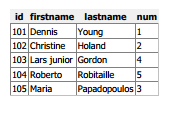
                                For a better table look , you can cheat and use HTML

                                bool createConnection() {
                                  QSqlDatabase db = QSqlDatabase::addDatabase("QSQLITE");
                                  db.setDatabaseName(":memory:");
                                  if (!db.open()) {
                                    QMessageBox::critical(0, qApp->tr("Cannot open database"), "Click Cancel to exit.", QMessageBox::Cancel);
                                    return false;
                                  }
                                  QSqlQuery query;
                                  qDebug() << "table:" <<   query.exec("create table person (id int primary key, "
                                                                       "firstname varchar(20), lastname varchar(20), num int )");
                                  query.exec("insert into person values(101, 'Dennis', 'Young','1')");
                                  query.exec("insert into person values(102, 'Christine', 'Holand','2')");
                                  query.exec("insert into person values(103, 'Lars junior', 'Gordon','4')");
                                  query.exec("insert into person values(104, 'Roberto', 'Robitaille','5')");
                                  query.exec("insert into person values(105, 'Maria', 'Papadopoulos','3')");
                                  return true;
                                }
                                
                                // credits to. (i adabted from his)  https://stackoverflow.com/questions/3147030/qtableview-printing/4079676#4079676
                                
                                void PrintTable( QPrinter* printer, QSqlQuery&  Query ) {
                                  QString strStream;
                                  QTextStream out(&strStream);
                                
                                  const int rowCount = Query.size();
                                  const int columnCount = Query.record().count();
                                
                                  out <<  "<html>\n"
                                      "<head>\n"
                                      "<meta Content=\"Text/html; charset=Windows-1251\">\n"
                                      <<  QString("<title>%1</title>\n").arg("TITLE OF TABLE")
                                      <<  "</head>\n"
                                      "<body bgcolor=#ffffff link=#5000A0>\n"
                                      "<table border=1 cellspacing=0 cellpadding=2>\n";
                                
                                  // headers
                                  out << "<thead><tr bgcolor=#f0f0f0>";
                                  for (int column = 0; column < columnCount; column++)
                                    out << QString("<th>%1</th>").arg(Query.record().fieldName(column));
                                  out << "</tr></thead>\n";
                                
                                  while (Query.next()) {
                                    out << "<tr>";
                                    for (int column = 0; column < columnCount; column++) {
                                      QString data = Query.value(column).toString();
                                      out << QString("<td bkcolor=0>%1</td>").arg((!data.isEmpty()) ? data : QString("&nbsp;"));
                                    }
                                    out << "</tr>\n";
                                  }
                                
                                  out <<  "</table>\n"
                                      "</body>\n"
                                      "</html>\n";
                                
                                  QTextDocument document;
                                  document.setHtml(strStream);
                                  document.print(printer);
                                
                                }
                                
                                void print() {
                                  QPrinter printer(QPrinter::HighResolution);
                                  printer.setOrientation(QPrinter::Portrait);
                                  printer.setPageSize(QPrinter::A4);
                                  printer.setOutputFormat(QPrinter::PdfFormat);
                                 //  printer.setOutputFileName("e:/file.pdf"); // just for me testing
                                 QPrintDialog dlg(&printer, 0);
                                 if(dlg.exec() == QDialog::Accepted) {
                                  QSqlQuery query;
                                  query.exec("SELECT * from person");
                                  PrintTable(&printer, query);
                                 }
                                }
                                ...
                                //To use
                                // you dont need that just makes my DB createConnection();
                                  print();
                                

                                And then you can get this
                                alt text

                                1 Reply Last reply
                                1
                                • F filipdns

                                  @mrjj Hello I try that but I got error :
                                  erreur : C2819: type 'QPainter' does not have an overloaded member 'operator ->'
                                  erreur : C2232: '->QPainter::drawText': left operand has 'class' type, use '.'
                                  erreur : C2065: 'x': undeclared identifier
                                  erreur : C2065: 'y': undeclared identifier
                                  erreur : C3861: 'width': identifier not found
                                  erreur : C3861: 'height': identifier not found

                                  void print()
                                  
                                  {
                                  
                                  
                                      QPrinter printer(QPrinter::HighResolution);
                                      //printer.setResolution(1200);
                                      printer.setOrientation(QPrinter::Portrait);
                                      printer.setPageSize(QPrinter::A4);
                                      QPrintDialog *dlg = new QPrintDialog(&printer,0);
                                      if(dlg->exec() == QDialog::Accepted) {
                                          //QPainter::Antialiasing;
                                          QPainter::TextAntialiasing;
                                          QPainter painter(&printer);
                                          QSqlQuery query;
                                          query.exec("SELECT date_etape, immatriculation FROM flight_log");
                                          while (query.next()) {
                                              QString date_etape = query.value(0).toString();
                                              QString immatriculation = query.value(1).toString();
                                              QString text = date_etape +"\t" + immatriculation ; // make one row line with tabs
                                              painter->drawText(x, y, width, height, Qt::TextExpandTabs , text); // fix width, height
                                              //     that would print one "row" tabbed
                                          }
                                  
                                          painter.end();
                                      }
                                  
                                  jsulmJ Offline
                                  jsulmJ Offline
                                  jsulm
                                  Lifetime Qt Champion
                                  wrote on last edited by
                                  #22

                                  @filipdns said in [SOLVED] PDF Print in multiple pages:

                                  QPainter painter(&printer);

                                  Your painter is not a pointer, so change

                                  painter->drawText(x, y, width, height, Qt::TextExpandTabs , text);
                                  

                                  to

                                  painter.drawText(x, y, width, height, Qt::TextExpandTabs , text);
                                  

                                  https://forum.qt.io/topic/113070/qt-code-of-conduct

                                  1 Reply Last reply
                                  1

                                  • Login

                                  • Login or register to search.
                                  • First post
                                    Last post
                                  0
                                  • Categories
                                  • Recent
                                  • Tags
                                  • Popular
                                  • Users
                                  • Groups
                                  • Search
                                  • Get Qt Extensions
                                  • Unsolved