Skip to content
  • Categories
  • Recent
  • Tags
  • Popular
  • Users
  • Groups
  • Search
  • Get Qt Extensions
  • Unsolved
Collapse
Brand Logo
  1. Home
  2. Qt Development
  3. General and Desktop
  4. Autocomplete
Qt 6.11 is out! See what's new in the release blog

Autocomplete

Scheduled Pinned Locked Moved Solved General and Desktop
30 Posts 4 Posters 26.4k Views 1 Watching
  • Oldest to Newest
  • Newest to Oldest
  • Most Votes
Reply
  • Reply as topic
Log in to reply
This topic has been deleted. Only users with topic management privileges can see it.
  • mrjjM mrjj

    Hi
    Ehh, you expect it to guess what parameters you want to use for
    a constructor ?
    It cant possible do that.
    Say for a QWidget, its (QWidget *parent ) and most other elements in the app would be
    an possible choice so im not sure why you expect it to auto fill the parameters.

    ? Offline
    ? Offline
    A Former User
    wrote on last edited by A Former User
    #3

    @mrjj

    edited:

    0_1517424503293_Screenshot (21).png

    Just an example, first one I could find. You see it has parameter fields. It doesn't autocomplete like "connect" for instance.

    1 Reply Last reply
    0
    • mrjjM Offline
      mrjjM Offline
      mrjj
      Lifetime Qt Champion
      wrote on last edited by
      #4

      Hi
      Oh, it sounds like something i have not seen before. exciting :)
      Can you tell me what i do wrongly ?
      alt text

      ? 1 Reply Last reply
      0
      • mrjjM mrjj

        Hi
        Oh, it sounds like something i have not seen before. exciting :)
        Can you tell me what i do wrongly ?
        alt text

        ? Offline
        ? Offline
        A Former User
        wrote on last edited by A Former User
        #5

        @mrjj deleted bad info

        mrjjM 1 Reply Last reply
        0
        • ? A Former User

          @mrjj deleted bad info

          mrjjM Offline
          mrjjM Offline
          mrjj
          Lifetime Qt Champion
          wrote on last edited by
          #6

          @Ian-Bray
          After selecting ReadData and pressing return only gives me

          alt text

          Im wondering if you use other code-model than i do ?
          or newer Creator than 4.5.0 ?

          ? 1 Reply Last reply
          0
          • mrjjM mrjj

            @Ian-Bray
            After selecting ReadData and pressing return only gives me
            alt text

            Im wondering if you use other code-model than i do ?
            or newer Creator than 4.5.0 ?

            ? Offline
            ? Offline
            A Former User
            wrote on last edited by A Former User
            #7

            No, I'm a dipshit. I have two machines open, Win 10 and Ubuntu on Laptop. Sorry.

            It's ctrl+spacebar to insert/autocomplete, not return like I just said. And it works on both windows and linux.

            I can't get the autocomplete to work on this kind of selection, just the Function is inserted with an empty parameter field and often there are half dozen parameters.

            alt text

            JonBJ 1 Reply Last reply
            0
            • mrjjM Offline
              mrjjM Offline
              mrjj
              Lifetime Qt Champion
              wrote on last edited by
              #8

              Hi
              Hehe, well im deepship too ;)
              I cant get it to fill in parameters at all

              1 Reply Last reply
              0
              • J.HilkJ Offline
                J.HilkJ Offline
                J.Hilk
                Moderators
                wrote on last edited by
                #9

                I don't think that is possible.

                If it is, I would like to know, but I think its more intended as a help for you to choose the varibale.
                For example if your write your function body, the popup is below the curser and can be inserted with pressing enter. In your example the popup is above the curser. Coincidence? Unlikely

                After all you shouldn't call functions with class/Type/unit identifiers as part of the arguments.


                Be aware of the Qt Code of Conduct, when posting : https://forum.qt.io/topic/113070/qt-code-of-conduct


                Q: What's that?
                A: It's blue light.
                Q: What does it do?
                A: It turns blue.

                1 Reply Last reply
                0
                • ? A Former User

                  No, I'm a dipshit. I have two machines open, Win 10 and Ubuntu on Laptop. Sorry.

                  It's ctrl+spacebar to insert/autocomplete, not return like I just said. And it works on both windows and linux.

                  I can't get the autocomplete to work on this kind of selection, just the Function is inserted with an empty parameter field and often there are half dozen parameters.

                  alt text

                  JonBJ Offline
                  JonBJ Offline
                  JonB
                  wrote on last edited by JonB
                  #10

                  @Ian-Bray, @mrjj

                  I don't use Qt Creator, but I do use auto-completers in other IDEs, which I assume work similarly.

                  I still don't get just what either of you are expecting to happen? When it comes to the available parameters/overloads to a function call, the completers cannot know what you want to actually pass. The overloads they show you are purely for your information, so you can see what the number & types of arguments are. You do not "pick" anything at this point, and it does not "fill in" anything at this point either. You type in whatever you want to pass (which itself will give autocomplete, but nothing to do with the function declaration), and sometimes they recognise purely by number of parameters which overload you are selecting as you type the comma at the end of each parameter. They often mark what they think the parameter is that you have reached by highlighting that in bold in the list of parameters. If what you are expecting is that it will paste the formal parameters into the call, they don't, what would be the point? That's it for auto-complete! In my experience.

                  mrjjM 1 Reply Last reply
                  1
                  • JonBJ JonB

                    @Ian-Bray, @mrjj

                    I don't use Qt Creator, but I do use auto-completers in other IDEs, which I assume work similarly.

                    I still don't get just what either of you are expecting to happen? When it comes to the available parameters/overloads to a function call, the completers cannot know what you want to actually pass. The overloads they show you are purely for your information, so you can see what the number & types of arguments are. You do not "pick" anything at this point, and it does not "fill in" anything at this point either. You type in whatever you want to pass (which itself will give autocomplete, but nothing to do with the function declaration), and sometimes they recognise purely by number of parameters which overload you are selecting as you type the comma at the end of each parameter. They often mark what they think the parameter is that you have reached by highlighting that in bold in the list of parameters. If what you are expecting is that it will paste the formal parameters into the call, they don't, what would be the point? That's it for auto-complete! In my experience.

                    mrjjM Offline
                    mrjjM Offline
                    mrjj
                    Lifetime Qt Champion
                    wrote on last edited by
                    #11

                    @JonB
                    Well it sounds like poster can make it fill in
                    parameters even i never seen it or can make it do it.
                    As my first post indicates im also very skeptical about completion on the parameters but
                    it sounds like poster can make it do it some types so hence im still trying.

                    JonBJ 1 Reply Last reply
                    0
                    • mrjjM mrjj

                      @JonB
                      Well it sounds like poster can make it fill in
                      parameters even i never seen it or can make it do it.
                      As my first post indicates im also very skeptical about completion on the parameters but
                      it sounds like poster can make it do it some types so hence im still trying.

                      JonBJ Offline
                      JonBJ Offline
                      JonB
                      wrote on last edited by JonB
                      #12

                      @mrjj
                      I don't follow you. Neither of his 2 screenshots show any "filling in", they show possible parameters in a "pop-up tooltip", like I said that's all?

                      If you think about it, what (I think) you/he are asking is, in that example, for it to offer every single literal/variable/function retuning type QMargins. It won't do this. Plus, you could have an unknown number of objects etc. which happen to have a member or function of type QMargins too. so it would have to offer every object which "might lead to" a QMargins as the start of the completion. It won't do that either!

                      mrjjM 1 Reply Last reply
                      0
                      • JonBJ JonB

                        @mrjj
                        I don't follow you. Neither of his 2 screenshots show any "filling in", they show possible parameters in a "pop-up tooltip", like I said that's all?

                        If you think about it, what (I think) you/he are asking is, in that example, for it to offer every single literal/variable/function retuning type QMargins. It won't do this. Plus, you could have an unknown number of objects etc. which happen to have a member or function of type QMargins too. so it would have to offer every object which "might lead to" a QMargins as the start of the completion. It won't do that either!

                        mrjjM Offline
                        mrjjM Offline
                        mrjj
                        Lifetime Qt Champion
                        wrote on last edited by mrjj
                        #13

                        @JonB
                        There is no picture of poster's idea of auto filled parameters.
                        So either poster want something that is impossible or
                        something i dont understand/have seen.

                        like ". It doesn't autocomplete like "connect" for instance."

                        i cant connect to auto complete in any way.

                        JonBJ J.HilkJ 2 Replies Last reply
                        0
                        • mrjjM mrjj

                          @JonB
                          There is no picture of poster's idea of auto filled parameters.
                          So either poster want something that is impossible or
                          something i dont understand/have seen.

                          like ". It doesn't autocomplete like "connect" for instance."

                          i cant connect to auto complete in any way.

                          JonBJ Offline
                          JonBJ Offline
                          JonB
                          wrote on last edited by JonB
                          #14

                          @mrjj
                          Like I said, that's because the parameters are not supposed to be "auto-completable", they are there only as a "tooltip" to help you understand the types/overloads available, not as a "picker"/"paster"!

                          mrjjM 1 Reply Last reply
                          0
                          • mrjjM mrjj

                            @JonB
                            There is no picture of poster's idea of auto filled parameters.
                            So either poster want something that is impossible or
                            something i dont understand/have seen.

                            like ". It doesn't autocomplete like "connect" for instance."

                            i cant connect to auto complete in any way.

                            J.HilkJ Offline
                            J.HilkJ Offline
                            J.Hilk
                            Moderators
                            wrote on last edited by
                            #15

                            @mrjj
                            QObject::connect has indeed an autocomplete function

                            Right after the class Reference (Qt5 Syntax) MyClass:: and right after the signal or slot macro(Qt4 Syntax)

                            QT4Syntax actually fills in the argument Types


                            Be aware of the Qt Code of Conduct, when posting : https://forum.qt.io/topic/113070/qt-code-of-conduct


                            Q: What's that?
                            A: It's blue light.
                            Q: What does it do?
                            A: It turns blue.

                            mrjjM 1 Reply Last reply
                            0
                            • J.HilkJ J.Hilk

                              @mrjj
                              QObject::connect has indeed an autocomplete function

                              Right after the class Reference (Qt5 Syntax) MyClass:: and right after the signal or slot macro(Qt4 Syntax)

                              QT4Syntax actually fills in the argument Types

                              mrjjM Offline
                              mrjjM Offline
                              mrjj
                              Lifetime Qt Champion
                              wrote on last edited by
                              #16

                              @J.Hilk
                              ah, in that way. well i didnt think of it as parameters filling. just suggestion for context as it can do anywhere.
                              Ok, that concludes the post :)
                              Not possible.

                              1 Reply Last reply
                              0
                              • JonBJ JonB

                                @mrjj
                                Like I said, that's because the parameters are not supposed to be "auto-completable", they are there only as a "tooltip" to help you understand the types/overloads available, not as a "picker"/"paster"!

                                mrjjM Offline
                                mrjjM Offline
                                mrjj
                                Lifetime Qt Champion
                                wrote on last edited by
                                #17

                                @JonB
                                Hi, Yes im fully aware of that but poster had completion working (he said)
                                Just trying to determine what poster saw.
                                And i fully agree, auto filling of parameters sounded really fishy :)

                                ? 1 Reply Last reply
                                0
                                • mrjjM mrjj

                                  @JonB
                                  Hi, Yes im fully aware of that but poster had completion working (he said)
                                  Just trying to determine what poster saw.
                                  And i fully agree, auto filling of parameters sounded really fishy :)

                                  ? Offline
                                  ? Offline
                                  A Former User
                                  wrote on last edited by A Former User
                                  #18

                                  @mrjj Crikey.

                                  I want to type for instance ProgressBar::paintEvent(QPaintEvent *event)

                                  I type Prog autocomplete pops up, I hit return yay ProgressBar

                                  Then I type :: and autocomplete kicks in again, I make my selection and hit return Now I have
                                  ProgressBar::paintEvent. and the Parameter List is offered in a little floating box. and ctrl+spacebar inserts it.

                                  Now I have ProgressBar::paintEvent(QPaintEvent *event)

                                  Didn't mean to start a fire or anything!

                                  mrjjM 1 Reply Last reply
                                  0
                                  • ? A Former User

                                    @mrjj Crikey.

                                    I want to type for instance ProgressBar::paintEvent(QPaintEvent *event)

                                    I type Prog autocomplete pops up, I hit return yay ProgressBar

                                    Then I type :: and autocomplete kicks in again, I make my selection and hit return Now I have
                                    ProgressBar::paintEvent. and the Parameter List is offered in a little floating box. and ctrl+spacebar inserts it.

                                    Now I have ProgressBar::paintEvent(QPaintEvent *event)

                                    Didn't mean to start a fire or anything!

                                    mrjjM Offline
                                    mrjjM Offline
                                    mrjj
                                    Lifetime Qt Champion
                                    wrote on last edited by
                                    #19

                                    @Ian-Bray
                                    Oh, no fires here. Just a bit confusion :)
                                    Now i understand.
                                    There you select a member and yes then it inserts the complete signature ( meaning with the parameters)
                                    as it can see how it should be from the .h file.

                                    How ever when shows
                                    alt text
                                    It shows possible parameters and u must type variable names as its a function call

                                    As far as i know, there is no key to have it paste the signature in such cases. :(
                                    But you can press F2 on the method name to go there and then copy the signature.

                                    ? 1 Reply Last reply
                                    0
                                    • mrjjM mrjj

                                      @Ian-Bray
                                      Oh, no fires here. Just a bit confusion :)
                                      Now i understand.
                                      There you select a member and yes then it inserts the complete signature ( meaning with the parameters)
                                      as it can see how it should be from the .h file.

                                      How ever when shows
                                      alt text
                                      It shows possible parameters and u must type variable names as its a function call

                                      As far as i know, there is no key to have it paste the signature in such cases. :(
                                      But you can press F2 on the method name to go there and then copy the signature.

                                      ? Offline
                                      ? Offline
                                      A Former User
                                      wrote on last edited by
                                      #20

                                      @mrjj

                                      If I type QColor and then a semi-colon "("

                                      I get a menu popup with 11 options. Using the up/down keys I scroll to number 3 and hit return to insert, but the carriage returns and ctrl + spacebar just resets it to the first option.

                                      mrjjM 1 Reply Last reply
                                      0
                                      • ? A Former User

                                        @mrjj

                                        If I type QColor and then a semi-colon "("

                                        I get a menu popup with 11 options. Using the up/down keys I scroll to number 3 and hit return to insert, but the carriage returns and ctrl + spacebar just resets it to the first option.

                                        mrjjM Offline
                                        mrjjM Offline
                                        mrjj
                                        Lifetime Qt Champion
                                        wrote on last edited by
                                        #21

                                        @Ian-Bray
                                        Hmm, you should get what u select in drop-down. sounds odd.
                                        Like this ?
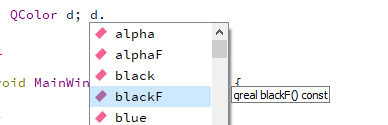
                                        alt text

                                        ? 1 Reply Last reply
                                        0
                                        • mrjjM mrjj

                                          @Ian-Bray
                                          Hmm, you should get what u select in drop-down. sounds odd.
                                          Like this ?
                                          alt text

                                          ? Offline
                                          ? Offline
                                          A Former User
                                          wrote on last edited by
                                          #22

                                          @mrjj No QColor(

                                          mrjjM 1 Reply Last reply
                                          0

                                          • Login

                                          • Login or register to search.
                                          • First post
                                            Last post
                                          0
                                          • Categories
                                          • Recent
                                          • Tags
                                          • Popular
                                          • Users
                                          • Groups
                                          • Search
                                          • Get Qt Extensions
                                          • Unsolved
