
Skip to content
  • Categories
  • Recent
  • Tags
  • Popular
  • Users
  • Groups
  • Search
  • Get Qt Extensions
  • Unsolved
Collapse
Brand Logo
  1. Home
  2. Qt Development
  3. General and Desktop
  4. What is the right way to update from QT 5.9 to QT 5.10?
Qt 6.11 is out! See what's new in the release blog

What is the right way to update from QT 5.9 to QT 5.10?

Scheduled Pinned Locked Moved Unsolved General and Desktop
5 Posts 3 Posters 2.5k Views 3 Watching
  • Oldest to Newest
  • Newest to Oldest
  • Most Votes
Reply
  • Reply as topic
Log in to reply
This topic has been deleted. Only users with topic management privileges can see it.
  • D Offline
    D Offline
    Dmitriano
    wrote on last edited by
    #1

    I have QT 5.9 installed on my Windows 10 machine. What way should I choose update from QT 5.9 to QT 5.10?

    My attempt to update QT with its Maintenance Tool failed probably because it does not have default repositories:
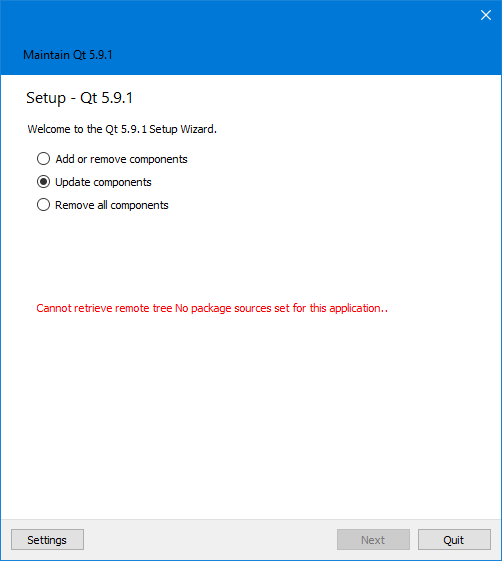
    MT

    should I specify some repository and update using Maintenance Tool?

    As far as I see, alternatively, I can download https://download.qt.io/archive/qt/5.10/5.10.0/qt-opensource-windows-x86-5.10.0.exe and run on my machine. Does this replace 5.9 with 5.10 or keeps 5.9 installed?

    1 Reply Last reply
    0
    • SGaistS Offline
      SGaistS Offline
      SGaist
      Lifetime Qt Champion
      wrote on last edited by
      #2

      Hi,

      If you'd like to do "continuous updates" you should rather use the online installer. With it you can add remove older version of Qt as you want.

      The offline installers are usually used when you want to work with only on precise version of Qt.

      Interested in AI ? www.idiap.ch
      Please read the Qt Code of Conduct - https://forum.qt.io/topic/113070/qt-code-of-conduct

      D 1 Reply Last reply
      1
      • SGaistS SGaist

        Hi,

        If you'd like to do "continuous updates" you should rather use the online installer. With it you can add remove older version of Qt as you want.

        The offline installers are usually used when you want to work with only on precise version of Qt.

        D Offline
        D Offline
        Dmitriano
        wrote on last edited by
        #3

        @SGaist What is Maintenance Tool for? Why it does not have default repositories? How to configure it?

        1 Reply Last reply
        0
        • SGaistS Offline
          SGaistS Offline
          SGaist
          Lifetime Qt Champion
          wrote on last edited by
          #4

          As the name suggests, it's for maintaining your Qt installation. Like I wrote before, the offline installers are meant for people working with a defined version of Qt + tooling. Use the online installer to manage several version of Qt.

          Interested in AI ? www.idiap.ch
          Please read the Qt Code of Conduct - https://forum.qt.io/topic/113070/qt-code-of-conduct

          1 Reply Last reply
          1
          • BuckwheatB Offline
            BuckwheatB Offline
            Buckwheat
            wrote on last edited by
            #5

            Hi!

            I just went through this with our licensed version. I used the maintenance too. It will NOT update to 5.10. Add the 5.10 component and it will be available along side of 5.9.

            Then, when you update both 5.9 and 5.10 will update.

            If you choose to remove 5.9, just un-check the 5.9 in the "Add or remove" section.

            Dave Fileccia

            1 Reply Last reply
            0

            • Login

            • Login or register to search.
            • First post
              Last post
            0
            • Categories
            • Recent
            • Tags
            • Popular
            • Users
            • Groups
            • Search
            • Get Qt Extensions
            • Unsolved