Skip to content
  • Categories
  • Recent
  • Tags
  • Popular
  • Users
  • Groups
  • Search
  • Get Qt Extensions
  • Unsolved
Collapse
Brand Logo
  1. Home
  2. Qt Development
  3. QML and Qt Quick
  4. Importing QtStudio3D fails.

Importing QtStudio3D fails.

Scheduled Pinned Locked Moved Solved QML and Qt Quick
51 Posts 3 Posters 17.2k Views 2 Watching
  • Oldest to Newest
  • Newest to Oldest
  • Most Votes
Reply
  • Reply as topic
Log in to reply
This topic has been deleted. Only users with topic management privileges can see it.
  • F Offline
    F Offline
    filipdns
    wrote on last edited by
    #23

    sorry, I don't see what you mean about qml directory

    small_birdS 1 Reply Last reply
    0
    • F filipdns

      sorry, I don't see what you mean about qml directory

      small_birdS Offline
      small_birdS Offline
      small_bird
      wrote on last edited by
      #24

      @filipdns When we import some plugin in qml, the compiler needs to search the qml directory.

      0_1509496187775_1.jpg
      The other directory's content is as following:
      0_1509496244601_2.PNG
      However, Qt3dStudio's directory content is as following:
      0_1509496386451_3.PNG
      You see that? No plugins.qmltypes file? Why?

      1 Reply Last reply
      0
      • F filipdns

        try that:
        -uninstall VS, (all of them, 2017,2015,... etc and all redistribuable package)
        -uninstall all QT, delete QT folder, and in C:\Users<username>\AppData\Roaming delete all qt folder
        -install git: https://git-for-windows.github.io/
        -install perl: https://www.perl.org/get.html
        -install cmake: https://cmake.org/download/
        -install python: 2.7.14 : https://www.python.org/
        -install https://go.microsoft.com/fwlink/?LinkId=691126
        -install FBXSDK: http://download.autodesk.com/us/fbx_release_older/2016.1.2/fbx20161_2_fbxsdk_vs2015_win.exe
        -re-install QT with qt tool, only keep msvc2015 and qt studio
        -in QT root folder, right click and select git bash
        -paste in git terminal :
        git clone --recursive https://codereview.qt-project.org/qt3dstudio/qt3dstudio
        -in this folder, go to src/3rd party and paste the boost folder that I will send to you (I did some modification to be able to compile 3d studio).
        -double click on qt3dstudio.pro from created folder by git in QT
        -in project setting, add make step and in argument, tape "install"
        -in environemental configuration add new with variable "FBXSDK" and value, the root to the FBXSDK you install before, like this:
        C://Autodesk/FBX SDK/2016.1.2
        -after that, compile qt studio and see what happen

        I will send you the boost folder a soon I will be at home

        small_birdS Offline
        small_birdS Offline
        small_bird
        wrote on last edited by
        #25

        @filipdns However, I got the following error:

          C:\Program Files (x86)\Microsoft Visual Studio 14.0\VC\include\type_traits:1501: error: C2893: fail to make funciton templete “unknown-type std::invoke(_Callable &&,_Types &&...)” spectial (compile source file Client\Code\Core\Utility\TestCmdUtils.cpp)
        
        1 Reply Last reply
        0
        • F Offline
          F Offline
          filipdns
          wrote on last edited by
          #26

          do you do clean installation as I tell you?

          small_birdS 1 Reply Last reply
          0
          • F filipdns

            do you do clean installation as I tell you?

            small_birdS Offline
            small_birdS Offline
            small_bird
            wrote on last edited by
            #27

            @filipdns Yes, my configure is as following:

            0_1509527400869_sdfsdfdsfssdfs.PNG

            1 Reply Last reply
            0
            • F Offline
              F Offline
              filipdns
              wrote on last edited by
              #28

              then I don't know what is going on I'm sorry...

              small_birdS 1 Reply Last reply
              0
              • F Offline
                F Offline
                filipdns
                wrote on last edited by
                #29

                I can only tell you my qtstudio3d in qml has no plugins.qmltypes file too

                1 Reply Last reply
                0
                • F Offline
                  F Offline
                  filipdns
                  wrote on last edited by
                  #30

                  the problem is no there

                  small_birdS 1 Reply Last reply
                  0
                  • F filipdns

                    then I don't know what is going on I'm sorry...

                    small_birdS Offline
                    small_birdS Offline
                    small_bird
                    wrote on last edited by
                    #31

                    @filipdns En, mine has compiler error, not warning!!!

                    1 Reply Last reply
                    0
                    • F filipdns

                      the problem is no there

                      small_birdS Offline
                      small_birdS Offline
                      small_bird
                      wrote on last edited by
                      #32

                      @filipdns Are you sure you can import qt3dstudio in qml? It should has the search path. Could you show me the shortcut?

                      1 Reply Last reply
                      0
                      • F Offline
                        F Offline
                        filipdns
                        wrote on last edited by
                        #33

                        @small_bird said in Importing QtStudio3D fails.:

                        import qt3dstudio in qml

                        import qt3dstudio in qml? no you don't import any thing it's building process do it for you

                        small_birdS 2 Replies Last reply
                        0
                        • F filipdns

                          @small_bird said in Importing QtStudio3D fails.:

                          import qt3dstudio in qml

                          import qt3dstudio in qml? no you don't import any thing it's building process do it for you

                          small_birdS Offline
                          small_birdS Offline
                          small_bird
                          wrote on last edited by
                          #34

                          @filipdns
                          0_1509538476892_dsfsdfsdfsdfsdfsdfsfsd.PNG
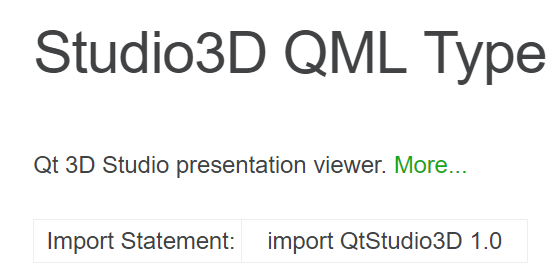
                          The document shows that we can import studio3d to munipulate the elements in the qml project.

                          1 Reply Last reply
                          0
                          • F filipdns

                            @small_bird said in Importing QtStudio3D fails.:

                            import qt3dstudio in qml

                            import qt3dstudio in qml? no you don't import any thing it's building process do it for you

                            small_birdS Offline
                            small_birdS Offline
                            small_bird
                            wrote on last edited by
                            #35

                            @filipdns You have mentioned it before:
                            https://forum.qt.io/topic/84211/qtstudio3d

                            1 Reply Last reply
                            0
                            • F Offline
                              F Offline
                              filipdns
                              wrote on last edited by
                              #36

                              oh ok, yes but before importing it had to be installed...

                              small_birdS 1 Reply Last reply
                              0
                              • F Offline
                                F Offline
                                filipdns
                                wrote on last edited by
                                #37

                                until you don't build source correctly it will not work

                                1 Reply Last reply
                                0
                                • F filipdns

                                  oh ok, yes but before importing it had to be installed...

                                  small_birdS Offline
                                  small_birdS Offline
                                  small_bird
                                  wrote on last edited by small_bird
                                  #38

                                  @filipdns En, actually you have sent me some lib files. They should be loaded correctly if I put them into the right directory. But it still shows the following error:

                                  0_1509541392160_sdfdfs.PNG

                                  1 Reply Last reply
                                  0
                                  • F Offline
                                    F Offline
                                    filipdns
                                    wrote on last edited by
                                    #39

                                    start from zero has I describe to you I'm sure it will work after that

                                    small_birdS 1 Reply Last reply
                                    1
                                    • F filipdns

                                      start from zero has I describe to you I'm sure it will work after that

                                      small_birdS Offline
                                      small_birdS Offline
                                      small_bird
                                      wrote on last edited by
                                      #40

                                      @filipdns Ok, I'd try that.

                                      1 Reply Last reply
                                      0
                                      • F Offline
                                        F Offline
                                        filipdns
                                        wrote on last edited by filipdns
                                        #41

                                        as I can see (creator look for declarative_qtstudio3dd), you try to compile in debug mode but I send you the release dll, try in release mode to see what happen

                                        small_birdS 1 Reply Last reply
                                        0
                                        • F filipdns

                                          as I can see (creator look for declarative_qtstudio3dd), you try to compile in debug mode but I send you the release dll, try in release mode to see what happen

                                          small_birdS Offline
                                          small_birdS Offline
                                          small_bird
                                          wrote on last edited by
                                          #42

                                          @filipdns 0_1509546375818_sddsf.PNG
                                          Yes, it is in release mode.

                                          1 Reply Last reply
                                          0

                                          • Login

                                          • Login or register to search.
                                          • First post
                                            Last post
                                          0
                                          • Categories
                                          • Recent
                                          • Tags
                                          • Popular
                                          • Users
                                          • Groups
                                          • Search
                                          • Get Qt Extensions
                                          • Unsolved