
Skip to content
  • Categories
  • Recent
  • Tags
  • Popular
  • Users
  • Groups
  • Search
  • Get Qt Extensions
  • Unsolved
Collapse
Brand Logo
  1. Home
  2. Qt Development
  3. Qt Creator and other tools
  4. Install QT Creator - failed to start - it could not load Qt Platform
Qt 6.11 is out! See what's new in the release blog

Install QT Creator - failed to start - it could not load Qt Platform

Scheduled Pinned Locked Moved Solved Qt Creator and other tools
16 Posts 5 Posters 7.5k Views 2 Watching
  • Oldest to Newest
  • Newest to Oldest
  • Most Votes
Reply
  • Reply as topic
Log in to reply
This topic has been deleted. Only users with topic management privileges can see it.
  • P Offline
    P Offline
    peter_cz
    wrote on last edited by
    #7

    online installer

    jsulmJ 1 Reply Last reply
    0
    • P peter_cz

      online installer

      jsulmJ Offline
      jsulmJ Offline
      jsulm
      Lifetime Qt Champion
      wrote on last edited by
      #8

      @peter_cz Try to start QtCreator from a cmd.exe after setting "set QT_DEBUG_PLUGINS=1" there. Then you should see a lot of debug output which could help to find out what is going wrong.

      https://forum.qt.io/topic/113070/qt-code-of-conduct

      1 Reply Last reply
      0
      • P Offline
        P Offline
        peter_cz
        wrote on last edited by
        #9

        I did:

        cd C:\Qt\Tools\QtCreator\bin>

        set variable as

        C:\Qt\Tools\QtCreator\bin>set QT_DEBUG_PLUGINS=1

        run creator as
        C:\Qt\Tools\QtCreator\bin>qtcreator.exe

        and no debug info and imedatelly Error message appears

        BTW is it possible to include image to this forum as screenshot from my PC ?

        jsulmJ 1 Reply Last reply
        0
        • P peter_cz

          I did:

          cd C:\Qt\Tools\QtCreator\bin>

          set variable as

          C:\Qt\Tools\QtCreator\bin>set QT_DEBUG_PLUGINS=1

          run creator as
          C:\Qt\Tools\QtCreator\bin>qtcreator.exe

          and no debug info and imedatelly Error message appears

          BTW is it possible to include image to this forum as screenshot from my PC ?

          jsulmJ Offline
          jsulmJ Offline
          jsulm
          Lifetime Qt Champion
          wrote on last edited by
          #10

          @peter_cz My bad - release build will probably not show anything.
          Image sharing is working only sporadically here. You can try.

          https://forum.qt.io/topic/113070/qt-code-of-conduct

          1 Reply Last reply
          0
          • P Offline
            P Offline
            peter_cz
            wrote on last edited by
            #11

            What do I need to do to make it working on Windows 7 and supply info you need to resolve the issue?

            mrjjM 1 Reply Last reply
            0
            • P peter_cz

              What do I need to do to make it working on Windows 7 and supply info you need to resolve the issue?

              mrjjM Offline
              mrjjM Offline
              mrjj
              Lifetime Qt Champion
              wrote on last edited by
              #12

              @peter_cz
              Its pretty odd to have creator say so.
              Normally its with deployment of apps.
              do you use mingw or visual stud?
              It could be the vs runtimes as they are not always installed in win 7

              I would look at Creator.exe with
              http://www.dependencywalker.com/

              and see if something is missing.

              Maybe install was damaged
              Check your creator have the actual dll
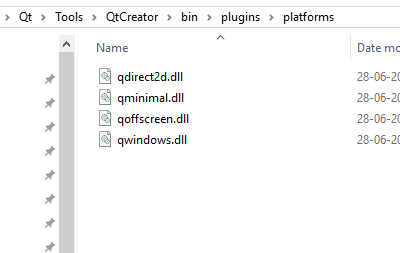
              alt text

              1 Reply Last reply
              0
              • P Offline
                P Offline
                peter_cz
                wrote on last edited by
                #13

                Mine directory looks like this

                0_1502958384616_Capture.PNG

                and depandancy walker

                0_1502958511610_Capture1.PNG

                1 Reply Last reply
                0
                • mrjjM Offline
                  mrjjM Offline
                  mrjj
                  Lifetime Qt Champion
                  wrote on last edited by
                  #14

                  Hi
                  It does look ok
                  And it seems that all Qt*.dlls can be loaded?

                  I wonder if something went wrong during install.

                  The installer didn't say anything?

                  1 Reply Last reply
                  0
                  • hskoglundH Offline
                    hskoglundH Offline
                    hskoglund
                    wrote on last edited by
                    #15

                    Hi, you could try once again with set QT_DEBUG_PLUGINS=1 but this time, before you start qtcreator.exe, to see the debug output, download and start dbgview.exe

                    1 Reply Last reply
                    2
                    • P Offline
                      P Offline
                      peter_cz
                      wrote on last edited by
                      #16

                      please look at this thread about Application can't start because could not find or load Qt

                      1 Reply Last reply
                      2

                      • Login

                      • Login or register to search.
                      • First post
                        Last post
                      0
                      • Categories
                      • Recent
                      • Tags
                      • Popular
                      • Users
                      • Groups
                      • Search
                      • Get Qt Extensions
                      • Unsolved