Skip to content
  • Categories
  • Recent
  • Tags
  • Popular
  • Users
  • Groups
  • Search
  • Get Qt Extensions
  • Unsolved
Collapse
Brand Logo
  1. Home
  2. Qt Development
  3. General and Desktop
  4. QtVirtualkeyboard
Qt 6.11 is out! See what's new in the release blog

QtVirtualkeyboard

Scheduled Pinned Locked Moved Unsolved General and Desktop
16 Posts 5 Posters 5.3k Views 4 Watching
  • Oldest to Newest
  • Newest to Oldest
  • Most Votes
Reply
  • Reply as topic
Log in to reply
This topic has been deleted. Only users with topic management privileges can see it.
  • mrdebugM mrdebug

    Did on Windows. The keyboard works perfectly.
    But on Linux? I obtain this error:

    g++: error: unrecognized command line option ‘-std=c++1z’

    gcc --version
    gcc (Debian 4.9.2-10) 4.9.2

    Debian 8, 64 bit

    jsulmJ Offline
    jsulmJ Offline
    jsulm
    Lifetime Qt Champion
    wrote on last edited by
    #7

    @mrdebug Did you configure it from a clean state (without build artefacts from previous build)?

    https://forum.qt.io/topic/113070/qt-code-of-conduct

    1 Reply Last reply
    0
    • mrdebugM Offline
      mrdebugM Offline
      mrdebug
      wrote on last edited by
      #8

      Yes, tryied many times

      Need programmers to hire?
      www.labcsp.com
      www.denisgottardello.it
      GMT+1
      Skype: mrdebug

      1 Reply Last reply
      0
      • Pradeep KumarP Offline
        Pradeep KumarP Offline
        Pradeep Kumar
        wrote on last edited by
        #9

        Hi,

        @mrdebug

        let me know, if u have a break through.
        When u get the solution,

        Thanks,

        Pradeep Kumar
        Qt,QML Developer

        1 Reply Last reply
        0
        • mrdebugM mrdebug

          Did on Windows. The keyboard works perfectly.
          But on Linux? I obtain this error:

          g++: error: unrecognized command line option ‘-std=c++1z’

          gcc --version
          gcc (Debian 4.9.2-10) 4.9.2

          Debian 8, 64 bit

          the_T Offline
          the_T Offline
          the_
          wrote on last edited by the_
          #10

          @mrdebug
          I am not 100% sure if gcc4.9 already supports c++1z
          what happens if you change it to c++11 ?(this standard is supported by that 'old' gcc version ;) )

          edit
          c++14 seems to be only partly supported by gcc4.9
          see http://en.cppreference.com/w/cpp/compiler_support

          -- No support in PM --

          1 Reply Last reply
          0
          • mrdebugM Offline
            mrdebugM Offline
            mrdebug
            wrote on last edited by
            #11

            Maybe it is necessary to send a bug report to the QtVirtualkeyboard developers.

            Need programmers to hire?
            www.labcsp.com
            www.denisgottardello.it
            GMT+1
            Skype: mrdebug

            1 Reply Last reply
            0
            • Pradeep KumarP Offline
              Pradeep KumarP Offline
              Pradeep Kumar
              wrote on last edited by
              #12

              Hi,

              Should wait for some days, and then file it, coz we need to try or may be someone has tried and have the solution, lets us try and wait for the solution.

              Thanks,

              Pradeep Kumar
              Qt,QML Developer

              1 Reply Last reply
              0
              • mrjjM Offline
                mrjjM Offline
                mrjj
                Lifetime Qt Champion
                wrote on last edited by
                #13

                Hi
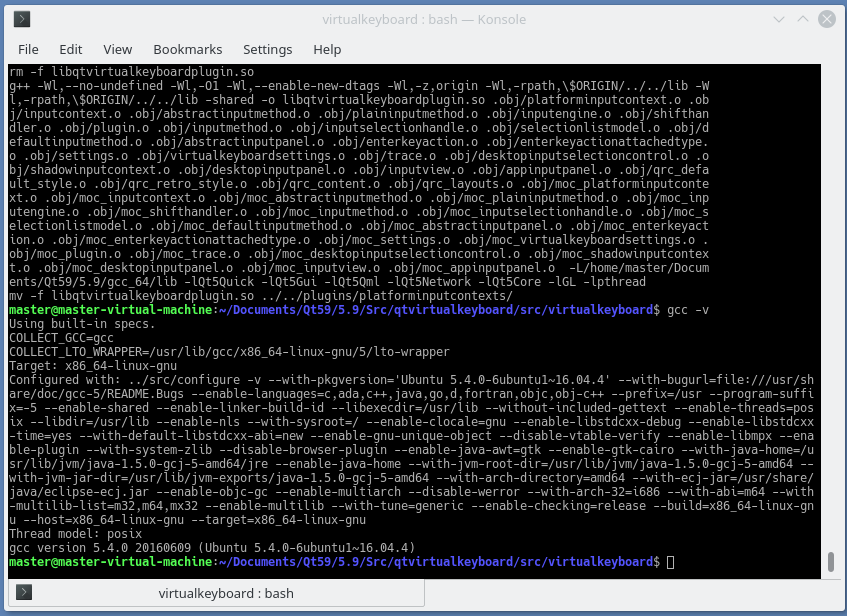
                I think it's related to gcc version.
                I just build virtual keyboard in Kde neon with gcc 5.4
                No errors.
                alt text

                1 Reply Last reply
                1
                • Pradeep KumarP Offline
                  Pradeep KumarP Offline
                  Pradeep Kumar
                  wrote on last edited by Pradeep Kumar
                  #14

                  Hi,

                  @mrjj ,

                  will try updating gcc, then compile qtvirtualkeyboard.
                  will keep updated.

                  @mrdebug ,
                  we need to try once updating gcc.

                  Thanks,

                  Pradeep Kumar
                  Qt,QML Developer

                  1 Reply Last reply
                  0
                  • Pradeep KumarP Offline
                    Pradeep KumarP Offline
                    Pradeep Kumar
                    wrote on last edited by Pradeep Kumar
                    #15

                    Hi,

                    @mrdebug

                    Install latest g++ and gcc versions and

                    Then u try to compile the qtvirtualkeyboard pluign

                    use qmake.
                    then make clean.
                    then make.
                    make install.
                    

                    Then run the program to launch to get virtual keyboard,
                    u will get the virtual keyboard.

                    Note:
                    I am unable to get to respective languages, i am trying it.
                    will keep updating or if u get the virtual keyboard in respective languages, please post the solution.

                    Thanks,

                    Pradeep Kumar
                    Qt,QML Developer

                    the_T 1 Reply Last reply
                    0
                    • Pradeep KumarP Pradeep Kumar

                      Hi,

                      @mrdebug

                      Install latest g++ and gcc versions and

                      Then u try to compile the qtvirtualkeyboard pluign

                      use qmake.
                      then make clean.
                      then make.
                      make install.
                      

                      Then run the program to launch to get virtual keyboard,
                      u will get the virtual keyboard.

                      Note:
                      I am unable to get to respective languages, i am trying it.
                      will keep updating or if u get the virtual keyboard in respective languages, please post the solution.

                      Thanks,

                      the_T Offline
                      the_T Offline
                      the_
                      wrote on last edited by
                      #16

                      @Pradeep-Kumar
                      did you read http://doc.qt.io/qt-5/qtvirtualkeyboard-build.html ?

                      you need to set CONFIG+=<language> in the .pro file of qvirtualkeyboard before you rebuild it.

                      -- No support in PM --

                      1 Reply Last reply
                      0

                      • Login

                      • Login or register to search.
                      • First post
                        Last post
                      0
                      • Categories
                      • Recent
                      • Tags
                      • Popular
                      • Users
                      • Groups
                      • Search
                      • Get Qt Extensions
                      • Unsolved