Skip to content
  • Categories
  • Recent
  • Tags
  • Popular
  • Users
  • Groups
  • Search
  • Get Qt Extensions
  • Unsolved
Collapse
Brand Logo
  1. Home
  2. Qt Development
  3. General and Desktop
  4. QtVirtualkeyboard
Qt 6.11 is out! See what's new in the release blog

QtVirtualkeyboard

Scheduled Pinned Locked Moved Unsolved General and Desktop
16 Posts 5 Posters 6.4k Views 4 Watching
  • Oldest to Newest
  • Newest to Oldest
  • Most Votes
Reply
  • Reply as topic
Log in to reply
This topic has been deleted. Only users with topic management privileges can see it.
  • Pradeep KumarP Offline
    Pradeep KumarP Offline
    Pradeep Kumar
    wrote on last edited by Pradeep Kumar
    #3

    Hi,

    @mrdebug

    Link :

    https://forum.qt.io/topic/79500/example-of-virtual-keyboard-showing-in-different-languages/29

    for how to get virtual keyboard in different languages, which was achieved n Windows platform and using Qt 5.8 and Qt 5.9 also.

    Still exploring in ubuntu.

    Provided the link for u coz i got the output in Windows using Qt 5.8, Qt 5.9, so it might be helpful for you.

    Thanks,

    Pradeep Kumar
    Qt,QML Developer

    1 Reply Last reply
    1
    • mrdebugM Offline
      mrdebugM Offline
      mrdebug
      wrote on last edited by
      #4

      So it is necessary to rebuild it.

      Need programmers to hire?
      www.labcsp.com
      www.denisgottardello.it
      GMT+1
      Skype: mrdebug

      1 Reply Last reply
      0
      • Pradeep KumarP Offline
        Pradeep KumarP Offline
        Pradeep Kumar
        wrote on last edited by
        #5

        yes.

        Thanks,

        Pradeep Kumar
        Qt,QML Developer

        1 Reply Last reply
        0
        • mrdebugM Offline
          mrdebugM Offline
          mrdebug
          wrote on last edited by
          #6

          Did on Windows. The keyboard works perfectly.
          But on Linux? I obtain this error:

          g++: error: unrecognized command line option ‘-std=c++1z’

          gcc --version
          gcc (Debian 4.9.2-10) 4.9.2

          Debian 8, 64 bit

          Need programmers to hire?
          www.labcsp.com
          www.denisgottardello.it
          GMT+1
          Skype: mrdebug

          jsulmJ the_T 2 Replies Last reply
          0
          • mrdebugM mrdebug

            Did on Windows. The keyboard works perfectly.
            But on Linux? I obtain this error:

            g++: error: unrecognized command line option ‘-std=c++1z’

            gcc --version
            gcc (Debian 4.9.2-10) 4.9.2

            Debian 8, 64 bit

            jsulmJ Offline
            jsulmJ Offline
            jsulm
            Lifetime Qt Champion
            wrote on last edited by
            #7

            @mrdebug Did you configure it from a clean state (without build artefacts from previous build)?

            https://forum.qt.io/topic/113070/qt-code-of-conduct

            1 Reply Last reply
            0
            • mrdebugM Offline
              mrdebugM Offline
              mrdebug
              wrote on last edited by
              #8

              Yes, tryied many times

              Need programmers to hire?
              www.labcsp.com
              www.denisgottardello.it
              GMT+1
              Skype: mrdebug

              1 Reply Last reply
              0
              • Pradeep KumarP Offline
                Pradeep KumarP Offline
                Pradeep Kumar
                wrote on last edited by
                #9

                Hi,

                @mrdebug

                let me know, if u have a break through.
                When u get the solution,

                Thanks,

                Pradeep Kumar
                Qt,QML Developer

                1 Reply Last reply
                0
                • mrdebugM mrdebug

                  Did on Windows. The keyboard works perfectly.
                  But on Linux? I obtain this error:

                  g++: error: unrecognized command line option ‘-std=c++1z’

                  gcc --version
                  gcc (Debian 4.9.2-10) 4.9.2

                  Debian 8, 64 bit

                  the_T Offline
                  the_T Offline
                  the_
                  wrote on last edited by the_
                  #10

                  @mrdebug
                  I am not 100% sure if gcc4.9 already supports c++1z
                  what happens if you change it to c++11 ?(this standard is supported by that 'old' gcc version ;) )

                  edit
                  c++14 seems to be only partly supported by gcc4.9
                  see http://en.cppreference.com/w/cpp/compiler_support

                  -- No support in PM --

                  1 Reply Last reply
                  0
                  • mrdebugM Offline
                    mrdebugM Offline
                    mrdebug
                    wrote on last edited by
                    #11

                    Maybe it is necessary to send a bug report to the QtVirtualkeyboard developers.

                    Need programmers to hire?
                    www.labcsp.com
                    www.denisgottardello.it
                    GMT+1
                    Skype: mrdebug

                    1 Reply Last reply
                    0
                    • Pradeep KumarP Offline
                      Pradeep KumarP Offline
                      Pradeep Kumar
                      wrote on last edited by
                      #12

                      Hi,

                      Should wait for some days, and then file it, coz we need to try or may be someone has tried and have the solution, lets us try and wait for the solution.

                      Thanks,

                      Pradeep Kumar
                      Qt,QML Developer

                      1 Reply Last reply
                      0
                      • mrjjM Offline
                        mrjjM Offline
                        mrjj
                        Lifetime Qt Champion
                        wrote on last edited by
                        #13

                        Hi
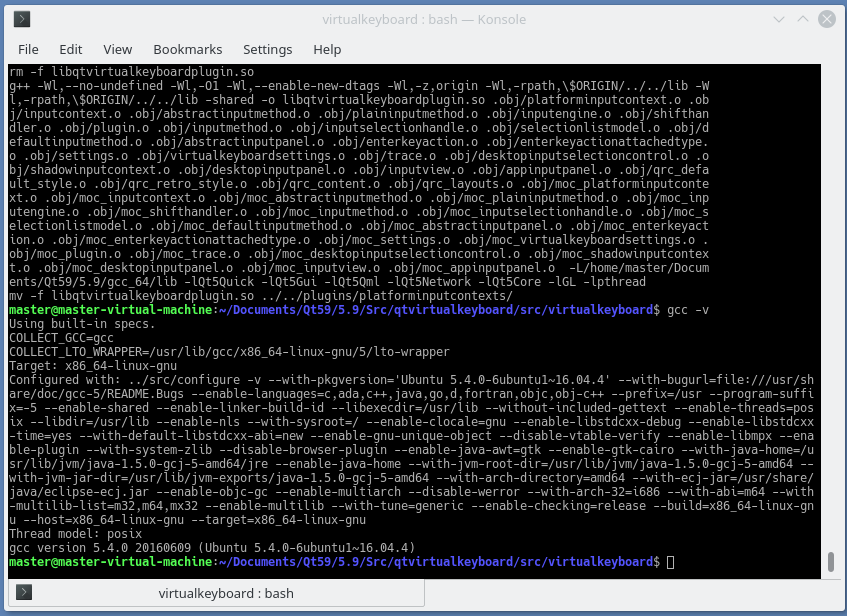
                        I think it's related to gcc version.
                        I just build virtual keyboard in Kde neon with gcc 5.4
                        No errors.
                        alt text

                        1 Reply Last reply
                        1
                        • Pradeep KumarP Offline
                          Pradeep KumarP Offline
                          Pradeep Kumar
                          wrote on last edited by Pradeep Kumar
                          #14

                          Hi,

                          @mrjj ,

                          will try updating gcc, then compile qtvirtualkeyboard.
                          will keep updated.

                          @mrdebug ,
                          we need to try once updating gcc.

                          Thanks,

                          Pradeep Kumar
                          Qt,QML Developer

                          1 Reply Last reply
                          0
                          • Pradeep KumarP Offline
                            Pradeep KumarP Offline
                            Pradeep Kumar
                            wrote on last edited by Pradeep Kumar
                            #15

                            Hi,

                            @mrdebug

                            Install latest g++ and gcc versions and

                            Then u try to compile the qtvirtualkeyboard pluign

                            use qmake.
                            then make clean.
                            then make.
                            make install.
                            

                            Then run the program to launch to get virtual keyboard,
                            u will get the virtual keyboard.

                            Note:
                            I am unable to get to respective languages, i am trying it.
                            will keep updating or if u get the virtual keyboard in respective languages, please post the solution.

                            Thanks,

                            Pradeep Kumar
                            Qt,QML Developer

                            the_T 1 Reply Last reply
                            0
                            • Pradeep KumarP Pradeep Kumar

                              Hi,

                              @mrdebug

                              Install latest g++ and gcc versions and

                              Then u try to compile the qtvirtualkeyboard pluign

                              use qmake.
                              then make clean.
                              then make.
                              make install.
                              

                              Then run the program to launch to get virtual keyboard,
                              u will get the virtual keyboard.

                              Note:
                              I am unable to get to respective languages, i am trying it.
                              will keep updating or if u get the virtual keyboard in respective languages, please post the solution.

                              Thanks,

                              the_T Offline
                              the_T Offline
                              the_
                              wrote on last edited by
                              #16

                              @Pradeep-Kumar
                              did you read http://doc.qt.io/qt-5/qtvirtualkeyboard-build.html ?

                              you need to set CONFIG+=<language> in the .pro file of qvirtualkeyboard before you rebuild it.

                              -- No support in PM --

                              1 Reply Last reply
                              0

                              • Login

                              • Login or register to search.
                              • First post
                                Last post
                              0
                              • Categories
                              • Recent
                              • Tags
                              • Popular
                              • Users
                              • Groups
                              • Search
                              • Get Qt Extensions
                              • Unsolved