
Skip to content
  • Categories
  • Recent
  • Tags
  • Popular
  • Users
  • Groups
  • Search
  • Get Qt Extensions
  • Unsolved
Collapse
Brand Logo
  1. Home
  2. Qt Development
  3. Mobile and Embedded
  4. Responsive design for mobile app

Responsive design for mobile app

Scheduled Pinned Locked Moved Unsolved Mobile and Embedded
5 Posts 3 Posters 1.3k Views 2 Watching
  • Oldest to Newest
  • Newest to Oldest
  • Most Votes
Reply
  • Reply as topic
Log in to reply
This topic has been deleted. Only users with topic management privileges can see it.
  • C Offline
    C Offline
    Clody21
    wrote on last edited by
    #1

    Hello I would like to know how to set up a responsive layout on mobile devices (Android, Ios).
    I'm implementing a login page, so with a box that needs to be centered and with two input texts and one key, I can not figure out the size of the phone (portrait, landscape).
    Does anyone have an example, or can they indicate a technique?

    Thank you

    mrjjM 1 Reply Last reply
    0
    • C Clody21

      Hello I would like to know how to set up a responsive layout on mobile devices (Android, Ios).
      I'm implementing a login page, so with a box that needs to be centered and with two input texts and one key, I can not figure out the size of the phone (portrait, landscape).
      Does anyone have an example, or can they indicate a technique?

      Thank you

      mrjjM Offline
      mrjjM Offline
      mrjj
      Lifetime Qt Champion
      wrote on last edited by
      #2

      @Clody21

      Hi
      Try
      QRect rect = qApp->primaryScreen()->geometry();

      and see what it reports ? ( to find size)

      1 Reply Last reply
      0
      • C Offline
        C Offline
        Clody21
        wrote on last edited by Clody21
        #3

        I do not know where to place this code, i have imported QtWidget

        Thank you @mrjj

        mrjjM 1 Reply Last reply
        0
        • C Clody21

          I do not know where to place this code, i have imported QtWidget

          Thank you @mrjj

          mrjjM Offline
          mrjjM Offline
          mrjj
          Lifetime Qt Champion
          wrote on last edited by
          #4

          @Clody21
          Im not sure i understand.
          Inside your mainwindow widget or any other place that gets run.

          " imported QtWidget"

          is this QML ?

          1 Reply Last reply
          0
          • GTDevG Offline
            GTDevG Offline
            GTDev
            wrote on last edited by GTDev
            #5

            Hi,
            You might want to take a look at V-Play Engine for QML-based mobile apps and games. V-Play offers many components for creating cross-platform apps that automatically adapt their layout and UI to match the native iOS and Android user experience.

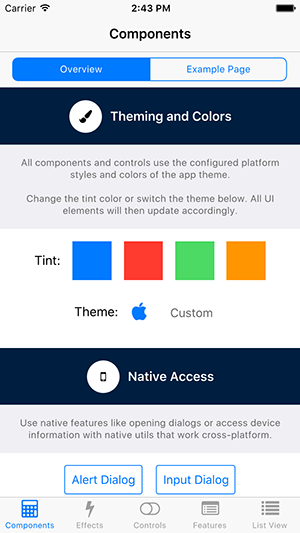
            V-Play comes with many open-source examples and project templates you can use as reference (there's also a template for a simple login-page). For an overview of the most important features, you can have a look at the Component Showcase demo:
            alt text

            To quickly learn the basic concepts you can have a look at some tutorials, for example Supporting Multiple Screens Sizes and Densities with V-Play Apps.

            Hope this helps!

            Best,
            Günther

            Senior Developer at Felgo - https://felgo.com/qt

            Develop mobile Apps for iOS & Android with Qt
            Felgo is an official Qt Technology Partner

            1 Reply Last reply
            2

            • Login

            • Login or register to search.
            • First post
              Last post
            0
            • Categories
            • Recent
            • Tags
            • Popular
            • Users
            • Groups
            • Search
            • Get Qt Extensions
            • Unsolved