Skip to content
  • Categories
  • Recent
  • Tags
  • Popular
  • Users
  • Groups
  • Search
  • Get Qt Extensions
  • Unsolved
Collapse
Brand Logo
  1. Home
  2. Qt Development
  3. General and Desktop
  4. Layout issues
Forum Updated to NodeBB v4.3 + New Features

Layout issues

Scheduled Pinned Locked Moved Solved General and Desktop
46 Posts 6 Posters 18.2k Views 2 Watching
  • Oldest to Newest
  • Newest to Oldest
  • Most Votes
Reply
  • Reply as topic
Log in to reply
This topic has been deleted. Only users with topic management privileges can see it.
  • J.HilkJ J.Hilk

    @Cobra91151 you're right, its becaus eof the buttons

    To continue with your current solution:

    Pack all "Top VBoxLayouts" into a HBoxlayout and add that layout with the appSettingsButtonLayout to a VBoxLayout.

    Cobra91151C Offline
    Cobra91151C Offline
    Cobra91151
    wrote on last edited by Cobra91151
    #37

    @J.Hilk

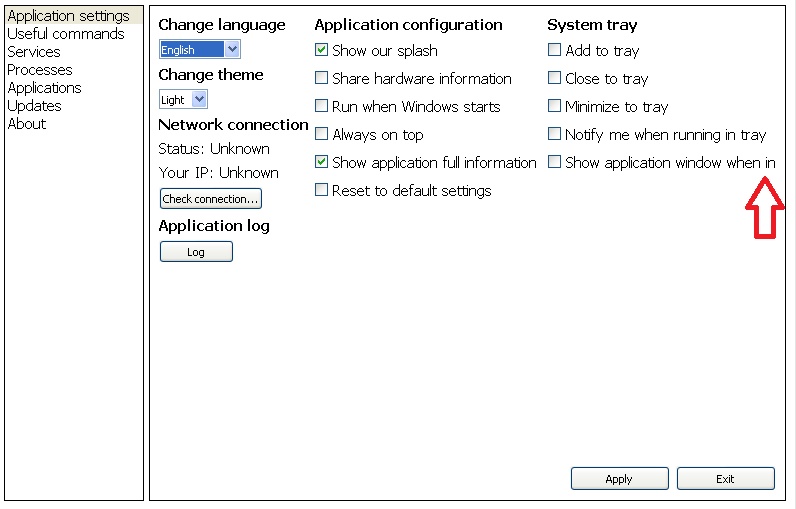
    Thank you very much. One more bug:

    alt text

    These issues is also when changing languages.

    Current font:
    I use default font - MS Shell Dlg 2 with setPixelSize(15);

    Maybe I need to set another font? What font is suitable for windows app development?

    jsulmJ 1 Reply Last reply
    0
    • Cobra91151C Cobra91151

      @J.Hilk

      Thank you very much. One more bug:

      alt text

      These issues is also when changing languages.

      Current font:
      I use default font - MS Shell Dlg 2 with setPixelSize(15);

      Maybe I need to set another font? What font is suitable for windows app development?

      jsulmJ Offline
      jsulmJ Offline
      jsulm
      Lifetime Qt Champion
      wrote on last edited by
      #38

      @Cobra91151 I would say this isn't a bug - there is just not enough space for this long check box text. You should use two columns instead of three.

      https://forum.qt.io/topic/113070/qt-code-of-conduct

      Cobra91151C 1 Reply Last reply
      0
      • jsulmJ jsulm

        @Cobra91151 I would say this isn't a bug - there is just not enough space for this long check box text. You should use two columns instead of three.

        Cobra91151C Offline
        Cobra91151C Offline
        Cobra91151
        wrote on last edited by Cobra91151
        #39

        @jsulm

        This is not an option. I need three columns.

        jsulmJ J.HilkJ 2 Replies Last reply
        0
        • Cobra91151C Cobra91151

          @jsulm

          This is not an option. I need three columns.

          jsulmJ Offline
          jsulmJ Offline
          jsulm
          Lifetime Qt Champion
          wrote on last edited by
          #40

          @Cobra91151 Then you need more space, or smaller font, or shorter text...

          https://forum.qt.io/topic/113070/qt-code-of-conduct

          Cobra91151C 1 Reply Last reply
          0
          • jsulmJ jsulm

            @Cobra91151 Then you need more space, or smaller font, or shorter text...

            Cobra91151C Offline
            Cobra91151C Offline
            Cobra91151
            wrote on last edited by
            #41

            @jsulm

            Ok. So what font family do you suggest to be suitable for windows app development?

            A jsulmJ 2 Replies Last reply
            0
            • Cobra91151C Cobra91151

              @jsulm

              Ok. So what font family do you suggest to be suitable for windows app development?

              A Offline
              A Offline
              ambershark
              wrote on last edited by ambershark
              #42

              @Cobra91151 Instead of lowering your font, why don't use just use your space better?

              You can use 1 column for instance with separators or group boxes to denote different sections. You could use 2 columns.

              One of the easiest changes that would solve your problems is getting rid of the listbox on the left and making those tabs on the top. Same effect, literally saves 25% of your horizontal space.

              Also I noticed you are using addStretch now in places where I think you meant to use addSpacing. Stretch are growable blocks with a minimum size of the number you pass in. So 1 is usually plenty for a stretch, even 0 is fine (the default). If you want controllable spacing you want to use addSpacing().

              My L-GPL'd C++ Logger github.com/ambershark-mike/sharklog

              1 Reply Last reply
              1
              • Cobra91151C Cobra91151

                @jsulm

                Ok. So what font family do you suggest to be suitable for windows app development?

                jsulmJ Offline
                jsulmJ Offline
                jsulm
                Lifetime Qt Champion
                wrote on last edited by
                #43

                @Cobra91151 I will not suggest any fonts. You should use the default. You should really consider to change your layout instead of hacking around with fonts until it somehow fits.

                https://forum.qt.io/topic/113070/qt-code-of-conduct

                1 Reply Last reply
                1
                • Cobra91151C Cobra91151

                  @jsulm

                  This is not an option. I need three columns.

                  J.HilkJ Offline
                  J.HilkJ Offline
                  J.Hilk
                  Moderators
                  wrote on last edited by
                  #44

                  @Cobra91151

                  Personally, when I'm in a situation like you are, I go with a clipped Text and an info tooltip.

                  Here an example for a QLabel:

                  void setTextToLabel(QLabel *label, const QString text)
                      {
                          QFontMetrics metrix(label->font());
                          int width = label->width() - 2;
                          QString clippedText = metrix.elidedText(text, Qt::ElideRight, width);
                          label->setText(clippedText);
                  
                         if(text == clippedText)
                            label->setToolTip("");
                         else
                            label->setToolTip(text);
                      }
                  

                  Be aware of the Qt Code of Conduct, when posting : https://forum.qt.io/topic/113070/qt-code-of-conduct


                  Q: What's that?
                  A: It's blue light.
                  Q: What does it do?
                  A: It turns blue.

                  Cobra91151C 2 Replies Last reply
                  0
                  • J.HilkJ J.Hilk

                    @Cobra91151

                    Personally, when I'm in a situation like you are, I go with a clipped Text and an info tooltip.

                    Here an example for a QLabel:

                    void setTextToLabel(QLabel *label, const QString text)
                        {
                            QFontMetrics metrix(label->font());
                            int width = label->width() - 2;
                            QString clippedText = metrix.elidedText(text, Qt::ElideRight, width);
                            label->setText(clippedText);
                    
                           if(text == clippedText)
                              label->setToolTip("");
                           else
                              label->setToolTip(text);
                        }
                    
                    Cobra91151C Offline
                    Cobra91151C Offline
                    Cobra91151
                    wrote on last edited by
                    #45

                    @J.Hilk

                    Thanks for the suggestion. I will try it and reply.

                    1 Reply Last reply
                    0
                    • J.HilkJ J.Hilk

                      @Cobra91151

                      Personally, when I'm in a situation like you are, I go with a clipped Text and an info tooltip.

                      Here an example for a QLabel:

                      void setTextToLabel(QLabel *label, const QString text)
                          {
                              QFontMetrics metrix(label->font());
                              int width = label->width() - 2;
                              QString clippedText = metrix.elidedText(text, Qt::ElideRight, width);
                              label->setText(clippedText);
                      
                             if(text == clippedText)
                                label->setToolTip("");
                             else
                                label->setToolTip(text);
                          }
                      
                      Cobra91151C Offline
                      Cobra91151C Offline
                      Cobra91151
                      wrote on last edited by
                      #46

                      @J.Hilk

                      Thanks. I have modified your function to get not only QLabel but all QWidgets . I post it here so others can find a solution.

                      Code:

                      QString clipWidgetText(QWidget *widget, const QString widgetText, int subtractPixelSize)
                      {
                          QFontMetrics fontMetrics(widget->font());
                          int widgetWidth = widget->width() - subtractPixelSize;
                          QString clippedText = fontMetrics.elidedText(widgetText, Qt::ElideRight, widgetWidth);
                          return clippedText;
                      }
                      

                      Usage:

                      QCheckBox *checkBox1 = new QCheckBox("Some long text", this)
                      checkBox1->setText(clipWidgetText(checkBox1, checkBox1->text(), 5);
                      

                      Thanks to all. I have fixed all layout issues.

                      1 Reply Last reply
                      0

                      • Login

                      • Login or register to search.
                      • First post
                        Last post
                      0
                      • Categories
                      • Recent
                      • Tags
                      • Popular
                      • Users
                      • Groups
                      • Search
                      • Get Qt Extensions
                      • Unsolved