
Skip to content
  • Categories
  • Recent
  • Tags
  • Popular
  • Users
  • Groups
  • Search
  • Get Qt Extensions
  • Unsolved
Collapse
Brand Logo
  1. Home
  2. Qt Development
  3. General and Desktop
  4. Picture
Qt 6.11 is out! See what's new in the release blog

Picture

Scheduled Pinned Locked Moved Solved General and Desktop
82 Posts 7 Posters 157.2k Views 3 Watching
  • Oldest to Newest
  • Newest to Oldest
  • Most Votes
Reply
  • Reply as topic
Log in to reply
This topic has been deleted. Only users with topic management privileges can see it.
  • P Offline
    P Offline
    Payx
    wrote on last edited by
    #65

    I try to change the rectSize with 100 x 100.

    my first function is :

    void MainWindow::on_push_clicked()
    {
    	QString fileName = QFileDialog::getOpenFileName(this,
    	tr("Open Image"), "/", tr("Image Files (*.png *.jpg *.bmp)"));
    	QPixmap pix(fileName);
    	ui->label->setPixmap(pix);
    	const QSize s = pix.size();
    	QImage pixi = QImage(pix.toImage());
    
    	ui->label_2->setText( "Size: " + QString::number(s.width()) +" "+ QString::number(s.height()) );
    
    }
    

    It load an image with an explorer file.

    But the picture dont change at all when i click on the push2

    1 Reply Last reply
    0
    • VRoninV Offline
      VRoninV Offline
      VRonin
      wrote on last edited by VRonin
      #66

      I did not say you were done, just that you were on the right path.

      from the code you posted it's clear you did not grasp scoping 100% so i'll repost the link: http://www.cplusplus.com/doc/tutorial/namespaces/#scopes

      pix and pixi die as soon as MainWindow::on_push_clicked() terminates

      "La mort n'est rien, mais vivre vaincu et sans gloire, c'est mourir tous les jours"
      ~Napoleon Bonaparte

      On a crusade to banish setIndexWidget() from the holy land of Qt

      P 1 Reply Last reply
      0
      • VRoninV VRonin

        I did not say you were done, just that you were on the right path.

        from the code you posted it's clear you did not grasp scoping 100% so i'll repost the link: http://www.cplusplus.com/doc/tutorial/namespaces/#scopes

        pix and pixi die as soon as MainWindow::on_push_clicked() terminates

        P Offline
        P Offline
        Payx
        wrote on last edited by
        #67

        @VRonin Yes but in my .h i add QImage pixi thats not correct?

        1 Reply Last reply
        0
        • VRoninV Offline
          VRoninV Offline
          VRonin
          wrote on last edited by
          #68

          I'm surprised your compiler doesn't yell about redefinition (I probably know why but that's not the point here). I'send you to http://www.cplusplus.com/doc/tutorial/namespaces/#scopes once again

          "La mort n'est rien, mais vivre vaincu et sans gloire, c'est mourir tous les jours"
          ~Napoleon Bonaparte

          On a crusade to banish setIndexWidget() from the holy land of Qt

          kshegunovK P 2 Replies Last reply
          0
          • VRoninV VRonin

            I'm surprised your compiler doesn't yell about redefinition (I probably know why but that's not the point here). I'send you to http://www.cplusplus.com/doc/tutorial/namespaces/#scopes once again

            kshegunovK Offline
            kshegunovK Offline
            kshegunov
            Moderators
            wrote on last edited by
            #69

            @VRonin said in Picture:

            I'm surprised your compiler doesn't yell about redefinition

            Not redefinition, shadowing, hence no yelling. :)

            Read and abide by the Qt Code of Conduct

            VRoninV 1 Reply Last reply
            2
            • kshegunovK kshegunov

              @VRonin said in Picture:

              I'm surprised your compiler doesn't yell about redefinition

              Not redefinition, shadowing, hence no yelling. :)

              VRoninV Offline
              VRoninV Offline
              VRonin
              wrote on last edited by
              #70

              @kshegunov said in Picture:

              shadowing

              The case @kshegunov is explaining is in the 3rd code block of the link above:

              // inner block scopes
              #include <iostream>
              using namespace std;
              
              int main () {
                int x = 10;
                int y = 20;
                {
                  int x;   // ok, inner scope.
                  x = 50;  // sets value to inner x
                  y = 50;  // sets value to (outer) y
                  cout << "inner block:\n";
                  cout << "x: " << x << '\n';
                  cout << "y: " << y << '\n';
                }
                cout << "outer block:\n";
                cout << "x: " << x << '\n';
                cout << "y: " << y << '\n';
                return 0;
              }
              

              This means I should go back to that tutorial myself

              "La mort n'est rien, mais vivre vaincu et sans gloire, c'est mourir tous les jours"
              ~Napoleon Bonaparte

              On a crusade to banish setIndexWidget() from the holy land of Qt

              1 Reply Last reply
              2
              • VRoninV VRonin

                I'm surprised your compiler doesn't yell about redefinition (I probably know why but that's not the point here). I'send you to http://www.cplusplus.com/doc/tutorial/namespaces/#scopes once again

                P Offline
                P Offline
                Payx
                wrote on last edited by
                #71

                @VRonin so if i want use my picture in an other function i have to declare it before my function as i did for

                QColor dominantColor(const QImage& image, const QPoint& topLeft, const QSize& rectSize);

                so i have to add a line code QImage pixi in my .cpp ?

                why not in my .h, and why

                QColor dominantColor
                

                dont work in my .h too ?

                1 Reply Last reply
                0
                • VRoninV Offline
                  VRoninV Offline
                  VRonin
                  wrote on last edited by
                  #72

                  Ok, this has become too chatty, let's make it more structured before we both get banned.

                  • Put dominantColor and fillSection code from either me or @mrjj at the top of your .cpp file, just below the #includes no need to declare them in advance in this case
                  • in the private: section of your .h file add QImage m_baseImag;
                  • in on_push_clicked load the image from file and store it in m_baseImag then use QPixmap::fromImage(m_baseImag) to display the image in the QLabel
                  • in on_push2_clicked iterate over every 4x4 square of your picture calling the two functions:
                  for (int i=0;i<m_baseImag.width();i+=4){
                             for (int j=0;j<m_baseImag.height();j+=4){
                  fillSection(m_baseImag,QPoint(i,j),QSize(4,4),dominantColour(m_baseImag,QPoint(i,j),QSize(4,4)));
                  }}
                  
                  • use QPixmap::fromImage(m_baseImag) to display the new image in another QLabel

                  "La mort n'est rien, mais vivre vaincu et sans gloire, c'est mourir tous les jours"
                  ~Napoleon Bonaparte

                  On a crusade to banish setIndexWidget() from the holy land of Qt

                  1 Reply Last reply
                  1
                  • P Offline
                    P Offline
                    Payx
                    wrote on last edited by Payx
                    #73

                    Hello,

                    I have 0 error but it didn't work.

                    here my code

                    void MainWindow::on_push_clicked()
                    {
                    	QString fileName = QFileDialog::getOpenFileName(this,
                    	tr("Open Image"), "/", tr("Image Files (*.png *.jpg *.bmp)"));
                    	QPixmap pix(fileName);
                    	ui->label->setPixmap(pix);
                    	const QSize s = pix.size();
                    	QImage pixi = QImage(pix.toImage());


                    }
                    
                    void MainWindow::on_push2_clicked()
                    {
                    	QPoint point(0,0);
                    	QSize size(4,4);
                    	for(int i=0;i<pixi.width();i+=4){
                    		for(int j=0;j<pixi.height();j+=4){
                    			fillSection(pixi,point,size,dominantColor(pixi,point,size));
                    		}
                    	}
                    
                    	QPixmap pixa=QPixmap::fromImage(pixi);
                    
                    	ui->label_2->setPixmap(pixa);
                    }
                    

                    In my .h i declared

                    private:
                       Ui::MainWindow *ui;
                       QImage pixi;
                    

                    pixi is the name of my picture (= m_baseImag)

                    i display pixa (Qpix from pixi) in the same label as pixi (dont know if i can do that)

                    1 Reply Last reply
                    0
                    • mrjjM Offline
                      mrjjM Offline
                      mrjj
                      Lifetime Qt Champion
                      wrote on last edited by
                      #74

                      Hi
                      Good work.
                      in here
                      void MainWindow::on_push_clicked()
                      {
                      ......
                      QImage pixi = QImage(pix.toImage()); // This looks like a local variable? ( die by scope)
                      }

                      Did you mean to use the one from .H ?

                      so
                      pixi = QImage(pix.toImage());

                      1 Reply Last reply
                      1
                      • P Offline
                        P Offline
                        Payx
                        wrote on last edited by
                        #75

                        i changed my code by using pixi = QImage(pix.toImage());

                        and in my .h i got QImage pixi.

                        I try to fix my rectSize to 15x15

                        And my picture at the end is the same, she changed a little (she got a blue pixel in the top left

                        1 Reply Last reply
                        0
                        • VRoninV Offline
                          VRoninV Offline
                          VRonin
                          wrote on last edited by
                          #76

                          you never update point in your loop. it's always 0,0 it should be i,j

                          "La mort n'est rien, mais vivre vaincu et sans gloire, c'est mourir tous les jours"
                          ~Napoleon Bonaparte

                          On a crusade to banish setIndexWidget() from the holy land of Qt

                          P 1 Reply Last reply
                          2
                          • VRoninV VRonin

                            you never update point in your loop. it's always 0,0 it should be i,j

                            P Offline
                            P Offline
                            Payx
                            wrote on last edited by Payx
                            #77
                            This post is deleted!
                            1 Reply Last reply
                            0
                            • P Offline
                              P Offline
                              Payx
                              wrote on last edited by
                              #78

                              Ok after long hours, i fixed it.

                              Thank you very much for your time in my project.

                              But i have a little question :

                              In the code it only returns Red, Blue or Green.

                              Do you have a function who return a lot of color, like if in my rect the most principal color is grey (for example) what could i do to add a lot of color ?

                              At the end i will have a picture more pixelated but that i can recognize

                              kshegunovK 1 Reply Last reply
                              0
                              • mrjjM Offline
                                mrjjM Offline
                                mrjj
                                Lifetime Qt Champion
                                wrote on last edited by
                                #79

                                Hi

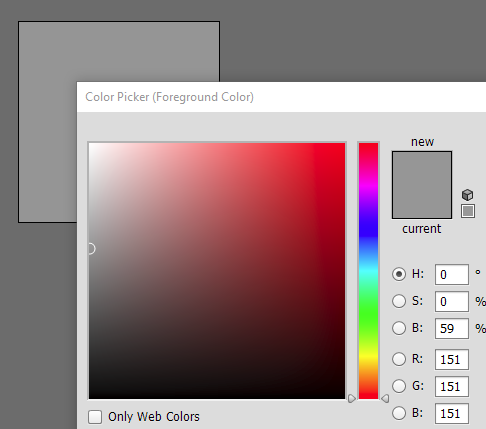
                                • if in my rect the most principal color is grey

                                That is just values for R,G,B. still.
                                1 Reply Last reply
                                1
                                • VRoninV Offline
                                  VRoninV Offline
                                  VRonin
                                  wrote on last edited by VRonin
                                  #80

                                  Modify dominantColour with this one. It takes the most frequent colour that appears in the square and fills it with it

                                  QColor dominantColour(const QImage& image,const QPoint& topLeft, const QSize& rectSize){
                                  	const int maxRight = qMin(image.width(),topLeft.x() + rectSize.width());
                                  	const int maxBottom = qMin(image.height(),topLeft.y() + rectSize.height());
                                  	QHash<QColor,int> colourMap;
                                  	for(int x=topLeft.x();x<maxRight;++x){
                                  		for(int y=topLeft.y();y<maxBottom;++y){
                                  			const QColor tempColor=image.pixelColor(x,y);
                                  			auto colourIter=colourMap.find(tempColor);
                                  			if(colourIter==colourMap.end())
                                  				colourMap.insert(tempColor,1);
                                  			else
                                  				colourIter.value()++;
                                  		}
                                  	}
                                  	if(colourMap.isEmpty())
                                  		return Qt::black;
                                  	return std::max_element(colourMap.constBegin(),colourMap.constEnd()).key();
                                  }
                                  

                                  "La mort n'est rien, mais vivre vaincu et sans gloire, c'est mourir tous les jours"
                                  ~Napoleon Bonaparte

                                  On a crusade to banish setIndexWidget() from the holy land of Qt

                                  1 Reply Last reply
                                  1
                                  • P Payx

                                    Ok after long hours, i fixed it.

                                    Thank you very much for your time in my project.

                                    But i have a little question :

                                    In the code it only returns Red, Blue or Green.

                                    Do you have a function who return a lot of color, like if in my rect the most principal color is grey (for example) what could i do to add a lot of color ?

                                    At the end i will have a picture more pixelated but that i can recognize

                                    kshegunovK Offline
                                    kshegunovK Offline
                                    kshegunov
                                    Moderators
                                    wrote on last edited by
                                    #81

                                    I suggest you average the color in the rectangle, e.g. (thanks to @VRonin for the scaffolding):

                                    QColor dominantColour(const QImage & image,const QPoint & topLeft, const QSize & rectSize)
                                    {
                                        qint32 averageRed = 0, averageGreen = 0, averageBlue = 0;
                                    
                                        const qint32 maxX = qMin<qint32>(image.width(), topLeft.x() + rectSize.width());
                                        const qint32 maxY = qMin<qint32>(image.height(), topLeft.y() + rectSize.height());
                                        for (qint32 y = topLeft.y(); y < maxY; y++)  {
                                            for (qint32 x = topLeft.x(); x < maxX; x++)   {
                                                QRgb pixel = image.pixel(x, y);
                                                
                                                averageRed += qRed(pixel);
                                                averageGreen += qGreen(pixel);
                                                averageBlue += qBlue(pixel);
                                            }
                                        }
                                    
                                        qint32 n = rectSize.width() * rectSize.height();
                                    
                                        Q_ASSERT(n);
                                        if (n <= 0)
                                            return Qt::black;
                                    
                                        return QColor(averageRed / n, averageGreen / n, averageBlue / n);
                                    }
                                    

                                    Read and abide by the Qt Code of Conduct

                                    1 Reply Last reply
                                    1
                                    • P Offline
                                      P Offline
                                      Payx
                                      wrote on last edited by
                                      #82

                                      Thank you very much !

                                      1 Reply Last reply
                                      0

                                      • Login

                                      • Login or register to search.
                                      • First post
                                        Last post
                                      0
                                      • Categories
                                      • Recent
                                      • Tags
                                      • Popular
                                      • Users
                                      • Groups
                                      • Search
                                      • Get Qt Extensions
                                      • Unsolved