
Skip to content
  • Categories
  • Recent
  • Tags
  • Popular
  • Users
  • Groups
  • Search
  • Get Qt
  • Unsolved
Collapse
qtws26_logo

The Qt Event of the Year: Qt World Summit 2026

Save Your Spot >
Brand Logo
  1. Home
  2. Qt Development
  3. General and Desktop
  4. Line graph Plot in Qdialog
Qt 6.12 LTS is out! See what's new in the release blog

Line graph Plot in Qdialog

Scheduled Pinned Locked Moved Unsolved General and Desktop
16 Posts 4 Posters 8.0k Views 2 Watching
  • Oldest to Newest
  • Newest to Oldest
  • Most Votes
Reply
  • Reply as topic
Log in to reply
This topic has been deleted. Only users with topic management privileges can see it.
  • MeenuM Meenu

    Error QtCharts/QChartView: No such file or directory. Can i install QtChart Separately. I'm using QT Creator 3.5.1 based on QT 5.6.0(GCC 5.3.1 20160413, 32 bit). I was seen this example from Google. but i don't know how to implement. Kindly explain step by step.

    ? Offline
    ? Offline
    A Former User
    wrote on last edited by
    #4

    @Meenu It's an add-on module and should be provided by Ubuntu's package manager.

    1 Reply Last reply
    0
    • MeenuM Offline
      MeenuM Offline
      Meenu
      wrote on last edited by
      #5

      how to add manually

      ? 2 Replies Last reply
      0
      • MeenuM Meenu

        how to add manually

        ? Offline
        ? Offline
        A Former User
        wrote on last edited by
        #6

        @Meenu package manager

        1 Reply Last reply
        0
        • MeenuM Meenu

          Error QtCharts/QChartView: No such file or directory. Can i install QtChart Separately. I'm using QT Creator 3.5.1 based on QT 5.6.0(GCC 5.3.1 20160413, 32 bit). I was seen this example from Google. but i don't know how to implement. Kindly explain step by step.

          mrjjM Offline
          mrjjM Offline
          mrjj
          Lifetime Qt Champion
          wrote on last edited by mrjj
          #7

          @Meenu
          hi
          if u only need something really simple. ( ie no zoom etc)
          you can also just draw on an image and show in a Label.
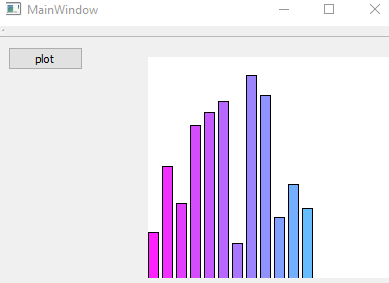
          alternate text

          test project
          https://www.dropbox.com/s/qwde8lb0fkjrrh3/mycheapgraph.zip?dl=0

          its few lines of code

          int GetBarHeight(int MAX) {
          return rand() % (MAX - 5) + 5;
          }

          void MainWindow::on_pushButton_released() {
            int h = ui->label->height();
            int w = ui->label->width();
            QPixmap pix(w, h);
            QPainter paint(&pix);
            pix.fill( Qt::white );
            paint.setPen(QColor(0, 0, 0, 255));
            int y = 0;
            int x = 0;
            int bw = 10; // bar width
            for (int barcount = 0; barcount < 12; ++barcount) {
              paint.setBrush(QColor(255 - x, 34 + x, 255, 255));
              paint.drawRect(x, h - GetBarHeight(h),  bw, h );
              x += bw + 4;
            }
            paint.end();
            ui->label->setPixmap(pix);
          }
          
          ? MeenuM 2 Replies Last reply
          0
          • mrjjM mrjj

            @Meenu
            hi
            if u only need something really simple. ( ie no zoom etc)
            you can also just draw on an image and show in a Label.

            alternate text

            test project
            https://www.dropbox.com/s/qwde8lb0fkjrrh3/mycheapgraph.zip?dl=0

            its few lines of code

            int GetBarHeight(int MAX) {
            return rand() % (MAX - 5) + 5;
            }

            void MainWindow::on_pushButton_released() {
              int h = ui->label->height();
              int w = ui->label->width();
              QPixmap pix(w, h);
              QPainter paint(&pix);
              pix.fill( Qt::white );
              paint.setPen(QColor(0, 0, 0, 255));
              int y = 0;
              int x = 0;
              int bw = 10; // bar width
              for (int barcount = 0; barcount < 12; ++barcount) {
                paint.setBrush(QColor(255 - x, 34 + x, 255, 255));
                paint.drawRect(x, h - GetBarHeight(h),  bw, h );
                x += bw + 4;
              }
              paint.end();
              ui->label->setPixmap(pix);
            }
            
            ? Offline
            ? Offline
            A Former User
            wrote on last edited by
            #8

            @mrjj Nice color gradient ;-)

            1 Reply Last reply
            1
            • MeenuM Meenu

              how to add manually

              ? Offline
              ? Offline
              A Former User
              wrote on last edited by
              #9

              @Meenu This might help you with Ubuntu's package manager: https://help.ubuntu.com/lts/serverguide/apt.html

              MeenuM 1 Reply Last reply
              1
              • mrjjM mrjj

                @Meenu
                hi
                if u only need something really simple. ( ie no zoom etc)
                you can also just draw on an image and show in a Label.

                alternate text

                test project
                https://www.dropbox.com/s/qwde8lb0fkjrrh3/mycheapgraph.zip?dl=0

                its few lines of code

                int GetBarHeight(int MAX) {
                return rand() % (MAX - 5) + 5;
                }

                void MainWindow::on_pushButton_released() {
                  int h = ui->label->height();
                  int w = ui->label->width();
                  QPixmap pix(w, h);
                  QPainter paint(&pix);
                  pix.fill( Qt::white );
                  paint.setPen(QColor(0, 0, 0, 255));
                  int y = 0;
                  int x = 0;
                  int bw = 10; // bar width
                  for (int barcount = 0; barcount < 12; ++barcount) {
                    paint.setBrush(QColor(255 - x, 34 + x, 255, 255));
                    paint.drawRect(x, h - GetBarHeight(h),  bw, h );
                    x += bw + 4;
                  }
                  paint.end();
                  ui->label->setPixmap(pix);
                }
                
                MeenuM Offline
                MeenuM Offline
                Meenu
                wrote on last edited by
                #10

                @mrjj
                I want to plot line graph. so i changed the code like below

                int data[255];
                int i = 0;
                for (i = 0; i < 255; ++i)  data[i] = i;
                for (i = 0; i < 255; ++i)  paint.drawLine(i, data[i], i+1, data[i+1]);
                

                Here How to Set Lable's pixel (0,0) as bottom left corner?
                Now, Graph plotting reversely(Top left corner).

                mrjjM VRoninV 2 Replies Last reply
                0
                • MeenuM Meenu

                  @mrjj
                  I want to plot line graph. so i changed the code like below

                  int data[255];
                  int i = 0;
                  for (i = 0; i < 255; ++i)  data[i] = i;
                  for (i = 0; i < 255; ++i)  paint.drawLine(i, data[i], i+1, data[i+1]);
                  

                  Here How to Set Lable's pixel (0,0) as bottom left corner?
                  Now, Graph plotting reversely(Top left corner).

                  mrjjM Offline
                  mrjjM Offline
                  mrjj
                  Lifetime Qt Champion
                  wrote on last edited by
                  #11

                  @Meenu
                  hi
                  you can change for painter with
                  painter.translate();

                  http://doc.qt.io/qt-5/qpainter.html#translate

                  its not related to the label at all.
                  we draw on image and label just show it :)

                  MeenuM 1 Reply Last reply
                  0
                  • ? A Former User

                    @Meenu This might help you with Ubuntu's package manager: https://help.ubuntu.com/lts/serverguide/apt.html

                    MeenuM Offline
                    MeenuM Offline
                    Meenu
                    wrote on last edited by
                    #12

                    @Wieland Getting Error - chartdataset.cpp:30:36: fatal error: private/chartdataset_p.h: No such file or directory.
                    I was download qtcharts-opensource-src-5.7.0 and installed successfully, like from download directory.

                    > qmake
                    > sudo make
                    

                    line chart from examples working good. i like to implement this chart in my QDialog.
                    Now, i came to my code and simply add

                    #include <QtCharts/QChartView>
                    #include <QtCharts/QLineSeries>
                    

                    how can i link QTChart with my *.Pro File.

                    1 Reply Last reply
                    0
                    • mrjjM mrjj

                      @Meenu
                      hi
                      you can change for painter with
                      painter.translate();

                      http://doc.qt.io/qt-5/qpainter.html#translate

                      its not related to the label at all.
                      we draw on image and label just show it :)

                      MeenuM Offline
                      MeenuM Offline
                      Meenu
                      wrote on last edited by
                      #13

                      @mrjj Thank you. Its Working.

                      paint.translate(0,h);
                      paint.scale(1.0, -1.0);
                      
                      1 Reply Last reply
                      1
                      • MeenuM Meenu

                        @mrjj
                        I want to plot line graph. so i changed the code like below

                        int data[255];
                        int i = 0;
                        for (i = 0; i < 255; ++i)  data[i] = i;
                        for (i = 0; i < 255; ++i)  paint.drawLine(i, data[i], i+1, data[i+1]);
                        

                        Here How to Set Lable's pixel (0,0) as bottom left corner?
                        Now, Graph plotting reversely(Top left corner).

                        VRoninV Offline
                        VRoninV Offline
                        VRonin
                        wrote on last edited by VRonin
                        #14

                        @Meenu said:

                        so i changed the code like below

                        for (i = 0; i < 255; ++i)  paint.drawLine(i, data[i], i+1, data[i+1]);
                        

                        If you cannot see the problem there add #include <array> and change int data[255]; into std::array<int,255> data;

                        "La mort n'est rien, mais vivre vaincu et sans gloire, c'est mourir tous les jours"
                        ~Napoleon Bonaparte

                        On a crusade to banish setIndexWidget() from the holy land of Qt

                        MeenuM 1 Reply Last reply
                        0
                        • VRoninV VRonin

                          @Meenu said:

                          so i changed the code like below

                          for (i = 0; i < 255; ++i)  paint.drawLine(i, data[i], i+1, data[i+1]);
                          

                          If you cannot see the problem there add #include <array> and change int data[255]; into std::array<int,255> data;

                          MeenuM Offline
                          MeenuM Offline
                          Meenu
                          wrote on last edited by
                          #15

                          @VRonin Its plotting random data. nice.

                          1 Reply Last reply
                          0
                          • MeenuM Offline
                            MeenuM Offline
                            Meenu
                            wrote on last edited by
                            #16

                            After install QTChart / QWT chart controls, is possible to use these controls in to QDialog box.
                            How to link with *.PRO File.
                            QWT link process :

                            QWT_DIR = /usr/local/qwt-6.1.3
                            INCLUDEPATH += $$QWT_DIR/include
                            
                            CONFIG(debug, debug|release):LIBS += -L$$QWT_DIR\lib\ \
                            -lqwtd5
                            else:LIBS += -L$$QWT_DIR\lib\ \
                            -lqwt5
                            
                            DEFINES += QWT_DLL
                            

                            is correct?

                            1 Reply Last reply
                            0

                            • Login

                            • Login or register to search.
                            • First post
                              Last post
                            0
                            • Categories
                            • Recent
                            • Tags
                            • Popular
                            • Users
                            • Groups
                            • Search
                            • Get Qt
                            • Unsolved