Skip to content
  • Categories
  • Recent
  • Tags
  • Popular
  • Users
  • Groups
  • Search
  • Get Qt Extensions
  • Unsolved
Collapse
Brand Logo
  1. Home
  2. Qt Development
  3. General and Desktop
  4. Line graph Plot in Qdialog

Line graph Plot in Qdialog

Scheduled Pinned Locked Moved Unsolved General and Desktop
16 Posts 4 Posters 5.5k Views 2 Watching
  • Oldest to Newest
  • Newest to Oldest
  • Most Votes
Reply
  • Reply as topic
Log in to reply
This topic has been deleted. Only users with topic management privileges can see it.
  • MeenuM Offline
    MeenuM Offline
    Meenu
    wrote on last edited by
    #1

    I'm new for QT. I was created Qdialog based application under Ubuntu operating system (like Ubuntu SDK IDE -> File -> New File or Project -> Application -> QT Widget's App -> Base Class : QDialog). Working Good.

    I like to plot line graph in this dialog. i have array of data arr[1024]. how can i plot as a line graph?

    ? 1 Reply Last reply
    0
    • MeenuM Meenu

      I'm new for QT. I was created Qdialog based application under Ubuntu operating system (like Ubuntu SDK IDE -> File -> New File or Project -> Application -> QT Widget's App -> Base Class : QDialog). Working Good.

      I like to plot line graph in this dialog. i have array of data arr[1024]. how can i plot as a line graph?

      ? Offline
      ? Offline
      A Former User
      wrote on last edited by
      #2

      @Meenu Hi, welcome to the Qt forum! Have a look at the LineChart Example.

      1 Reply Last reply
      1
      • MeenuM Offline
        MeenuM Offline
        Meenu
        wrote on last edited by
        #3

        Error QtCharts/QChartView: No such file or directory. Can i install QtChart Separately. I'm using QT Creator 3.5.1 based on QT 5.6.0(GCC 5.3.1 20160413, 32 bit). I was seen this example from Google. but i don't know how to implement. Kindly explain step by step.

        ? mrjjM 2 Replies Last reply
        0
        • MeenuM Meenu

          Error QtCharts/QChartView: No such file or directory. Can i install QtChart Separately. I'm using QT Creator 3.5.1 based on QT 5.6.0(GCC 5.3.1 20160413, 32 bit). I was seen this example from Google. but i don't know how to implement. Kindly explain step by step.

          ? Offline
          ? Offline
          A Former User
          wrote on last edited by
          #4

          @Meenu It's an add-on module and should be provided by Ubuntu's package manager.

          1 Reply Last reply
          0
          • MeenuM Offline
            MeenuM Offline
            Meenu
            wrote on last edited by
            #5

            how to add manually

            ? 2 Replies Last reply
            0
            • MeenuM Meenu

              how to add manually

              ? Offline
              ? Offline
              A Former User
              wrote on last edited by
              #6

              @Meenu package manager

              1 Reply Last reply
              0
              • MeenuM Meenu

                Error QtCharts/QChartView: No such file or directory. Can i install QtChart Separately. I'm using QT Creator 3.5.1 based on QT 5.6.0(GCC 5.3.1 20160413, 32 bit). I was seen this example from Google. but i don't know how to implement. Kindly explain step by step.

                mrjjM Offline
                mrjjM Offline
                mrjj
                Lifetime Qt Champion
                wrote on last edited by mrjj
                #7

                @Meenu
                hi
                if u only need something really simple. ( ie no zoom etc)
                you can also just draw on an image and show in a Label.
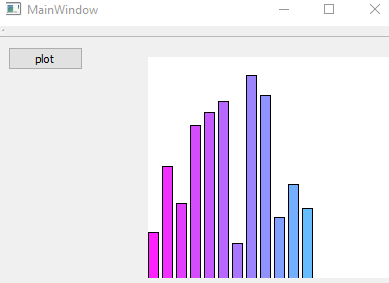
                alternate text

                test project
                https://www.dropbox.com/s/qwde8lb0fkjrrh3/mycheapgraph.zip?dl=0

                its few lines of code

                int GetBarHeight(int MAX) {
                return rand() % (MAX - 5) + 5;
                }

                void MainWindow::on_pushButton_released() {
                  int h = ui->label->height();
                  int w = ui->label->width();
                  QPixmap pix(w, h);
                  QPainter paint(&pix);
                  pix.fill( Qt::white );
                  paint.setPen(QColor(0, 0, 0, 255));
                  int y = 0;
                  int x = 0;
                  int bw = 10; // bar width
                  for (int barcount = 0; barcount < 12; ++barcount) {
                    paint.setBrush(QColor(255 - x, 34 + x, 255, 255));
                    paint.drawRect(x, h - GetBarHeight(h),  bw, h );
                    x += bw + 4;
                  }
                  paint.end();
                  ui->label->setPixmap(pix);
                }
                
                ? MeenuM 2 Replies Last reply
                0
                • mrjjM mrjj

                  @Meenu
                  hi
                  if u only need something really simple. ( ie no zoom etc)
                  you can also just draw on an image and show in a Label.

                  alternate text

                  test project
                  https://www.dropbox.com/s/qwde8lb0fkjrrh3/mycheapgraph.zip?dl=0

                  its few lines of code

                  int GetBarHeight(int MAX) {
                  return rand() % (MAX - 5) + 5;
                  }

                  void MainWindow::on_pushButton_released() {
                    int h = ui->label->height();
                    int w = ui->label->width();
                    QPixmap pix(w, h);
                    QPainter paint(&pix);
                    pix.fill( Qt::white );
                    paint.setPen(QColor(0, 0, 0, 255));
                    int y = 0;
                    int x = 0;
                    int bw = 10; // bar width
                    for (int barcount = 0; barcount < 12; ++barcount) {
                      paint.setBrush(QColor(255 - x, 34 + x, 255, 255));
                      paint.drawRect(x, h - GetBarHeight(h),  bw, h );
                      x += bw + 4;
                    }
                    paint.end();
                    ui->label->setPixmap(pix);
                  }
                  
                  ? Offline
                  ? Offline
                  A Former User
                  wrote on last edited by
                  #8

                  @mrjj Nice color gradient ;-)

                  1 Reply Last reply
                  1
                  • MeenuM Meenu

                    how to add manually

                    ? Offline
                    ? Offline
                    A Former User
                    wrote on last edited by
                    #9

                    @Meenu This might help you with Ubuntu's package manager: https://help.ubuntu.com/lts/serverguide/apt.html

                    MeenuM 1 Reply Last reply
                    1
                    • mrjjM mrjj

                      @Meenu
                      hi
                      if u only need something really simple. ( ie no zoom etc)
                      you can also just draw on an image and show in a Label.

                      alternate text

                      test project
                      https://www.dropbox.com/s/qwde8lb0fkjrrh3/mycheapgraph.zip?dl=0

                      its few lines of code

                      int GetBarHeight(int MAX) {
                      return rand() % (MAX - 5) + 5;
                      }

                      void MainWindow::on_pushButton_released() {
                        int h = ui->label->height();
                        int w = ui->label->width();
                        QPixmap pix(w, h);
                        QPainter paint(&pix);
                        pix.fill( Qt::white );
                        paint.setPen(QColor(0, 0, 0, 255));
                        int y = 0;
                        int x = 0;
                        int bw = 10; // bar width
                        for (int barcount = 0; barcount < 12; ++barcount) {
                          paint.setBrush(QColor(255 - x, 34 + x, 255, 255));
                          paint.drawRect(x, h - GetBarHeight(h),  bw, h );
                          x += bw + 4;
                        }
                        paint.end();
                        ui->label->setPixmap(pix);
                      }
                      
                      MeenuM Offline
                      MeenuM Offline
                      Meenu
                      wrote on last edited by
                      #10

                      @mrjj
                      I want to plot line graph. so i changed the code like below

                      int data[255];
                      int i = 0;
                      for (i = 0; i < 255; ++i)  data[i] = i;
                      for (i = 0; i < 255; ++i)  paint.drawLine(i, data[i], i+1, data[i+1]);
                      

                      Here How to Set Lable's pixel (0,0) as bottom left corner?
                      Now, Graph plotting reversely(Top left corner).

                      mrjjM VRoninV 2 Replies Last reply
                      0
                      • MeenuM Meenu

                        @mrjj
                        I want to plot line graph. so i changed the code like below

                        int data[255];
                        int i = 0;
                        for (i = 0; i < 255; ++i)  data[i] = i;
                        for (i = 0; i < 255; ++i)  paint.drawLine(i, data[i], i+1, data[i+1]);
                        

                        Here How to Set Lable's pixel (0,0) as bottom left corner?
                        Now, Graph plotting reversely(Top left corner).

                        mrjjM Offline
                        mrjjM Offline
                        mrjj
                        Lifetime Qt Champion
                        wrote on last edited by
                        #11

                        @Meenu
                        hi
                        you can change for painter with
                        painter.translate();

                        http://doc.qt.io/qt-5/qpainter.html#translate

                        its not related to the label at all.
                        we draw on image and label just show it :)

                        MeenuM 1 Reply Last reply
                        0
                        • ? A Former User

                          @Meenu This might help you with Ubuntu's package manager: https://help.ubuntu.com/lts/serverguide/apt.html

                          MeenuM Offline
                          MeenuM Offline
                          Meenu
                          wrote on last edited by
                          #12

                          @Wieland Getting Error - chartdataset.cpp:30:36: fatal error: private/chartdataset_p.h: No such file or directory.
                          I was download qtcharts-opensource-src-5.7.0 and installed successfully, like from download directory.

                          > qmake
                          > sudo make
                          

                          line chart from examples working good. i like to implement this chart in my QDialog.
                          Now, i came to my code and simply add

                          #include <QtCharts/QChartView>
                          #include <QtCharts/QLineSeries>
                          

                          how can i link QTChart with my *.Pro File.

                          1 Reply Last reply
                          0
                          • mrjjM mrjj

                            @Meenu
                            hi
                            you can change for painter with
                            painter.translate();

                            http://doc.qt.io/qt-5/qpainter.html#translate

                            its not related to the label at all.
                            we draw on image and label just show it :)

                            MeenuM Offline
                            MeenuM Offline
                            Meenu
                            wrote on last edited by
                            #13

                            @mrjj Thank you. Its Working.

                            paint.translate(0,h);
                            paint.scale(1.0, -1.0);
                            
                            1 Reply Last reply
                            1
                            • MeenuM Meenu

                              @mrjj
                              I want to plot line graph. so i changed the code like below

                              int data[255];
                              int i = 0;
                              for (i = 0; i < 255; ++i)  data[i] = i;
                              for (i = 0; i < 255; ++i)  paint.drawLine(i, data[i], i+1, data[i+1]);
                              

                              Here How to Set Lable's pixel (0,0) as bottom left corner?
                              Now, Graph plotting reversely(Top left corner).

                              VRoninV Offline
                              VRoninV Offline
                              VRonin
                              wrote on last edited by VRonin
                              #14

                              @Meenu said:

                              so i changed the code like below

                              for (i = 0; i < 255; ++i)  paint.drawLine(i, data[i], i+1, data[i+1]);
                              

                              If you cannot see the problem there add #include <array> and change int data[255]; into std::array<int,255> data;

                              "La mort n'est rien, mais vivre vaincu et sans gloire, c'est mourir tous les jours"
                              ~Napoleon Bonaparte

                              On a crusade to banish setIndexWidget() from the holy land of Qt

                              MeenuM 1 Reply Last reply
                              0
                              • VRoninV VRonin

                                @Meenu said:

                                so i changed the code like below

                                for (i = 0; i < 255; ++i)  paint.drawLine(i, data[i], i+1, data[i+1]);
                                

                                If you cannot see the problem there add #include <array> and change int data[255]; into std::array<int,255> data;

                                MeenuM Offline
                                MeenuM Offline
                                Meenu
                                wrote on last edited by
                                #15

                                @VRonin Its plotting random data. nice.

                                1 Reply Last reply
                                0
                                • MeenuM Offline
                                  MeenuM Offline
                                  Meenu
                                  wrote on last edited by
                                  #16

                                  After install QTChart / QWT chart controls, is possible to use these controls in to QDialog box.
                                  How to link with *.PRO File.
                                  QWT link process :

                                  QWT_DIR = /usr/local/qwt-6.1.3
                                  INCLUDEPATH += $$QWT_DIR/include
                                  
                                  CONFIG(debug, debug|release):LIBS += -L$$QWT_DIR\lib\ \
                                  -lqwtd5
                                  else:LIBS += -L$$QWT_DIR\lib\ \
                                  -lqwt5
                                  
                                  DEFINES += QWT_DLL
                                  

                                  is correct?

                                  1 Reply Last reply
                                  0

                                  • Login

                                  • Login or register to search.
                                  • First post
                                    Last post
                                  0
                                  • Categories
                                  • Recent
                                  • Tags
                                  • Popular
                                  • Users
                                  • Groups
                                  • Search
                                  • Get Qt Extensions
                                  • Unsolved