Skip to content
  • Categories
  • Recent
  • Tags
  • Popular
  • Users
  • Groups
  • Search
  • Get Qt Extensions
  • Unsolved
Collapse
Brand Logo
  1. Home
  2. Qt Development
  3. General and Desktop
  4. QML Bluetooth Example Problem
Qt 6.11 is out! See what's new in the release blog

QML Bluetooth Example Problem

Scheduled Pinned Locked Moved Unsolved General and Desktop
qmlbluetoothnon-functional
23 Posts 5 Posters 15.0k Views 2 Watching
  • Oldest to Newest
  • Newest to Oldest
  • Most Votes
Reply
  • Reply as topic
Log in to reply
This topic has been deleted. Only users with topic management privileges can see it.
  • SGaistS Offline
    SGaistS Offline
    SGaist
    Lifetime Qt Champion
    wrote on last edited by
    #4

    Yes, that's the one

    1. Clone the module
    2. Checkout the branch
    3. Build it (you can open the project within Qt Creator)
    4. Install it

    And you should be good to go.

    Interested in AI ? www.idiap.ch
    Please read the Qt Code of Conduct - https://forum.qt.io/topic/113070/qt-code-of-conduct

    ideadesignerI user_eduU 2 Replies Last reply
    0
    • SGaistS SGaist

      Yes, that's the one

      1. Clone the module
      2. Checkout the branch
      3. Build it (you can open the project within Qt Creator)
      4. Install it

      And you should be good to go.

      ideadesignerI Offline
      ideadesignerI Offline
      ideadesigner
      wrote on last edited by
      #5

      @SGaist
      How can i clone or branch off the repo. Because there is no button on this page.

      kshegunovK 1 Reply Last reply
      0
      • ideadesignerI ideadesigner

        @SGaist
        How can i clone or branch off the repo. Because there is no button on this page.

        kshegunovK Offline
        kshegunovK Offline
        kshegunov
        Moderators
        wrote on last edited by
        #6

        @ideadesigner

        How can i clone or branch off the repo. Because there is no button on this page.

        This should cover it.

        Read and abide by the Qt Code of Conduct

        1 Reply Last reply
        1
        • SGaistS Offline
          SGaistS Offline
          SGaist
          Lifetime Qt Champion
          wrote on last edited by
          #7

          The links are on the summary page. Otherwise that's basic git

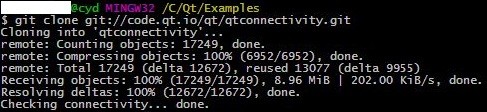
          git clone https://code.qt.io/qt/qtconnectivity.git
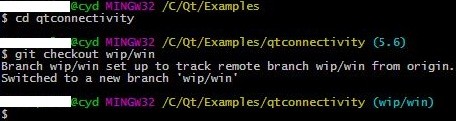
          cd qtconnectivity
          git checkout wip/win
          

          Interested in AI ? www.idiap.ch
          Please read the Qt Code of Conduct - https://forum.qt.io/topic/113070/qt-code-of-conduct

          1 Reply Last reply
          0
          • ideadesignerI Offline
            ideadesignerI Offline
            ideadesigner
            wrote on last edited by ideadesigner
            #8

            @kshegunov
            I took git setup and installed.
            @SGaist
            I tried but gave me permission error:

            $ git clone http://code.qt.io/cgit/qt/qtconnectivity.git/tree/
            fatal: could not create work tree dir 'tree': Permission denied

            Thanks for your helping guys.

            1 Reply Last reply
            0
            • SGaistS Offline
              SGaistS Offline
              SGaist
              Lifetime Qt Champion
              wrote on last edited by
              #9

              Retry by copying the git command I wrote.

              Interested in AI ? www.idiap.ch
              Please read the Qt Code of Conduct - https://forum.qt.io/topic/113070/qt-code-of-conduct

              ideadesignerI 1 Reply Last reply
              0
              • SGaistS SGaist

                Retry by copying the git command I wrote.

                ideadesignerI Offline
                ideadesignerI Offline
                ideadesigner
                wrote on last edited by
                #10

                @SGaist Same answer from Git with your URL

                1 Reply Last reply
                0
                • K Offline
                  K Offline
                  kuzulis
                  Qt Champions 2020
                  wrote on last edited by
                  #11

                  git clone git://code.qt.io/qt/qtconnectivity.git

                  1 Reply Last reply
                  0
                  • SGaistS Offline
                    SGaistS Offline
                    SGaist
                    Lifetime Qt Champion
                    wrote on last edited by
                    #12

                    Because you added tree again at the end ? Don't do it, just clone the git repository.

                    Interested in AI ? www.idiap.ch
                    Please read the Qt Code of Conduct - https://forum.qt.io/topic/113070/qt-code-of-conduct

                    ideadesignerI 1 Reply Last reply
                    0
                    • SGaistS SGaist

                      Because you added tree again at the end ? Don't do it, just clone the git repository.

                      ideadesignerI Offline
                      ideadesignerI Offline
                      ideadesigner
                      wrote on last edited by
                      #13

                      @kuzulis I tried your URL in different computer and no problem.
                      @SGaist No, I didn't add the 'tree'. I think the problem is 'https://' because 'git://' is worked.

                      kshegunovK 1 Reply Last reply
                      0
                      • SGaistS Offline
                        SGaistS Offline
                        SGaist
                        Lifetime Qt Champion
                        wrote on last edited by
                        #14

                        Strange… Anyway, the essential part is that you got the module and can continue to hack :)

                        Interested in AI ? www.idiap.ch
                        Please read the Qt Code of Conduct - https://forum.qt.io/topic/113070/qt-code-of-conduct

                        1 Reply Last reply
                        0
                        • ideadesignerI ideadesigner

                          @kuzulis I tried your URL in different computer and no problem.
                          @SGaist No, I didn't add the 'tree'. I think the problem is 'https://' because 'git://' is worked.

                          kshegunovK Offline
                          kshegunovK Offline
                          kshegunov
                          Moderators
                          wrote on last edited by
                          #15

                          @ideadesigner @SGaist

                          I may be absolutely wrong and please correct me if I am, but I think https requires (gerrit) authentication to work ...

                          Read and abide by the Qt Code of Conduct

                          1 Reply Last reply
                          0
                          • K Offline
                            K Offline
                            kuzulis
                            Qt Champions 2020
                            wrote on last edited by
                            #16

                            requires (gerrit) authentication to work

                            yes

                            1 Reply Last reply
                            0
                            • ideadesignerI Offline
                              ideadesignerI Offline
                              ideadesigner
                              wrote on last edited by
                              #17

                              I can't understand, at my pc, 'git bash' gave me same error with 'git://...'.

                              $ git clone git://code.qt.io/qt/qtconnectivity.git
                              fatal: could not create work tree dir 'qtconnectivity': Permission denied

                              1 Reply Last reply
                              0
                              • SGaistS Offline
                                SGaistS Offline
                                SGaist
                                Lifetime Qt Champion
                                wrote on last edited by
                                #18

                                Permission denied ? Do you have write permission in the folder you're trying to clone in ?

                                Interested in AI ? www.idiap.ch
                                Please read the Qt Code of Conduct - https://forum.qt.io/topic/113070/qt-code-of-conduct

                                ideadesignerI 1 Reply Last reply
                                1
                                • SGaistS SGaist

                                  Permission denied ? Do you have write permission in the folder you're trying to clone in ?

                                  ideadesignerI Offline
                                  ideadesignerI Offline
                                  ideadesigner
                                  wrote on last edited by
                                  #19

                                  @SGaist I see. I understood my fault.
                                  I worked respectively in pictures,
                                  1.Wrong folder

                                  image

                                  2.Changed my folder
                                  image

                                  3.Changed my branch
                                  image

                                  4.Opened the qt project file and ran the btscanner example
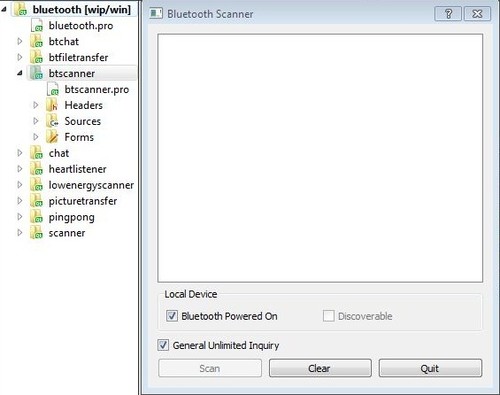
                                  image

                                  5.Still same answer
                                  image

                                  1 Reply Last reply
                                  0
                                  • K Offline
                                    K Offline
                                    kuzulis
                                    Qt Champions 2020
                                    wrote on last edited by
                                    #20

                                    Still same answer

                                    You should re-build && re-install QtConnectivity from the wip/win branch: make && make install, and only then try to use examples.

                                    PS: A good idea it is cleanup all existing QtBluetooth stuff from your Qt-installed directory, before making-installing of wip/win branch.

                                    1 Reply Last reply
                                    1
                                    • ideadesignerI Offline
                                      ideadesignerI Offline
                                      ideadesigner
                                      wrote on last edited by
                                      #21

                                      I couldn't do it :) I will make it later, for now I am going to make my android app. So, I don't make bluetooth app on windows for a while. Thanks for your help. @kuzulis @SGaist

                                      1 Reply Last reply
                                      0
                                      • SGaistS SGaist

                                        Yes, that's the one

                                        1. Clone the module
                                        2. Checkout the branch
                                        3. Build it (you can open the project within Qt Creator)
                                        4. Install it

                                        And you should be good to go.

                                        user_eduU Offline
                                        user_eduU Offline
                                        user_edu
                                        wrote on last edited by
                                        #22

                                        @SGaist I tried the same steps, however, on trying to build it got the following error " C:/Qt/Examples/Qt-5.7/bluetooth/qtconnectivity/examples/bluetooth/picturetransfer/picturetransfer.pro is lacking an install target." Could you please advise. Thanks

                                        1 Reply Last reply
                                        0
                                        • SGaistS Offline
                                          SGaistS Offline
                                          SGaist
                                          Lifetime Qt Champion
                                          wrote on last edited by
                                          #23

                                          Hi,

                                          That's a bug that should have been fixed for the next release.

                                          Interested in AI ? www.idiap.ch
                                          Please read the Qt Code of Conduct - https://forum.qt.io/topic/113070/qt-code-of-conduct

                                          1 Reply Last reply
                                          0

                                          • Login

                                          • Login or register to search.
                                          • First post
                                            Last post
                                          0
                                          • Categories
                                          • Recent
                                          • Tags
                                          • Popular
                                          • Users
                                          • Groups
                                          • Search
                                          • Get Qt Extensions
                                          • Unsolved