Skip to content
  • Categories
  • Recent
  • Tags
  • Popular
  • Users
  • Groups
  • Search
  • Get Qt Extensions
  • Unsolved
Collapse
Brand Logo
  1. Home
  2. Qt Development
  3. General and Desktop
  4. Please help!
Forum Updated to NodeBB v4.3 + New Features

Please help!

Scheduled Pinned Locked Moved Solved General and Desktop
9 Posts 3 Posters 1.5k Views 2 Watching
  • Oldest to Newest
  • Newest to Oldest
  • Most Votes
Reply
  • Reply as topic
Log in to reply
This topic has been deleted. Only users with topic management privileges can see it.
  • monamourM Offline
    monamourM Offline
    monamour
    wrote on last edited by monamour
    #1

    Dear all,

     I am a new in python programming QT. I am trying to make a small program to download videos from Youtube but I have small issue in it.
    

    The program design as follows:

    First line "lineEdit" for url link.
    Second line "lineEdit_2" for save as in my desktop.
    Third line "pushbutton" for click to download.

    Everything is working smoothly. What I want is when I press in the download button (Pushbutton) through a message box: "The link is empty" by checking the fields "lineEdit" or "lineEdit_2" if it is blank (empty) or not.

    What I have tried this statement,

    if len(self.lineEdit.text()) == 0 and len(self.lineEdit_2.text()) == 1:
    QMessageBox.information(self, "Error", "The link is empty")

    The code

    ###PyQt5 && Python 3.4####

    #class
        self.Handel_Buttons()
    	self.Handel_Browse()
    	
    
    def Handel_Buttons(self):
        self.pushButton.clicked.connect(self.Download)
    
    def Handel_Browse(self):
        pass
    
    def Download(self):
        url= self.lineEdit.text()
        save_location = self.lineEdit_2.text()
    	
    	# First check
    	if len(self.lineEdit.text()) == 0 and len(self.lineEdit_2.text()) == 1:
    		QMessageBox.information(self, "Error", "The link is empty")
    
        try:
           urllib.request.urlretrieve(url, save_location)
        except Exception:
    
            QMessageBox.warning(self , "Download Error" , "The Download is Failed")
            return
            QMessageBox.Information(self , "Download Completed" , "The Download is Finished")
    

    ###End of the code###

    But no success. Any ideas.

    Many thanks,

    jsulmJ 1 Reply Last reply
    0
    • monamourM monamour

      Dear all,

       I am a new in python programming QT. I am trying to make a small program to download videos from Youtube but I have small issue in it.
      

      The program design as follows:

      First line "lineEdit" for url link.
      Second line "lineEdit_2" for save as in my desktop.
      Third line "pushbutton" for click to download.

      Everything is working smoothly. What I want is when I press in the download button (Pushbutton) through a message box: "The link is empty" by checking the fields "lineEdit" or "lineEdit_2" if it is blank (empty) or not.

      What I have tried this statement,

      if len(self.lineEdit.text()) == 0 and len(self.lineEdit_2.text()) == 1:
      QMessageBox.information(self, "Error", "The link is empty")

      The code

      ###PyQt5 && Python 3.4####

      #class
          self.Handel_Buttons()
      	self.Handel_Browse()
      	
      
      def Handel_Buttons(self):
          self.pushButton.clicked.connect(self.Download)
      
      def Handel_Browse(self):
          pass
      
      def Download(self):
          url= self.lineEdit.text()
          save_location = self.lineEdit_2.text()
      	
      	# First check
      	if len(self.lineEdit.text()) == 0 and len(self.lineEdit_2.text()) == 1:
      		QMessageBox.information(self, "Error", "The link is empty")
      
          try:
             urllib.request.urlretrieve(url, save_location)
          except Exception:
      
              QMessageBox.warning(self , "Download Error" , "The Download is Failed")
              return
              QMessageBox.Information(self , "Download Completed" , "The Download is Finished")
      

      ###End of the code###

      But no success. Any ideas.

      Many thanks,

      jsulmJ Offline
      jsulmJ Offline
      jsulm
      Lifetime Qt Champion
      wrote on last edited by
      #2

      @monamour said in Please help!:

      if len(self.lineEdit.text()) == 0 and len(self.lineEdit_2.text()) == 1

      Why do you have

      len(self.lineEdit_2.text()) == 1
      

      ? Why 1?
      Also you can use http://doc.qt.io/qt-5/qstring.html#length

      if not self.lineEdit.text().empty() and not self.lineEdit_2.text().empty:
          QMessageBox.information(self, "Error", "The link is empty")
      

      https://forum.qt.io/topic/113070/qt-code-of-conduct

      monamourM 1 Reply Last reply
      4
      • jsulmJ jsulm

        @monamour said in Please help!:

        if len(self.lineEdit.text()) == 0 and len(self.lineEdit_2.text()) == 1

        Why do you have

        len(self.lineEdit_2.text()) == 1
        

        ? Why 1?
        Also you can use http://doc.qt.io/qt-5/qstring.html#length

        if not self.lineEdit.text().empty() and not self.lineEdit_2.text().empty:
            QMessageBox.information(self, "Error", "The link is empty")
        
        monamourM Offline
        monamourM Offline
        monamour
        wrote on last edited by
        #3

        @jsulm Thanks so much for your quick replying.

        I've tried your code and this the error message:

        Traceback (most recent call last):
        File "index.py", line 44, in Download
        if not self.lineEdit.text().empty() and not self.lineEdit_2.text().empty:
        AttributeError: 'str' object has no attribute 'empty'

        jsulmJ 1 Reply Last reply
        0
        • monamourM monamour

          @jsulm Thanks so much for your quick replying.

          I've tried your code and this the error message:

          Traceback (most recent call last):
          File "index.py", line 44, in Download
          if not self.lineEdit.text().empty() and not self.lineEdit_2.text().empty:
          AttributeError: 'str' object has no attribute 'empty'

          jsulmJ Offline
          jsulmJ Offline
          jsulm
          Lifetime Qt Champion
          wrote on last edited by
          #4

          @monamour

          if not self.lineEdit.text().empty() and not self.lineEdit_2.text().empty():
              QMessageBox.information(self, "Error", "The link is empty")
          

          https://forum.qt.io/topic/113070/qt-code-of-conduct

          monamourM 1 Reply Last reply
          1
          • jsulmJ jsulm

            @monamour

            if not self.lineEdit.text().empty() and not self.lineEdit_2.text().empty():
                QMessageBox.information(self, "Error", "The link is empty")
            
            monamourM Offline
            monamourM Offline
            monamour
            wrote on last edited by
            #5

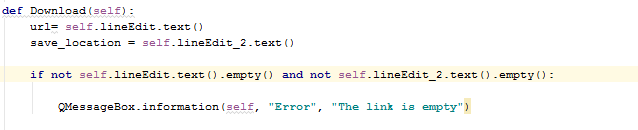
            @jsulm Exactely the same error message that I have mentioned.

            0_1548742346420_xyz.PNG

            ####Error Message###
            Traceback (most recent call last):
            File "index.py", line 44, in Download
            if not self.lineEdit.text().empty() and not self.lineEdit_2.text().empty:
            AttributeError: 'str' object has no attribute 'empty'

            jsulmJ 1 Reply Last reply
            0
            • monamourM monamour

              @jsulm Exactely the same error message that I have mentioned.

              0_1548742346420_xyz.PNG

              ####Error Message###
              Traceback (most recent call last):
              File "index.py", line 44, in Download
              if not self.lineEdit.text().empty() and not self.lineEdit_2.text().empty:
              AttributeError: 'str' object has no attribute 'empty'

              jsulmJ Offline
              jsulmJ Offline
              jsulm
              Lifetime Qt Champion
              wrote on last edited by
              #6

              @monamour OK. It returns a Python string. Then use your approach with len(...), but fix that == 1

              https://forum.qt.io/topic/113070/qt-code-of-conduct

              monamourM 1 Reply Last reply
              0
              • jsulmJ jsulm

                @monamour OK. It returns a Python string. Then use your approach with len(...), but fix that == 1

                monamourM Offline
                monamourM Offline
                monamour
                wrote on last edited by
                #7

                @jsulm The problem has been solved after I fixed the "== 1".

                Many thanks. I am so appreciated for your help.

                Pablo J. RoginaP 1 Reply Last reply
                2
                • monamourM monamour

                  @jsulm The problem has been solved after I fixed the "== 1".

                  Many thanks. I am so appreciated for your help.

                  Pablo J. RoginaP Offline
                  Pablo J. RoginaP Offline
                  Pablo J. Rogina
                  wrote on last edited by
                  #8

                  @monamour if your issue is solved, please don't forget to mark your post as such! Thanks

                  Upvote the answer(s) that helped you solve the issue
                  Use "Topic Tools" button to mark your post as Solved
                  Add screenshots via postimage.org
                  Don't ask support requests via chat/PM. Please use the forum so others can benefit from the solution in the future

                  monamourM 1 Reply Last reply
                  0
                  • Pablo J. RoginaP Pablo J. Rogina

                    @monamour if your issue is solved, please don't forget to mark your post as such! Thanks

                    monamourM Offline
                    monamourM Offline
                    monamour
                    wrote on last edited by
                    #9

                    @Pablo-J.-Rogina Done. Thanks.

                    1 Reply Last reply
                    1

                    • Login

                    • Login or register to search.
                    • First post
                      Last post
                    0
                    • Categories
                    • Recent
                    • Tags
                    • Popular
                    • Users
                    • Groups
                    • Search
                    • Get Qt Extensions
                    • Unsolved