Skip to content
  • Categories
  • Recent
  • Tags
  • Popular
  • Users
  • Groups
  • Search
  • Get Qt Extensions
  • Unsolved
Collapse
Brand Logo
  1. Home
  2. Qt Development
  3. General and Desktop
  4. how to create Singleinstance application
Qt 6.11 is out! See what's new in the release blog

how to create Singleinstance application

Scheduled Pinned Locked Moved Solved General and Desktop
13 Posts 4 Posters 6.8k Views
  • Oldest to Newest
  • Newest to Oldest
  • Most Votes
Reply
  • Reply as topic
Log in to reply
This topic has been deleted. Only users with topic management privileges can see it.
  • B Bharth

    hi,,,
    if im running exe file its opening application again if i click exe file it is opening new application ,,,
    i want only one application if it is already opened it should show Qmessaagebox

    please help me,,,,
    thanks in advance

    RatzzR Offline
    RatzzR Offline
    Ratzz
    wrote on last edited by Ratzz
    #2

    @Bharth
    You can make use of QtSingleApplication https://doc.qt.io/archives/qtextended4.4/qtopiadesktop/qtsingleapplication.html
    How to use them here.
    Good example by using QLockFile http://blog.aeguana.com/2015/10/15/how-to-run-a-single-app-instance-in-qt/

    --Alles ist gut.

    B 1 Reply Last reply
    4
    • B Bharth

      hi,,,
      if im running exe file its opening application again if i click exe file it is opening new application ,,,
      i want only one application if it is already opened it should show Qmessaagebox

      please help me,,,,
      thanks in advance

      J.HilkJ Offline
      J.HilkJ Offline
      J.Hilk
      Moderators
      wrote on last edited by
      #3

      @Bharth
      I do this via a QSharedMemory instance, I'm not sure if thats the best way to do it though.

      //insice main.cpp
      QSharedMemory _singular("myAppNameInstance");
          if(_singular.attach(QSharedMemory::ReadOnly)){
              //Instance Already running
              _singular.detach();
              //Your MessageBox-code should go here
              return -42;
          }else{
             //Program is not yet running.
              _singular.create(1);
          }
      

      Be aware of the Qt Code of Conduct, when posting : https://forum.qt.io/topic/113070/qt-code-of-conduct


      Q: What's that?
      A: It's blue light.
      Q: What does it do?
      A: It turns blue.

      B 1 Reply Last reply
      2
      • RatzzR Ratzz

        @Bharth
        You can make use of QtSingleApplication https://doc.qt.io/archives/qtextended4.4/qtopiadesktop/qtsingleapplication.html
        How to use them here.
        Good example by using QLockFile http://blog.aeguana.com/2015/10/15/how-to-run-a-single-app-instance-in-qt/

        B Offline
        B Offline
        Bharth
        wrote on last edited by
        #4

        @Ratzz said in how to create Singleinstance application:

        @Bharth
        You can make use of QtSingleApplication https://doc.qt.io/archives/qtextended4.4/qtopiadesktop/qtsingleapplication.html
        How to use them here.

        i checked this one it is showing file not found
        #include<QtSingleApplication>

        RatzzR 1 Reply Last reply
        0
        • B Bharth

          @Ratzz said in how to create Singleinstance application:

          @Bharth
          You can make use of QtSingleApplication https://doc.qt.io/archives/qtextended4.4/qtopiadesktop/qtsingleapplication.html
          How to use them here.

          i checked this one it is showing file not found
          #include<QtSingleApplication>

          RatzzR Offline
          RatzzR Offline
          Ratzz
          wrote on last edited by Ratzz
          #5

          @Bharth said in how to create Singleinstance application:

          it is showing file not found

          Its not part of Qt. You need to download and add them to your project.
          You can download from here .

          --Alles ist gut.

          B 1 Reply Last reply
          1
          • J.HilkJ J.Hilk

            @Bharth
            I do this via a QSharedMemory instance, I'm not sure if thats the best way to do it though.

            //insice main.cpp
            QSharedMemory _singular("myAppNameInstance");
                if(_singular.attach(QSharedMemory::ReadOnly)){
                    //Instance Already running
                    _singular.detach();
                    //Your MessageBox-code should go here
                    return -42;
                }else{
                   //Program is not yet running.
                    _singular.create(1);
                }
            
            B Offline
            B Offline
            Bharth
            wrote on last edited by
            #6

            @J.Hilk said in how to create Singleinstance application:

            myAppNameInstance

            QMessageBox::information(this,"Application is already running...","appname");

            this keyword showing error,,,,invalid use of this

            why you are retunring -42 what is the meaning...

            thanks for your reply

            J.HilkJ 1 Reply Last reply
            0
            • B Bharth

              @J.Hilk said in how to create Singleinstance application:

              myAppNameInstance

              QMessageBox::information(this,"Application is already running...","appname");

              this keyword showing error,,,,invalid use of this

              why you are retunring -42 what is the meaning...

              thanks for your reply

              J.HilkJ Offline
              J.HilkJ Offline
              J.Hilk
              Moderators
              wrote on last edited by J.Hilk
              #7

              @Bharth
              the main.cpp is not QObject based class, so you can't give QMessageBox this as parent.

              why you are retunring -42 what is the meanin

              The Answer to the Ultimate Question of Death, The Universe, and Everything ...

              The boring answer: an arbitrary return value I choose to identify the exit of the application.


              Be aware of the Qt Code of Conduct, when posting : https://forum.qt.io/topic/113070/qt-code-of-conduct


              Q: What's that?
              A: It's blue light.
              Q: What does it do?
              A: It turns blue.

              1 Reply Last reply
              5
              • RatzzR Ratzz

                @Bharth said in how to create Singleinstance application:

                it is showing file not found

                Its not part of Qt. You need to download and add them to your project.
                You can download from here .

                B Offline
                B Offline
                Bharth
                wrote on last edited by
                #8

                @Ratzz said in how to create Singleinstance application:

                @Bharth said in how to create Singleinstance application:

                it is showing file not found

                Its not part of Qt. You need to download and add them to your project.
                You can download from here .

                i downloaded but i dont know which i should add to my project

                RatzzR 1 Reply Last reply
                0
                • B Bharth

                  @Ratzz said in how to create Singleinstance application:

                  @Bharth said in how to create Singleinstance application:

                  it is showing file not found

                  Its not part of Qt. You need to download and add them to your project.
                  You can download from here .

                  i downloaded but i dont know which i should add to my project

                  RatzzR Offline
                  RatzzR Offline
                  Ratzz
                  wrote on last edited by
                  #9

                  @Bharth said in how to create Singleinstance application:

                  i dont know which i should add to my project

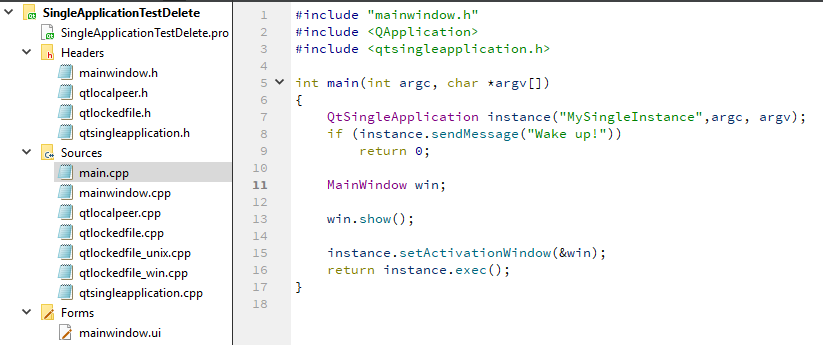
                  For me this works
                  alt text

                  --Alles ist gut.

                  1 Reply Last reply
                  3
                  • B Offline
                    B Offline
                    Bharth
                    wrote on last edited by
                    #10

                    thanks for your reply ,,,i will try

                    1 Reply Last reply
                    0
                    • B Offline
                      B Offline
                      Bharth
                      wrote on last edited by
                      #11

                      its working but not able to show qmessagebox,,,,
                      again if i click exe file it should open old one now its not opening

                      jsulmJ 1 Reply Last reply
                      0
                      • B Bharth

                        its working but not able to show qmessagebox,,,,
                        again if i click exe file it should open old one now its not opening

                        jsulmJ Offline
                        jsulmJ Offline
                        jsulm
                        Lifetime Qt Champion
                        wrote on last edited by
                        #12

                        @Bharth said in how to create Singleinstance application:

                        again if i click exe file it should open old one now its not opening

                        Do you mean you want to show a message if you try to start a second instance?
                        Then simply do it inside this block:

                        if (instance.sendMessage("Wake up!"))
                        {
                            QMessageBox::information(nullptr, "Information", "Already running!", ...);
                            return 0;
                        }
                        

                        https://forum.qt.io/topic/113070/qt-code-of-conduct

                        1 Reply Last reply
                        3
                        • B Offline
                          B Offline
                          Bharth
                          wrote on last edited by
                          #13

                          @jsulm said in how to create Singleinstance application:

                          QMessageBox::information(nullptr, "Information", "Already running!", ...);

                          thank you so much its worked....

                          1 Reply Last reply
                          0

                          • Login

                          • Login or register to search.
                          • First post
                            Last post
                          0
                          • Categories
                          • Recent
                          • Tags
                          • Popular
                          • Users
                          • Groups
                          • Search
                          • Get Qt Extensions
                          • Unsolved