
Skip to content
  • Categories
  • Recent
  • Tags
  • Popular
  • Users
  • Groups
  • Search
  • Get Qt Extensions
  • Unsolved
Collapse
Brand Logo
  1. Home
  2. Qt Development
  3. General and Desktop
  4. Qt doesn't work properly on Debian
Forum Updated to NodeBB v4.3 + New Features

Qt doesn't work properly on Debian

Scheduled Pinned Locked Moved Unsolved General and Desktop
4 Posts 4 Posters 793 Views 2 Watching
  • Oldest to Newest
  • Newest to Oldest
  • Most Votes
Reply
  • Reply as topic
Log in to reply
This topic has been deleted. Only users with topic management privileges can see it.
  • S Offline
    S Offline
    Strongaloff
    wrote on last edited by Strongaloff
    #1

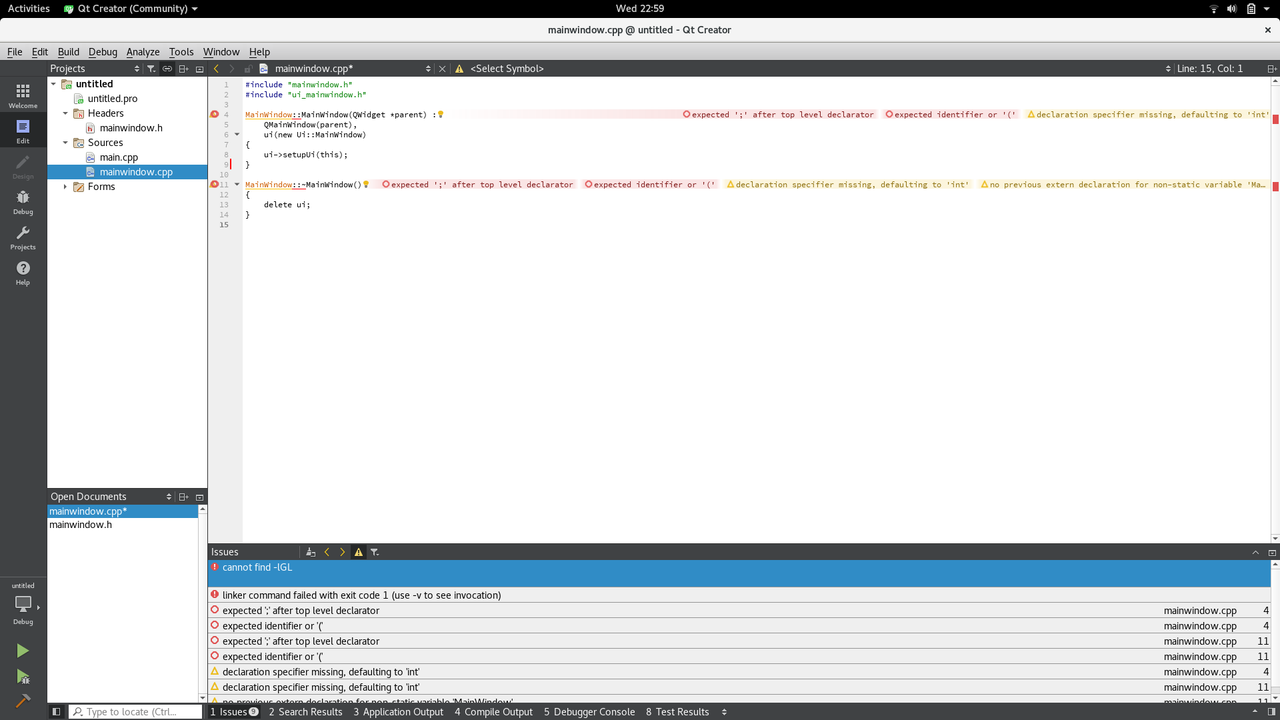
    After installing the software and adding the "sudo apt-get install qtcreator", Qt doesn't work and gives plenty of errors on the default widget application (a simple window).

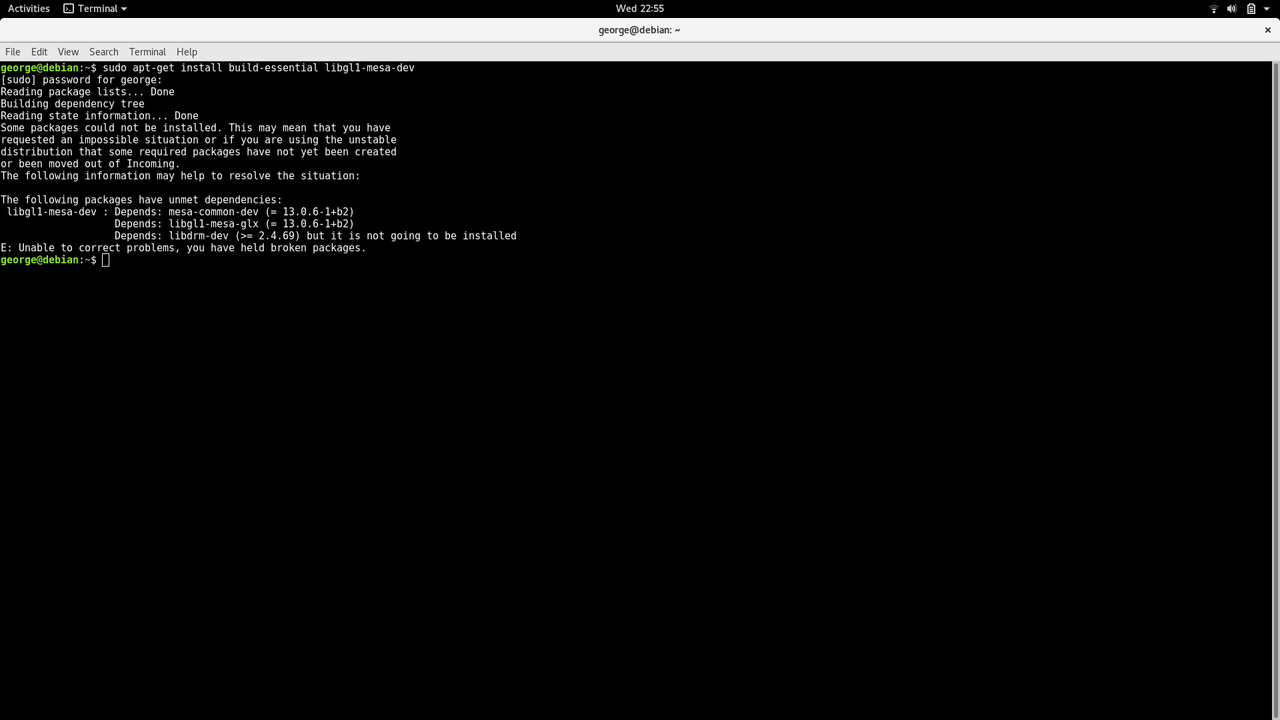
    However, I think it is due to the fact that I can't install "sudo apt-get install build-essential libgl1-mesa-dev" since it gives me this error:
    alt text

    On Windows it works on the first try, but I need to code it on Linux since I can't use the .exe file on Linux.

    //Forgot to add. An example of errors that I get on Linux but not on Windows:
    alt text

    kshegunovK 1 Reply Last reply
    0
    • Christian EhrlicherC Offline
      Christian EhrlicherC Offline
      Christian Ehrlicher
      Lifetime Qt Champion
      wrote on last edited by
      #2

      You should ask in a debian forum why the packages do not match. We can't do anything here since we don't know what / how debian packages Qt.

      Qt Online Installer direct download: https://download.qt.io/official_releases/online_installers/
      Visit the Qt Academy at https://academy.qt.io/catalog

      1 Reply Last reply
      2
      • SGaistS Offline
        SGaistS Offline
        SGaist
        Lifetime Qt Champion
        wrote on last edited by
        #3

        Hi,

        From the looks of it, you have broken dependencies which are not related to Qt at all. As @Christian-Ehrlicher suggested you should check with the Debian folks.

        You can start by search why you have libdrm-dev blocking. Maybe start by uninstalling it before re-trying to install libgl1-mesa-dev.

        Interested in AI ? www.idiap.ch
        Please read the Qt Code of Conduct - https://forum.qt.io/topic/113070/qt-code-of-conduct

        1 Reply Last reply
        2
        • S Strongaloff

          After installing the software and adding the "sudo apt-get install qtcreator", Qt doesn't work and gives plenty of errors on the default widget application (a simple window).

          However, I think it is due to the fact that I can't install "sudo apt-get install build-essential libgl1-mesa-dev" since it gives me this error:

          alt text

          On Windows it works on the first try, but I need to code it on Linux since I can't use the .exe file on Linux.

          //Forgot to add. An example of errors that I get on Linux but not on Windows:

          alt text

          kshegunovK Offline
          kshegunovK Offline
          kshegunov
          Moderators
          wrote on last edited by kshegunov
          #4

          Qt works perfectly fine on every debian flavor I've tried, which is basically everything up to testing (currently "buster", but I'm pretty sure it works on "sid" as well). Now your package manager is complaining, probably it was interrupted and it was left with a corrupted state. Run $> apt-get install -f to attempt automatic fixing. If that doesn't work you should ask either on the debian forums/mailing lists or search around the internet. This is not (currently) a Qt issue, your system is in an inconsistent state.

          Read and abide by the Qt Code of Conduct

          1 Reply Last reply
          4

          • Login

          • Login or register to search.
          • First post
            Last post
          0
          • Categories
          • Recent
          • Tags
          • Popular
          • Users
          • Groups
          • Search
          • Get Qt Extensions
          • Unsolved