
MDI application with multiple Forms
-
look here
-
Hi
When you say MDi, we think of mutiple windows type embedded
in the same app. shown at same time.
From your description, it sounds more like a wizard type of
sequence. Fill in X, press next Fill in Y, then press save.
Which a
http://doc.qt.io/qt-5/qstackedwidget.html
is super for.
Or even
http://doc.qt.io/qt-5/qwizard.html -
Hi
When you say MDi, we think of mutiple windows type embedded
in the same app. shown at same time.
From your description, it sounds more like a wizard type of
sequence. Fill in X, press next Fill in Y, then press save.
Which a
http://doc.qt.io/qt-5/qstackedwidget.html
is super for.
Or even
http://doc.qt.io/qt-5/qwizard.html@mrjj I would say so.. I have developed a set of UI forms but they are in SDI format, which are activated by clicking the button clicks on the respective forms, but not menu driven, which is not convenient for going back and forth.
So I am designing a menu driven app which will contain all the forms within the MDI allowing only a single instance of each window after the login.
For example, I will start of the application with the login screen and according to the type of users will allow access to certain screens by enabling and disabling of the menu items and then after that I will logout which will take me back to the login screen. which is more user friendly to the end users.
It is not a wizard as you suggested, i.e. operation on the single screens will start and end there, for the next screen the user will have to go to the menu item and select and invoke the screens. But all will be interacting with the same data source (text/ xml / DB).
I am having trouble invoking the multiple forms within the MDI.. The example with the Qt creator shows a text editor it is sort of a repeater for the same form. where as I want a select set of forms within the MDI container invoked from the menu.
Will look into the link you have pointed out, if possible let me know if you find a tutorial or example to the problem I have explained.
Thank you.
-
look here
@Gerd I have looked into the example, it is more of a text editor which can be invoked multiple times, My requirement is invoking of predetermined and pre designed UI forms with a selection of text fields for editing and saving information into a data source. I will look into the example again and see if I can get some help with the problem I am working on.
looks like the terminology used is slightly different to the one used in .net development, hopefully I could clarify.
Thank you. -
Hi
It sounds like something stackedwidget would work for.
These different forms-will they need to be shown at same time inside app, or will it always be just one that is visible? and u can navigate between them inside the app/same area.try this fast sample
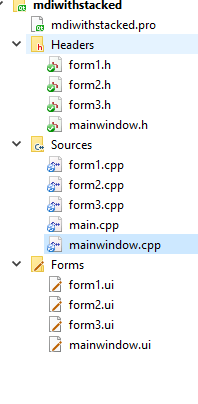
it has stacked and 3 forms it switches between.
https://www.dropbox.com/s/00chu3zefptjkr7/mdiwithstacked.zip?dl=0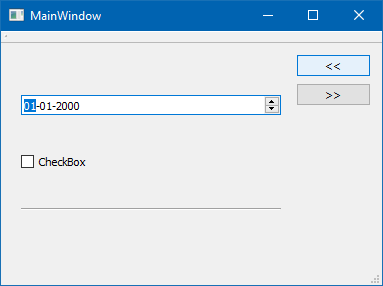
-
Hi
It sounds like something stackedwidget would work for.
These different forms-will they need to be shown at same time inside app, or will it always be just one that is visible? and u can navigate between them inside the app/same area.try this fast sample
it has stacked and 3 forms it switches between.
https://www.dropbox.com/s/00chu3zefptjkr7/mdiwithstacked.zip?dl=0
@mrjj Hi, I looked into the code you shared, it is not what I had in mind, I need the application to be menu driven.
I should be able to choose the UI form based on the user selection in the menubar.
For example I want to have Appmenu under which I will have the options, Login, form1, form2, form3, Logout, Exit.So at the app start the user will be shown the login form and once he logs in he will be able to choose any one of the forms from the menu or all the forms available in the menu.
I would say the Login, form1, form2, form3 are all mdichild forms which are contained within the MDIParent whenever invoked. I am yet to come across an example which explains the process.
I am not sure if stacked widgets is going to help me with that.
The MDI example available with the Qt package doesnt use forms UI as it is a text editor, which has a MDI parent and the text editors being the MDI Childs. wish Qt had an example along the similar lines but with forms.
Thanks for looking into the issue, if you find a solution please do post.
-
@mrjj Hi, I looked into the code you shared, it is not what I had in mind, I need the application to be menu driven.
I should be able to choose the UI form based on the user selection in the menubar.
For example I want to have Appmenu under which I will have the options, Login, form1, form2, form3, Logout, Exit.So at the app start the user will be shown the login form and once he logs in he will be able to choose any one of the forms from the menu or all the forms available in the menu.
I would say the Login, form1, form2, form3 are all mdichild forms which are contained within the MDIParent whenever invoked. I am yet to come across an example which explains the process.
I am not sure if stacked widgets is going to help me with that.
The MDI example available with the Qt package doesnt use forms UI as it is a text editor, which has a MDI parent and the text editors being the MDI Childs. wish Qt had an example along the similar lines but with forms.
Thanks for looking into the issue, if you find a solution please do post.
@Nishanth said in MDI application with multiple Forms:
The MDI example available with the Qt package doesnt use forms UI
Well, it uses QTextWidget (I guess), which is a QWidget at the end. Just put your own widget there instead of the text edit.
-
@Nishanth said in MDI application with multiple Forms:
The MDI example available with the Qt package doesnt use forms UI
Well, it uses QTextWidget (I guess), which is a QWidget at the end. Just put your own widget there instead of the text edit.
@jsulm I have explained why the MDI example doesn't provide the required solution to my problem in the previous threads. If it was just one widget as you told I would have got it over with, My requirement is multiple controls (widgets) which comprises of multiple text boxes and buttons in a UI form. and I have multiple UI forms.
-
@jsulm I have explained why the MDI example doesn't provide the required solution to my problem in the previous threads. If it was just one widget as you told I would have got it over with, My requirement is multiple controls (widgets) which comprises of multiple text boxes and buttons in a UI form. and I have multiple UI forms.
@Nishanth I know. The thing is: all these widgets you are talking about are placed on some widget (parent widget), right? So, create a custom widget where you put all these widgets and then put this custom widget (parent widget) where you need it...
-
@Nishanth I know. The thing is: all these widgets you are talking about are placed on some widget (parent widget), right? So, create a custom widget where you put all these widgets and then put this custom widget (parent widget) where you need it...
@jsulm I have placed a MDIarea into the main window and have tried to load the forms created inside the main window, but it was not working. Maybe I am missing something here.
Maybe I am not used to the terminology used here, so in Qt, UI forms are widgets, controls (textboxes, labels, etc..) are widgets?
I will look around for the solution, hopefully should be able to figure it out.
Thanks. -
@jsulm I have placed a MDIarea into the main window and have tried to load the forms created inside the main window, but it was not working. Maybe I am missing something here.
Maybe I am not used to the terminology used here, so in Qt, UI forms are widgets, controls (textboxes, labels, etc..) are widgets?
I will look around for the solution, hopefully should be able to figure it out.
Thanks. -
@mrjj Hi, I looked into the code you shared, it is not what I had in mind, I need the application to be menu driven.
I should be able to choose the UI form based on the user selection in the menubar.
For example I want to have Appmenu under which I will have the options, Login, form1, form2, form3, Logout, Exit.So at the app start the user will be shown the login form and once he logs in he will be able to choose any one of the forms from the menu or all the forms available in the menu.
I would say the Login, form1, form2, form3 are all mdichild forms which are contained within the MDIParent whenever invoked. I am yet to come across an example which explains the process.
I am not sure if stacked widgets is going to help me with that.
The MDI example available with the Qt package doesnt use forms UI as it is a text editor, which has a MDI parent and the text editors being the MDI Childs. wish Qt had an example along the similar lines but with forms.
Thanks for looking into the issue, if you find a solution please do post.
@Nishanth
Well you could switch pages in stack widget with menus.However, it sounds like you a really hooked on MDI.
Note, though. they draw win 7 style on win 8/9.MDI can hold any widget, including forms.
The process is the same as inserting any other widget. -
@Nishanth
Well you could switch pages in stack widget with menus.However, it sounds like you a really hooked on MDI.
Note, though. they draw win 7 style on win 8/9.MDI can hold any widget, including forms.
The process is the same as inserting any other widget.@mrjj I am looking at MDI as it has a familiar feel to a lot of desktop applications I use, and meets the requirement. I just have to find a good tutorial or an example for what I am looking for in QT. I guess I am having beginners trouble with Qt. Couple of examples that with the documentations are implemented in a different way which I feel will not work for me. going through them I might just land on some thing that helps me.
Thanks. -
@mrjj I am looking at MDI as it has a familiar feel to a lot of desktop applications I use, and meets the requirement. I just have to find a good tutorial or an example for what I am looking for in QT. I guess I am having beginners trouble with Qt. Couple of examples that with the documentations are implemented in a different way which I feel will not work for me. going through them I might just land on some thing that helps me.
Thanks.@Nishanth
Hi
Can you perhaps show an image of such a desktop program you use?
Might help us pinpoint exactly what you are after.
Most app i use is not MDI in the old sense where is document is
a floating window inside the app. but more like stacked widget where I switch views.Also check out
http://doc.qt.io/qt-5/qdockwidget.html -
Qt Creator for one is a MDI application.. I think there are a lot of apps which are an MDI and I have seen desktop application like the one I am trying to develop in Qt developed in c#, vb.net for windows platforms as well.
I have explained the requirement I am working on couple of times I really cannot be any more elaborate than I have been. Anyways thanks for your time. I am sure I will get to the solution.
If I get a working solution I will maybe post a sample code later on. Till then the search is on.
-
Qt Creator for one is a MDI application.. I think there are a lot of apps which are an MDI and I have seen desktop application like the one I am trying to develop in Qt developed in c#, vb.net for windows platforms as well.
I have explained the requirement I am working on couple of times I really cannot be any more elaborate than I have been. Anyways thanks for your time. I am sure I will get to the solution.
If I get a working solution I will maybe post a sample code later on. Till then the search is on.
@Nishanth
Yep, its a multi view application but not a MDI app in the traditional sense.
You can split a Editor view and see 2 or more at same time but the views do not have
captions and decorations.
For such design, QSplitter can be used to divide the client area into view.
You can also use QDockWidgets which also can support multiple views
and/or support floating windows.
http://doc.qt.io/qt-5/qtwidgets-mainwindows-dockwidgets-example.html -
@Nishanth
Yep, its a multi view application but not a MDI app in the traditional sense.
You can split a Editor view and see 2 or more at same time but the views do not have
captions and decorations.
For such design, QSplitter can be used to divide the client area into view.
You can also use QDockWidgets which also can support multiple views
and/or support floating windows.
http://doc.qt.io/qt-5/qtwidgets-mainwindows-dockwidgets-example.html@mrjj I am looking at developing a MDI application in as you put it “traditional sense” which is probably very simple when compared to how other mdi application are from the requirement I have posted. Whatever suggestions you have suggested are pretty neat but it doesn’t really help me with my requirement.
Thank you for taking the time to post. -
@mrjj I am looking at developing a MDI application in as you put it “traditional sense” which is probably very simple when compared to how other mdi application are from the requirement I have posted. Whatever suggestions you have suggested are pretty neat but it doesn’t really help me with my requirement.
Thank you for taking the time to post.@Nishanth
Ok, then MDI area is best fit. Its 100% traditional :)
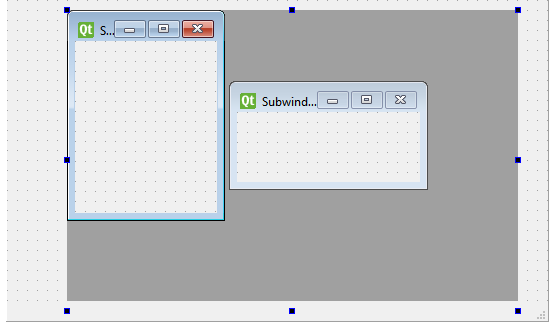
You can use any form/widget for the inner content.
just use
QMdiSubWindow *addSubWindow(QWidget *widget, Qt::WindowFlags flags = Qt::WindowFlags());
to create new window where widget is your form object.

