Skip to content
  • Categories
  • Recent
  • Tags
  • Popular
  • Users
  • Groups
  • Search
  • Get Qt Extensions
  • Unsolved
Collapse
Brand Logo
  1. Home
  2. Qt Development
  3. General and Desktop
  4. transparent Widget
Qt 6.11 is out! See what's new in the release blog

transparent Widget

Scheduled Pinned Locked Moved Unsolved General and Desktop
24 Posts 7 Posters 31.5k Views 5 Watching
  • Oldest to Newest
  • Newest to Oldest
  • Most Votes
Reply
  • Reply as topic
Log in to reply
This topic has been deleted. Only users with topic management privileges can see it.
  • CodeFreaksC Offline
    CodeFreaksC Offline
    CodeFreaks
    wrote on last edited by CodeFreaks
    #3

    @mrjj
    Thanks,
    Set the window opacity is not the thing that I want because it influences whole contents not only the background.
    I want to make both main window and QTabWidget be transparent (in Windows).
    Something like this:
    MyWidget

    mrjjM 1 Reply Last reply
    0
    • Chris KawaC Offline
      Chris KawaC Offline
      Chris Kawa
      Lifetime Qt Champion
      wrote on last edited by Chris Kawa
      #4

      Hi, the image you linked can't be seen by people that don't have account on qtcentre. I'm reuploding it, hope you don't mind.

      Aero window

      This effect is not opacity. It is called Aero Glass and it's a window frame style provided by the Windows DWM (Desktop Window Manager). It's done by extending the window frame into the client area. Qt has a wrapper for that API in the WinExtras module (as seen in the window title in that screenshot). The function you're looking for is extendFrameIntoClientArea().
      Note that this will only work on Windows Vista and 7. In Windows 8 and 10 the glass effect on the frame was replaced by a solid color so you still can extend the frame, but you won't get that blurred transparency.

      CodeFreaksC 1 Reply Last reply
      2
      • CodeFreaksC CodeFreaks

        @mrjj
        Thanks,
        Set the window opacity is not the thing that I want because it influences whole contents not only the background.
        I want to make both main window and QTabWidget be transparent (in Windows).
        Something like this:
        MyWidget

        mrjjM Offline
        mrjjM Offline
        mrjj
        Lifetime Qt Champion
        wrote on last edited by mrjj
        #5

        @CodeFreaks
        So the image one can see in your sample actually the Desktop image ?

        Well you can do
        setAttribute(Qt::WA_TranslucentBackground, true);
        setWindowFlags(Qt::FramelessWindowHint);

        and mainwindow will be completely transparent.
        (but also loses close buttons etc)

        CodeFreaksC 1 Reply Last reply
        3
        • mrjjM mrjj

          @CodeFreaks
          So the image one can see in your sample actually the Desktop image ?

          Well you can do
          setAttribute(Qt::WA_TranslucentBackground, true);
          setWindowFlags(Qt::FramelessWindowHint);

          and mainwindow will be completely transparent.
          (but also loses close buttons etc)

          CodeFreaksC Offline
          CodeFreaksC Offline
          CodeFreaks
          wrote on last edited by CodeFreaks
          #6

          @mrjj
          Thanks for reply,
          @mrjj said in transparent Widget:

          So the image one can see in your sample actually the Desktop image ?

          Any thing behind my app can be seen.
          This method doesn't work for QTabWidget (as I tried),
          also for Main Window any content behind it, is accessible for all mouse/touch events (In Windows 8.1).

          1 Reply Last reply
          0
          • Chris KawaC Chris Kawa

            Hi, the image you linked can't be seen by people that don't have account on qtcentre. I'm reuploding it, hope you don't mind.

            Aero window

            This effect is not opacity. It is called Aero Glass and it's a window frame style provided by the Windows DWM (Desktop Window Manager). It's done by extending the window frame into the client area. Qt has a wrapper for that API in the WinExtras module (as seen in the window title in that screenshot). The function you're looking for is extendFrameIntoClientArea().
            Note that this will only work on Windows Vista and 7. In Windows 8 and 10 the glass effect on the frame was replaced by a solid color so you still can extend the frame, but you won't get that blurred transparency.

            CodeFreaksC Offline
            CodeFreaksC Offline
            CodeFreaks
            wrote on last edited by CodeFreaks
            #7

            @Chris-Kawa
            Thanks for reply,
            As I realized;
            It is possible to make a semi transparent widget (parent/child) in Linux but if I want to do the same in Windows I should use Winextras which windows 8 and later versions don't support it.
            Doesn't exist any way to make it possible for Windows 8 and 10?

            1 Reply Last reply
            0
            • Chris KawaC Offline
              Chris KawaC Offline
              Chris Kawa
              Lifetime Qt Champion
              wrote on last edited by
              #8

              windows 8 and later versions don't support it

              Well it's not that they don't support it. They do and the APIs are exactly the same. It's just that the style has changed and aero windows are no longer transparent.

              I'm afraid I don't have good news. The closest thing to that effect in Windows 10 is the new Acrylic Material:
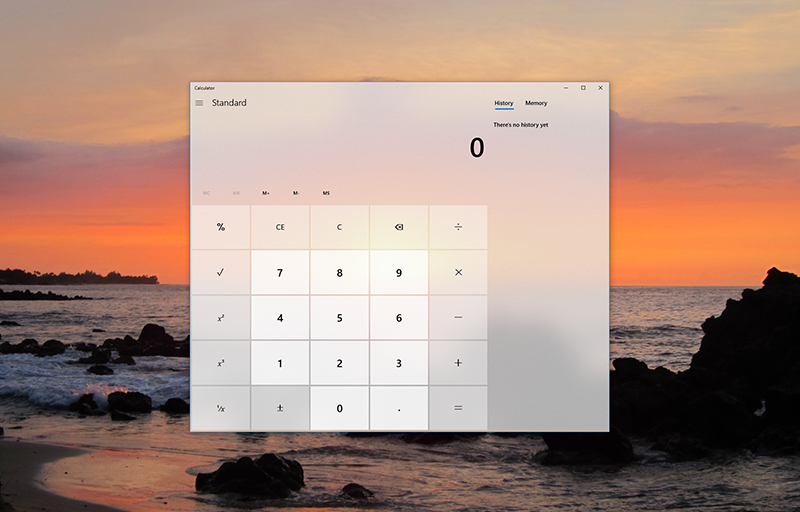
              The bad part is that it is available exclusively via XAML brushes, so while trivial to use with C# it might be very difficult or even impossible to make it work with native C++ (yeah, thanks Microsoft...). Combining it with Qt on top of that. Well... good luck ;)

              The only other alternative I know is to implement the whole thing yourself i.e. take a screenshot from under the window with native API and write your own DirectX shaders to add the glass effect. That would be just a very dirty hack though that would probably break easily. It is a lot of very low level work involving DirectComposition and expected performance is not gonna be too good. Combining it with Qt would also pose quite a challenge.

              The sad state of the world is that Microsoft is heavily promoting XAML technology and has actively taken away all the easy ways to add the same effect to native c++ apps.

              1 Reply Last reply
              5
              • CodeFreaksC Offline
                CodeFreaksC Offline
                CodeFreaks
                wrote on last edited by CodeFreaks
                #9
                This post is deleted!
                1 Reply Last reply
                0
                • CodeFreaksC Offline
                  CodeFreaksC Offline
                  CodeFreaks
                  wrote on last edited by CodeFreaks
                  #10
                  This post is deleted!
                  1 Reply Last reply
                  0
                  • CodeFreaksC Offline
                    CodeFreaksC Offline
                    CodeFreaks
                    wrote on last edited by CodeFreaks
                    #11

                    I examined many ways,
                    But I can't make a transparent tabwidget (In Linux) :
                    0_1533655210141_trpr2.png

                    1 Reply Last reply
                    0
                    • Chris KawaC Offline
                      Chris KawaC Offline
                      Chris Kawa
                      Lifetime Qt Champion
                      wrote on last edited by Chris Kawa
                      #12

                      It's a 3 step process.

                      1. Make the window widget transparent using attribute Qt::WA_TranslucentBackground, which gives you something like in your picture:
                        Transparency step 1

                      2. Make the tab header transparent. You can do that with stylesheet QTabBar::tab { background: transparent; }
                        Note that this is styling QTabBar, not QTabWidget.
                        Transparency step 2
                        You can modify the stylesheet to add the borders of the tab back if you like.

                      3. Make the tab content transparent. Note that QTabWidget itself doesn't have a background. It's the background of the widget inside it that you need to make transparent. The easiest way to do this is to tell Qt that the paint event takes care of all the painting and it does not need to fill the background with default color i.e. use Qt::WA_OpaquePaintEvent attribute.
                        Transparency step 3

                      So the entire example looks like this:

                      int main(int argc, char *argv[])
                      {
                          QApplication a(argc, argv);
                      
                          QWidget* tab_content = new QWidget();
                          tab_content->setAttribute(Qt::WA_OpaquePaintEvent); //makes the widget transparent
                      
                          QTabWidget* tw = new QTabWidget();
                          tw->addTab(tab_content, "Example");
                          tw->setStyleSheet("QTabBar::tab { background: transparent; }"); //makes the header transparent
                      
                          QWidget w;
                          w.setAttribute(Qt::WA_TranslucentBackground); //makes the window transparent
                          w.setLayout(new QVBoxLayout());
                          w.layout()->addWidget(tw);
                          w.show();
                      
                          return a.exec();
                      }
                      
                      CodeFreaksC 8Observer88 JoeCFDJ 3 Replies Last reply
                      10
                      • Chris KawaC Chris Kawa

                        It's a 3 step process.

                        1. Make the window widget transparent using attribute Qt::WA_TranslucentBackground, which gives you something like in your picture:
                          Transparency step 1

                        2. Make the tab header transparent. You can do that with stylesheet QTabBar::tab { background: transparent; }
                          Note that this is styling QTabBar, not QTabWidget.
                          Transparency step 2
                          You can modify the stylesheet to add the borders of the tab back if you like.

                        3. Make the tab content transparent. Note that QTabWidget itself doesn't have a background. It's the background of the widget inside it that you need to make transparent. The easiest way to do this is to tell Qt that the paint event takes care of all the painting and it does not need to fill the background with default color i.e. use Qt::WA_OpaquePaintEvent attribute.
                          Transparency step 3

                        So the entire example looks like this:

                        int main(int argc, char *argv[])
                        {
                            QApplication a(argc, argv);
                        
                            QWidget* tab_content = new QWidget();
                            tab_content->setAttribute(Qt::WA_OpaquePaintEvent); //makes the widget transparent
                        
                            QTabWidget* tw = new QTabWidget();
                            tw->addTab(tab_content, "Example");
                            tw->setStyleSheet("QTabBar::tab { background: transparent; }"); //makes the header transparent
                        
                            QWidget w;
                            w.setAttribute(Qt::WA_TranslucentBackground); //makes the window transparent
                            w.setLayout(new QVBoxLayout());
                            w.layout()->addWidget(tw);
                            w.show();
                        
                            return a.exec();
                        }
                        
                        CodeFreaksC Offline
                        CodeFreaksC Offline
                        CodeFreaks
                        wrote on last edited by CodeFreaks
                        #13

                        @Chris-Kawa
                        Hi Dear Chris Kawa
                        The method that you mentioned in previous post helped me a lot.
                        Thanks a lot.
                        But I tried to make a semi-transparent canvas (of qwtplot) . The canvas inherit from QFrame. I tried many days but I still can't do that.
                        A black background will appear instead of parent widget behind it.
                        QwtPlotCanvas Class Reference

                        1 Reply Last reply
                        0
                        • Chris KawaC Chris Kawa

                          It's a 3 step process.

                          1. Make the window widget transparent using attribute Qt::WA_TranslucentBackground, which gives you something like in your picture:
                            Transparency step 1

                          2. Make the tab header transparent. You can do that with stylesheet QTabBar::tab { background: transparent; }
                            Note that this is styling QTabBar, not QTabWidget.
                            Transparency step 2
                            You can modify the stylesheet to add the borders of the tab back if you like.

                          3. Make the tab content transparent. Note that QTabWidget itself doesn't have a background. It's the background of the widget inside it that you need to make transparent. The easiest way to do this is to tell Qt that the paint event takes care of all the painting and it does not need to fill the background with default color i.e. use Qt::WA_OpaquePaintEvent attribute.
                            Transparency step 3

                          So the entire example looks like this:

                          int main(int argc, char *argv[])
                          {
                              QApplication a(argc, argv);
                          
                              QWidget* tab_content = new QWidget();
                              tab_content->setAttribute(Qt::WA_OpaquePaintEvent); //makes the widget transparent
                          
                              QTabWidget* tw = new QTabWidget();
                              tw->addTab(tab_content, "Example");
                              tw->setStyleSheet("QTabBar::tab { background: transparent; }"); //makes the header transparent
                          
                              QWidget w;
                              w.setAttribute(Qt::WA_TranslucentBackground); //makes the window transparent
                              w.setLayout(new QVBoxLayout());
                              w.layout()->addWidget(tw);
                              w.show();
                          
                              return a.exec();
                          }
                          
                          8Observer88 Offline
                          8Observer88 Offline
                          8Observer8
                          wrote on last edited by 8Observer8
                          #14

                          @Chris-Kawa, I tried your code but it does not work on Windows 10 and Qt 5.15.2. Why? Maybe does somebody else know it?

                          75fed7ee-28f7-4f06-bc0e-964e810e3be0-image.png

                          T 1 Reply Last reply
                          1
                          • 8Observer88 8Observer8

                            @Chris-Kawa, I tried your code but it does not work on Windows 10 and Qt 5.15.2. Why? Maybe does somebody else know it?

                            75fed7ee-28f7-4f06-bc0e-964e810e3be0-image.png

                            T Offline
                            T Offline
                            Taytoo
                            wrote on last edited by
                            #15

                            @8Observer8 Were you able to resolve this issue? I'm having weird behavior even though i'm following the instructions, so not sure what am I doing wrong?

                            8Observer88 1 Reply Last reply
                            0
                            • T Taytoo

                              @8Observer8 Were you able to resolve this issue? I'm having weird behavior even though i'm following the instructions, so not sure what am I doing wrong?

                              8Observer88 Offline
                              8Observer88 Offline
                              8Observer8
                              wrote on last edited by 8Observer8
                              #16

                              @Taytoo I am also waiting for a solution. Maybe someone knows what is the problem in the above example?

                              How to implement the same behavior as in ScreenToGif to take a screenshot inside a window?

                              a0b7471f-1d25-4498-8039-89ebd6a432ca-image.png

                              1 Reply Last reply
                              0
                              • Chris KawaC Chris Kawa

                                It's a 3 step process.

                                1. Make the window widget transparent using attribute Qt::WA_TranslucentBackground, which gives you something like in your picture:
                                  Transparency step 1

                                2. Make the tab header transparent. You can do that with stylesheet QTabBar::tab { background: transparent; }
                                  Note that this is styling QTabBar, not QTabWidget.
                                  Transparency step 2
                                  You can modify the stylesheet to add the borders of the tab back if you like.

                                3. Make the tab content transparent. Note that QTabWidget itself doesn't have a background. It's the background of the widget inside it that you need to make transparent. The easiest way to do this is to tell Qt that the paint event takes care of all the painting and it does not need to fill the background with default color i.e. use Qt::WA_OpaquePaintEvent attribute.
                                  Transparency step 3

                                So the entire example looks like this:

                                int main(int argc, char *argv[])
                                {
                                    QApplication a(argc, argv);
                                
                                    QWidget* tab_content = new QWidget();
                                    tab_content->setAttribute(Qt::WA_OpaquePaintEvent); //makes the widget transparent
                                
                                    QTabWidget* tw = new QTabWidget();
                                    tw->addTab(tab_content, "Example");
                                    tw->setStyleSheet("QTabBar::tab { background: transparent; }"); //makes the header transparent
                                
                                    QWidget w;
                                    w.setAttribute(Qt::WA_TranslucentBackground); //makes the window transparent
                                    w.setLayout(new QVBoxLayout());
                                    w.layout()->addWidget(tw);
                                    w.show();
                                
                                    return a.exec();
                                }
                                
                                JoeCFDJ Offline
                                JoeCFDJ Offline
                                JoeCFD
                                wrote on last edited by JoeCFD
                                #17

                                @Chris-Kawa Your code works nicely on my local computer. But the transparent feature is gone after I copy the executable from my machine to another computer. Any thoughts?

                                same OS: Ubuntu 22.04
                                same Qt version: 5.15.3

                                JoeCFDJ 1 Reply Last reply
                                0
                                • JoeCFDJ JoeCFD

                                  @Chris-Kawa Your code works nicely on my local computer. But the transparent feature is gone after I copy the executable from my machine to another computer. Any thoughts?

                                  same OS: Ubuntu 22.04
                                  same Qt version: 5.15.3

                                  JoeCFDJ Offline
                                  JoeCFDJ Offline
                                  JoeCFD
                                  wrote on last edited by JoeCFD
                                  #18

                                  @JoeCFD I lied. The desktop is different. One is gnome and another one is lxqt. It could be a qt bug.

                                  Ronel_qtmasterR 1 Reply Last reply
                                  0
                                  • JoeCFDJ JoeCFD

                                    @JoeCFD I lied. The desktop is different. One is gnome and another one is lxqt. It could be a qt bug.

                                    Ronel_qtmasterR Offline
                                    Ronel_qtmasterR Offline
                                    Ronel_qtmaster
                                    wrote on last edited by
                                    #19

                                    @JoeCFD you people may find this helpfull
                                    https://github.com/jordanprog86/QtTransparentWindow.git
                                    tw.PNG

                                    JoeCFDJ 1 Reply Last reply
                                    0
                                    • Ronel_qtmasterR Ronel_qtmaster

                                      @JoeCFD you people may find this helpfull
                                      https://github.com/jordanprog86/QtTransparentWindow.git
                                      tw.PNG

                                      JoeCFDJ Offline
                                      JoeCFDJ Offline
                                      JoeCFD
                                      wrote on last edited by JoeCFD
                                      #20

                                      @Ronel_qtmaster thanks for your post. Your code is not working on Lubuntu with LXQt desktop as well for Qt5/6. Chris Kawa's test code has the same issue.

                                      The following example works
                                      https://doc.qt.io/qt-5/qtwidgets-widgets-shapedclock-example.html

                                      JoeCFDJ Ronel_qtmasterR 2 Replies Last reply
                                      0
                                      • JoeCFDJ JoeCFD

                                        @Ronel_qtmaster thanks for your post. Your code is not working on Lubuntu with LXQt desktop as well for Qt5/6. Chris Kawa's test code has the same issue.

                                        The following example works
                                        https://doc.qt.io/qt-5/qtwidgets-widgets-shapedclock-example.html

                                        JoeCFDJ Offline
                                        JoeCFDJ Offline
                                        JoeCFD
                                        wrote on last edited by JoeCFD
                                        #21

                                        @JoeCFD solved the transparency issue in my code with mask. but kind of awkward and unnecessary. Submit a bug report with Chris Kawa's test code here
                                        https://bugreports.qt.io/browse/QTBUG-124722

                                        JoeCFDJ 2 Replies Last reply
                                        0
                                        • JoeCFDJ JoeCFD

                                          @Ronel_qtmaster thanks for your post. Your code is not working on Lubuntu with LXQt desktop as well for Qt5/6. Chris Kawa's test code has the same issue.

                                          The following example works
                                          https://doc.qt.io/qt-5/qtwidgets-widgets-shapedclock-example.html

                                          Ronel_qtmasterR Offline
                                          Ronel_qtmasterR Offline
                                          Ronel_qtmaster
                                          wrote on last edited by
                                          #22

                                          @JoeCFD i think on ubuntu it might depend on the windows manager

                                          1 Reply Last reply
                                          0

                                          • Login

                                          • Login or register to search.
                                          • First post
                                            Last post
                                          0
                                          • Categories
                                          • Recent
                                          • Tags
                                          • Popular
                                          • Users
                                          • Groups
                                          • Search
                                          • Get Qt Extensions
                                          • Unsolved