Skip to content
  • Categories
  • Recent
  • Tags
  • Popular
  • Users
  • Groups
  • Search
  • Get Qt Extensions
  • Unsolved
Collapse
Brand Logo
  1. Home
  2. Qt Development
  3. General and Desktop
  4. Add button is greyed out in Devices Is this expected in communit edition of Qt Creator ver 4.7?
Qt 6.11 is out! See what's new in the release blog

Add button is greyed out in Devices Is this expected in communit edition of Qt Creator ver 4.7?

Scheduled Pinned Locked Moved Unsolved General and Desktop
7 Posts 3 Posters 934 Views 3 Watching
  • Oldest to Newest
  • Newest to Oldest
  • Most Votes
Reply
  • Reply as topic
Log in to reply
This topic has been deleted. Only users with topic management privileges can see it.
  • I Offline
    I Offline
    initmahesh
    wrote on last edited by
    #1

    I am trying to add a raspi for cross platform development as per blog here https://www.ics.com/blog/configuring-qt-creator-raspberry-pi
    at step 5 on my QT creator (Community edition ) the option to Add is greyed out is that expected?

    1 Reply Last reply
    1
    • mrjjM Offline
      mrjjM Offline
      mrjj
      Lifetime Qt Champion
      wrote on last edited by
      #2

      Hi
      As far as i know its not expected.
      if you mean this
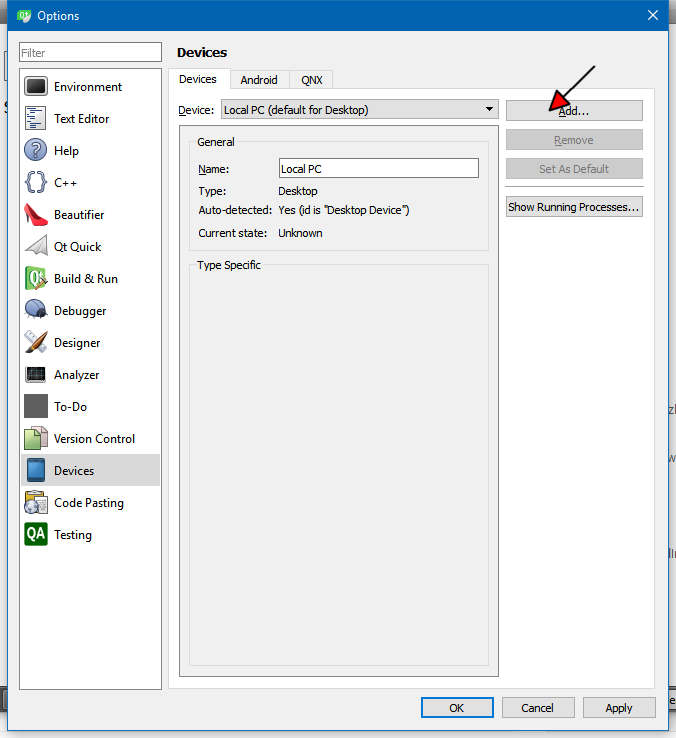
      alt text

      1 Reply Last reply
      0
      • I Offline
        I Offline
        initmahesh
        wrote on last edited by
        #3

        yes correct i mean that here is my screen shot anyway i can enable it ?
        0_1532186703002_f50a7723-ca82-4d13-b45e-8ed3e44f7091-image.png

        1 Reply Last reply
        1
        • mrjjM Offline
          mrjjM Offline
          mrjj
          Lifetime Qt Champion
          wrote on last edited by mrjj
          #4

          I just checked 3 installations.
          button is always enabled.

          Im wondering if its due to not having any Kits ?
          or
          my Creator(s) is slightly older so could be a bug/ something new.
          update:
          updating Creator to see.

          1 Reply Last reply
          1
          • I Offline
            I Offline
            initmahesh
            wrote on last edited by
            #5

            here is my kits
            0_1532187023440_a79f76c3-76f3-45d9-8d3d-6b1841c32a07-image.png
            any suggestion to get pass it i m stuck for my cross platform development :(

            1 Reply Last reply
            0
            • mrjjM Offline
              mrjjM Offline
              mrjj
              Lifetime Qt Champion
              wrote on last edited by
              #6

              Hi
              button also enabled in newer Creator.
              You kit looks ok.

              If you in Kits, select Managed to the Right of
              Device. button is still grey?

              1 Reply Last reply
              0
              • SGaistS Offline
                SGaistS Offline
                SGaist
                Lifetime Qt Champion
                wrote on last edited by
                #7

                Hi,

                You RasPi kit is listed as Desktop in Device Type and the Device field contains Local PC. The Qt version used is also your distribution provided Qt. So basically nothing that might give Qt Creator a clue that you have a Qt Kit for a device.

                Interested in AI ? www.idiap.ch
                Please read the Qt Code of Conduct - https://forum.qt.io/topic/113070/qt-code-of-conduct

                1 Reply Last reply
                2

                • Login

                • Login or register to search.
                • First post
                  Last post
                0
                • Categories
                • Recent
                • Tags
                • Popular
                • Users
                • Groups
                • Search
                • Get Qt Extensions
                • Unsolved