Skip to content
  • Categories
  • Recent
  • Tags
  • Popular
  • Users
  • Groups
  • Search
  • Get Qt Extensions
  • Unsolved
Collapse
Brand Logo
  1. Home
  2. Qt Development
  3. Mobile and Embedded
  4. difference between windows graphics and Android graphics
Qt 6.11 is out! See what's new in the release blog

difference between windows graphics and Android graphics

Scheduled Pinned Locked Moved Unsolved Mobile and Embedded
2 Posts 2 Posters 470 Views 1 Watching
  • Oldest to Newest
  • Newest to Oldest
  • Most Votes
Reply
  • Reply as topic
Log in to reply
This topic has been deleted. Only users with topic management privileges can see it.
  • G Offline
    G Offline
    gotronics
    wrote on last edited by
    #1

    look at the attached screen shot of the QCalenderWidget year spinbox it is chopped on the top and bottom where am I going wrong , I find and why does the widget change when in android platform? please assist
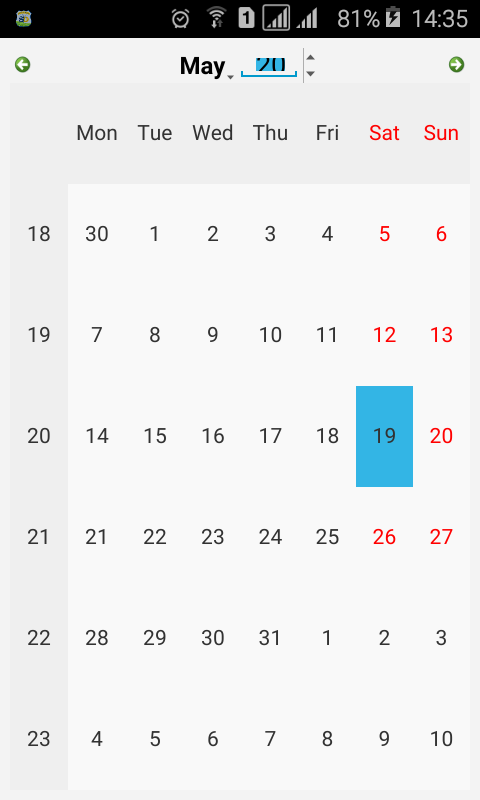
    0_1526735230910_Screenshot_2018-05-19-14-35-44.png

    K 1 Reply Last reply
    0
    • G gotronics

      look at the attached screen shot of the QCalenderWidget year spinbox it is chopped on the top and bottom where am I going wrong , I find and why does the widget change when in android platform? please assist

      0_1526735230910_Screenshot_2018-05-19-14-35-44.png

      K Offline
      K Offline
      koahnig
      wrote on last edited by
      #2

      @gotronics

      I assume you are using standard widgets under Qt with C++.

      AFAIK there is still an issue with the port respectively this is actually hard to do. Especially with widgets which may be used for display and selection this is the case. E.g. comboboxes are looking fine for selection, but as soon as you try to edit them, you have the same problem. Changing sizes do not really have any effect, which is the real background.

      I have read somewhere QML for the GUI in connection with C++ for the rest is the better way to go there. With QML you have a better control and may control sizes of input fields.

      Hope that helps.

      Vote the answer(s) that helped you to solve your issue(s)

      1 Reply Last reply
      1

      • Login

      • Login or register to search.
      • First post
        Last post
      0
      • Categories
      • Recent
      • Tags
      • Popular
      • Users
      • Groups
      • Search
      • Get Qt Extensions
      • Unsolved