Skip to content
  • Categories
  • Recent
  • Tags
  • Popular
  • Users
  • Groups
  • Search
  • Get Qt Extensions
  • Unsolved
Collapse
Brand Logo
  1. Home
  2. Qt Development
  3. General and Desktop
  4. Can't layout window properly
Qt 6.11 is out! See what's new in the release blog

Can't layout window properly

Scheduled Pinned Locked Moved Solved General and Desktop
5 Posts 2 Posters 1.4k Views 1 Watching
  • Oldest to Newest
  • Newest to Oldest
  • Most Votes
Reply
  • Reply as topic
Log in to reply
This topic has been deleted. Only users with topic management privileges can see it.
  • M Offline
    M Offline
    MafiaSkafia
    wrote on last edited by
    #1

    Hello, i'm still a noob using Qt and would like you to help me with this:

    So i'm creating a desktop app, with a menu bar and two tabs using Qt designer. For the first TAB i want an OpenGL widget to be displayed in about 3/4 of the total TAB space, just like this:
    0_1525607556057_help.PNG

    But when i try to apply an horizontal layout to both sections (buttons on the left and OpenGL widget on the right), so that when i resize the main window they scale properly, my OpenGL window only fills half the screen..
    I would be very appreciated if anyone could help me out! Thanks in advance.

    1 Reply Last reply
    0
    • mrjjM Offline
      mrjjM Offline
      mrjj
      Lifetime Qt Champion
      wrote on last edited by
      #2

      Hi
      but is the tabwidget in a layout so it follows mainwindow?
      Like layout on centralwidget and tabwidget in that ?

      1 Reply Last reply
      3
      • M Offline
        M Offline
        MafiaSkafia
        wrote on last edited by
        #3

        @mrjj said in Can't layout window properly:

        e layout on centralwidge
        Hey! Yes, I would like the tabWidget to scale properly with the main window. But i also want the OpenGLwidget to fill 3/4 of the tabWidget and also to scale with the main window. Basically i want this example to scale properly when i resize the window:

        0_1525619844917_help2.PNG

        1 Reply Last reply
        0
        • mrjjM Offline
          mrjjM Offline
          mrjj
          Lifetime Qt Champion
          wrote on last edited by
          #4

          Hi
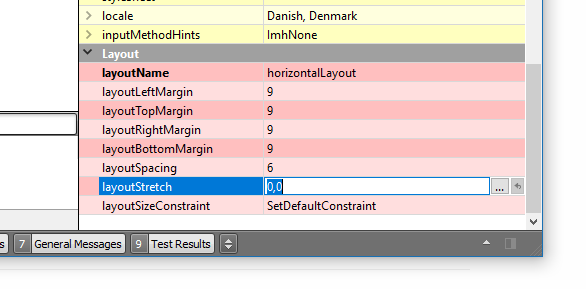
          you can do that with
          layoutstrech
          alt text
          it works as procent sort of.
          say you write 1,2
          second would take up as 2/3 space. fool around with some values and see.

          M 1 Reply Last reply
          3
          • mrjjM mrjj

            Hi
            you can do that with
            layoutstrech
            alt text
            it works as procent sort of.
            say you write 1,2
            second would take up as 2/3 space. fool around with some values and see.

            M Offline
            M Offline
            MafiaSkafia
            wrote on last edited by
            #5

            @mrjj

            Thank you it's solved! And sorry for the late reply..

            1 Reply Last reply
            1

            • Login

            • Login or register to search.
            • First post
              Last post
            0
            • Categories
            • Recent
            • Tags
            • Popular
            • Users
            • Groups
            • Search
            • Get Qt Extensions
            • Unsolved