Skip to content
  • Categories
  • Recent
  • Tags
  • Popular
  • Users
  • Groups
  • Search
  • Get Qt Extensions
  • Unsolved
Collapse
Brand Logo
  1. Home
  2. Qt Development
  3. General and Desktop
  4. Can't layout window properly

Can't layout window properly

Scheduled Pinned Locked Moved Solved General and Desktop
5 Posts 2 Posters 762 Views 1 Watching
  • Oldest to Newest
  • Newest to Oldest
  • Most Votes
Reply
  • Reply as topic
Log in to reply
This topic has been deleted. Only users with topic management privileges can see it.
  • M Offline
    M Offline
    MafiaSkafia
    wrote on last edited by
    #1

    Hello, i'm still a noob using Qt and would like you to help me with this:

    So i'm creating a desktop app, with a menu bar and two tabs using Qt designer. For the first TAB i want an OpenGL widget to be displayed in about 3/4 of the total TAB space, just like this:
    0_1525607556057_help.PNG

    But when i try to apply an horizontal layout to both sections (buttons on the left and OpenGL widget on the right), so that when i resize the main window they scale properly, my OpenGL window only fills half the screen..
    I would be very appreciated if anyone could help me out! Thanks in advance.

    1 Reply Last reply
    0
    • mrjjM Offline
      mrjjM Offline
      mrjj
      Lifetime Qt Champion
      wrote on last edited by
      #2

      Hi
      but is the tabwidget in a layout so it follows mainwindow?
      Like layout on centralwidget and tabwidget in that ?

      1 Reply Last reply
      3
      • M Offline
        M Offline
        MafiaSkafia
        wrote on last edited by
        #3

        @mrjj said in Can't layout window properly:

        e layout on centralwidge
        Hey! Yes, I would like the tabWidget to scale properly with the main window. But i also want the OpenGLwidget to fill 3/4 of the tabWidget and also to scale with the main window. Basically i want this example to scale properly when i resize the window:

        0_1525619844917_help2.PNG

        1 Reply Last reply
        0
        • mrjjM Offline
          mrjjM Offline
          mrjj
          Lifetime Qt Champion
          wrote on last edited by
          #4

          Hi
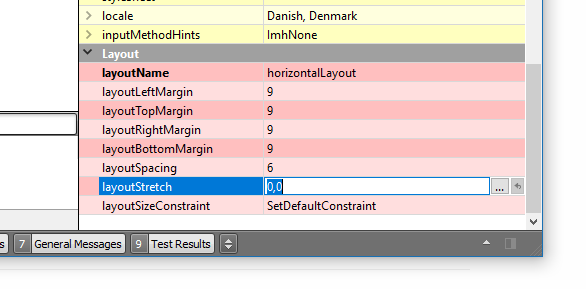
          you can do that with
          layoutstrech
          alt text
          it works as procent sort of.
          say you write 1,2
          second would take up as 2/3 space. fool around with some values and see.

          M 1 Reply Last reply
          3
          • mrjjM mrjj

            Hi
            you can do that with
            layoutstrech
            alt text
            it works as procent sort of.
            say you write 1,2
            second would take up as 2/3 space. fool around with some values and see.

            M Offline
            M Offline
            MafiaSkafia
            wrote on last edited by
            #5

            @mrjj

            Thank you it's solved! And sorry for the late reply..

            1 Reply Last reply
            1

            • Login

            • Login or register to search.
            • First post
              Last post
            0
            • Categories
            • Recent
            • Tags
            • Popular
            • Users
            • Groups
            • Search
            • Get Qt Extensions
            • Unsolved