Skip to content
  • Categories
  • Recent
  • Tags
  • Popular
  • Users
  • Groups
  • Search
  • Get Qt Extensions
  • Unsolved
Collapse
Brand Logo
  1. Home
  2. Qt Development
  3. General and Desktop
  4. space around qbutton text

space around qbutton text

Scheduled Pinned Locked Moved Solved General and Desktop
8 Posts 5 Posters 1.5k Views 2 Watching
  • Oldest to Newest
  • Newest to Oldest
  • Most Votes
Reply
  • Reply as topic
Log in to reply
This topic has been deleted. Only users with topic management privileges can see it.
  • U Offline
    U Offline
    user4592357
    wrote on last edited by
    #1

    i create a custom qmsgbox like this:

    QMessageBox msgBox;
    msgBox.setText("text");
    msgBox.setWindowTitle("title");
    const auto yesButton = msgBox.addButton(QObject::tr("Yes"), QMessageBox::YesRole);
    const auto noButton = msgBox.addButton(QObject::tr("No"), QMessageBox::NoRole);
    

    the text of buttons, however, doesn't have left and right margins and i have to put spaces around Yes and No to make them look less ugly. any suggestions?

    JonBJ 1 Reply Last reply
    0
    • U user4592357

      i create a custom qmsgbox like this:

      QMessageBox msgBox;
      msgBox.setText("text");
      msgBox.setWindowTitle("title");
      const auto yesButton = msgBox.addButton(QObject::tr("Yes"), QMessageBox::YesRole);
      const auto noButton = msgBox.addButton(QObject::tr("No"), QMessageBox::NoRole);
      

      the text of buttons, however, doesn't have left and right margins and i have to put spaces around Yes and No to make them look less ugly. any suggestions?

      JonBJ Offline
      JonBJ Offline
      JonB
      wrote on last edited by
      #2

      @user4592357
      Button style like margins or whatever, instead of altering text?

      1 Reply Last reply
      0
      • F Offline
        F Offline
        Fuel
        wrote on last edited by
        #3

        you cant setStyleSheet of the Buttons?

        1 Reply Last reply
        0
        • M Offline
          M Offline
          mpergand
          wrote on last edited by
          #4

          What OS ?
          0_1510926258893_MsgBox.png
          No such issue in Ubuntu and MacOS
          Anyway, there's an extra margin around the box in OSX (in all Qt 5 versions as far as i know)

          U 1 Reply Last reply
          0
          • M mpergand

            What OS ?
            0_1510926258893_MsgBox.png
            No such issue in Ubuntu and MacOS
            Anyway, there's an extra margin around the box in OSX (in all Qt 5 versions as far as i know)

            U Offline
            U Offline
            user4592357
            wrote on last edited by
            #5

            @mpergand

            Windows :D

            mrjjM 1 Reply Last reply
            0
            • U user4592357

              @mpergand

              Windows :D

              mrjjM Offline
              mrjjM Offline
              mrjj
              Lifetime Qt Champion
              wrote on last edited by
              #6

              @user4592357
              Hi
              what windows ?
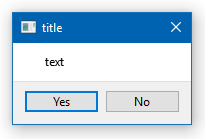
              This is win 10, Qt5.9

              alt text

              (your code)

              U 1 Reply Last reply
              0
              • mrjjM mrjj

                @user4592357
                Hi
                what windows ?
                This is win 10, Qt5.9

                alt text

                (your code)

                U Offline
                U Offline
                user4592357
                wrote on last edited by user4592357
                #7

                @mrjj

                win10, qt5.6.2

                hmm this is really weird. the actual text that i'm setting to the button is longer than the 'yes' and 'no' so that's the reason. i guess i need to set a width to the button

                anyways, thanks for the help

                mrjjM 1 Reply Last reply
                0
                • U user4592357

                  @mrjj

                  win10, qt5.6.2

                  hmm this is really weird. the actual text that i'm setting to the button is longer than the 'yes' and 'no' so that's the reason. i guess i need to set a width to the button

                  anyways, thanks for the help

                  mrjjM Offline
                  mrjjM Offline
                  mrjj
                  Lifetime Qt Champion
                  wrote on last edited by
                  #8

                  @user4592357
                  Yep seems you are right if u use all space so buttons are expanded, then no extra space is added.
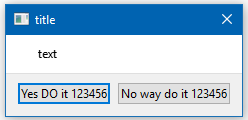
                  alt text

                  1 Reply Last reply
                  0

                  • Login

                  • Login or register to search.
                  • First post
                    Last post
                  0
                  • Categories
                  • Recent
                  • Tags
                  • Popular
                  • Users
                  • Groups
                  • Search
                  • Get Qt Extensions
                  • Unsolved