Skip to content
  • Categories
  • Recent
  • Tags
  • Popular
  • Users
  • Groups
  • Search
  • Get Qt Extensions
  • Unsolved
Collapse
Brand Logo
  1. Home
  2. Qt Development
  3. General and Desktop
  4. space around qbutton text
Qt 6.11 is out! See what's new in the release blog

space around qbutton text

Scheduled Pinned Locked Moved Solved General and Desktop
8 Posts 5 Posters 2.1k Views 2 Watching
  • Oldest to Newest
  • Newest to Oldest
  • Most Votes
Reply
  • Reply as topic
Log in to reply
This topic has been deleted. Only users with topic management privileges can see it.
  • U Offline
    U Offline
    user4592357
    wrote on last edited by
    #1

    i create a custom qmsgbox like this:

    QMessageBox msgBox;
    msgBox.setText("text");
    msgBox.setWindowTitle("title");
    const auto yesButton = msgBox.addButton(QObject::tr("Yes"), QMessageBox::YesRole);
    const auto noButton = msgBox.addButton(QObject::tr("No"), QMessageBox::NoRole);
    

    the text of buttons, however, doesn't have left and right margins and i have to put spaces around Yes and No to make them look less ugly. any suggestions?

    JonBJ 1 Reply Last reply
    0
    • U user4592357

      i create a custom qmsgbox like this:

      QMessageBox msgBox;
      msgBox.setText("text");
      msgBox.setWindowTitle("title");
      const auto yesButton = msgBox.addButton(QObject::tr("Yes"), QMessageBox::YesRole);
      const auto noButton = msgBox.addButton(QObject::tr("No"), QMessageBox::NoRole);
      

      the text of buttons, however, doesn't have left and right margins and i have to put spaces around Yes and No to make them look less ugly. any suggestions?

      JonBJ Offline
      JonBJ Offline
      JonB
      wrote on last edited by
      #2

      @user4592357
      Button style like margins or whatever, instead of altering text?

      1 Reply Last reply
      0
      • F Offline
        F Offline
        Fuel
        wrote on last edited by
        #3

        you cant setStyleSheet of the Buttons?

        1 Reply Last reply
        0
        • M Offline
          M Offline
          mpergand
          wrote on last edited by
          #4

          What OS ?
          0_1510926258893_MsgBox.png
          No such issue in Ubuntu and MacOS
          Anyway, there's an extra margin around the box in OSX (in all Qt 5 versions as far as i know)

          U 1 Reply Last reply
          0
          • M mpergand

            What OS ?
            0_1510926258893_MsgBox.png
            No such issue in Ubuntu and MacOS
            Anyway, there's an extra margin around the box in OSX (in all Qt 5 versions as far as i know)

            U Offline
            U Offline
            user4592357
            wrote on last edited by
            #5

            @mpergand

            Windows :D

            mrjjM 1 Reply Last reply
            0
            • U user4592357

              @mpergand

              Windows :D

              mrjjM Offline
              mrjjM Offline
              mrjj
              Lifetime Qt Champion
              wrote on last edited by
              #6

              @user4592357
              Hi
              what windows ?
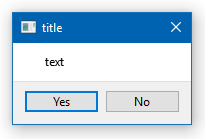
              This is win 10, Qt5.9

              alt text

              (your code)

              U 1 Reply Last reply
              0
              • mrjjM mrjj

                @user4592357
                Hi
                what windows ?
                This is win 10, Qt5.9

                alt text

                (your code)

                U Offline
                U Offline
                user4592357
                wrote on last edited by user4592357
                #7

                @mrjj

                win10, qt5.6.2

                hmm this is really weird. the actual text that i'm setting to the button is longer than the 'yes' and 'no' so that's the reason. i guess i need to set a width to the button

                anyways, thanks for the help

                mrjjM 1 Reply Last reply
                0
                • U user4592357

                  @mrjj

                  win10, qt5.6.2

                  hmm this is really weird. the actual text that i'm setting to the button is longer than the 'yes' and 'no' so that's the reason. i guess i need to set a width to the button

                  anyways, thanks for the help

                  mrjjM Offline
                  mrjjM Offline
                  mrjj
                  Lifetime Qt Champion
                  wrote on last edited by
                  #8

                  @user4592357
                  Yep seems you are right if u use all space so buttons are expanded, then no extra space is added.
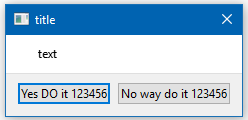
                  alt text

                  1 Reply Last reply
                  0

                  • Login

                  • Login or register to search.
                  • First post
                    Last post
                  0
                  • Categories
                  • Recent
                  • Tags
                  • Popular
                  • Users
                  • Groups
                  • Search
                  • Get Qt Extensions
                  • Unsolved