Skip to content
  • Categories
  • Recent
  • Tags
  • Popular
  • Users
  • Groups
  • Search
  • Get Qt Extensions
  • Unsolved
Collapse
Brand Logo
  1. Home
  2. Qt Development
  3. Installation and Deployment
  4. Deploying QtQuck Fail
Qt 6.11 is out! See what's new in the release blog

Deploying QtQuck Fail

Scheduled Pinned Locked Moved Solved Installation and Deployment
2 Posts 1 Posters 722 Views
  • Oldest to Newest
  • Newest to Oldest
  • Most Votes
Reply
  • Reply as topic
Log in to reply
This topic has been deleted. Only users with topic management privileges can see it.
  • E Offline
    E Offline
    Elnur_Ismailzada
    wrote on last edited by Elnur_Ismailzada
    #1

    Hi.
    I want to deploy my application on Windows. I used Qml.
    As in https://wiki.qt.io/Deploy_an_Application_on_Windows
    I copy all the .dll files from C:\Qt\5.9.1\mingw53_32\bin
    all the folders from C:\Qt\5.9.1\mingw53_32\plugins
    all the folders from C:\Qt\5.9.1\mingw53_32\qml

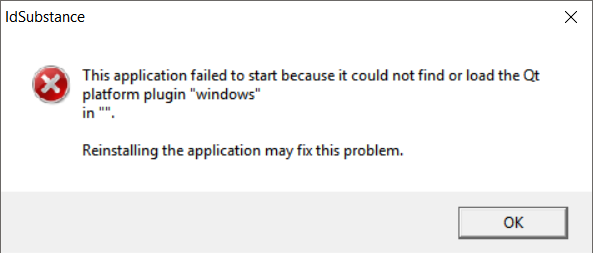
    After launch my exe I'm getting error
    0_1510440860603_1.PNG
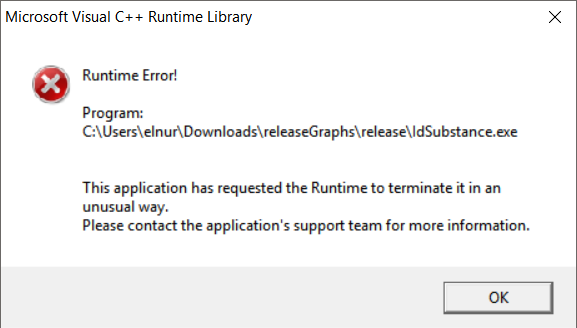
    after that moment
    0_1510441013192_2.PNG

    Any ideas?
    Thanks.

    1 Reply Last reply
    0
    • E Offline
      E Offline
      Elnur_Ismailzada
      wrote on last edited by
      #2

      So, I win)
      My file structure. In qt.conf
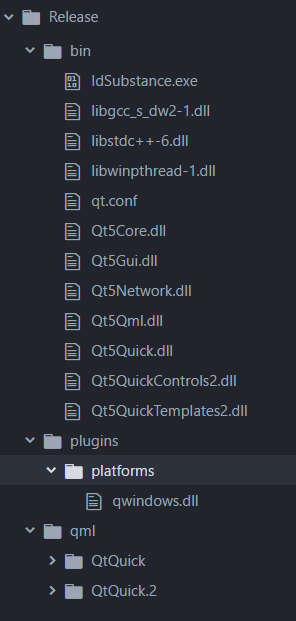
      0_1510484659118_b6355c4e-f546-4ef8-9f61-fdcfef07ed8c-image.png

      And

      # In qt.conf
      [Paths]
      Prefix=..
      
      1 Reply Last reply
      0

      • Login

      • Login or register to search.
      • First post
        Last post
      0
      • Categories
      • Recent
      • Tags
      • Popular
      • Users
      • Groups
      • Search
      • Get Qt Extensions
      • Unsolved