
Odd behavior with a selected QTableWidgetItem
-
I have a QTableWidget with 10 rows and 11 columns. Here is some of the initialization:
        logTable = new QTableWidget(10, 11, this);
        logTable->setSelectionMode(QAbstractItemView::SingleSelection);
        logTable->setSelectionBehavior(QAbstractItemView::SelectRows);
        connect(logTable, SIGNAL(itemSelectionChanged()), this, SLOT(tableSelectionChanged()));
About half of the table cells are filled with QTableWidgetItems and the other half is QLabels. When a user selects a row in the table, the appearance of the QLabels doesn't change, so that's why I needed to make the tableSelectionChanged() slot. Inside that slot, I change the stylesheets of all the QLabels, and things work just fine. With the QTableWidgetItems, however, I can't change their appearance inside the slot (the default appearance takes precedence). I use the setBackgroundColor method in the slot to change the QTableWidgetItem background, but it has no effect. Also, the font color in the QTableWidgetItems changes from black to white, which I don't want. These are the commands inside the slot that I use to change the appearance of the QTableWidgetItems and the QLabels:
    jobEntry[index].jobId->setBackgroundColor("#FF0000"));
    jobEntry[index].jobVolume->setStyleSheet("QLabel { background-color: #FF0000; border-radius: 0px }");
The first one (setBackgroundColor) doesn't have any effect, but the second one sets the background color of the QLabel correctly. How can I disable the default behavior of the QTableWidgetItems, so I can replace it with my own?
-
I have a QTableWidget with 10 rows and 11 columns. Here is some of the initialization:
        logTable = new QTableWidget(10, 11, this);
        logTable->setSelectionMode(QAbstractItemView::SingleSelection);
        logTable->setSelectionBehavior(QAbstractItemView::SelectRows);
        connect(logTable, SIGNAL(itemSelectionChanged()), this, SLOT(tableSelectionChanged()));
About half of the table cells are filled with QTableWidgetItems and the other half is QLabels. When a user selects a row in the table, the appearance of the QLabels doesn't change, so that's why I needed to make the tableSelectionChanged() slot. Inside that slot, I change the stylesheets of all the QLabels, and things work just fine. With the QTableWidgetItems, however, I can't change their appearance inside the slot (the default appearance takes precedence). I use the setBackgroundColor method in the slot to change the QTableWidgetItem background, but it has no effect. Also, the font color in the QTableWidgetItems changes from black to white, which I don't want. These are the commands inside the slot that I use to change the appearance of the QTableWidgetItems and the QLabels:
    jobEntry[index].jobId->setBackgroundColor("#FF0000"));
    jobEntry[index].jobVolume->setStyleSheet("QLabel { background-color: #FF0000; border-radius: 0px }");
The first one (setBackgroundColor) doesn't have any effect, but the second one sets the background color of the QLabel correctly. How can I disable the default behavior of the QTableWidgetItems, so I can replace it with my own?
@Endless77 said in Odd behavior with a selected QTableWidgetItem:
QTableWidgetItem
Hi did you try
QTableWidget::item {
background-color: rgb(255, 85, 127);
}(stylesheet)
-
The QTableWidgetItem doesn't support the setstylesheet method, so it doesn't seem that I can use stylesheets to alter its appearance.
@Endless77
Im not sure i understandIs QTableWidget::item not for the items ?You must set the style sheet on the TableWidget, NOT item.
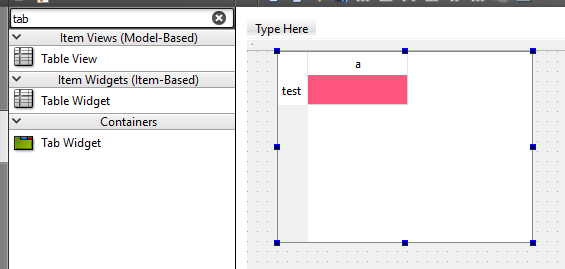
Please see here
http://doc.qt.io/qt-5/stylesheet-reference.htmlOh, update:
This is the one u are after
QTableWidget::item:selected{ background-color: red }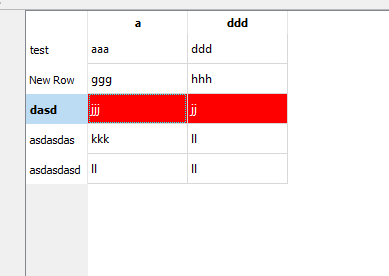
Sorry, the other one will color ALL items. This is only on selected.
-
If I understand correctly, then setting the stylesheet for the table would mean that all of the QTableWidgetItems in the table would have that style. The background color for any given row may be different than another row.
@Endless77
Hi
QTableWidget::item
is for all items.QTableWidget::item:selected{ background-color: red }
Is only for the selected onesso that should work for you ?
-
If I understand correctly, then setting the stylesheet for the table would mean that all of the QTableWidgetItems in the table would have that style. The background color for any given row may be different than another row.
@Endless77 said in Odd behavior with a selected QTableWidgetItem:
. The background color for any given row may be different than another row.
Oh sorry i missed that. Just though you tried to match selection color for one color so to speak.
Then stylesheet is not optimal as you would have to change for each row. -
Okay, so I thought the QTableWidget::item:selected would be promising, but it didn't work for me. The table looked the same as usual without anything selected, but when I selected a row, the normal selection coloring was in place.
I was also hopeful about the second suggestion, using setBackgroundColor(QColor()). That had no effect in my code. I changed the code in my slot that changes the colors, but the selection color was the same when the row was selected. When I deselected the row, that's when I saw the red background.
I can't seem to be able to override the default selection behavior for the QTableWidgetItems even when I specifically set the color to be different.
-
Okay, so I thought the QTableWidget::item:selected would be promising, but it didn't work for me. The table looked the same as usual without anything selected, but when I selected a row, the normal selection coloring was in place.
I was also hopeful about the second suggestion, using setBackgroundColor(QColor()). That had no effect in my code. I changed the code in my slot that changes the colors, but the selection color was the same when the row was selected. When I deselected the row, that's when I saw the red background.
I can't seem to be able to override the default selection behavior for the QTableWidgetItems even when I specifically set the color to be different.
@Endless77
Hmm its hard to guess at.How did u color all the rows in differnt colors in first place?
-
I used the same method, setBackgroundColor, to set the color in each QTableWidgetItem when the table is first displayed. I figured that using it again when something was selected would simply change the background color.
@Endless77
well yes it should, if you use tableSelectionChanged
and set it there. Didn't try but it sounds ok.

