Skip to content
  • Categories
  • Recent
  • Tags
  • Popular
  • Users
  • Groups
  • Search
  • Get Qt Extensions
  • Unsolved
Collapse
Brand Logo
  1. Home
  2. Qt Development
  3. General and Desktop
  4. Odd behavior with a selected QTableWidgetItem

Odd behavior with a selected QTableWidgetItem

Scheduled Pinned Locked Moved Unsolved General and Desktop
12 Posts 3 Posters 4.3k Views 1 Watching
  • Oldest to Newest
  • Newest to Oldest
  • Most Votes
Reply
  • Reply as topic
Log in to reply
This topic has been deleted. Only users with topic management privileges can see it.
  • E Offline
    E Offline
    Endless77
    wrote on last edited by
    #3

    The QTableWidgetItem doesn't support the setstylesheet method, so it doesn't seem that I can use stylesheets to alter its appearance.

    mrjjM 1 Reply Last reply
    0
    • E Endless77

      The QTableWidgetItem doesn't support the setstylesheet method, so it doesn't seem that I can use stylesheets to alter its appearance.

      mrjjM Offline
      mrjjM Offline
      mrjj
      Lifetime Qt Champion
      wrote on last edited by mrjj
      #4

      @Endless77
      Im not sure i understand

      Is QTableWidget::item not for the items ?

      You must set the style sheet on the TableWidget, NOT item.
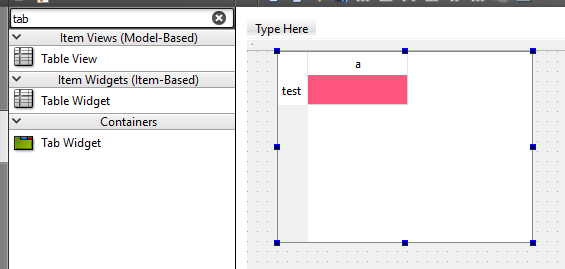
      alt text

      Please see here
      http://doc.qt.io/qt-5/stylesheet-reference.html

      Oh, update:
      This is the one u are after
      QTableWidget::item:selected{ background-color: red }
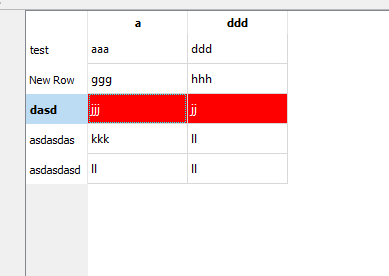
      alt text

      Sorry, the other one will color ALL items. This is only on selected.

      1 Reply Last reply
      0
      • E Offline
        E Offline
        Endless77
        wrote on last edited by
        #5

        If I understand correctly, then setting the stylesheet for the table would mean that all of the QTableWidgetItems in the table would have that style. The background color for any given row may be different than another row.

        mrjjM 2 Replies Last reply
        0
        • E Endless77

          If I understand correctly, then setting the stylesheet for the table would mean that all of the QTableWidgetItems in the table would have that style. The background color for any given row may be different than another row.

          mrjjM Offline
          mrjjM Offline
          mrjj
          Lifetime Qt Champion
          wrote on last edited by
          #6

          @Endless77
          Hi
          QTableWidget::item
          is for all items.

          QTableWidget::item:selected{ background-color: red }
          Is only for the selected ones

          so that should work for you ?

          1 Reply Last reply
          0
          • hskoglundH Offline
            hskoglundH Offline
            hskoglund
            wrote on last edited by
            #7

            Hi,to add to @mrjj, also I think your original ->setBackgroundColor() should work fine, but with a slight tweak:

            jobEntry[index].jobId->setBackgroundColor(QColor(255,0,0));
            

            (At least it works for me:-)

            1 Reply Last reply
            1
            • E Endless77

              If I understand correctly, then setting the stylesheet for the table would mean that all of the QTableWidgetItems in the table would have that style. The background color for any given row may be different than another row.

              mrjjM Offline
              mrjjM Offline
              mrjj
              Lifetime Qt Champion
              wrote on last edited by
              #8

              @Endless77 said in Odd behavior with a selected QTableWidgetItem:

              . The background color for any given row may be different than another row.

              Oh sorry i missed that. Just though you tried to match selection color for one color so to speak.
              Then stylesheet is not optimal as you would have to change for each row.

              1 Reply Last reply
              0
              • E Offline
                E Offline
                Endless77
                wrote on last edited by
                #9

                Okay, so I thought the QTableWidget::item:selected would be promising, but it didn't work for me. The table looked the same as usual without anything selected, but when I selected a row, the normal selection coloring was in place.

                I was also hopeful about the second suggestion, using setBackgroundColor(QColor()). That had no effect in my code. I changed the code in my slot that changes the colors, but the selection color was the same when the row was selected. When I deselected the row, that's when I saw the red background.

                I can't seem to be able to override the default selection behavior for the QTableWidgetItems even when I specifically set the color to be different.

                mrjjM 1 Reply Last reply
                0
                • E Endless77

                  Okay, so I thought the QTableWidget::item:selected would be promising, but it didn't work for me. The table looked the same as usual without anything selected, but when I selected a row, the normal selection coloring was in place.

                  I was also hopeful about the second suggestion, using setBackgroundColor(QColor()). That had no effect in my code. I changed the code in my slot that changes the colors, but the selection color was the same when the row was selected. When I deselected the row, that's when I saw the red background.

                  I can't seem to be able to override the default selection behavior for the QTableWidgetItems even when I specifically set the color to be different.

                  mrjjM Offline
                  mrjjM Offline
                  mrjj
                  Lifetime Qt Champion
                  wrote on last edited by
                  #10

                  @Endless77
                  Hmm its hard to guess at.

                  How did u color all the rows in differnt colors in first place?

                  1 Reply Last reply
                  0
                  • E Offline
                    E Offline
                    Endless77
                    wrote on last edited by
                    #11

                    I used the same method, setBackgroundColor, to set the color in each QTableWidgetItem when the table is first displayed. I figured that using it again when something was selected would simply change the background color.

                    mrjjM 1 Reply Last reply
                    0
                    • E Endless77

                      I used the same method, setBackgroundColor, to set the color in each QTableWidgetItem when the table is first displayed. I figured that using it again when something was selected would simply change the background color.

                      mrjjM Offline
                      mrjjM Offline
                      mrjj
                      Lifetime Qt Champion
                      wrote on last edited by
                      #12

                      @Endless77
                      well yes it should, if you use tableSelectionChanged
                      and set it there. Didn't try but it sounds ok.

                      1 Reply Last reply
                      0

                      • Login

                      • Login or register to search.
                      • First post
                        Last post
                      0
                      • Categories
                      • Recent
                      • Tags
                      • Popular
                      • Users
                      • Groups
                      • Search
                      • Get Qt Extensions
                      • Unsolved