Skip to content
  • Categories
  • Recent
  • Tags
  • Popular
  • Users
  • Groups
  • Search
  • Get Qt Extensions
  • Unsolved
Collapse
Brand Logo
  1. Home
  2. Qt Development
  3. General and Desktop
  4. Current year in Qt pro file
Qt 6.11 is out! See what's new in the release blog

Current year in Qt pro file

Scheduled Pinned Locked Moved Solved General and Desktop
10 Posts 4 Posters 5.4k Views 2 Watching
  • Oldest to Newest
  • Newest to Oldest
  • Most Votes
Reply
  • Reply as topic
Log in to reply
This topic has been deleted. Only users with topic management privileges can see it.
  • Cobra91151C Offline
    Cobra91151C Offline
    Cobra91151
    wrote on last edited by Cobra91151
    #1

    Hi! I want to get current year in qt pro file to display it in QMAKE_TARGET_COPYRIGHT variable.
    I have tried with $$system("date") but it doesn't work.
    How to do it? Thanks in advance.

    1 Reply Last reply
    0
    • SGaistS Offline
      SGaistS Offline
      SGaist
      Lifetime Qt Champion
      wrote on last edited by
      #2

      Hi,

      What is your code exactly ?

      Interested in AI ? www.idiap.ch
      Please read the Qt Code of Conduct - https://forum.qt.io/topic/113070/qt-code-of-conduct

      Cobra91151C 1 Reply Last reply
      0
      • SGaistS SGaist

        Hi,

        What is your code exactly ?

        Cobra91151C Offline
        Cobra91151C Offline
        Cobra91151
        wrote on last edited by
        #3

        @SGaist

        My code:

        QMAKE_TARGET_COPYRIGHT = $$system("date /T")
        message($$QMAKE_TARGET_COPYRIGHT)
        

        It returns:
        Project MESSAGE: Fri 02/17/2017
        When I use just $$system("date") it can't read the Qt project.

        I need to pass some parameter to get just - 2017.

        jsulmJ 1 Reply Last reply
        0
        • Cobra91151C Cobra91151

          @SGaist

          My code:

          QMAKE_TARGET_COPYRIGHT = $$system("date /T")
          message($$QMAKE_TARGET_COPYRIGHT)
          

          It returns:
          Project MESSAGE: Fri 02/17/2017
          When I use just $$system("date") it can't read the Qt project.

          I need to pass some parameter to get just - 2017.

          jsulmJ Offline
          jsulmJ Offline
          jsulm
          Lifetime Qt Champion
          wrote on last edited by jsulm
          #4

          @Cobra91151 What about

          date +%Y
          

          see: man date
          Update: you're on Windows?

          https://forum.qt.io/topic/113070/qt-code-of-conduct

          Cobra91151C 1 Reply Last reply
          1
          • jsulmJ jsulm

            @Cobra91151 What about

            date +%Y
            

            see: man date
            Update: you're on Windows?

            Cobra91151C Offline
            Cobra91151C Offline
            Cobra91151
            wrote on last edited by Cobra91151
            #5

            @jsulm

            Yes.
            I have tried your code:

            QMAKE_TARGET_COPYRIGHT = $$system("date +%Y")
            message($$QMAKE_TARGET_COPYRIGHT)
            

            After pro file is saved it can't read my project. It stuck on - Reading Project....

            Update:
            Also I have tried to create console application to test it. If I'm right that $$system() function in Qt is the same as is system() (C++) when use it in Visual Studio project. So:

            Visual Studio Console Project Code:
            system("date") - returns: The current date is: Fri 02/17/2017 (not working in Qt pro)
            system("date /T") - returns: Fri 02/17/2017 (working in Qt pro)

            So I think system("date /T") should be, but I need also some parameter to display just year.

            mrjjM 1 Reply Last reply
            0
            • Cobra91151C Cobra91151

              @jsulm

              Yes.
              I have tried your code:

              QMAKE_TARGET_COPYRIGHT = $$system("date +%Y")
              message($$QMAKE_TARGET_COPYRIGHT)
              

              After pro file is saved it can't read my project. It stuck on - Reading Project....

              Update:
              Also I have tried to create console application to test it. If I'm right that $$system() function in Qt is the same as is system() (C++) when use it in Visual Studio project. So:

              Visual Studio Console Project Code:
              system("date") - returns: The current date is: Fri 02/17/2017 (not working in Qt pro)
              system("date /T") - returns: Fri 02/17/2017 (working in Qt pro)

              So I think system("date /T") should be, but I need also some parameter to display just year.

              mrjjM Offline
              mrjjM Offline
              mrjj
              Lifetime Qt Champion
              wrote on last edited by
              #6

              @Cobra91151

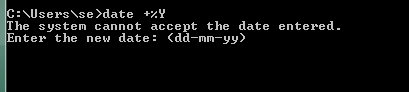
              well date +%Y does
              date +%Y

              alt text

              so that is why its hanging :)

              Date command do not mention ANY way to change the format. ( in help)

              Cobra91151C 1 Reply Last reply
              1
              • mrjjM mrjj

                @Cobra91151

                well date +%Y does
                date +%Y

                alt text

                so that is why its hanging :)

                Date command do not mention ANY way to change the format. ( in help)

                Cobra91151C Offline
                Cobra91151C Offline
                Cobra91151
                wrote on last edited by
                #7

                @mrjj

                So there no way to get current year in QMAKE_TARGET_COPYRIGHT?

                mrjjM 1 Reply Last reply
                0
                • Cobra91151C Offline
                  Cobra91151C Offline
                  Cobra91151
                  wrote on last edited by
                  #8

                  I have found a solution. Code:
                  QMAKE_TARGET_COPYRIGHT = $$system("echo %date:~10,4%")
                  message($$QMAKE_TARGET_COPYRIGHT)

                  It returns 2017.

                  jsulmJ 1 Reply Last reply
                  1
                  • Cobra91151C Cobra91151

                    @mrjj

                    So there no way to get current year in QMAKE_TARGET_COPYRIGHT?

                    mrjjM Offline
                    mrjjM Offline
                    mrjj
                    Lifetime Qt Champion
                    wrote on last edited by
                    #9

                    @Cobra91151

                    clever :)
                    since the length should remain the same, cutting should work
                    across languages etc. i hope.

                    1 Reply Last reply
                    0
                    • Cobra91151C Cobra91151

                      I have found a solution. Code:
                      QMAKE_TARGET_COPYRIGHT = $$system("echo %date:~10,4%")
                      message($$QMAKE_TARGET_COPYRIGHT)

                      It returns 2017.

                      jsulmJ Offline
                      jsulmJ Offline
                      jsulm
                      Lifetime Qt Champion
                      wrote on last edited by
                      #10

                      @Cobra91151 date +%Y is for Linux, that's why I asked about Windows :-)

                      https://forum.qt.io/topic/113070/qt-code-of-conduct

                      1 Reply Last reply
                      1

                      • Login

                      • Login or register to search.
                      • First post
                        Last post
                      0
                      • Categories
                      • Recent
                      • Tags
                      • Popular
                      • Users
                      • Groups
                      • Search
                      • Get Qt Extensions
                      • Unsolved