
Modern App Packaging
-
Hi, everyone! I’d like to ask the Qt development pros, in as much detail as possible, how you package your applications??
Let me explain what I mean by “package.” For Windows, this means a single .exe file that, when run, starts the installation. For macOS, it’s a single .dmg file.
So, I have some code. There's a standard “src” folder and a standard “CMakeLists.txt” file. Now I need to take certain steps to end up with all the possible installers for Windows, Mac, and Linux at once. My question is: what exactly are those steps?
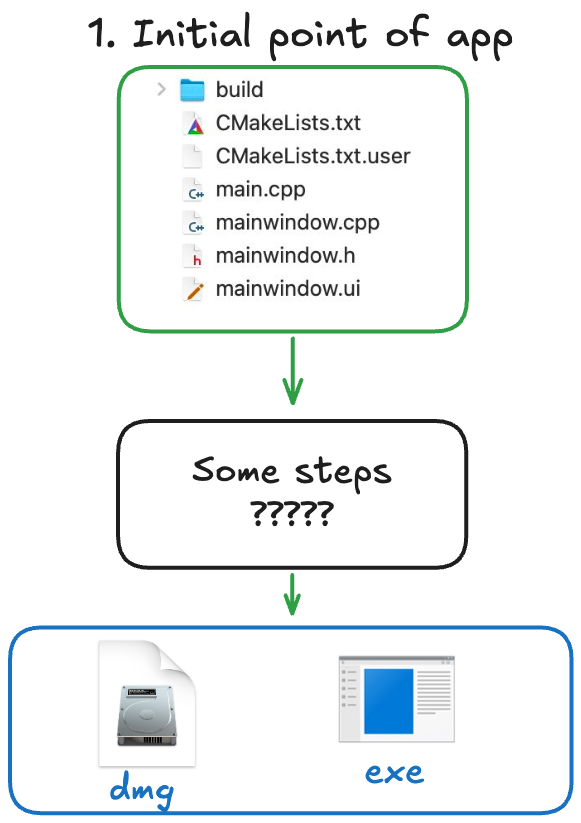
To be honest, I don't really get the big picture. I understand some of the steps—for example, you can create an installer simply by following the guides from Inno Setup itself. But the exact sequence of steps is a mystery to me. By the way, on Windows, simply runningwindeployqtdoesn’t work—it doesn’t bundle the dependencies. So, developers, please share your experiences and how you make this process easier for yourselves! Based on the responses, I plan to write a guide on GitHub so that others can use it. I think packaging an application is a tricky topic full of nuances. -
Hi and welcome to devnet,
Might be a silly question but did you read through the windeployqt and macdeployqt documentation ?
These pages already covers quite a lot of the things you are mentioning. -
There is a Qt Installer Framework that could be used with all operating systems. However, I didn't figure out yet how to force running the installer as root on Linux. We actually use different ways on Windows (NSIS Installer), macOS (dmg), and Linux (Qt Installer Framework). But, for us this is done by the CI/CD and not as part of the regular build script.
If you want to go with CMake, isn't there also CPack?
As I'm not a CMake expert and if there is no specific way, you can certainly conditionally (dependent on the OS) execute deploy scripts.
BTW, we've landed on AppImages for Linux to create portable executables. If you want I can share how the couple of steps we do. We had to use both linuxdeploy and linuxdeployqt to get it working properly with AppImages.
-
There's lots of way to do it, for exampling using Qt Installer Framework, as @SimonSchroeder suggested.
For my open source projects, I do something very similar to your diagram, except instead of producing a Windows
*.exeinstaller, I produce a "portable app" - which is a single archive (you can just unzip it), containing everything the app needs to runs - all the libraries, etc, which are installed viawindeployqt. If you want to use something like Inno, it would be just one more step.Using one of my open source projects as an example, the steps are roughly as follows:
Linux
- install linuxdeploy, and linuxdeploy-plugin-qt.
- tell cmake how to produce an AppImage using
linuxdeploy - configure and build with cmake
- run tests, of course ;)
- build an AppImage via cmake
macOS
- tell cmake to produce an
Info.plistfile - configure and build with cmake
- run tests, of course ;)
- use
macdeployqtto produce a dmg
Windows
- add custom "portable" targets to
CMakefileLists.txt, so cmake knows how to copy the required binaries, resources, and runwindeployqtfor my setup. - configure and build with cmake
- run tests, of course ;)
- package portable apps via cmake - this step uses
windeployqt. - I don't do this, but you could run Inno Setup to package the files from the portable apps in the previous step.
Of course, using Qt Install Framework would be great too, but is a very different approach - ie producing installers, as opposed to self-contains AppImage/dmg/Portable App files. There's not right or wrong - just whatever suits your scenario/s.
Cheers.
-
Hi and welcome to devnet,
Might be a silly question but did you read through the windeployqt and macdeployqt documentation ?
These pages already covers quite a lot of the things you are mentioning.@SGaist said in Modern App Packaging:
Hi and welcome to devnet,
Might be a silly question but did you read through the windeployqt and macdeployqt documentation ?
These pages already covers quite a lot of the things you are mentioning.I'm more interested in hearing about developers' real-world experiences than just links. Of course I've read that documentation!
@Paul-Colby said in Modern App Packaging:
There's lots of way to do it, for exampling using Qt Installer Framework, as @SimonSchroeder suggested.
Cheers.Thank you so much! This is exactly what I was looking for—a detailed description of your experience. What compiler do you use when developing with Qt? Your approach of calling
windeployqtdirectly from CMake is interesting. -
@SGaist said in Modern App Packaging:
Hi and welcome to devnet,
Might be a silly question but did you read through the windeployqt and macdeployqt documentation ?
These pages already covers quite a lot of the things you are mentioning.I'm more interested in hearing about developers' real-world experiences than just links. Of course I've read that documentation!
@Paul-Colby said in Modern App Packaging:
There's lots of way to do it, for exampling using Qt Installer Framework, as @SimonSchroeder suggested.
Cheers.Thank you so much! This is exactly what I was looking for—a detailed description of your experience. What compiler do you use when developing with Qt? Your approach of calling
windeployqtdirectly from CMake is interesting.@MarkoProg said in Modern App Packaging:
Thank you so much! This is exactly what I was looking for
You're very welcome :)
What compiler do you use when developing with Qt?
Locally, I just use the OS-provided versions of GCC and Clang on the latest LTS (work) and non-LTS (personal) Ubuntu. And occasionally the current Clang, and MSVC on macOS and Windows respectively (especially when CI alerts me to issues on those platforms).
On GitHub Workflows, I use the current GitHub-provided versions of Clang, GCC, and MSVC - the actual versions depend on the GitHub runner, for example currently GitHub's Windows runners provide MSVC 19, Clang 17, and MinGW 13 - and I use all three, for x86, x86-64 and ARM64 builds, except where not supported by Qt. Whereas the Ubuntu runners use the versions provided by Ubuntu LTS, which are typically older.
You an see the compilers / toolchains in the GitHub Workflows
build.yamlfile, specifically:And the actual versions that end up being found (by CMake) and thus used, is in the output of the "Build w/o coverage instrumentation" steps, like:
-- CMake version is 3.31.6
-- CMake build type is Release
-- The CXX compiler identification is GNU 13.1.0
Cheers.
-
There's lots of way to do it, for exampling using Qt Installer Framework, as @SimonSchroeder suggested.
For my open source projects, I do something very similar to your diagram, except instead of producing a Windows
*.exeinstaller, I produce a "portable app" - which is a single archive (you can just unzip it), containing everything the app needs to runs - all the libraries, etc, which are installed viawindeployqt. If you want to use something like Inno, it would be just one more step.Using one of my open source projects as an example, the steps are roughly as follows:
Linux
- install linuxdeploy, and linuxdeploy-plugin-qt.
- tell cmake how to produce an AppImage using
linuxdeploy - configure and build with cmake
- run tests, of course ;)
- build an AppImage via cmake
macOS
- tell cmake to produce an
Info.plistfile - configure and build with cmake
- run tests, of course ;)
- use
macdeployqtto produce a dmg
Windows
- add custom "portable" targets to
CMakefileLists.txt, so cmake knows how to copy the required binaries, resources, and runwindeployqtfor my setup. - configure and build with cmake
- run tests, of course ;)
- package portable apps via cmake - this step uses
windeployqt. - I don't do this, but you could run Inno Setup to package the files from the portable apps in the previous step.
Of course, using Qt Install Framework would be great too, but is a very different approach - ie producing installers, as opposed to self-contains AppImage/dmg/Portable App files. There's not right or wrong - just whatever suits your scenario/s.
Cheers.
@Paul-Colby said in Modern App Packaging:
- add custom "portable" targets to
CMakefileLists.txt, so cmake knows how to copy the required binaries, resources, and runwindeployqtfor my setup.
Could this part be replaced by the official
qt_generate_deploy_app_script()command? https://doc.qt.io/qt-6/qt-generate-deploy-app-script.htmlQt Doc Search for browsers: forum.qt.io/topic/35616/web-browser-extension-for-improved-doc-searches
-
@Paul-Colby said in Modern App Packaging:
- add custom "portable" targets to
CMakefileLists.txt, so cmake knows how to copy the required binaries, resources, and runwindeployqtfor my setup.
Could this part be replaced by the official
qt_generate_deploy_app_script()command? https://doc.qt.io/qt-6/qt-generate-deploy-app-script.html@JKSH said in Modern App Packaging:
Could this part be replaced by the official
qt_generate_deploy_app_script()command?Absolutely! If you only need/want to support Qt 6.3+ 🙂
Some of my projects are still supporting Qt 5.x, and 6.2, so I haven't adopted
qt_generate_deploy_app_script()yet, nor a few other nice things that Qt6+ has added. I will sometime 🤞(yes, I know Qt 5.x is soooo old 😅) - add custom "portable" targets to
-
There's lots of way to do it, for exampling using Qt Installer Framework, as @SimonSchroeder suggested.
For my open source projects, I do something very similar to your diagram, except instead of producing a Windows
*.exeinstaller, I produce a "portable app" - which is a single archive (you can just unzip it), containing everything the app needs to runs - all the libraries, etc, which are installed viawindeployqt. If you want to use something like Inno, it would be just one more step.Using one of my open source projects as an example, the steps are roughly as follows:
Linux
- install linuxdeploy, and linuxdeploy-plugin-qt.
- tell cmake how to produce an AppImage using
linuxdeploy - configure and build with cmake
- run tests, of course ;)
- build an AppImage via cmake
macOS
- tell cmake to produce an
Info.plistfile - configure and build with cmake
- run tests, of course ;)
- use
macdeployqtto produce a dmg
Windows
- add custom "portable" targets to
CMakefileLists.txt, so cmake knows how to copy the required binaries, resources, and runwindeployqtfor my setup. - configure and build with cmake
- run tests, of course ;)
- package portable apps via cmake - this step uses
windeployqt. - I don't do this, but you could run Inno Setup to package the files from the portable apps in the previous step.
Of course, using Qt Install Framework would be great too, but is a very different approach - ie producing installers, as opposed to self-contains AppImage/dmg/Portable App files. There's not right or wrong - just whatever suits your scenario/s.
Cheers.
@Paul-Colby said in Modern App Packaging:
Using one of my open source projects as an example, the steps are roughly as follows:
That is a great overview. I would upvote more than once if I could!
@Paul-Colby said in Modern App Packaging:
except instead of producing a Windows *.exe installer, I produce a "portable app" - which is a single archive (you can just unzip it), containing everything the app needs to runs
For years we had problems with DLLs on Windows (which was before I got to work at this company and before they/we used Qt). The problem is when users want to switch out the executable, but developers might have slightly incompatible Qt versions on their machines. That is one big reason why we chose to compile Qt statically ourselves (and also using static Windows runtime). With 3rd party libraries it is sometimes hard to convince them to link against the static Windows runtime as well, but it is certainly worth it. The main software is just a single executable without any DLL dependencies. We do need some config files in specific directories. These we just put into the exectuable as well and check on startup if they exist and copy them to the right folder if necessary. For some users a portable app inside a ZIP file is still too complicated because they wouldn't know where to put it. I'm still playing with the idea to not just copy config files to the correct folder, but also to have an install button inside the app itself which will automatically copy it into "Program Files" directory, put it into the start menu and maybe register file extensions. This is so much easier with macOS or with AppImages/xdg on Linux. I believe this is how apps should work on Windows as well–no extra installer. I wish there would be something like AppImages for Windows as well (then I would be willing to use DLLs again).
@Paul-Colby said in Modern App Packaging:
Locally, I just use the OS-provided versions of GCC and Clang on the latest LTS (work) and non-LTS (personal) Ubuntu.
Isn't there some requirement for linuxdeploy that you cannot use the most recent version of the OS (in order to provide the best backwards compatility across most distros)? Or is there a specific switch to override this? I couldn't see anything from your linked CMake files. Or were you just lucky so far?


