
Get exit code in terminal
-
Hello, I'm using the latest version of Qt Creator to write C code in Windows 10.
How can I make the exit code appear in the external terminal? The exit code shows up when I have checked "Use internal terminal" however I prefer to have the terminal open up in a separate window. Unfortunately it doesn't show the exit code, only "Press <RETURN> to close this window...".Code::Blocks has such a terminal (cb_console_runner.exe), so maybe there is a way I can integrate it in Qt Creator? I've previously done exactly that in KDevelop by tweaking the "Launch Settings", but I'm struggling to do that in Qt Creator.
Anyway, either making Qt Creator's terminal show the exit code or using the one from Code::Blocks will be fine. Thanks in advance!
-
Hi @Programist,
that seems indeed a difference between internal and external Terminal.
If its any help: You can open the Application Output and it will show the result of the last run also ("finished successfully" resp. "finished with code X".
Maybe that already helps you.
Regards
-
The terminal window will run a regular shell (e.g. bash on Linux). Normal shell behavior is to not show the exit code. What you could do in QtCreator is to write a small script that launches your program and then prints its exit code. You can specify in QtCreator to run your script instead.
-
The terminal window will run a regular shell (e.g. bash on Linux). Normal shell behavior is to not show the exit code. What you could do in QtCreator is to write a small script that launches your program and then prints its exit code. You can specify in QtCreator to run your script instead.
@SimonSchroeder said in Get exit code in terminal:
You can specify in QtCreator to run your script instead.
I read up yesterday to suggest this and (I think) it says you cannot do that under Windows? You can choose what is run for the external terminal under Linux (e.g. xterm) but not Windows? So I didn't suggest it.
-
@SimonSchroeder said in Get exit code in terminal:
You can specify in QtCreator to run your script instead.
I read up yesterday to suggest this and (I think) it says you cannot do that under Windows? You can choose what is run for the external terminal under Linux (e.g. xterm) but not Windows? So I didn't suggest it.
@JonB Are you sure? I would expect that you can run a .bat file instead...
I am on Windows and there is an option to select the "executable". I don't see a reason why this cannot be a .bat file (or a call to
cmdthat immediately executes the .bat file). And it is possible to get the return code in the good old Windows command line. (Though, I haven't tested it.) -
QtC is already running a bat file to set up the compiler environment. So should be possible
-
@JonB Are you sure? I would expect that you can run a .bat file instead...
I am on Windows and there is an option to select the "executable". I don't see a reason why this cannot be a .bat file (or a call to
cmdthat immediately executes the .bat file). And it is possible to get the return code in the good old Windows command line. (Though, I haven't tested it.)@SimonSchroeder said in Get exit code in terminal:
@JonB Are you sure?
Absolutely not, I don't use Windows! My comment based on https://doc.qt.io/qtcreator/creator-reference-terminal-view.html
To open the terminal in a separate window, go to Preferences > Terminal, and clear Use internal terminal.
On Linux and macOS, you can set the terminal to open by selecting Preferences > Environment > System.
Hence I assume not on Windows?
-
@SimonSchroeder said in Get exit code in terminal:
@JonB Are you sure?
Absolutely not, I don't use Windows! My comment based on https://doc.qt.io/qtcreator/creator-reference-terminal-view.html
To open the terminal in a separate window, go to Preferences > Terminal, and clear Use internal terminal.
On Linux and macOS, you can set the terminal to open by selecting Preferences > Environment > System.
Hence I assume not on Windows?
@JonB I was thinking about the projects run configuration where there is a check box "Run in terminal". (This one is also there on Windows.)
-
Hello, I'm using the latest version of Qt Creator to write C code in Windows 10.
How can I make the exit code appear in the external terminal? The exit code shows up when I have checked "Use internal terminal" however I prefer to have the terminal open up in a separate window. Unfortunately it doesn't show the exit code, only "Press <RETURN> to close this window...".Code::Blocks has such a terminal (cb_console_runner.exe), so maybe there is a way I can integrate it in Qt Creator? I've previously done exactly that in KDevelop by tweaking the "Launch Settings", but I'm struggling to do that in Qt Creator.
Anyway, either making Qt Creator's terminal show the exit code or using the one from Code::Blocks will be fine. Thanks in advance!
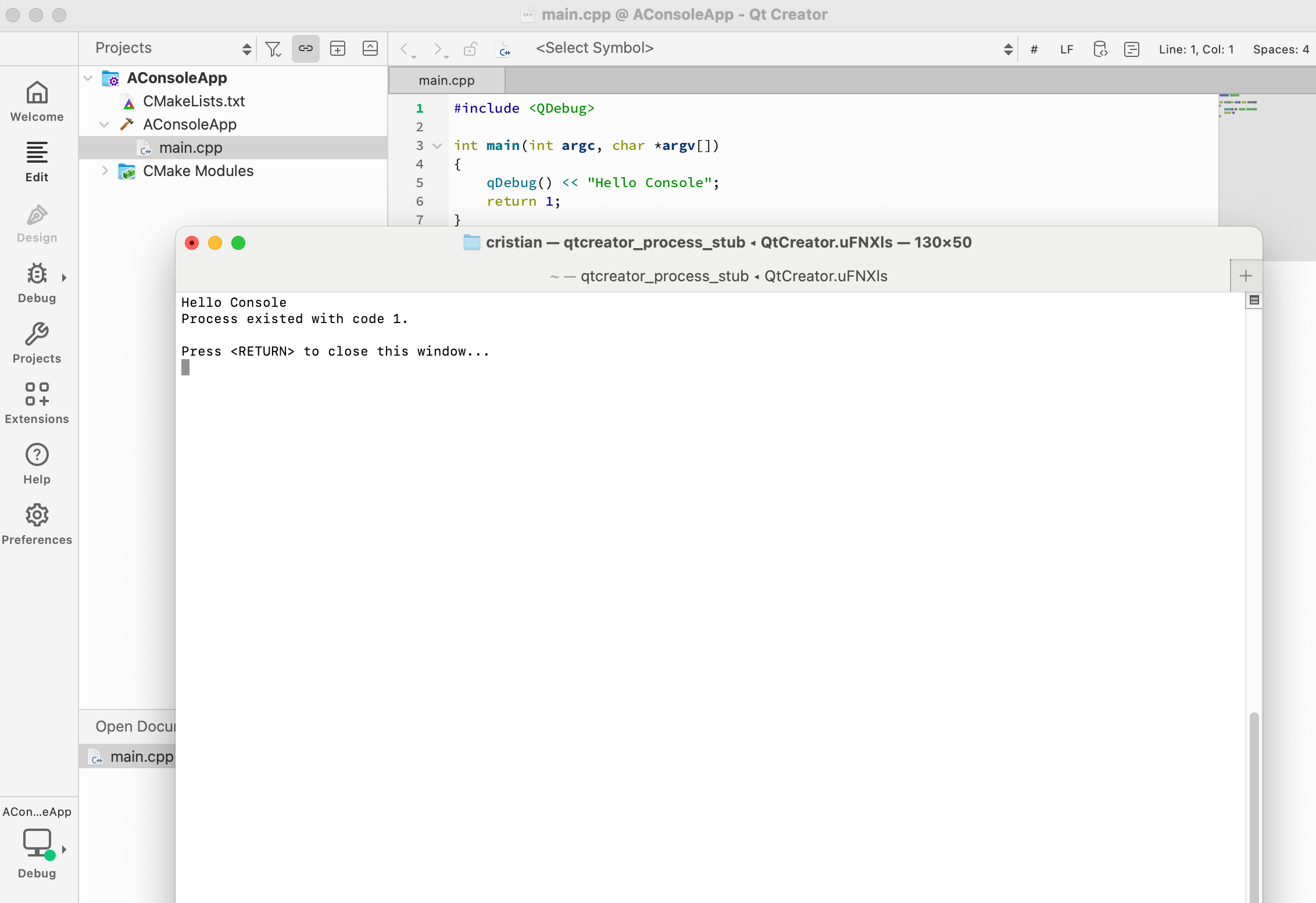
@Programist Do open a bug report / feature request. Qt Creator uses a
process_stubprocess that could print the process output, just like the internal terminal does.Edit: If you want to hack Qt Creator, you could do this:
--- src/tools/process_stub/main.cpp
+++ src/tools/process_stub/main.cpp
@@ -189,7 +189,9 @@ void doExit(int exitCode)
         controlSocket.waitForBytesWritten(1000);

     if (!commandLineParser.value("wait").isEmpty()) {
-        std::cout << commandLineParser.value("wait").toStdString() << std::endl;
+        std::cout << "Process existed with code " << exitCode << "." << std::endl
+                  << std::endl
+                  << commandLineParser.value("wait").toStdString() << std::endl;

         waitingForExitKeyPress = true;
         onKeyPress([] { doExit(0); });
Then you would get the expected result:
-
@Programist Do open a bug report / feature request. Qt Creator uses a
process_stubprocess that could print the process output, just like the internal terminal does.Edit: If you want to hack Qt Creator, you could do this:
--- src/tools/process_stub/main.cpp
+++ src/tools/process_stub/main.cpp
@@ -189,7 +189,9 @@ void doExit(int exitCode)
         controlSocket.waitForBytesWritten(1000);

     if (!commandLineParser.value("wait").isEmpty()) {
-        std::cout << commandLineParser.value("wait").toStdString() << std::endl;
+        std::cout << "Process existed with code " << exitCode << "." << std::endl
+                  << std::endl
+                  << commandLineParser.value("wait").toStdString() << std::endl;

         waitingForExitKeyPress = true;
         onKeyPress([] { doExit(0); });
Then you would get the expected result:
-
@cristian-adam
If you/someone is going to use that code to really patch Creator, adjust its spelling to report "exiting" rather than "existence" ;-)@JonB said in Get exit code in terminal:
@cristian-adam
If you/someone is going to use that code to really patch Creator, adjust its spelling to report "exiting" rather than "existence" ;-)🤣
Sometimes the fingers have their own mind.


