
Qt Creator can't create new project
-
Hi everyone, i just install Qt Creator in Ubuntu 22.04 yesterday
But when start it, it show this error
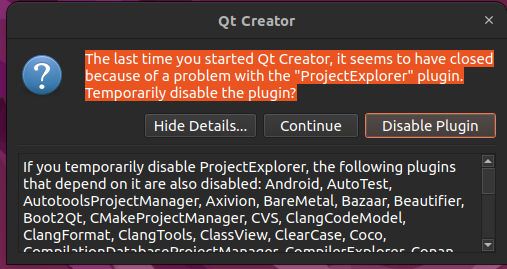
The detail message is
"*If you temporarily disable ProjectExplorer, the following plugins that depend on it are also disabled: Android, AutoTest, AutotoolsProjectManager, Axivion, BareMetal, Bazaar, Beautifier, Boot2Qt, CMakeProjectManager, CVS, ClangCodeModel, ClangFormat, ClangTools, ClassView, ClearCase, Coco, CompilationDatabaseProjectManager, CompilerExplorer, Conan, Copilot, CppEditor, Cppcheck, CtfVisualizer, Debugger, Designer, DevContainer, Docker, EffectComposer, ExtraPropertyEditorManager, Fossil, GLSLEditor, GenericProjectManager, Git, GitLab, Help, IncrediBuild, Insight, Ios, LanguageClient, LuaLanguageClient, McuSupport, Mercurial, MesonProjectManager, ModelEditor, Nim, PerfProfiler, Perforce, Python, QbsProjectManager, QmakeProjectManager, QmlDesigner, QmlDesignerBase, QmlDesignerLite, QmlJSEditor, QmlJSTools, QmlPreview, QmlProfiler, QmlProjectManager, Qnx, QtApplicationManagerIntegration, QtSupport, RemoteLinux, ResourceEditor, SafeRenderer, ScxmlEditor, Squish, StudioWelcome, Subversion, Terminal, Todo, Valgrind, Vcpkg, VcsBase, WebAssembly, learning.Disable plugins permanently in Help > About Plugins.*"
I have try "Disable Plugin", it can enter the app, but seem like it not working normally. I can't create new project . If i click "Continue" the popup just disapper
Hope that someone can help me. This is my first time i use Qt Creator. !!
Thank you !!** -
Hi everyone, i just install Qt Creator in Ubuntu 22.04 yesterday
But when start it, it show this error
The detail message is
"*If you temporarily disable ProjectExplorer, the following plugins that depend on it are also disabled: Android, AutoTest, AutotoolsProjectManager, Axivion, BareMetal, Bazaar, Beautifier, Boot2Qt, CMakeProjectManager, CVS, ClangCodeModel, ClangFormat, ClangTools, ClassView, ClearCase, Coco, CompilationDatabaseProjectManager, CompilerExplorer, Conan, Copilot, CppEditor, Cppcheck, CtfVisualizer, Debugger, Designer, DevContainer, Docker, EffectComposer, ExtraPropertyEditorManager, Fossil, GLSLEditor, GenericProjectManager, Git, GitLab, Help, IncrediBuild, Insight, Ios, LanguageClient, LuaLanguageClient, McuSupport, Mercurial, MesonProjectManager, ModelEditor, Nim, PerfProfiler, Perforce, Python, QbsProjectManager, QmakeProjectManager, QmlDesigner, QmlDesignerBase, QmlDesignerLite, QmlJSEditor, QmlJSTools, QmlPreview, QmlProfiler, QmlProjectManager, Qnx, QtApplicationManagerIntegration, QtSupport, RemoteLinux, ResourceEditor, SafeRenderer, ScxmlEditor, Squish, StudioWelcome, Subversion, Terminal, Todo, Valgrind, Vcpkg, VcsBase, WebAssembly, learning.Disable plugins permanently in Help > About Plugins.*"
I have try "Disable Plugin", it can enter the app, but seem like it not working normally. I can't create new project . If i click "Continue" the popup just disapper
Hope that someone can help me. This is my first time i use Qt Creator. !!
Thank you !!**@Zk47
While you wait to see if there is a better answer: you should set an environment variable prior to invoking Creator which may give some useful diagnostic messages to see why it can't load that plugin correctly. To do that you will need to run Creator from a terminal/command. Find out where theqtcreatorexecutable is, whether it's on yourPATH, so you can run it from a terminal instead of clicking an icon. Then do this:export QT_DEBUG_PLUGINS=1 qtcreatorThat will run it with that environment variable set. If
qtcreatoris not on yourPATHyou will need to type the full path to it for the shell to find it (else you'll getqtcreator: Not founderror).Examine the output for why it's having trouble with the "ProjectExplorer plugin".

