Skip to content
  • Categories
  • Recent
  • Tags
  • Popular
  • Users
  • Groups
  • Search
  • Get Qt Extensions
  • Unsolved
Collapse
Brand Logo
  1. Home
  2. Qt Development
  3. QML and Qt Quick
  4. qmlscene issues
Forum Updated to NodeBB v4.3 + New Features

qmlscene issues

Scheduled Pinned Locked Moved Unsolved QML and Qt Quick
3 Posts 3 Posters 130 Views 1 Watching
  • Oldest to Newest
  • Newest to Oldest
  • Most Votes
Reply
  • Reply as topic
Log in to reply
This topic has been deleted. Only users with topic management privileges can see it.
  • J Offline
    J Offline
    JacobNowitsky
    wrote last edited by
    #1

    How to fix below?

    j@j:~$ qmlscene main.qml
    file:///home/j/main.qml:2 module "QtQuick.Window" is not installed
    file:///home/j/main.qml:1 module "QtQuick" is not installed
    file:///home/j/main.qml:2 module "QtQuick.Window" is not installed
    file:///home/j/main.qml:1 module "QtQuick" is not installed

    import QtQuick 6.2
    import QtQuick.Window 6.2
    
    Window {
        visible: true
        width: 200
        height: 100
    
        Text {
            anchors.centerIn: parent
            text: "QtQuick version: " + Qt.application.qtVersion
        }
    }
    
    1 Reply Last reply
    0
    • Christian EhrlicherC Christian Ehrlicher moved this topic from General and Desktop
    • JoeCFDJ Offline
      JoeCFDJ Offline
      JoeCFD
      wrote last edited by JoeCFD
      #2

      you are using Qt6. I guess qmlscene is for Qt5. Try
      qml main.qml
      and remove 6.2 from QML code because version number is not needed anymore in Qt6.

      I tested your code with qml and did not see any problem.

      import QtQuick
      import QtQuick.Window
      
      Window {
          visible: true
          width: 200
          height: 100
      
          Text {
              anchors.centerIn: parent
              text: "QtQuick version: " + Qt.application.qtVersion
          }
      }
      
      
      1 Reply Last reply
      0
      • jeremy_kJ Offline
        jeremy_kJ Offline
        jeremy_k
        wrote last edited by
        #3

        Change Qt.application.qtVersion to Qt.application.version, and it works for me with Qt 6.9.2 from a qt.io installer.
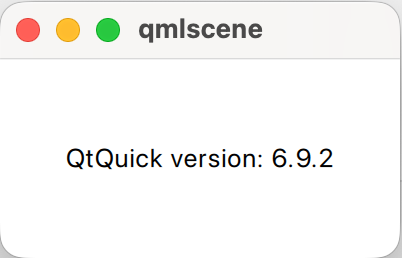
        759c144b-e019-4a67-a940-7fa90ff40f0a-image.png

        There is a warning on stderr:

        qt.tools.qmlscene.deprecated: Warning: qmlscene is deprecated and will be removed in a future version of Qt. Please use qml instead.

        Asking a question about code? http://eel.is/iso-c++/testcase/

        1 Reply Last reply
        0

        • Login

        • Login or register to search.
        • First post
          Last post
        0
        • Categories
        • Recent
        • Tags
        • Popular
        • Users
        • Groups
        • Search
        • Get Qt Extensions
        • Unsolved