Skip to content
  • Categories
  • Recent
  • Tags
  • Popular
  • Users
  • Groups
  • Search
  • Get Qt Extensions
  • Unsolved
Collapse
Brand Logo
  1. Home
  2. Qt Development
  3. QML and Qt Quick
  4. qmlscene issues
Qt 6.11 is out! See what's new in the release blog

qmlscene issues

Scheduled Pinned Locked Moved Unsolved QML and Qt Quick
3 Posts 3 Posters 371 Views 1 Watching
  • Oldest to Newest
  • Newest to Oldest
  • Most Votes
Reply
  • Reply as topic
Log in to reply
This topic has been deleted. Only users with topic management privileges can see it.
  • J Offline
    J Offline
    JacobNowitsky
    wrote on last edited by
    #1

    How to fix below?

    j@j:~$ qmlscene main.qml
    file:///home/j/main.qml:2 module "QtQuick.Window" is not installed
    file:///home/j/main.qml:1 module "QtQuick" is not installed
    file:///home/j/main.qml:2 module "QtQuick.Window" is not installed
    file:///home/j/main.qml:1 module "QtQuick" is not installed

    import QtQuick 6.2
    import QtQuick.Window 6.2
    
    Window {
        visible: true
        width: 200
        height: 100
    
        Text {
            anchors.centerIn: parent
            text: "QtQuick version: " + Qt.application.qtVersion
        }
    }
    
    1 Reply Last reply
    0
    • Christian EhrlicherC Christian Ehrlicher moved this topic from General and Desktop on
    • JoeCFDJ Offline
      JoeCFDJ Offline
      JoeCFD
      wrote on last edited by JoeCFD
      #2

      you are using Qt6. I guess qmlscene is for Qt5. Try
      qml main.qml
      and remove 6.2 from QML code because version number is not needed anymore in Qt6.

      I tested your code with qml and did not see any problem.

      import QtQuick
      import QtQuick.Window
      
      Window {
          visible: true
          width: 200
          height: 100
      
          Text {
              anchors.centerIn: parent
              text: "QtQuick version: " + Qt.application.qtVersion
          }
      }
      
      
      1 Reply Last reply
      0
      • jeremy_kJ Offline
        jeremy_kJ Offline
        jeremy_k
        wrote on last edited by
        #3

        Change Qt.application.qtVersion to Qt.application.version, and it works for me with Qt 6.9.2 from a qt.io installer.
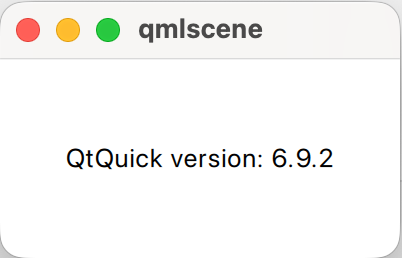
        759c144b-e019-4a67-a940-7fa90ff40f0a-image.png

        There is a warning on stderr:

        qt.tools.qmlscene.deprecated: Warning: qmlscene is deprecated and will be removed in a future version of Qt. Please use qml instead.

        Asking a question about code? http://eel.is/iso-c++/testcase/

        1 Reply Last reply
        0

        • Login

        • Login or register to search.
        • First post
          Last post
        0
        • Categories
        • Recent
        • Tags
        • Popular
        • Users
        • Groups
        • Search
        • Get Qt Extensions
        • Unsolved