
QSqlTableModel Network Performance
-
@ZNohre
To diagnose what is going on when, when I did my database work I always found it invaluable to be able to see (debug out) each query executed every time. I cannot remember whether/how I did this with Qt QSQL... calls. Maybe there wereprotectedmethods I could override, maybe there is some "trace" flag you can set. If an expert can recall what is available that would be helpful?UPDATE
Being unable to spot it myself in docs or by Googling, I tried ChatGPT. It said it was having a long think about this :) and thenShort answer: Qt does not provide a single built-in global switch that prints every SQL statement issued by all QSql* classes.
Hmph! Why in the world not? They really ought to offer some such from their code, wherever they send something the SQL db, it really wouldn't be that difficult for them....
@JonB I checked this out on the server side during the initial posting and found that one of my widgets had called its SELECT query 5,777 times(!) in maybe 2 hours of testing. I'll have to look into @SGaist's solution below re: the QT_DEBUG_SQL defined.
My cloud hosting bill may be a bit higher this month :)

-
@ZNohre said in QSqlTableModel Network Performance:
My connection is 150 mpbs down/50 mpbs up
More important than throughput are the latency numbers - what is the average RTT (round trip time) and many network hops does the application client need to go through to reach the database server.
Database protocols can be quite chatty, with lots of round-trips, so even a high bandwidth connection but with high latency will suffer greatly. The strategy in such case is to prefectch as much data as possible - e.g de-normalizing in the database by joining all related data in one big query and then splitting it back up in the client.
-
@IgKh Thank you, I still have a lot to learn about networking and databases so I wasn't aware of this. Is there a preferred tool/method to check these metrics (RTT and network hops)?
For RTT you can use
ping, but it sometimes blocked or not accurate. A good way is to run a query that doesn't need any data (such asSELECT 1) several times and measure the average execution times. Anything over 1-5 milliseconds is to be considered high latency.For network hops use the
traceroutecommand, or its equivalent on your platform. -
Full tableview models over an internet are bad ju-ju. You should switch to a client/server transaction model. It's ok to load managable chunks into a local table presentation, but you MUST limit the number of returned rows and use indexes properly. Never blindly load a table. Doing that means you are not using the relational database properly. Only time you should ever need full table access is during maintenance as a DBA, but even then it's not strictly necessary.
trying to predict and manage latency won't solve your problems. When you switch to a networked database model your access mechanisms have to allow for unpredictable latency.
Some hints
- make sure your SQL is being executed as stored procedures on the database server where the data is hosted, not the local machine..."cloud" should make you nervous if the table data isn't stored on the same machine as the DB server.
- switch to a rigid transaction model rather than a table view model
- make effective use of proper indexing and limiting of SQL result sets
Sorry to be the voice of gloom, but local DB and network are two different worlds.
-
Thanks again for all the replies here; circling back to mark this as solved.
I ended up implementing a custom QAbstractTableModel based on the ModifiedRow class in the QSqlTableModel source code.
The local data is populated via a QSqlQuery with setForwardOnly set to true.
void CachedSqlTableModel::select()
{
    if(m_select.isEmpty() || m_tableName.isEmpty()){
        qDebug() << "Invalid select statement";
        return;
    }

    //Initialize query
    QSqlQuery query;
    query.setForwardOnly(true);
    query.prepare(selectStatement());
    query.exec();

    if(query.isActive()){

        beginResetModel();

        //Reset data structure
        m_cache.clear();

        //Populate header data
        m_record = query.record();

        //Populate table data
        while(query.next()){
            m_cache.push_back(CachedRow(CachedRow::Update, query.record()));
        }

        endResetModel();

    } else {
        m_error = query.lastError();
    }
All of the related cached database operations are executed in the exact same way as the code in the QSqlTableModel database handlers.
    virtual bool updateRowInTable(int row, const QSqlRecord &values);
    virtual bool insertRowIntoTable(const QSqlRecord &values);
    virtual bool deleteRowFromTable(int row);
A big thank you to @Kent-Dorfman for the additional insights here. I implemented all of the suggestions above (stored procedures, transactions, indexing, limiting datasets, etc.) and there is a noticeable speed difference on all fronts.
-
Z ZNohre has marked this topic as solved on
-
Full code linked below if it's helpful to anyone else.
-
All,
I'm in the process of converting my desktop application from a local SQL server to a cloud based SQL server in Azure and having some performance issues with the switch.
On the local server during testing there are no performance issues. After moving the database to the cloud though I'm noticing a few issues with just the test data (5 tables, each with around 15-25 columns and 30 records in each).
Each table is accessed via a custom widget in a QMdiSubWindow. The custom widgets are primarily composed of:
- QSqlTableModel with an OnManualSubmit edit strategy
- QTableView (Green)
- QDataWidgetMapper (Blue)
- In certain cases, a secondary QTableView lookup based on the primary selection (Red)
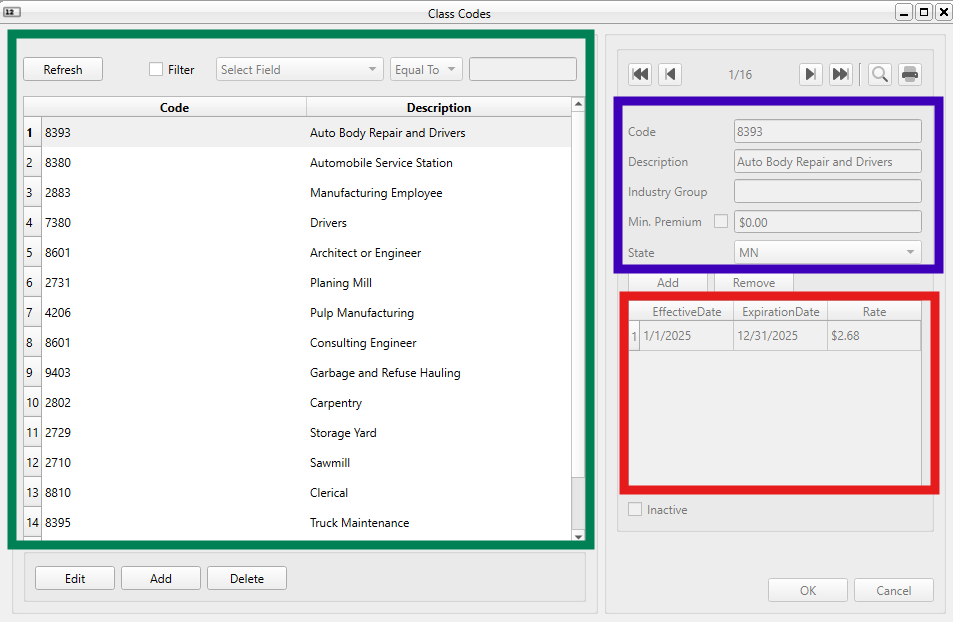
From researching similar posts such as this one it appears that my issue is related to the QTableView connections and volume of data() calls on the "live" model when gaining/losing focus, resizing, moving, etc.
My questions are:
-
Is this an application design issue? i.e. should the database not be accessed in the cloud? If so, what approaches have others used for database access from multiple locations?
-
If cloud access is fine (albeit with some additional security concerns) how have others implemented a cached model to get around these performance issues as suggested by @SGaist and @MrShawn in the linked post above?
- My first thought here was to create a QStandardItemModel class that gets populated on initial load via a QSqlQuery with setForwardOnly set to true. Keep track of changes (UPDATE, INSERT, DELETE, etc.) in a cache and batch the uploads to the cloud. Is this on track?
My connection is 150 mpbs down/50 mpbs up and I'm running 6.8.1 on Qt Creator 15.0.0.
Thanks,
Zach@ZNohre said in QSqlTableModel Network Performance:
Is this an application design issue? i.e. should the database not be accessed in the cloud? If so, what approaches have others used for database access from multiple locations?
Posting an update here as a breadcrumb trail for others that may find this post. While the above CachedSqlTable methods worked in development, during release the architecture was not scalable or secure and created a host of issues with deployment (as others had previously noted).
I ended up creating a .NET Web App API hosted in Azure as the boundary to the cloud SQL database. This involved refactoring out the CachedSqlTable methods in favor of an ApiClient class that calls HTTP endpoints to handle the CRUD operations. Rather than SQL authentication, the user is logged in via authenticated JWT and the ApiClient class has methods that mirror each endpoint to handle all operations.
I'm self-taught and had never worked in .NET, C#, or Web Apps before. However with some AI prompts and trial and error I was able to get this working without too much headache.
This was a major foundational refactor and in hindsight I wished I had known about this approach which is why I'm making this follow-up post roughly a year later :)
-
@ZNohre said in QSqlTableModel Network Performance:
Is this an application design issue? i.e. should the database not be accessed in the cloud? If so, what approaches have others used for database access from multiple locations?
Posting an update here as a breadcrumb trail for others that may find this post. While the above CachedSqlTable methods worked in development, during release the architecture was not scalable or secure and created a host of issues with deployment (as others had previously noted).
I ended up creating a .NET Web App API hosted in Azure as the boundary to the cloud SQL database. This involved refactoring out the CachedSqlTable methods in favor of an ApiClient class that calls HTTP endpoints to handle the CRUD operations. Rather than SQL authentication, the user is logged in via authenticated JWT and the ApiClient class has methods that mirror each endpoint to handle all operations.
I'm self-taught and had never worked in .NET, C#, or Web Apps before. However with some AI prompts and trial and error I was able to get this working without too much headache.
This was a major foundational refactor and in hindsight I wished I had known about this approach which is why I'm making this follow-up post roughly a year later :)
-
@ZNohre I just realized now that I somehow missed to tell you about shielding your database behind a REST API so you wouldn't expose your database over internet directly. Sorry for that but glad you went that route.
@SGaist No worries, I was attempting to do something that nobody actually does in practice (I just didn't know it at the time) so it probably was assumed a REST API was being used in some fashion already; it wasn't - plain old direct SQL access and authentication over the internet.
Once you see the REST API and implementation, it's obvious that it's the correct approach. My journey was more organic though from local files -> local SQL -> cloud SQL -> REST API. I'm sure if I had taken a course in application development or something I could have jumped to the end, but why walk down one right path when you can walk down three wrong ones first? ;)
During development, the database was only accessible via explicitly whitelisted IP addresses and was only test data at that so nothing would have been exposed.
Thanks for all the help, as always.
-
Not three wrong ones, each has its use 😅
That said, you learned stuff on the way which are valuableYou're welcome !


