
QTableView (QHeaderView) sort indicator alignment
-
The sort indicator within a
QHeaderView(of aQTableView) has a default alignment.
In case ofQCommonStyle(default) it isQt::AligRight | Qt::AlignVCenter. It is visible when the header has multiple lines. For example: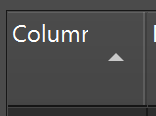
What is the simplest/easiest way to change that alignment to
Qt::AlignRight | Qt::AlignTop?I was unable to locate it in the source code hence, don't know what to customize.
Additionally, it seems there is a marging/padding/spacing issue too. You can see that the Column text "Column" is kind of cropped and the last character is not fully shown.
I have no idea why that happens.
horizontalHeader()->setSectionResizeMode(QHeaderView::ResizeToContents)is already set.Qt version is 6.8.1.
Thank you!
-
I tried experimenting with
styleSheetbut I assume I would need to add more into the stylesheet beside what I had so far?QHeaderView::down-arrow { margin: 10; width: 14; height: 8; position: static; subcontrol-position: right top; subcontrol-origin: content;}
QHeaderView::up-arrow { margin: 10; width: 14; height: 8; position: static; subcontrol-position: right top; subcontrol-origin: content;}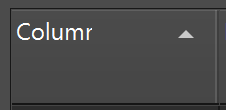
Problems here:
- the last character cropping issue is still there
- the column width got bigger and can't explain why
- the
width: 14andheight: 8are based on the source code but I cannot identify whymargin: 10is required to achieve the same as the default
qfusionstyle.cpp:
qt_fusion_draw_arrow()But that function only produces the triangle down/up arrow...
    const qreal dpi = QStyleHelper::dpi(option);                   // = 96
    const qreal dpr = painter->device()->devicePixelRatio();       // = 2
    const int arrowWidth = int(QStyleHelper::dpiScaled(14, dpi));  // = 14
    const int arrowHeight = int(QStyleHelper::dpiScaled(8, dpi));  // = 8

    const int arrowMax = qMin(arrowHeight, arrowWidth);            // = 8
    const int rectMax = qMin(rect.height(), rect.width());         // = 24, rect: w24 x h39 (in my case)
    const int size = qMin(arrowMax, rectMax);                      // = 8
...
        QRectF arrowRect;
        arrowRect.setWidth(size);                                  // = 8
        arrowRect.setHeight(arrowHeight * size / arrowWidth);      // = 4
Thanks!
-
Hi and welcome to devnet,
You wouldn't happen to be on Windows ?
-
R rTommy referenced this topic on
-
I also found a croppig problem each time a headerview style for an up-arrow or down-arrow has been set, it doesn't matter whether the style definition contains any attributes or not.
Effect can be reproduced even by:QHeaderView::down-arrow { }Seems to be a bug in my eyes.
