
Skip to content
  • Categories
  • Recent
  • Tags
  • Popular
  • Users
  • Groups
  • Search
  • Get Qt Extensions
  • Unsolved
Collapse
Brand Logo
  1. Home
  2. Qt Development
  3. General and Desktop
  4. Why is this QLabel not being handled properly by the vertical layout?
Forum Updated to NodeBB v4.3 + New Features

Why is this QLabel not being handled properly by the vertical layout?

Scheduled Pinned Locked Moved Solved General and Desktop
3 Posts 2 Posters 297 Views 1 Watching
  • Oldest to Newest
  • Newest to Oldest
  • Most Votes
Reply
  • Reply as topic
Log in to reply
This topic has been deleted. Only users with topic management privileges can see it.
  • M Offline
    M Offline
    Mizmas
    wrote on last edited by Mizmas
    #1

    The layout should not allow me to drag the QPushButton inside the frame of the QLabel
    designer_tJBOWKJoSj.gif

    1 Reply Last reply
    0
    • SGaistS Offline
      SGaistS Offline
      SGaist
      Lifetime Qt Champion
      wrote on last edited by
      #2

      Hi,

      How did you create that widget ?
      Are you sure they are all in the same layout ?
      What properties did you set on them ?
      You also seem to have a dialog within a dialog.

      Interested in AI ? www.idiap.ch
      Please read the Qt Code of Conduct - https://forum.qt.io/topic/113070/qt-code-of-conduct

      M 1 Reply Last reply
      1
      • SGaistS SGaist

        Hi,

        How did you create that widget ?
        Are you sure they are all in the same layout ?
        What properties did you set on them ?
        You also seem to have a dialog within a dialog.

        M Offline
        M Offline
        Mizmas
        wrote on last edited by
        #3

        @SGaist It's my regular setup to make a frameless window.

        Here's the hierarchy:
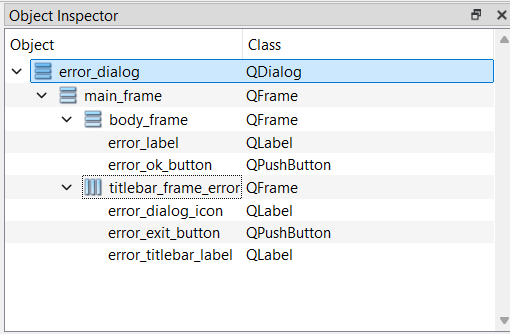
        Screenshot_3.png

        The main_frame is the entire error dialog, within is the the titlebar and the body_frame with the button and the label

        And, I figured it out, the problem was that I set a fixed minimum size for the main_frame which caused the problems somehow

        1 Reply Last reply
        0
        • M Mizmas has marked this topic as solved on

        • Login

        • Login or register to search.
        • First post
          Last post
        0
        • Categories
        • Recent
        • Tags
        • Popular
        • Users
        • Groups
        • Search
        • Get Qt Extensions
        • Unsolved